Apple Magic Mouse 2 (MLA02LL/A) Instruction Manual
Model: MLA02LL/A
Product Overview
The Apple Magic Mouse 2 is a wireless, rechargeable mouse designed for seamless integration with Mac OS X. It features a multi-touch surface for intuitive gestures and an ambidextrous design for comfortable use by both left and right-handed users. Its optimized foot design allows for smooth gliding across surfaces, enhancing precision and ease of use.
Key Features
Wireless Connectivity: Connects wirelessly via Bluetooth for convenient, clutter-free use.
Multi-Touch Surface: Supports intuitive gestures like swiping and scrolling directly on the mouse surface.
Rechargeable Battery: Features a built-in rechargeable battery, eliminating the need for disposable batteries.
Ambidextrous Design: Ergonomically designed for comfortable use in either hand.
Optimized Foot Design: Ensures smooth and effortless gliding across your desk.
Setup
Pairing Your Magic Mouse 2
The Magic Mouse 2 pairs automatically with your Mac when connected via the included USB-C to Lightning cable. For initial setup or re-pairing:
Ensure your Mac's Bluetooth is turned on. Go to System Settings > Bluetooth.
Connect your Magic Mouse 2 to your Mac using the USB-C to Lightning cable. This will automatically pair the mouse and begin charging it.
Once paired, you can disconnect the cable for wireless use. The mouse will remain connected via Bluetooth.
If the mouse does not appear in the Bluetooth settings, ensure it is charged and the power switch on the bottom of the mouse is in the 'On' position.
Charging the Battery
The Magic Mouse 2 features a built-in rechargeable lithium-ion battery. To charge:
Connect the Lightning port on the bottom of the Magic Mouse 2 to a USB-C port on your Mac or a USB power adapter using the provided USB-C to Lightning cable.
A full charge typically takes about 2 hours. A quick 2-minute charge can provide approximately 9 hours of use.
You can check the battery level in the Bluetooth menu on your Mac's menu bar.
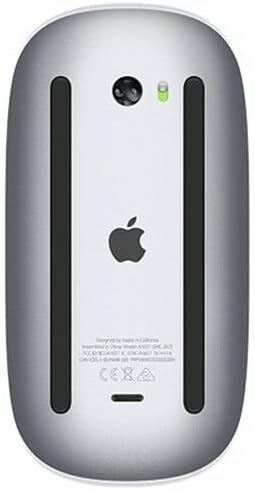
Bottom view of the Apple Magic Mouse 2, highlighting the Lightning charging port and power switch. The green indicator light shows the mouse is powered on.
Operating Your Magic Mouse 2
Multi-Touch Gestures
The Magic Mouse 2's smooth, seamless Multi-Touch surface allows for simple gestures to navigate your Mac:
Scroll: Swipe one finger up or down to scroll through documents and web pages.
Zoom: Hold down the Control key and scroll with one finger to zoom in or out.
Swipe between pages: Swipe one finger left or right to navigate between pages in Safari or other applications.
Swipe between full-screen apps: Swipe two fingers left or right to switch between full-screen applications.
Mission Control: Double-tap with two fingers to open Mission Control.
Top view of the Apple Magic Mouse 2, illustrating its minimalist design and multi-touch surface for gesture control.
Customizing Mouse Settings
You can customize the tracking speed, scrolling speed, and gesture settings for your Magic Mouse 2:
Go to System Settings > Mouse on your Mac.
Adjust the Tracking speed and Scrolling speed sliders to your preference.
In the More Gestures tab, you can enable or disable specific Multi-Touch gestures and view demonstrations of how to perform them.
Maintenance
Cleaning Your Magic Mouse 2
To keep your Magic Mouse 2 clean and functioning optimally:
Turn off the mouse using the switch on the bottom.
Use a soft, lint-free cloth slightly dampened with water to wipe the exterior surfaces.
Avoid getting moisture in any openings. Do not use window cleaners, household cleaners, aerosol sprays, solvents, alcohol, ammonia, or abrasives to clean your mouse.
Battery Care
To maximize the lifespan of your Magic Mouse 2's rechargeable battery:
Avoid fully discharging the battery frequently.
Store the mouse at room temperature when not in use for extended periods.
If storing for a long time, charge the battery to about 50% before turning it off.
Troubleshooting
Common Issues and Solutions
Mouse not connecting: - Ensure the mouse is charged and powered on. - Check your Mac's Bluetooth settings to confirm it's enabled and the mouse is listed. If not, try re-pairing by connecting the mouse with a cable. - Restart your Mac and the mouse.
Erratic cursor movement: - Clean the bottom sensor of the mouse with a soft, lint-free cloth. - Ensure you are using the mouse on a clean, non-reflective surface.
Gestures not working: - Verify that the gestures are enabled in System Settings > Mouse > More Gestures. - Ensure your fingers are making proper contact with the Multi-Touch surface.
Battery draining quickly: - Check for any background applications that might be excessively using the mouse. - Ensure the mouse is turned off when not in use for extended periods.
Specifications
Feature
Detail
Product Dimensions
2 x 2 x 2 inches
Item Weight
12.3 ounces
ASIN
B074T2NWVL
Batteries
Rechargeable (built-in)
Brand
Apple
Color
Silver
Connectivity Technology
Wireless (Bluetooth)
Number of Buttons
3 (virtual, via Multi-Touch)
Warranty and Support
Product Warranty
Apple products typically come with a one-year limited warranty against defects in materials and workmanship. For detailed warranty information, please refer to the official Apple warranty documentation included with your product or visit the Apple Support website.
Customer Support
For further assistance, technical support, or service inquiries, please visit the official Apple Support website or contact Apple Customer Service:
Ask about setup, troubleshooting, compatibility, parts, safety, or missing instructions. Manuals+ will review the question and use this page’s manual context to help answer it.