
1. Introduction
Thank you for choosing the TFA Dostmann Digital Timer and Stopwatch, model 38.2038.02. This device is designed for precise time management in various applications, including cooking, sports, studying, and more. It features a large display, quick time input buttons, and multiple placement options for convenience.
Please read this manual carefully to ensure proper use and to get the most out of your device.
2. Safety Information
- Keep the device away from extreme temperatures, direct sunlight, and moisture.
- Do not expose the device to strong vibrations or shocks.
- Do not attempt to disassemble or modify the device. This will void the warranty.
- Keep batteries out of reach of children. If swallowed, seek immediate medical attention.
- Dispose of used batteries according to local regulations.
3. Package Contents
- 1x TFA Dostmann Digital Timer and Stopwatch (Model 38.2038.02)
- 1x User Manual
- Batteries (may be included or pre-installed)
4. Product Overview
The TFA Dostmann Digital Timer and Stopwatch features a clear digital display and intuitive buttons for easy operation. It can be placed on a surface using its fold-out stand, attached to metallic surfaces with its magnetic back, or hung using the integrated eyelet.

Image: Front view of the timer, highlighting the large digital display and the '10M', '5M', '1M', '10s', 'RESET', and 'START/STOP' buttons.
Key Features:
- Large Digital Display: Clear and easy-to-read time display.
- Quick Set Buttons: Dedicated buttons for 10 minutes, 5 minutes, 1 minute, and 10 seconds for fast time input.
- Extra Loud Alarm: Ensures the alarm is heard even in noisy environments.
- Versatile Placement: Integrated magnet for metal surfaces, fold-out stand for tabletop use, and hanging eyelet.
- Maximum Time Setting: Up to 99 minutes and 50 seconds.
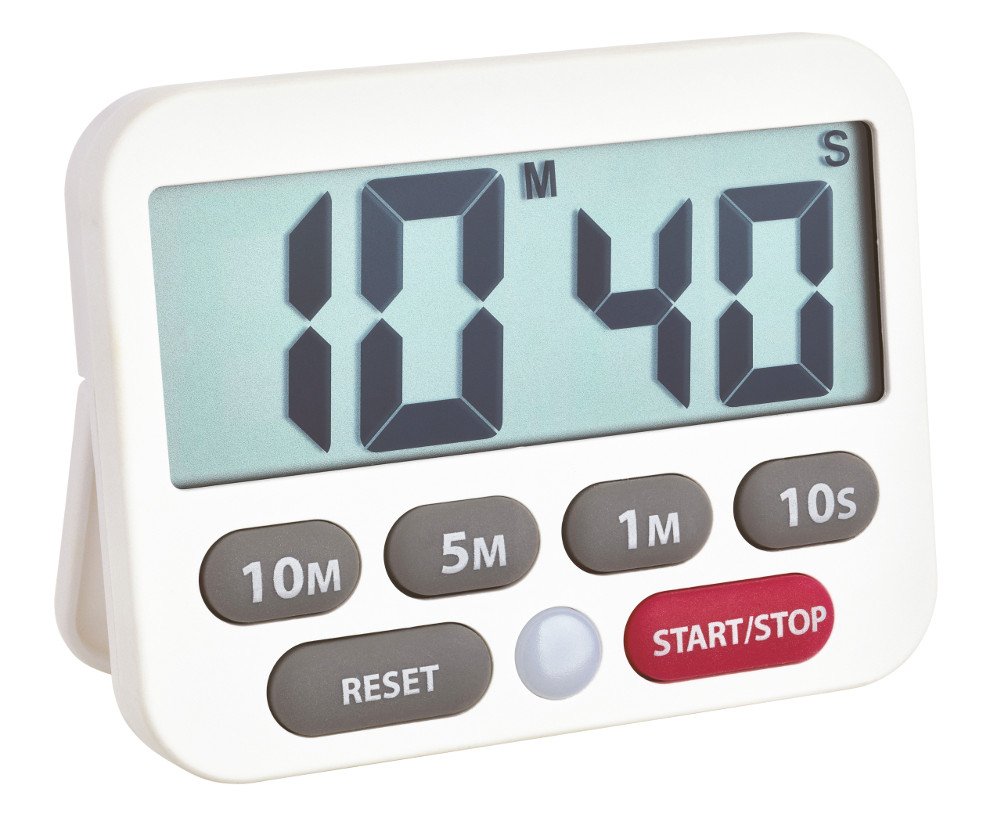
Image: The timer shown in a hand, illustrating its compact dimensions (90mm x 70mm).
5. Setup
5.1 Battery Installation
- Locate the battery compartment on the back of the device.
- Open the battery compartment cover.
- Insert one CR2032 button cell battery, ensuring the correct polarity (+/-).
- Close the battery compartment cover securely.
5.2 Placement
The timer offers flexible placement options:
- Magnetic Attachment: Use the magnet on the back to attach the timer to refrigerators, oven hoods, or other metallic surfaces.
- Tabletop Stand: Fold out the integrated stand on the back to place the timer upright on any flat surface.
- Hanging: Utilize the small eyelet at the top of the device to hang it on a hook or nail.
6. Operating Instructions
6.1 Timer Function (Countdown)
To set a countdown timer:
- Set Time: Press the '10M', '5M', '1M', and '10s' buttons to set the desired countdown time. Each press adds the corresponding time increment. For example, press '10M' once, '5M' twice, and '1M' three times to set 23 minutes. The maximum setting is 99 minutes and 50 seconds.
- Start Countdown: Press the 'START/STOP' button to begin the countdown. The display will show the remaining time.
- Pause/Resume: During the countdown, press 'START/STOP' again to pause the timer. Press it once more to resume.
- Alarm: Once the countdown reaches zero, an extra loud alarm will sound. The display may also flash.
- Stop Alarm: Press any button to stop the alarm. The timer will then start counting up, indicating the elapsed time since the alarm went off.
- Reset Timer: To clear the current time setting or stop the count-up, press the 'RESET' button. This will return the display to '00:00'.
6.2 Stopwatch Function (Count-up)
The device can also function as a basic stopwatch:
- Reset to Zero: Ensure the display shows '00:00' by pressing the 'RESET' button if necessary.
- Start Count-up: Press the 'START/STOP' button to begin counting up from zero.
- Pause/Resume: Press 'START/STOP' again to pause the count-up. Press it once more to resume.
- Reset Stopwatch: To clear the stopwatch time, press the 'RESET' button while the stopwatch is paused or running.
7. Maintenance
7.1 Cleaning
Clean the device with a soft, damp cloth. Do not use abrasive cleaners or solvents, as these may damage the display or casing. Ensure no water enters the device.
7.2 Battery Replacement
When the display becomes dim or the device stops functioning, it is time to replace the battery. Follow the steps in section 5.1 for battery installation. Always use a fresh CR2032 button cell battery.
8. Troubleshooting
- No Display / Device Not Turning On:
- Check if the battery is inserted correctly with the correct polarity.
- Replace the battery with a new CR2032 button cell.
- Alarm Not Sounding / Too Quiet:
- Ensure the battery has sufficient power. Replace if necessary.
- Check for any obstructions around the speaker area on the back of the device.
- Buttons Not Responding:
- Try resetting the device by removing and reinserting the battery.
- Ensure the buttons are not stuck or obstructed.
9. Specifications
| Model Number | 38.2038.02 |
| Dimensions (L x W x H) | 90 x 17 (37 with stand) x 70 mm (approx. 10 x 9 x 2 cm) |
| Item Weight | 66 Grams |
| Material | Plastic |
| Display Size | 90 mm (diagonal) |
| Max. Time Setting | 99 minutes, 50 seconds |
| Power Source | 1x CR2032 Button Cell Battery (required) |
| Mounting Options | Magnet, Stand, Hanging Eyelet |
10. Warranty Information
Warranty information for your TFA Dostmann Digital Timer and Stopwatch is typically provided with the product packaging or can be found on the official TFA Dostmann website. Please retain your proof of purchase for any warranty claims.
11. Support
For further assistance, technical support, or inquiries regarding your TFA Dostmann product, please refer to the contact information provided in your product packaging or visit the official TFA Dostmann website.
You can also visit the TFA Dostmann Store on Amazon for more information and products.


