
Zmodo ZS-2004-B-1TB
Zmodo Full HD 1080p Simplified PoE Security Camera System User Manual
Brand: Zmodo | Model: ZS-2004-B-1TB
Product Overview
The Zmodo Full HD 1080p Simplified PoE Security Camera System provides comprehensive surveillance for your property. This system includes an 8-channel NVR, a sPoE repeater, a 1TB hard drive, and four 1080p IP network cameras. Designed for ease of installation and reliable performance, it offers features such as simplified Power over Ethernet (PoE), 1080p Full HD video, intelligent recording, and remote viewing capabilities.

Image: Overview of the Zmodo Full HD 1080p Simplified PoE Security Camera System, showcasing the four IP cameras, the NVR unit, the sPoE repeater, and the included 1TB hard drive.
Package Contents
- 1 x 8 Channel Security NVR
- 1 x 19V 1.5A sPoE Repeater
- 1 x 1TB Hard Drive (Pre-installed in the NVR)
- 4 x Zmodo 1080P IP Network Camera
- 1 x 12V 2A NVR Power Supply
- 1 x 8M (26ft) CAT5e Network Cable
- 1 x 1M (3ft) CAT5e Network Cable
- 2 x 15M (50ft) Camera Cable
- 2 x 30M (98ft) Camera Cable
- 1 x Quick User Guide

Image: A complete view of all items included in the Zmodo security camera system package, including cameras, NVR, repeater, cables, power supply, and hard drive.
Setup and Installation
Simplified PoE Connection
The Simplified Power over Ethernet (sPoE) design allows for a single cable to transmit both data and power to the IP cameras, simplifying installation. The repeater facilitates flexible installation options.

Image: A visual representation of the Simplified PoE connection, illustrating how the NVR connects to the repeater, and the repeater connects to the camera using a single cable for both power and data.
System Connection Diagram
Follow this diagram for proper connection of your security system components.
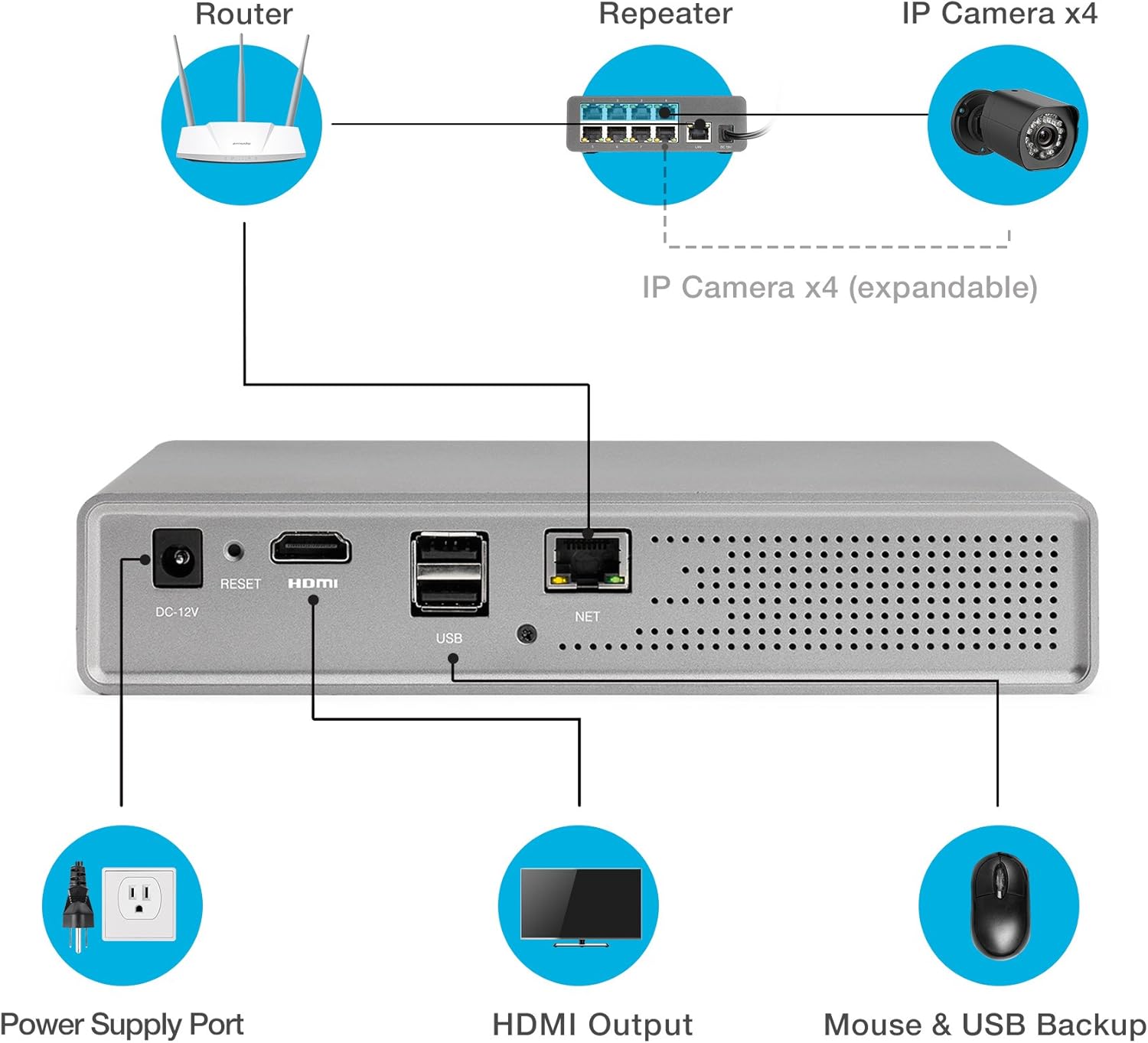
Image: A comprehensive diagram illustrating the connections between the router, sPoE repeater, IP cameras, NVR, NVR power supply, HDMI output to a monitor, and USB port for mouse and backup.
Camera Dimensions and Micro USB
The cameras feature a 3.6mm lens and offer 90-degree rotation for flexible positioning. The micro USB connection on the camera facilitates easier cable routing through smaller holes during installation.
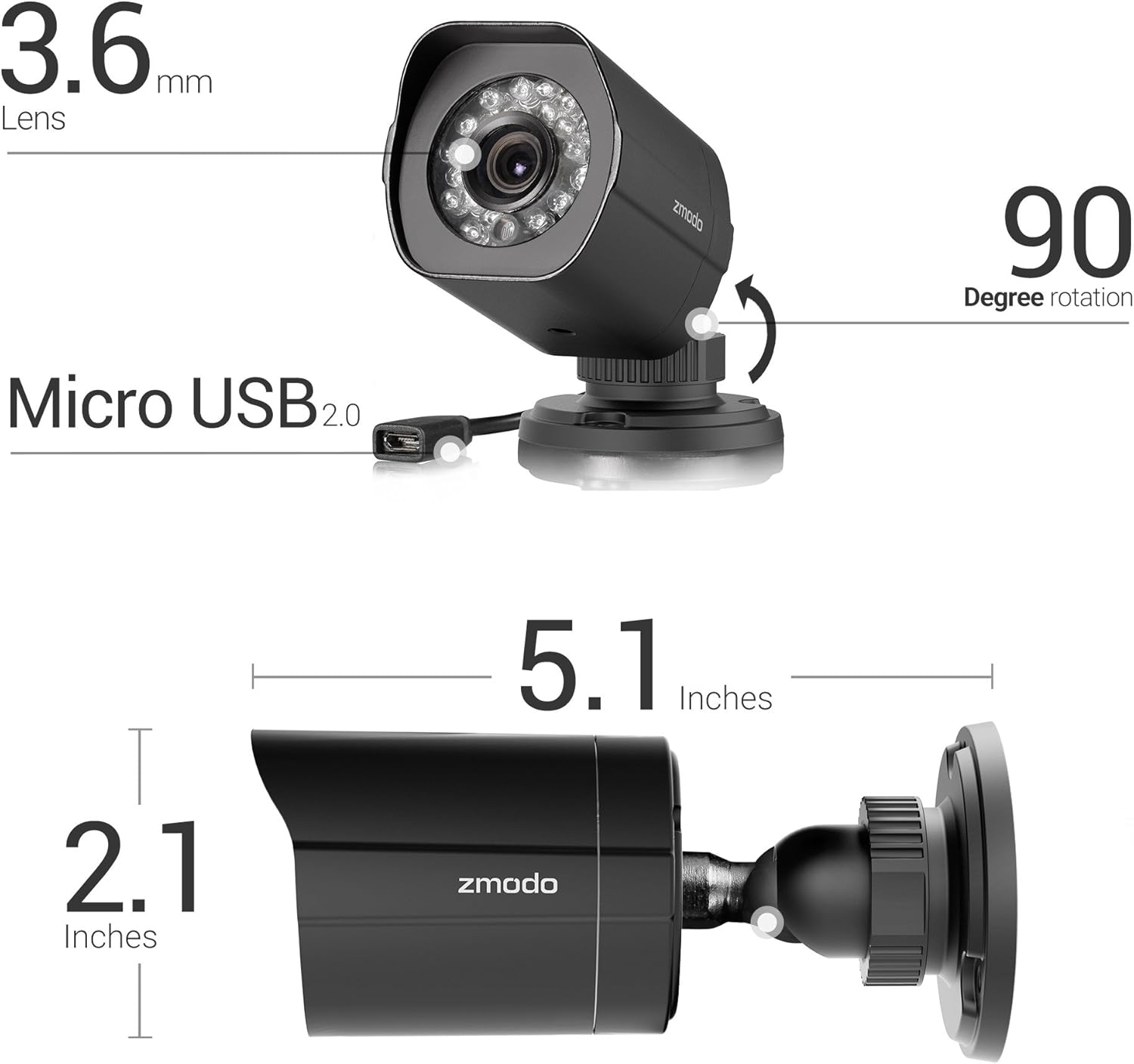
Image: Detailed view of a Zmodo camera, highlighting its 3.6mm lens, 90-degree rotation capability, micro USB 2.0 port, and overall dimensions (2.1 inches height, 5.1 inches length).
Important Note: Please do not directly plug the NVR power supply into the outlet before connecting it to the NVR unit.
Operating Your System
1080p Full HD Video and Night Vision
View crystal clear 1080p video and playback footage locally or remotely. The cameras are equipped with automatic infrared night vision, illuminating up to 65 feet for clear visibility in low-light conditions. With an IP65 weatherproof rating, the cameras are suitable for outdoor installation.
Remote Viewing via Zmodo App
Keep your property secured and monitor your security system from anywhere using the free Zmodo app on your smartphone. The app allows you to view live feeds, receive motion notifications, and access video clip alerts.

Image: A smartphone screen displaying the Zmodo app interface, highlighting features such as motion alerts, video clip playback, and the availability of 36 hours of free cloud storage.
Intelligent Recording and Storage
The NVR optimizes storage space by compressing recorded footage when no motion is detected, and recording at the full 25 frames per second (fps) when motion is detected. This intelligent recording can allow for up to 60 days of recording for four cameras. The NVR supports a 3.5-inch SATA hard drive, up to 6TB.
Motion Detection Algorithm
The Zmodo app distinguishes detected motion into two types of events: Major and Minor. Notifications are only sent when a Major event occurs.
- Major Events: Occur when motion is detected after a prolonged period without any event (at least 25 minutes).
- Minor Events: Occur when motion is detected within 20 minutes of the last motion event and at least 3 minutes without motion.
Maintenance and Environmental Guidelines
Operating Temperatures
- Camera Working Temperature: 14°F - 122°F (-10°C - 50°C)
- NVR/Repeater Working Temperature: 32°F - 104°F (0°C - 40°C)
Environmental Warning: Do not operate the system in wet or dusty environments to ensure optimal performance and longevity.
Troubleshooting
Common Issues and Solutions
- No Power to NVR:
Ensure the 12V 2A NVR Power Supply is securely connected to both the NVR and a working power outlet. Remember to connect the power supply to the NVR first before plugging it into the wall outlet.
- No Camera Feed:
Verify that the camera cables are properly connected to both the cameras and the sPoE repeater. Check the repeater's indicator lights to ensure power and data transmission. Ensure the repeater is powered on.
- Remote Viewing Issues:
Ensure your NVR is connected to your router via the provided network cable. Check your internet connection. Make sure the Zmodo app is updated to the latest version on your smartphone. If issues persist, try restarting your router and NVR.
- Motion Detection Not Working:
Review the motion detection settings within the Zmodo app. Ensure the sensitivity is appropriately configured and that the detection zones cover the desired areas. Remember that notifications are primarily for "Major Events."
- Hard Drive Not Recording:
Check the NVR's hard drive status in the system settings. Ensure the 1TB hard drive is properly installed and recognized. If the hard drive is full, the intelligent recording feature should manage space, but manual review or formatting might be necessary if issues persist (back up important footage first).
Product Specifications
| Feature | Specification |
|---|---|
| Brand | Zmodo |
| Model Number | ZS-2004-B-1TB |
| Connectivity Technology | Wired |
| Video Capture Resolution | 1080p Full HD |
| Special Features | Night Vision, Simplified PoE |
| Number of Channels | 8 (supports up to 8 cameras) |
| Memory Storage Capacity | 1 TB (pre-installed), supports up to 6TB |
| Color | Black |
| Power Source | Corded Electric |
| Item Dimensions (L x W x H) | 16.61 x 6.42 x 10.39 inches |
| Signal Format | Digital |
| Low Light Technology | Night Color |
| Night Vision Range | 65 Feet |
| Frame Rate | 25 FPS |
| Optical Sensor Technology | CMOS |
| Hardware Interface | Ethernet |
| Lens Type | Fixed |
| Video Input | RJ45 |
| Viewing Angle | 77 Degrees |
| Item Weight | 10 pounds |
| Date First Available | August 11, 2017 |
Support and Additional Resources
For further assistance, please refer to the official Zmodo support channels. The Zmodo app provides direct access to support and additional resources.
- Online User Guides: Additional user guides and documentation may be available on the Zmodo official website.
- In-App Support: Utilize the support features within the Zmodo mobile application for troubleshooting and direct assistance.
This product is designed for optimal performance when used according to the instructions provided. Adherence to environmental guidelines and proper installation procedures will ensure the longevity and reliability of your security system.
Related documentsZS-2004-B-1TB


Ask a question about this manual
Ask about setup, troubleshooting, compatibility, parts, safety, or missing instructions. Manuals+ will review the question and use this page’s manual context to help answer it.