
1. Introduction
This manual provides essential information for the safe and efficient use of your Anker Soundcore 2 Portable Bluetooth Speaker. Please read these instructions carefully before using the device and retain them for future reference.
The Anker Soundcore 2 is a portable Bluetooth speaker designed for high-quality audio playback with enhanced bass, extended battery life, and robust waterproof protection. It features Bluetooth 5 connectivity for stable wireless streaming and a compact design for easy portability.
Key Features:
- Outdoor-Proof Design: IPX7 waterproof rating protects against splashes, rain, and submersion.
- Extended Playtime: Up to 24 hours of continuous music playback on a single charge, thanks to a 5,200mAh Li-ion battery.
- Powerful Audio: 12W output with dual neodymium drivers and advanced digital signal processing for clear sound.
- Intense Bass: Exclusive BassUp technology and a patented spiral bass port enhance low-end frequencies.
- Portable and User-Friendly: Compact design with simple controls for effortless use anywhere.
2. Setup
2.1 Charging the Speaker
Before first use, fully charge your Soundcore 2 speaker. Connect the provided power cable to the speaker's charging port and a compatible USB power source. The charging indicator light will show the charging status.
A full charge provides approximately 24 hours of playtime. Ensure the charging port cover is securely closed when not charging to maintain waterproof integrity.
2.2 Bluetooth Pairing
- Power On: Press and hold the power button on the speaker until you hear an audible cue and the LED indicator begins to flash blue.
- Activate Bluetooth: On your smartphone, tablet, or other Bluetooth-enabled device, go to the Bluetooth settings and enable Bluetooth.
- Select Device: Look for 'Soundcore 2' in the list of available devices and select it to pair.
- Confirmation: Once successfully paired, the LED indicator on the speaker will turn solid blue, and you will hear a confirmation tone.
The speaker maintains a stable Bluetooth connection up to 66 feet (20 meters).
Video: A user demonstrates the Anker Soundcore 2 speaker, highlighting its features and durability after one year of use. This video provides insights into the speaker's long-term performance and ease of use.
3. Operating Instructions
3.1 Controls Overview
The Anker Soundcore 2 features intuitive controls located on the top surface of the speaker:
- Power Button: Press and hold to turn the speaker on or off.
- Volume Down (-): Press to decrease the volume.
- Play/Pause Button: Press to play or pause audio.
- Volume Up (+): Press to increase the volume.
- Bluetooth Button: Press to enter Bluetooth pairing mode or disconnect from the current device.

Image: Top view of the Anker Soundcore 2 speaker, clearly displaying the power, volume, play/pause, and Bluetooth pairing buttons for easy control.
3.2 Audio Playback
Once connected via Bluetooth, you can control your music directly from your paired device or using the speaker's integrated buttons. The speaker also supports an auxiliary input for wired connections.
Video: A detailed review of the Anker Soundcore 2 speaker, covering its sound quality, durability, and user experience. This video helps users understand the speaker's capabilities before purchase.
3.3 Stereo Pairing
For an enhanced audio experience, two Soundcore 2 speakers can be paired together to create a stereo sound system. Refer to the Soundcore app or the full user manual for detailed instructions on how to enable stereo pairing.

Image: Two Anker Soundcore 2 speakers are shown on a beach, demonstrating their ability to be paired for stereo sound, with visual cues of sound waves.
4. Care and Maintenance
4.1 Waterproof Feature (IPX7)
The Soundcore 2 speaker boasts an IPX7 waterproof rating, meaning it can withstand immersion in water up to 1 meter for 30 minutes. This makes it suitable for use by the pool, at the beach, or in the shower.
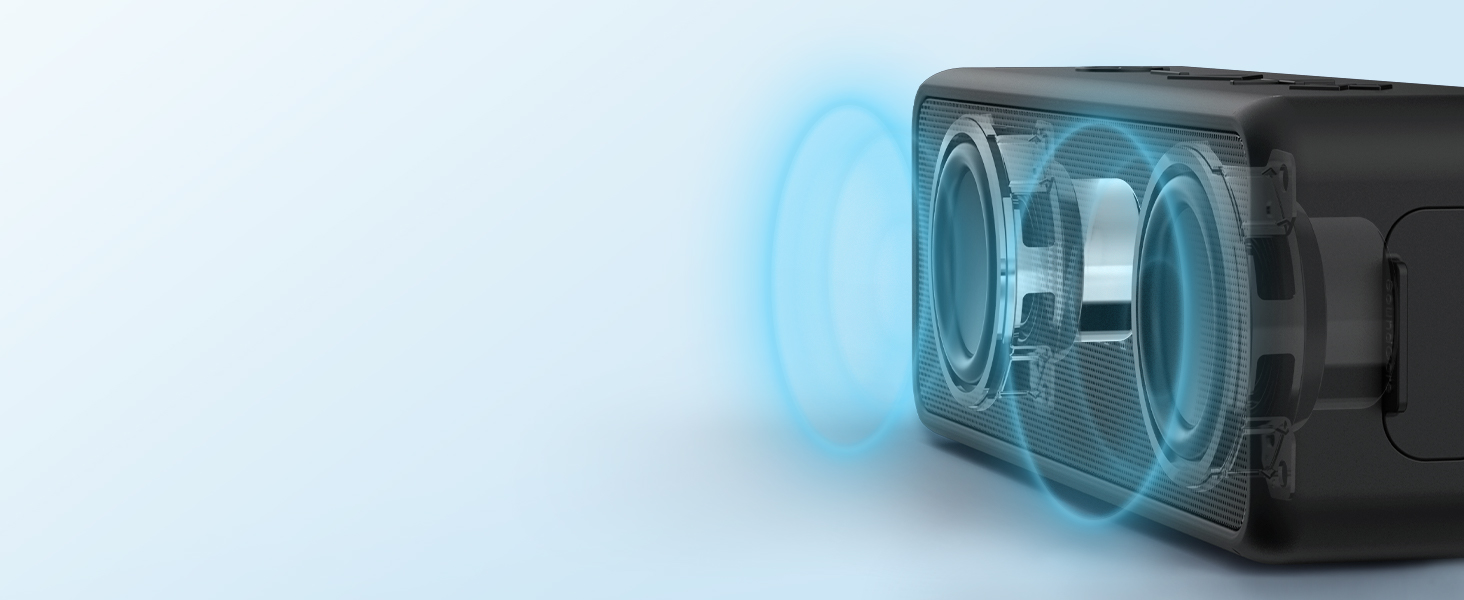
Image: The Anker Soundcore 2 speaker is shown being splashed with water, emphasizing its IPX7 waterproof capability. A critical note reminds users to keep the charging port cover closed to prevent water damage.
Important: Always ensure the rubber flap covering the charging port is securely closed before exposing the speaker to water to prevent damage.
Video: A user demonstrates the waterproof features of the Anker Soundcore speaker, showing its resilience to water exposure. This video confirms the IPX7 rating in a practical setting.
4.2 Cleaning
To clean the speaker, use a soft, damp cloth. Avoid using harsh chemicals or abrasive cleaners, as these may damage the surface or internal components.
5. Troubleshooting
- Cannot Pair: Ensure the speaker is in pairing mode (flashing blue LED) and within range of your device. Try restarting both the speaker and your device.
- No Sound: Check the volume levels on both the speaker and your connected device. Ensure the speaker is not muted.
- Poor Sound Quality: Move the speaker closer to your device to reduce interference. Ensure there are no obstructions between the devices.
- Speaker Not Turning On: The battery may be depleted. Connect the speaker to a power source and allow it to charge for a few minutes before attempting to power it on again.
6. Specifications
| Feature | Specification |
|---|---|
| Model Number | AK-A3105034 (A3105) |
| Connectivity Technology | Bluetooth 5 |
| Wireless Range | Up to 20 meters (66 feet) |
| Speaker Output Power | 12 Watts |
| Audio Output Mode | Stereo |
| Battery Capacity | 5200 Milliamp Hours |
| Battery Life | Up to 24 Hours |
| Waterproof Rating | IPX7 |
| Control Method | Touch |
| Item Weight | 14.56 ounces |
| Item Dimensions (D x W x H) | 1.77"D x 6.5"W x 2.13"H |
| Material | Plastic |
| Included Components | Anker SoundCore 2 Portable Bluetooth Speaker, Power Cable, Quick Start Guide |
7. Warranty and Support
Anker provides an 18-month warranty for the Soundcore 2 Portable Bluetooth Speaker. For any product-related inquiries or support, please contact Anker customer service. Details can be found on the official Anker website or through the contact information provided in the Quick Start Guide.


