
Introduction
Thank you for choosing the Zeadio Smartphone Video Cage Rig. This device is designed to enhance your mobile filmmaking and photography experience by providing stability, versatility, and expandability. It allows you to capture steady shots and connect various accessories to your smartphone, making it an essential tool for vlogging, live streaming, and professional-grade mobile video production.
Product Overview
The Zeadio Smartphone Video Cage Rig is a robust and adaptable frame designed to securely hold your smartphone while offering multiple attachment points for external accessories. It features dual handles for stable two-handed operation and includes a removable wireless remote shutter for convenient photo and video capture.

Figure 1: Zeadio Smartphone Video Cage Rig with a smartphone mounted, showing attached microphone and LED lights on cold shoe mounts.
Key Features:
- Universal Compatibility: Designed to fit most iPhone and Android smartphones, with or without a case.
- Enhanced Stability: Dual handles provide a firm, two-handed grip to minimize shake during recording.
- Accessory Mounting: Equipped with three standard cold shoe mounts for attaching LED lights, microphones, and other accessories.
- Tripod Mounts: Multiple 1/4-inch thread holes allow for mounting on tripods, sliders, stabilizers, or dollies.
- Removable Wireless Remote Shutter: A convenient Bluetooth remote for hands-free photo and video capture.
- Adjustable Phone Clamp: The phone clamp can be adjusted to accommodate various phone sizes and orientations (portrait or landscape).
Setup Guide
1. Installing Your Smartphone:
- Locate the adjustable phone clamp in the center of the rig.
- Unscrew the knob on the back of the clamp to loosen it.
- Gently pull apart the clamp to create enough space for your smartphone.
- Insert your smartphone into the clamp, ensuring it is centered and securely held by the rubberized grips.
- Tighten the knob on the back of the clamp until your phone is firmly in place. Do not overtighten.
- The clamp can be adjusted vertically to optimize the phone's position within the rig.
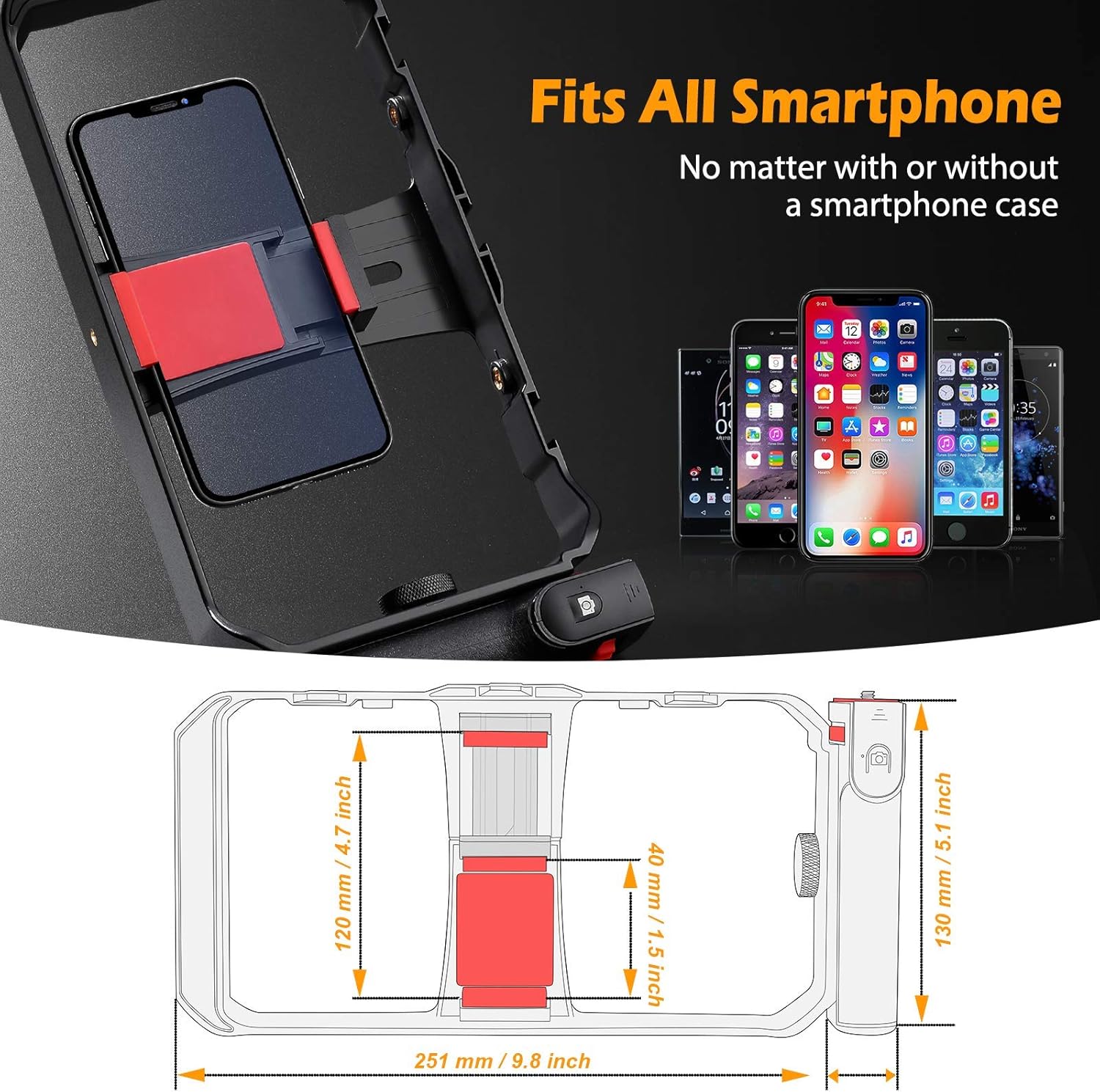
Figure 2: Illustration of smartphone installation into the adjustable clamp, highlighting universal compatibility and key dimensions.
2. Attaching Accessories (Lights, Microphones):
- The rig features three standard cold shoe mounts located on the top bar.
- Slide your LED light, microphone, or other cold shoe compatible accessories into these mounts.
- Secure the accessories by tightening their respective locking mechanisms.

Figure 3: Close-up view of the three cold shoe mounts on the top of the rig, demonstrating how accessories like lights and microphones can be attached.
3. Attaching to a Tripod or Stabilizer:
- The rig includes multiple 1/4-inch thread holes on the bottom and sides.
- Screw the rig onto any standard tripod, monopod, slider, or other compatible mounting equipment using these thread holes.
Operating Instructions
1. Using the Dual Handles for Stability:
- Grasp both side handles firmly with two hands. This provides a balanced and stable platform for recording, significantly reducing camera shake.
- For single-hand operation, one of the handles can be detached and used as a standalone grip.

Figure 4: Demonstrates holding the rig with two hands for horizontal shooting and with a single handle for vertical shooting.
2. Utilizing the Removable Wireless Remote Shutter:
- The wireless remote shutter is integrated into one of the handles. To remove it, unscrew the knob at the base of the handle and slide the remote out.
- Pairing: Turn on the remote shutter. On your smartphone, go to Bluetooth settings and pair with the device (usually named "AB Shutter3" or similar).
- Once paired, open your smartphone's camera application.
- Press the button on the remote to trigger your phone's camera for photos or to start/stop video recording.
- The remote allows for hands-free operation up to 10 meters, ideal for group shots or recording yourself.

Figure 5: The wireless remote shutter detached from the handle, illustrating its use for remote control of the smartphone camera.
3. Switching Between Portrait and Landscape Modes:
- The adjustable phone clamp allows you to easily switch your smartphone between horizontal (landscape) and vertical (portrait) orientations without removing it from the rig.
- Simply loosen the clamp knob slightly, rotate your phone to the desired orientation, and then re-tighten the knob.
Maintenance
- Cleaning: Wipe the rig with a soft, dry cloth to remove dust and debris. Avoid using harsh chemicals or abrasive materials.
- Storage: Store the rig in a cool, dry place away from direct sunlight and extreme temperatures.
- Battery Replacement (Wireless Remote): The wireless remote shutter requires 1 Lithium Metal battery. Refer to the remote's specific instructions for battery replacement.
Troubleshooting
- Phone not fitting securely: Ensure the clamp knob is fully loosened before inserting the phone. Adjust the clamp's vertical position if necessary. Remove bulky phone cases if the phone still does not fit.
- Wireless remote not connecting:
- Ensure the remote is powered on and has sufficient battery.
- Check your smartphone's Bluetooth settings to ensure Bluetooth is enabled and the remote is paired.
- Try unpairing and re-pairing the remote with your smartphone.
- Unstable footage: Ensure your smartphone is securely clamped and all accessories are tightly mounted. Use both handles for maximum stability.
Specifications
| Brand | Zeadio |
| Model Number | DV-HGRIP |
| Product Dimensions | 1.57 x 10.83 x 5.12 inches |
| Item Weight | 4.1 ounces (116 Grams) |
| Color | Black |
| Compatible Devices | Smartphones (iPhone and Android) |
| Battery (Remote) | 1 Lithium Metal battery required |
| Cold Shoe Mounts | 3 Standard Cold-shoe Mounts |
| Tripod Threads | 1/4-inch thread holes |
Note: The "Folded Size" specification (15 cm (l) x 7.5 cm (w) x 1 cm (h)) is typically associated with a foldable variant of this product. This manual pertains to the Basic Version (Model: DV-HGRIP).
Warranty and Support
For warranty information and customer support, please refer to the official Zeadio website or contact your retailer. Keep your purchase receipt for any warranty claims.
Manufacturer: Zeadio