
Zoom L-12
Zoom LiveTrak L-12 Digital Mixer & Recorder User Manual
Model: L-12 | Brand: Zoom
1. Introduction
The Zoom LiveTrak L-12 is a versatile 12-channel digital mixer that also functions as a 24-bit/96kHz 12-track recorder. Designed for musicians, podcasters, and live performers, it integrates multiple functionalities into a single, compact unit. This manual provides essential information for setting up, operating, maintaining, and troubleshooting your L-12 LiveTrak.

Figure 1: Top view of the Zoom L-12 LiveTrak Digital Mixer.
Key features include 5 monitor outputs for customizable headphone mixes, a 3-band EQ on each channel, 16 built-in effects, and a 14-in/4-out USB audio interface for seamless integration with Mac, PC, or iOS devices. The L-12 allows for direct recording to an SD card, making it ideal for on-the-go production without the need for a computer.
Video 1: Official introduction to the Zoom LiveTrak L-12, highlighting its core features and capabilities.
2. Setup
Before operating your Zoom L-12 LiveTrak, ensure proper setup to maximize performance and prevent damage.
2.1. Power Connection
Connect the supplied AC adapter to the DC IN jack on the rear panel of the L-12. Plug the adapter into a suitable power outlet. Press the POWER switch to turn the unit on.

Figure 2: Rear panel of the Zoom L-12, showing power input and other connections.
2.2. Input Connections
- Channels 1-8 (Mic/Line): Use XLR or 1/4-inch connectors for microphones and line-level instruments. Channels 1-2 offer Hi-Z inputs for direct connection of electric guitars or basses, eliminating the need for a direct box.
- Channels 9/10 & 11/12 (Line): These stereo channels feature TRS and RCA connectivity, suitable for keyboards, media players, or other audio devices.
2.3. Output Connections
- Master Out: Connect your main speakers or PA system using the XLR outputs.
- Monitor Out (Phones A-E): Connect up to five sets of headphones for individual monitor mixes. Each output has its own volume control.
2.4. SD Card Insertion
Insert a compatible SD card into the SD card slot on the rear panel. This is essential for direct recording and playback.

Figure 3: Angled view of the L-12 with various inputs and outputs connected.
3. Operating the L-12 LiveTrak
The L-12 LiveTrak offers intuitive controls for mixing, recording, and monitoring.
3.1. Channel Controls
Each of the 12 channels features dedicated controls:
- Gain Knobs: Adjust the input level for each channel.
- COMP Buttons: Engage the compressor for dynamic control on channels 1-8.
- SEL Buttons: Select a channel to adjust its EQ and effects settings via the Channel Strip.
- REC/PLAY Buttons: Arm tracks for recording or enable playback for individual channels.
- MUTE Buttons: Mute individual channels.
- Faders: Control the volume level of each channel.

Figure 4: Illuminated controls on the L-12, showing active channels and settings.
3.2. Channel Strip & Effects
The central Channel Strip allows for detailed adjustments:
- EQ: A 3-band mid-parametric EQ (High, Mid, Low) is available for each channel.
- SEND EFX: Adjust the amount of effect sent from the selected channel.
- Type Knob: Select from 16 built-in effects (e.g., Hall, Spring, Delay, Chorus, Vocal effects).
3.3. Recording & Playback
The L-12 offers robust recording capabilities:
- Direct to SD Card: Record up to 12 discrete tracks at 24-bit/96kHz directly to an SD card.
- Simultaneous Recording: Record to a computer and an SD card simultaneously (up to 48kHz).
- Overdubbing: Mix and overdub your projects directly on the unit.
- Scene Saving: Save and recall up to 9 custom mixer settings (fader positions, EQ, pan, mute) for quick setup changes.
- Auto-Record: Automatically start recording when the master fader detects a certain dB level.
- Pre-Record: Capture data up to 2 seconds before recording starts.

Figure 5: Close-up of the L-12's recording and scene management controls.
3.4. Monitoring
The L-12 provides five independent, customizable headphone mixes, allowing each band member or performer to hear exactly what they need. Adjust individual monitor levels using the dedicated knobs in the Monitor Out section.
3.5. USB Audio Interface
The L-12 functions as a 14-in/4-out USB audio interface, compatible with Mac, PC, and iOS devices (Apple Lightning-to-USB Camera Adapter required for iOS). This allows for simultaneous recording and streaming, and integration with your Digital Audio Workstation (DAW).
Video 2: A detailed overview of the Zoom LiveTrak L-12's features, including its recording, mixing, and interface capabilities.
4. Maintenance
Proper maintenance ensures the longevity and optimal performance of your L-12 LiveTrak.
- Cleaning: Use a soft, dry cloth to wipe down the unit. Avoid abrasive cleaners, solvents, or waxes.
- Storage: Store the unit in a cool, dry place away from direct sunlight, extreme temperatures, and high humidity.
- Handling: Avoid dropping or subjecting the unit to strong impacts. Do not place heavy objects on top of it.
- Liquid Exposure: Keep the unit away from liquids. If liquid enters the unit, immediately disconnect power and consult a qualified service technician.
5. Troubleshooting
If you encounter issues with your L-12 LiveTrak, refer to the following common solutions:
- No Power: Ensure the AC adapter is securely connected to both the unit and a working power outlet. Check the power switch.
- No Sound Output: Verify that all cables are correctly connected to the Master Out and your speakers/headphones. Check master fader levels, individual channel faders, and mute buttons. Ensure input gain is sufficient.
- Distorted Sound: Reduce input gain levels to prevent clipping. Check for proper impedance matching for instruments connected to Hi-Z inputs.
- Recording Issues: Ensure an SD card is inserted and has sufficient free space. Verify that tracks are armed for recording. Check sample rate settings.
- USB Connectivity Problems: Ensure the USB cable is securely connected. For iOS devices, confirm the Apple Lightning-to-USB Camera Adapter is used. Check device drivers on your computer if necessary.
For more complex issues, consult the official user guide or contact Zoom customer support.
6. Specifications
| Feature | Specification |
|---|---|
| Item Weight | 5.65 pounds (2.56 kg) |
| Product Dimensions | 17.5 x 3 x 11 inches (44.45 x 7.62 x 27.94 cm) |
| Item Model Number | L-12 |
| Power Source | Corded Electric |
| Voltage | 120 Volts |
| Number of Channels | 12 |
| Connectivity Technology | USB |
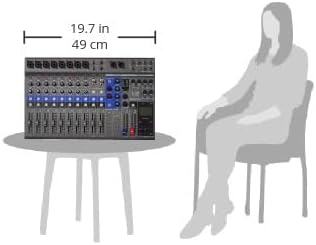
Figure 6: Size comparison of the L-12 LiveTrak Digital Mixer.
7. Warranty and Support
For detailed warranty information and technical support, please refer to the official Zoom website or the comprehensive user guide provided with your product. The user guide contains in-depth instructions and troubleshooting steps not covered in this summary.
Official User Guide (PDF): Download Here
Related documentsL-12


Ask a question about this manual
Ask about setup, troubleshooting, compatibility, parts, safety, or missing instructions. Manuals+ will review the question and use this page’s manual context to help answer it.