
1. Introduction
This manual provides detailed instructions for the proper setup, operation, and maintenance of your SellEton SL-WB Multi-Purpose 48" Weigh Bar System with the SL-7516-B Indicator. Please read this manual thoroughly before using the equipment to ensure safe and accurate operation. Retain this manual for future reference.
2. Safety Information
Observe the following safety precautions to prevent injury and ensure proper equipment function:
- Always operate the weigh bar system on a stable, level surface.
- Do not exceed the maximum weight capacity of 10,000 lb. Overloading can damage the load cells and compromise accuracy.
- Keep all electrical connections dry and free from moisture.
- Ensure cables are routed safely to prevent tripping hazards or damage.
- Do not attempt to repair or modify the equipment. Contact qualified service personnel for assistance.
- When weighing livestock, ensure animals are handled safely and the weigh bars are securely positioned to prevent movement or injury.
3. Package Contents
Verify that all items listed below are present in your package:
- Two (2) SellEton SL-WB 48" Weigh Bars
- One (1) SellEton SL-7516-B Digital Indicator
- Two (2) 15-foot cables for connecting weigh bars to the indicator
- Power adapter for indicator
- User Manual (this document)
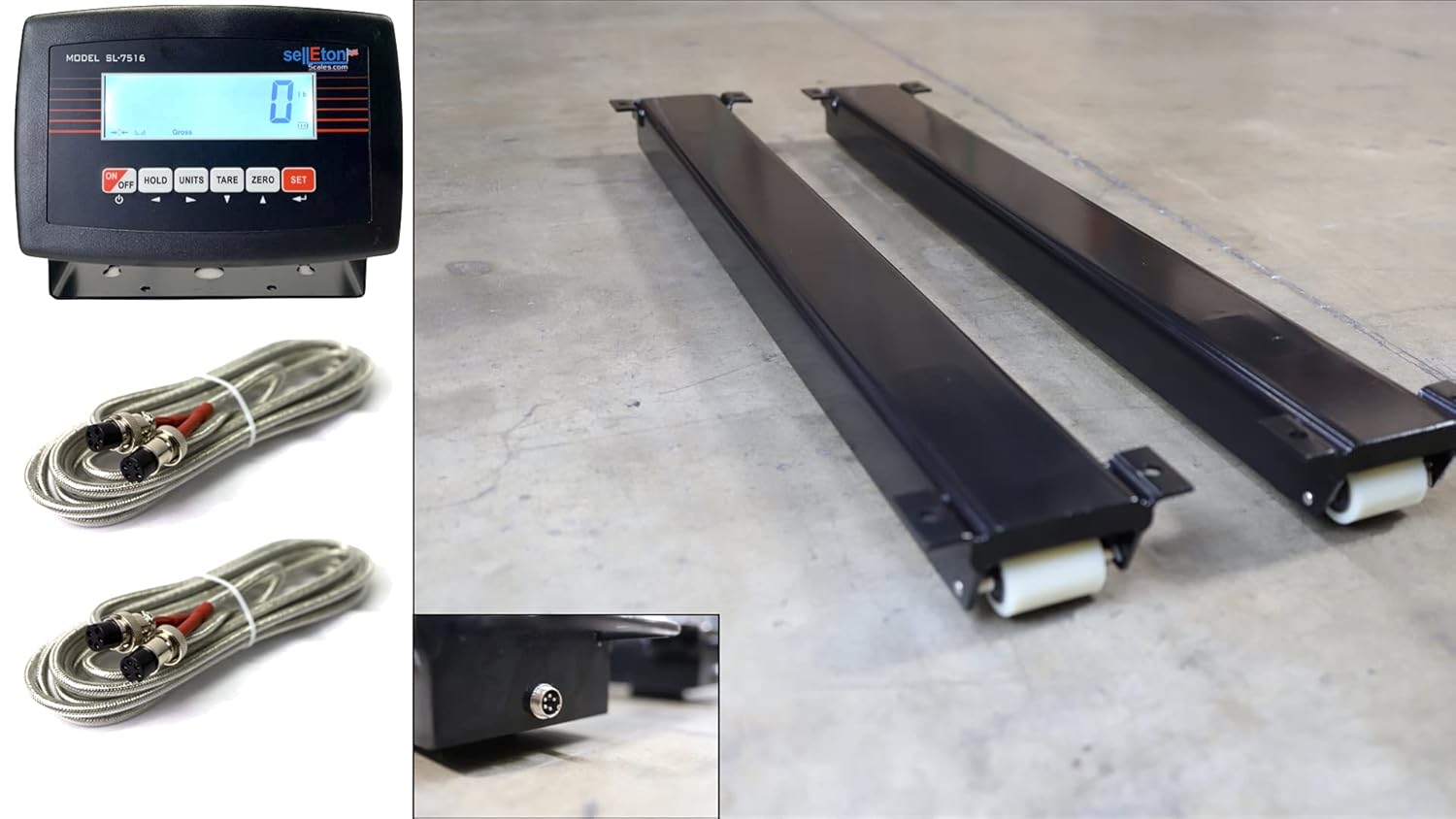
Image 3.1: Overview of the SellEton SL-WB Weigh Bar System, including the SL-7516-B indicator, two weigh bars, and connecting cables.
4. Setup
4.1 Unpacking
Carefully remove all components from the packaging. Inspect for any visible damage. Report any damage to your supplier immediately.
4.2 Component Identification
Familiarize yourself with the main components:
- Weigh Bars: The two long, black beams with wheels on one end. These contain the load cells.
- SL-7516-B Indicator: The digital display unit with control buttons.
- Cables: Used to connect the weigh bars to the indicator.

Image 4.1: The two SellEton SL-WB weigh bars, designed for portable and adaptable weighing solutions.
4.3 Assembly and Connection
- Place the two weigh bars on a firm, level surface. Ensure they are parallel and spaced appropriately for the item or animal to be weighed. The maximum distance between the two bars should not exceed 30 inches due to cable length.
- Locate the circular connector port on the side of each weigh bar.
- Connect one end of each 15-foot cable to a weigh bar by aligning the pins and twisting the connector until it is secure.
- Connect the other end of the two cables to the corresponding ports on the back of the SL-7516-B indicator.
- Connect the power adapter to the SL-7516-B indicator and plug it into a suitable power outlet.

Image 4.2: A close-up view of the circular connector port on the weigh bar, where the signal cable is attached.
5. Operating Instructions

Image 5.1: The SellEton SL-7516-B Digital Indicator, featuring a clear display and control buttons for various functions.
5.1 Powering On/Off
Press the ON/OFF button on the indicator to power the unit on or off.
5.2 Basic Weighing
- Ensure the weigh bars are clear of any objects and the indicator displays '0.0'. If not, press the ZERO button.
- Carefully place the item to be weighed onto the weigh bars.
- Read the weight displayed on the SL-7516-B indicator.
5.3 Animal Weighing Mode
The SL-7516-B indicator features an Animal Weighing mode designed for stable readings with moving loads. To activate this mode:
- Power on the indicator.
- Refer to the indicator's specific manual for detailed instructions on enabling and using the Animal Weighing mode. This mode typically averages readings over a short period to compensate for animal movement.
- Once the animal is on the scale, the indicator will stabilize and display the weight.
5.4 Unit Conversion
Press the UNITS button to cycle through available weight units (e.g., lb, kg). The current unit will be displayed on the indicator.
5.5 Zeroing and Taring
- Zero: To set the current weight to zero, ensuring accurate measurements for subsequent items, press the ZERO button when the weigh bars are empty.
- Tare: To subtract the weight of a container or platform, place the empty container on the weigh bars and press the TARE button. The display will show '0.0', and subsequent items placed in the container will show their net weight.
6. Maintenance
6.1 Cleaning
Clean the weigh bars and indicator regularly with a damp cloth. Avoid using abrasive cleaners or solvents that could damage the finish or electronic components. Ensure no moisture enters the indicator or cable connections.
6.2 Calibration
While the system is factory-calibrated, periodic calibration may be necessary to maintain accuracy, especially after relocation or prolonged use. Calibration should be performed using certified test weights. Refer to the SL-7516-B indicator manual for specific calibration procedures. It is recommended to have calibration performed by a qualified technician.

Image 6.1: Example of calibration weights used to ensure the accuracy of weighing scales.
6.3 Storage
When not in use, store the weigh bar system in a dry, clean environment. Disconnect the indicator from power and store cables neatly to prevent damage.
7. Troubleshooting
Refer to the table below for common issues and their solutions:
| Problem | Possible Cause | Solution |
|---|---|---|
| Indicator does not power on | No power supply; faulty power adapter; damaged indicator. | Check power connection; try a different outlet; contact support if issue persists. |
| Inaccurate weight readings | Not zeroed; uneven surface; damaged load cell; needs calibration. | Press ZERO button; ensure level surface; perform calibration or contact service. |
| "OVERLOAD" message | Weight exceeds capacity. | Remove excess weight immediately. Do not exceed 10,000 lb. |
| Unstable readings (not in animal mode) | Vibrations; air currents; unstable load. | Move to a stable environment; ensure load is still; use Animal Weighing mode if applicable. |
8. Specifications
| Feature | Detail |
|---|---|
| Model | SL-WB (Weigh Bars), SL-7516-B (Indicator) |
| Capacity | 10,000 lb |
| Readout Accuracy | 2 lb |
| Material | Carbon Steel |
| Cable Length (Weigh Bar to Indicator) | 15 feet per cable |
| Indicator Features | Animal Weighing Mode, Unit Conversion, Zero, Tare |
9. Warranty and Support
SellEton products are manufactured to high-quality standards. For information regarding warranty coverage, technical support, or service, please refer to the warranty card included with your product or visit the official SellEton website. Contacting customer support will require your product model and serial number.
