
Planet ISW-500T
ISW-500T Industrial Fast Ethernet Switch User Manual
Model: ISW-500T
1. Introduction
This manual provides comprehensive instructions for the installation, operation, and maintenance of the Planet ISW-500T Industrial 5-Port 10/100TX Compact Ethernet Switch. Designed for robust industrial environments, the ISW-500T offers reliable and fast data transmission with its 5 10/100Mbps auto-negotiation ports. Its IP30-rated compact case and wide-ranging redundant power system ensure stable performance in challenging conditions.
2. Product Overview
The ISW-500T is engineered for industrial applications, featuring a durable design and essential connectivity. Below are key components and their descriptions.

Figure 2.1: Angled view of the ISW-500T Industrial Ethernet Switch, showing its compact design and front-facing Ethernet ports.
2.1 Front Panel
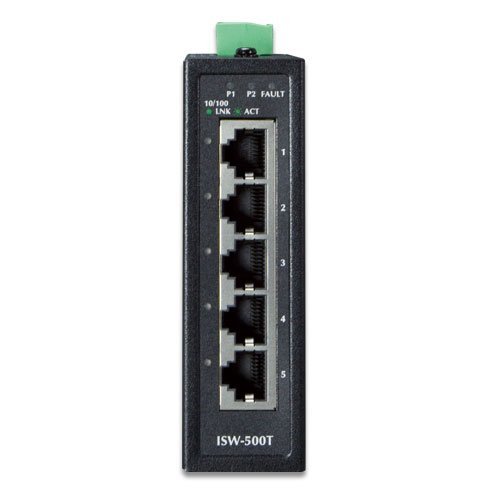
Figure 2.2: Front panel of the ISW-500T, detailing the five 10/100TX Ethernet ports (labeled 1-5) and LED indicators for power (P1, P2), fault (FAULT), and link/activity (LNK/ACT).
- Ethernet Ports (1-5): Five 10/100TX auto-negotiation ports for network connections.
- P1/P2 LEDs: Indicate the status of Power Input 1 and Power Input 2.
- FAULT LED: Illuminates if a power supply failure is detected.
- LNK/ACT LEDs: Indicate link status and data activity for each Ethernet port.
2.2 Top Panel
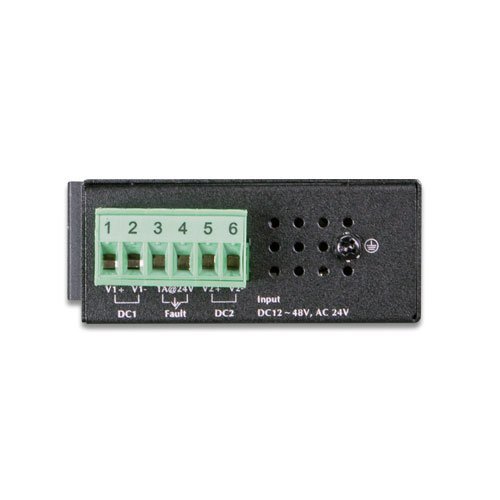
Figure 2.3: Top panel of the ISW-500T, featuring the removable terminal block for dual redundant power inputs (DC1, DC2) and a fault alarm output.
- Power Input Terminal Block: Supports wide-ranging redundant power inputs (12~48V DC or 24V AC). Includes connections for DC1 (V1+, V1-), DC2 (V2+, V2-), and a fault alarm output (Fault).
- Grounding Screw: For proper grounding of the device.
3. Key Features
- 5 10/100TX Fast Ethernet Ports
- 1Gbps Non-blocking Switch Fabric
- IP30-rated Compact Case
- Wide-ranging Redundant Power System (12~48V DC or 24V AC)
- Operating Temperature Range: -40 to 75°C
- Plug and Play for easy deployment
- Auto Power Saving and IEEE 802.3az Energy Efficient Ethernet (EEE) Protocol
- Dual Power Input System with Hardware Failover
- Ethernet ESD Protection: ±6KV DC contact discharge, ±8KV DC air discharge
- Surge Immunity: ±4KV
4. Setup and Installation
4.1 Package Contents
Verify the following items are included in your package:
- ISW-500T Industrial Ethernet Switch
- Terminal Block Connector
- Quick Installation Guide (if applicable, not provided in input)
4.2 Mounting
The ISW-500T is designed for DIN-rail or wall mounting. Ensure the mounting location is stable, well-ventilated, and within the specified operating temperature range (-40 to 75°C).
4.3 Power Connection
- Ensure the power source is off before connecting.
- Connect the 12~48V DC or 24V AC power supply to the appropriate terminals (V1+, V1- for DC1; V2+, V2- for DC2) on the terminal block.
- Tighten the screws on the terminal block to secure the wires.
- Connect the terminal block to the power input port on the top panel of the ISW-500T.
- For enhanced reliability, connect both DC1 and DC2 inputs to separate power sources. The device supports hardware failover.
- Ensure proper grounding by connecting a ground wire to the grounding screw.
4.4 Network Connection
- Connect standard RJ45 Ethernet cables from your network devices (e.g., industrial PCs, IP cameras, PLCs) to any of the five 10/100TX ports on the front panel of the ISW-500T.
- The switch supports auto MDI/MDI-X, so straight-through or crossover cables can be used.
- Verify the LNK/ACT LED for each connected port illuminates, indicating a successful link. A blinking LED indicates data activity.
5. Operation
The ISW-500T is a 'Plug and Play' device, requiring minimal configuration for basic operation.
5.1 Power On
Once power is supplied, the P1 and/or P2 LEDs will illuminate, indicating successful power input. The switch will automatically begin forwarding Ethernet traffic between connected devices.
5.2 Data Transmission
The switch operates at 10Mbps or 100Mbps, automatically negotiating the speed with connected devices. Data is forwarded efficiently with a 1Gbps non-blocking switch fabric.
5.3 Energy Efficiency
The ISW-500T incorporates Auto Power Saving and IEEE 802.3az Energy Efficient Ethernet (EEE) Protocol. This allows the switch to automatically detect cable link status and network traffic, adjusting power consumption accordingly. It consumes less power when less active, contributing to energy conservation.
5.4 Redundant Power System
The dual power input system ensures continuous operation. If Power Supply 1 fails, the hardware failover function automatically switches to Power Supply 2, maintaining system uptime. The FAULT LED will illuminate if a power supply failure occurs.
6. Maintenance
To ensure optimal performance and longevity of your ISW-500T switch, follow these maintenance guidelines:
- Environmental Control: Ensure the operating environment remains within the specified temperature range (-40 to 75°C) and humidity levels. Avoid exposure to excessive dust, moisture, or corrosive substances.
- Cleaning: Periodically clean the exterior of the switch with a soft, dry cloth. Do not use liquid or aerosol cleaners. Ensure ventilation openings are clear of obstructions.
- Cable Management: Keep network and power cables organized and securely connected to prevent accidental disconnections or damage.
- Power Supply Check: Regularly verify the status of the P1 and P2 LEDs to ensure both power inputs are functioning correctly, especially if using redundant power.
- Firmware Updates: While this model is 'Plug and Play' and typically does not require user firmware updates, always refer to the manufacturer's official website for any potential advisories or updates.
7. Troubleshooting
This section provides solutions to common issues you might encounter with the ISW-500T switch.
| Problem | Possible Cause | Solution |
|---|---|---|
| No Power (P1/P2 LEDs Off) | No power supply, incorrect voltage, loose power connection. |
|
| FAULT LED On | One of the redundant power supplies has failed. |
|
| LNK/ACT LED Off for a Connected Port | No link, faulty cable, device not powered on, incorrect port speed/duplex. |
|
| Slow Network Performance | Network congestion, faulty cable, device issues. |
|
8. Specifications
| Attribute | Value |
|---|---|
| Model Number | ISW-500T |
| Ports | 5 x 10/100TX Fast Ethernet |
| Switch Fabric | 1Gbps / non-blocking |
| Throughput | 0.74Mpps @ 64Bytes |
| Max. Power Consumption | 1.1W / 3.77BTU (power on w/o any connection), 2W / 6.86BTU (full loading) |
| Operating Temperature | -40 to 75°C (-40 to 167°F) |
| Power Input | 12~48V DC or 24V AC (Redundant) |
| Protection | Ethernet ESD Protection (±6KV DC contact, ±8KV DC air), ±4KV Surge Immunity |
| Dimensions (L x W x H) | 4.09 x 2.76 x 1.18 inches (103.9 x 70.1 x 30 mm) |
| Weight | 8.78 ounces (249 grams) |
| IP Rating | IP30 |
9. Warranty and Support
For detailed warranty information, technical support, and service inquiries, please refer to the official Planet Technology website or contact your authorized reseller. Warranty terms and conditions may vary by region and product. It is recommended to register your product upon purchase, if applicable, to ensure access to full support services.
Manufacturer: Planet Technology
Related documentsISW-500T


Ask a question about this manual
Ask about setup, troubleshooting, compatibility, parts, safety, or missing instructions. Manuals+ will review the question and use this page’s manual context to help answer it.