
ICOM BP285
Icom BP285 Li-ion Battery Pack User Manual
Model: BP285
1. Introduction
This manual provides essential information for the safe and effective use of the Icom BP285 Li-ion Battery Pack. The BP285 is a rechargeable lithium-ion battery designed for use with compatible Icom devices, specifically the M93D. It offers a nominal voltage of 7.2V and a typical capacity of 1570mAh (minimum 1485mAh, 11Wh), providing approximately 9 hours of operating time.
2. Safety Information
⚠ Danger: To prevent personal injury or damage to the battery, observe the following precautions:
- Do not open, jolt, short-circuit, or incinerate the battery.
- The battery may ignite or burst if mishandled.
- Use this battery only with specified Icom items.
- Charging temperature range is 10°C to 45°C (50°F to 113°F). Charging outside this range may damage the battery or reduce its lifespan.
- Do not dispose of the battery with general household waste. Follow local regulations for proper disposal of lithium-ion batteries. The crossed-out wheeled bin symbol indicates that the product should not be disposed of with other household waste.
3. Product Overview
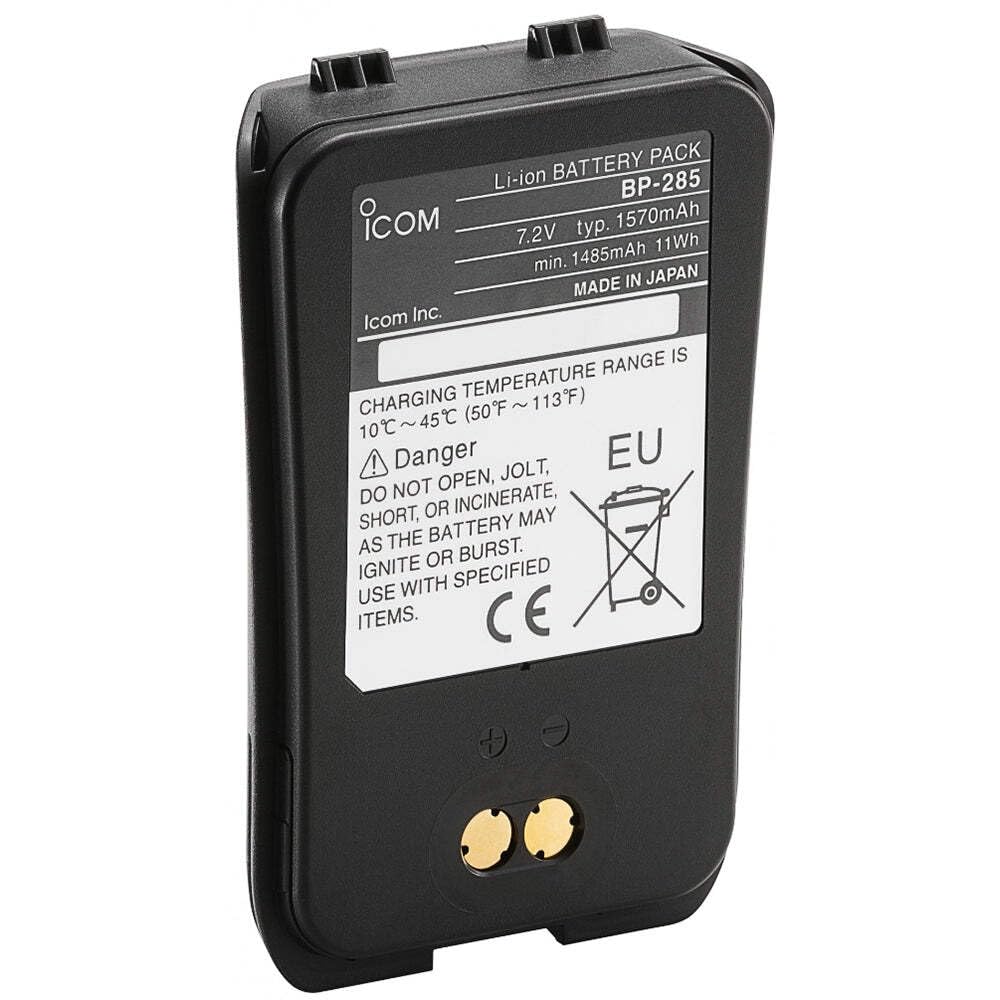
Image of the Icom BP285 Li-ion Battery Pack. The label clearly displays "Li-ion BATTERY PACK BP-285", "7.2V typ. 1570mAh", "min. 1485mAh 11Wh", and "MADE IN JAPAN". Below this, charging temperature guidelines and critical safety warnings are visible, including "DO NOT OPEN, JOLT, SHORT, OR INCINERATE, AS THE BATTERY MAY IGNITE OR BURST. USE WITH SPECIFIED ITEMS." The CE mark and the crossed-out wheeled bin symbol are also present, indicating compliance with European standards and proper disposal requirements.
The Icom BP285 is a compact and robust lithium-ion battery pack designed to provide reliable power to compatible Icom radio devices. Its design includes secure attachment points for integration with the radio unit and clearly marked terminals for charging.
4. Specifications
| Feature | Detail |
|---|---|
| Model Number | BP285 |
| Battery Type | Lithium-ion (Li-ion) |
| Nominal Voltage | 7.2 Volts |
| Typical Capacity | 1570 mAh |
| Minimum Capacity | 1485 mAh |
| Energy | 11 Wh |
| Operating Time | Approximately 9 hours (with compatible device) |
| Charging Temperature Range | 10°C ~ 45°C (50°F ~ 113°F) |
| Product Dimensions | 4 x 3 x 1 inches |
| Item Weight | 3.2 ounces |
| Manufacturer | Icom |
5. Setup and Charging
5.1 Initial Charge
Before first use, fully charge the BP285 battery pack. Use only the specified Icom rapid charger designed for this battery model.
5.2 Charging Procedure
- Ensure the battery is within the recommended charging temperature range of 10°C to 45°C (50°F to 113°F).
- Connect the Icom rapid charger to a suitable power source.
- Insert the BP285 battery pack into the charging slot of the rapid charger, ensuring proper alignment of the contacts.
- Observe the charger's indicator light. It will typically show a specific color (e.g., red) during charging and change color (e.g., green) when charging is complete. Refer to your specific charger's manual for detailed indicator meanings.
- Once fully charged, remove the battery from the charger.
Note: Overcharging the battery does not improve performance and may reduce its lifespan.
6. Operating Instructions
6.1 Attaching the Battery Pack
- Align the battery pack with the battery compartment on your compatible Icom radio (e.g., M93D).
- Gently slide the battery into place until it clicks securely. Ensure the battery release latches are engaged.
- Verify that the battery is firmly attached and does not wobble.
6.2 Detaching the Battery Pack
- Ensure the radio is powered off before removing the battery.
- Locate the battery release latches on the radio.
- Press or slide the latches to release the battery.
- Carefully slide the battery pack out of the compartment.
7. Maintenance and Storage
- Cleaning: Wipe the battery contacts and exterior with a clean, dry cloth. Do not use harsh chemicals or abrasive cleaners.
- Storage: If storing the battery for an extended period, charge it to approximately 50% capacity. Store in a cool, dry place away from direct sunlight and extreme temperatures.
- Temperature: Avoid exposing the battery to temperatures outside its operating range (e.g., direct sunlight in a car, freezing conditions).
- Disposal: When the battery reaches the end of its life, dispose of it responsibly according to local regulations for lithium-ion batteries. Do not dispose of it in general waste.
8. Troubleshooting
| Problem | Possible Cause | Solution |
|---|---|---|
| Battery not charging |
|
|
| Short operating time |
|
|
| Battery not fitting device |
|
|
9. Warranty and Support
For information regarding warranty coverage, please refer to the warranty card included with your original product purchase or visit the official Icom website.
If you require technical assistance or have questions not covered in this manual, please contact Icom customer support.
- Manufacturer: Icom Inc.
- Website: www.icomamerica.com (or relevant regional Icom website)
- Expert Advice: As per product information, expert advice is available. Refer to your purchase point or Icom's official support channels.
Related documentsBP285


Ask a question about this manual
Ask about setup, troubleshooting, compatibility, parts, safety, or missing instructions. Manuals+ will review the question and use this page’s manual context to help answer it.