
1. Introduction
Thank you for choosing the Hemudu Universal TV Table Top Stand, Model HT01B-001. This stand is designed to provide a stable and adjustable base for your 27 to 55-inch LCD flat screen television, supporting TVs up to 55 kg (121 lbs). It features height adjustment and tilt functionality for optimal viewing comfort, along with integrated cable management to maintain a tidy setup. Please read this manual carefully before assembly and use to ensure safe and correct installation.
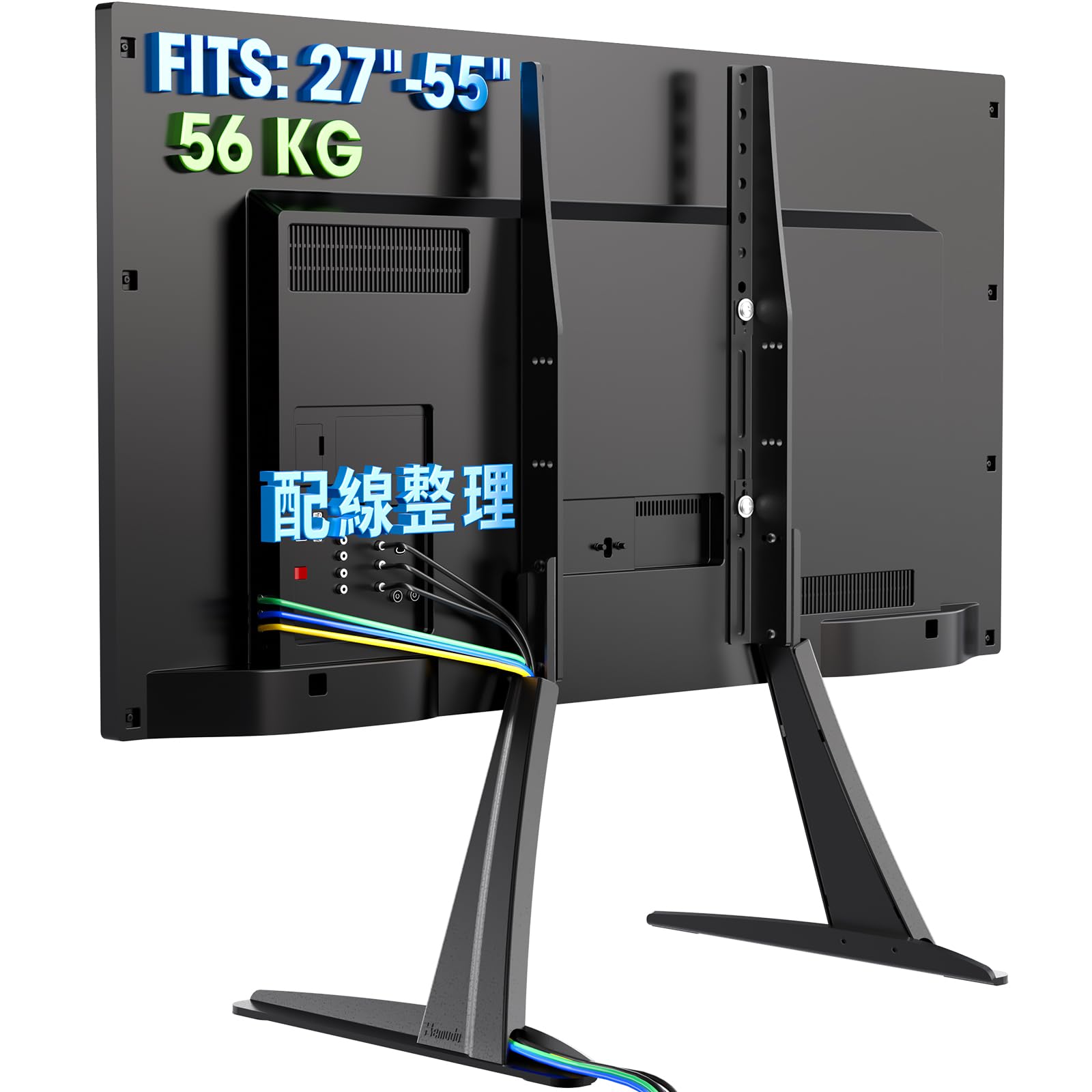
Image 1.1: Hemudu Universal TV Stand supporting a television.
2. Safety Information
- Weight Capacity: Do not exceed the maximum weight capacity of 55 kg (121 lbs). Ensure your TV's weight is within this limit.
- Screen Size: This stand is compatible with 27 to 55-inch TVs. Verify your TV's VESA mounting pattern and size before installation.
- Stability: Always place the TV stand on a flat, stable, and level surface. Avoid placing it on uneven or unstable furniture.
- Assembly: Follow all assembly instructions carefully. Incorrect assembly can lead to product failure or injury. It is recommended to have two people for TV mounting.
- Children: Keep children away from the assembly area. Small parts can be a choking hazard. Do not allow children to climb on the stand or TV.
- Maintenance: Regularly check all screws and connections to ensure they are secure.
3. Package Contents
Please verify that all components are present and undamaged before beginning assembly. If any parts are missing or damaged, contact customer support.
- TV Stand Base (2 pieces)
- TV Mounting Brackets (2 pieces)
- Connection Plate
- Hardware Kit (various screws, washers, spacers, Allen wrench)
- Cable Management Clips
- Instruction Manual

Image 3.1: Example of hardware kit components (screws, washers).
4. Specifications
| Feature | Specification |
|---|---|
| Model Number | HT01B-001 |
| Brand | Hemudu |
| Compatible Screen Size | 27 - 55 inches |
| Maximum Weight Capacity | 55 kg (121 lbs) |
| Material | Alloy Steel |
| Mounting Type | Table Top Stand |
| Movement Type | Adjustable (Height & Tilt) |
| Maximum Tilt Angle | 5 degrees forward, 5 degrees backward |
| Height Adjustment | 3 levels |
| Included Items | Screws, Tools, Cable Clips |

Image 4.1: Detailed dimensions of the stand components.
5. Setup and Installation
Follow these steps to assemble your Hemudu TV stand and mount your television.
- Prepare the Workspace: Clear a spacious and flat area for assembly. Lay down a soft cloth or blanket to protect your TV screen and furniture.
- Attach Mounting Brackets to TV: Identify the VESA mounting holes on the back of your TV. Select the appropriate screws, washers, and spacers from the hardware kit that fit your TV. Secure the two TV mounting brackets to the back of your TV. Ensure they are firmly attached and level.
- Assemble the Stand Bases: Connect the two stand bases to the central connection plate using the provided screws. Ensure the non-slip pads are attached to the bottom of the stand bases to protect your furniture surface.
- Attach TV to Stand: Carefully lift the TV (with brackets attached) and align the brackets with the vertical arms of the assembled stand base. Slide the TV onto the stand, ensuring the brackets are securely seated. It is highly recommended to have two people for this step to prevent damage or injury.
- Secure the TV: Use the provided safety screws to lock the TV mounting brackets to the stand's vertical arms. This prevents accidental dislodgement.
- Cable Management: Utilize the included cable management clips to route and organize your TV cables along the stand's vertical arms. This helps maintain a clean and organized appearance.

Image 5.1: Rear view of the stand with cable management in use.
6. Operating Instructions
The Hemudu TV stand offers adjustable features to optimize your viewing experience.
6.1 Height Adjustment
The stand allows for 3 levels of height adjustment. To adjust the height:
- Carefully lift the TV slightly to relieve pressure on the mounting points.
- Loosen the screws that secure the TV mounting brackets to the vertical arms of the stand.
- Slide the TV up or down to the desired height level. Ensure both sides are adjusted equally.
- Retighten the screws firmly to secure the TV at the new height.

Image 6.1: Illustration of the 3-level height adjustment feature.
6.2 Tilt Adjustment
The stand supports a tilt angle of 5 degrees forward and 5 degrees backward.
- Gently push the top or bottom of the TV screen to achieve the desired tilt angle.
- The stand's design allows for this adjustment without loosening screws.

Image 6.2: Demonstration of the tilt adjustment capability.
7. Maintenance
- Cleaning: Use a soft, dry cloth to clean the stand. Avoid abrasive cleaners or solvents that may damage the finish.
- Inspection: Periodically check all bolts and screws to ensure they remain tight and secure. Retighten if necessary.
- Stability: Ensure the stand remains on a stable surface. If moving the TV and stand, lift it carefully rather than dragging.
8. Troubleshooting
- TV feels unstable after assembly:
- Ensure all screws are tightened securely, especially those connecting the TV brackets to the stand and the stand bases to the central plate.
- Verify that the TV's weight and size are within the specified limits for the stand.
- Make sure the stand is placed on a completely flat and stable surface. - Difficulty attaching TV to stand:
- Confirm that the correct VESA screws and spacers are used for your TV model.
- Ensure the TV mounting brackets are oriented correctly and aligned with the stand's vertical arms.
- It is easier to attach the TV with two people. - Cables are messy:
- Use the provided cable management clips to route and secure cables along the stand's vertical arms.

Image 8.1: Comparison highlighting the enhanced stability of the Hemudu stand design.
9. Warranty and Support
For warranty information or technical support, please refer to the product packaging or contact your retailer. Keep your purchase receipt as proof of purchase.


