
1. Introduction
Thank you for choosing the SURKER HC-7068 Electric Hair Clipper. This versatile and robust grooming tool is designed for efficient and safe hair cutting, suitable for use on children, men, seniors, and even pets. Its ceramic blade ensures a precise and smooth trimming experience. Please read this manual thoroughly before first use to ensure proper operation, maintenance, and to maximize the lifespan of your device.
2. Safety Precautions
To reduce the risk of electric shock, injury, or damage, always observe the following safety precautions:
- Do not use this appliance near bathtubs, showers, basins, or other vessels containing water.
- Do not immerse the clipper in water or any other liquid.
- Keep the appliance dry. Do not use it in wet conditions.
- Always unplug the clipper from the power outlet immediately after charging and before cleaning.
- Do not use on infants or very young children without extreme caution and supervision.
- Avoid contact with moving parts. Keep fingers, hair, and clothing away from the blades during operation.
- Do not operate the clipper if it has a damaged cord or plug, if it is not working properly, or if it has been dropped or damaged.
- Use only attachments supplied by the manufacturer.
- Store the appliance in a dry place, away from direct sunlight and out of reach of children.
- The blades are sharp; handle with care during cleaning and attachment.
3. Package Contents
Please check the package contents upon opening to ensure all items are present:
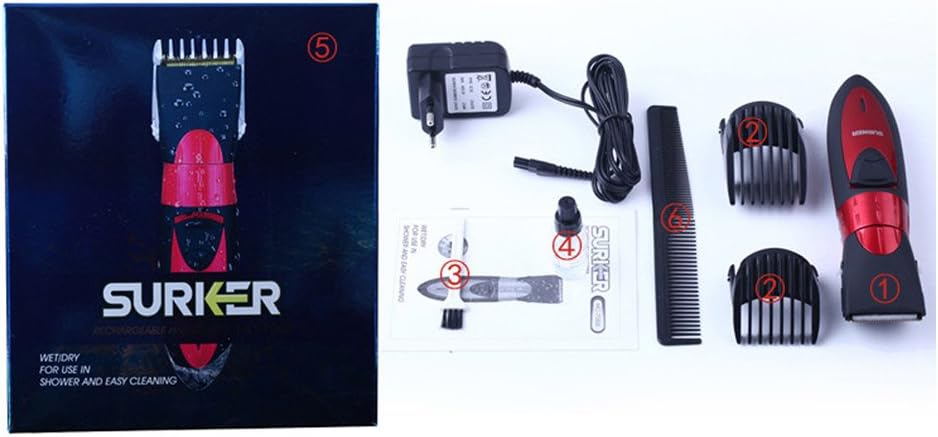
- 1 x SURKER HC-7068 Electric Hair Clipper
- 1 x Power Adapter
- 2 x Guide Combs (3/6mm and 9/12mm)
- 1 x Cleaning Brush
- 1 x Lubricating Oil
- 1 x Styling Comb
- 1 x Instruction Manual
4. Product Features
The SURKER HC-7068 is engineered with features to provide an optimal grooming experience:
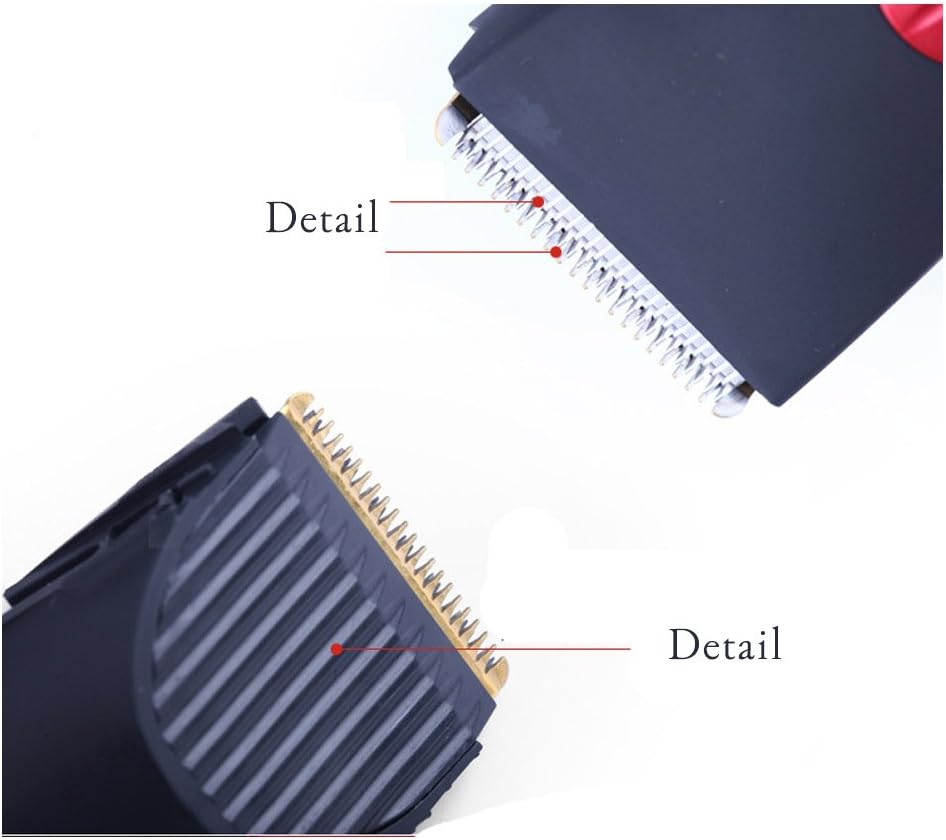
- Ceramic Blade: Equipped with a wear-resistant ceramic blade for precise, smooth, and durable cutting performance.
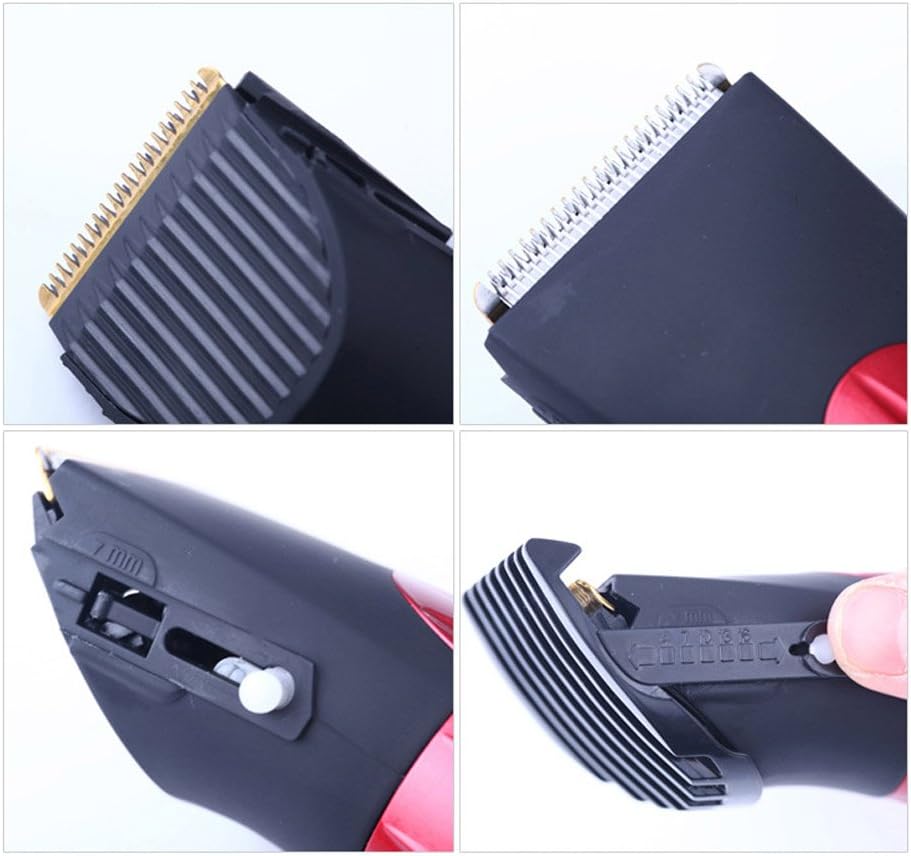
- Adjustable Cutting Length: Features an integrated dial for fine-tuning cutting lengths from 1mm to 7mm without a guide comb.
- Guide Combs: Includes two detachable guide combs (3/6mm and 9/12mm) for various hair lengths.
- Rechargeable Battery: Powered by a Lithium-ion battery, offering cordless operation for convenience.
- Long Battery Life: Provides approximately 40 minutes of continuous use after an 8-hour charge.
- Ergonomic Design: Designed for comfortable handling and ease of use.
- Easy to Clean: Simple to disassemble for quick and thorough cleaning.

5. Setup
5.1. Charging the Clipper
- Ensure the clipper is switched OFF.
- Connect the power adapter to the charging port at the bottom of the clipper.
- Plug the adapter into a standard electrical outlet.
- The charging indicator light will illuminate (if present) to show that the clipper is charging.
- Allow approximately 8 hours for a full charge before first use. A full charge provides up to 40 minutes of cordless operation.
- Do not overcharge the battery. Unplug the adapter once charging is complete.
5.2. Attaching Guide Combs
The clipper comes with two guide combs (3/6mm and 9/12mm) to achieve different cutting lengths.
- Select the desired guide comb.
- Align the comb with the clipper blade and slide it firmly into place until it clicks.
- To remove, gently push the comb upwards from the back and slide it off.

6. Operating Instructions
6.1. Powering On/Off
- To turn the clipper ON, slide the power switch located on the front of the unit upwards.
- To turn the clipper OFF, slide the power switch downwards.
6.2. Adjusting Cutting Length
The clipper features an integrated length adjustment dial for precise cutting without a guide comb, ranging from 1mm to 7mm. When using guide combs, the dial should be set to the shortest length (1mm) for optimal performance.
- To adjust the cutting length, rotate the red dial located on the body of the clipper.
- Align the desired length number with the indicator mark.

6.3. Hair Cutting Tips
- Ensure hair is clean and dry before cutting.
- For best results, comb the hair in the direction of growth.
- Start with a longer guide comb setting and gradually reduce the length if desired.
- Hold the clipper with the blade flat against the head and move it slowly against the direction of hair growth.
- Overlap strokes to ensure an even cut.
- Regularly clear hair clippings from the blade during use to maintain performance.
7. Maintenance and Cleaning
Proper maintenance ensures the longevity and optimal performance of your clipper.
7.1. Cleaning the Blades
- Ensure the clipper is switched OFF and unplugged from the power source.
- Carefully detach the blade assembly by pushing the blade unit forward until it separates from the clipper body.
- Use the provided cleaning brush to remove any trapped hair clippings from the blades and the clipper head.
- The ceramic blade can be rinsed under running water for thorough cleaning. Ensure the blade is completely dry before reattaching.
- Reattach the blade assembly by aligning it with the clipper body and pushing it back until it clicks into place.
7.2. Oiling the Blades
After every few uses, or after cleaning with water, it is essential to oil the blades to maintain their sharpness and smooth operation.
- Apply 1-2 drops of the provided lubricating oil evenly across the top of the blades.
- Turn the clipper on for a few seconds to allow the oil to distribute.
- Wipe off any excess oil with a soft cloth.
7.3. Storage
When not in use, store the clipper in a dry, cool place, away from direct sunlight and moisture. Ensure the clipper is clean and oiled before storing for extended periods.
8. Troubleshooting
If you encounter any issues with your SURKER HC-7068 clipper, refer to the table below for common problems and solutions.
| Problem | Possible Cause | Solution |
|---|---|---|
| Clipper does not turn on. | Battery is depleted. | Charge the clipper for 8 hours. |
| Clipper runs slowly or pulls hair. | Blades are dirty or not oiled. | Clean the blades thoroughly and apply lubricating oil. |
| Uneven cutting. | Guide comb not properly attached or hair not combed. | Ensure guide comb is securely attached. Comb hair before cutting and move clipper slowly. |
| Clipper makes unusual noise. | Blades are not properly aligned or need oiling. | Re-align the blade assembly. Apply lubricating oil. If problem persists, contact support. |
9. Specifications
| Feature | Specification |
|---|---|
| Model Number | HC-7068 |
| Brand | Surker |
| Blade Material | Ceramic |
| Power Source | Battery Powered (Rechargeable Lithium-ion) |
| Charging Time | Approx. 8 hours |
| Operating Time | Approx. 40 minutes (continuous) |
| Adjustable Cutting Length | 1mm - 7mm (without guide comb) |
| Guide Combs Included | 3/6mm, 9/12mm |
| Color | Black |
| Item Weight | 220 Grams |
| Package Dimensions | 21.8 x 19.1 x 5.1 cm |
| Manufacturer | XUKE |
10. Warranty and Support
This product is manufactured with high-quality materials and undergoes strict quality control. For information regarding warranty coverage, please refer to the warranty card included in your product packaging or contact your retailer.
For technical support, troubleshooting assistance, or inquiries about replacement parts, please contact the customer service department of your retailer or the manufacturer. Keep your purchase receipt as proof of purchase for any warranty claims.
