
CHI Steam 13102
CHI Steam Iron User Manual
Model: 13102
Brand: CHI Steam
Introduction
This manual provides comprehensive instructions for the safe and effective use of your CHI Steam Iron. Designed with advanced features for professional results, this iron combines powerful steam with precise temperature control to effortlessly smooth out wrinkles. Please read this manual thoroughly before first use and retain it for future reference.
Product Overview
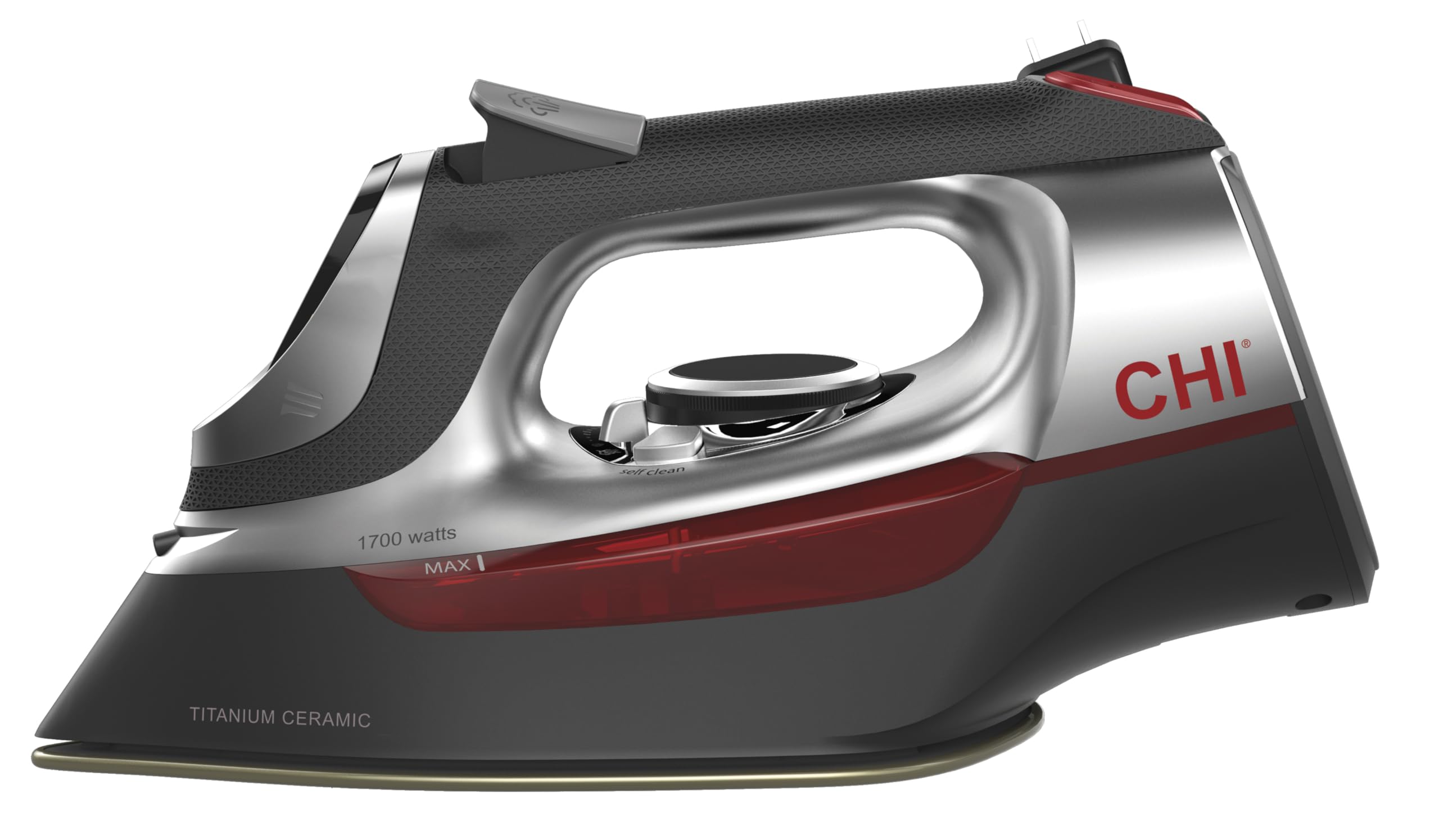
The CHI Steam Iron features a titanium-infused ceramic soleplate for durability and smooth gliding. It operates at 1700 watts, providing powerful steam through over 400 steam holes. Key features include an electronic temperature control with fabric guide, adjustable steam settings, a comfortable grip handle, and an 8-foot retractable cord for convenient storage. The water tank access door swivels open for easy filling.
Key Features:
- Titanium-Infused Ceramic Soleplate: Designed for durability, scratch resistance, quick heating, and extra-smooth gliding.
- 1700 Watts Power: Ensures rapid heat-up and powerful steam delivery.
- Over 400 Steam Holes: Provides extensive steam coverage for efficient wrinkle removal.
- Electronic Temperature Control with Fabric Guide: Illuminated digital display allows selection of fabric type for appropriate temperature settings.
- Adjustable Steam Lever: Easily control steam output from no steam to full power.
- 8-Foot Retractable Cord: Winds up quickly with the touch of a button for neat storage.
- 3-Way Auto Shutoff: Enhances safety by automatically turning off the iron when left unattended.
Setup
- Unpack the Iron: Carefully remove the iron and all packaging materials. Inspect the iron for any damage.
- Initial Cleaning: Before first use, wipe the soleplate with a damp cloth to remove any manufacturing residue.
- Fill Water Tank:
- Ensure the iron is unplugged and cool.
- Swivel open the electronic temperature control to access the water tank door.
- Fill the water tank with distilled water up to the "MAX" fill line. Using distilled water helps prevent mineral buildup and extends the life of your iron.
- Close the water tank door securely.
- Position the Iron: Place the iron on a stable, heat-resistant surface, such as an ironing board.
Operating Instructions
- Plug In: Extend the retractable cord by pressing the button and plug the iron into a standard electrical outlet. The electronic display will illuminate.
- Select Fabric Type: Turn the electronic temperature control dial to select the appropriate fabric setting (e.g., Linen, Cotton, Wool, Silk, Synthetic). The selected fabric type will be illuminated on the display.
- Heat-Up: Allow the iron to heat up to the selected temperature. The indicator light will change from flashing to solid red, and an audible beep will confirm it's ready for use.
- Adjust Steam: Use the adjustable steam lever to control the amount of steam desired. Slide it forward for more steam or backward for less/no steam.
- Steam Burst: For stubborn wrinkles, press the steam burst button located on the handle to release an extra powerful shot of steam.
- Water Spray: To dampen fabrics, press the water spray button on the handle.
- Ironing: Glide the iron smoothly over the fabric. The titanium-infused ceramic soleplate ensures even heat distribution and effortless movement.
- Auto Shutoff: The iron is equipped with a 3-way auto shutoff feature for safety. It will turn off automatically if left motionless for 30 seconds on its soleplate or side, or 15 minutes on its heel.
Maintenance
- Empty Water Tank: After each use, unplug the iron and allow it to cool completely. Empty any remaining water from the tank to prevent mineral buildup.
- Self-Clean Function: Regularly use the self-clean function to flush out mineral deposits from the steam vents. Refer to the detailed instructions in the full user manual for this process.
- Soleplate Cleaning: If the soleplate becomes stained or sticky, clean it with a damp cloth and a mild, non-abrasive cleaner designed for iron soleplates. Do not use abrasive scouring pads or metal cleaners.
- Storage: Once cool and empty, retract the cord and store the iron upright on its heel in a safe, dry place.
Troubleshooting
| Problem | Possible Cause | Solution |
|---|---|---|
| Iron does not heat up. | Not plugged in; power outage; auto shutoff activated. | Ensure iron is securely plugged in. Check power supply. Move iron to reactivate. |
| No steam or insufficient steam. | Water tank empty; temperature too low; steam vents clogged. | Fill water tank. Set temperature to a steam-producing setting (e.g., Linen, Cotton). Perform self-clean. |
| Water leaking from soleplate. | Water tank overfilled; temperature too low for steam; mineral buildup. | Do not overfill. Ensure iron is hot enough for steam. Perform self-clean. |
| Iron sticks to fabric. | Soleplate dirty; incorrect temperature setting. | Clean soleplate. Adjust temperature according to fabric type. |
For more detailed troubleshooting, please refer to the full user manual.
Specifications
| Brand | CHI Steam |
| Model Number | 13102 |
| Wattage | 1700 W |
| Soleplate Material | Titanium-Infused Ceramic |
| Cord Length | 8 feet (retractable) |
| Auto Shutoff | 3-Way (30 seconds horizontal/side, 15 minutes vertical) |
| Product Dimensions | 12.3"L x 4.8"W |
| Item Weight | 3.5 pounds |
| Color | Silver |
Warranty and Support
This CHI Steam Iron comes with a Two (2) year limited warranty. For warranty claims, technical support, or additional information, please refer to the official user manual or contact CHI Steam customer service.
You can download the full user manual here.
Related documents13102


Ask a question about this manual
Ask about setup, troubleshooting, compatibility, parts, safety, or missing instructions. Manuals+ will review the question and use this page’s manual context to help answer it.