
JHS A019-8KR/A
JHS Portable Air Conditioner User Manual
Model: A019-8KR/A | Brand: JHS
1. Introduction
Thank you for choosing the JHS 8,000 BTU Small Portable Air Conditioner. This 3-in-1 unit provides cooling, fan, and dehumidification functions, designed to keep your space comfortable. This manual provides essential information for the safe and efficient operation, installation, and maintenance of your new portable air conditioner. Please read it thoroughly before use and retain it for future reference.
2. Important Safety Information
To reduce the risk of fire, electrical shock, or injury when using your air conditioner, follow these basic precautions:
- Read all instructions before using the appliance.
- Ensure the power supply matches the rating label on the unit.
- Always plug the unit into a grounded 3-prong outlet. Do not remove the grounding prong.
- Do not operate the unit with a damaged cord or plug.
- If the unit has not been stored and transported in an UPRIGHT position, wait at least 24 hours before operating it.
- Do not block air vents or exhaust openings.
- Keep the unit away from heat sources and direct sunlight.
- Unplug the unit before cleaning or servicing.
- This appliance is not intended for use by persons (including children) with reduced physical, sensory or mental capabilities, or lack of experience and knowledge, unless they have been given supervision or instruction concerning use of the appliance by a person responsible for their safety.
3. Package Contents
Verify that all items listed below are included in your package:
- JHS Portable Air Conditioner Unit
- Remote Control (batteries AAA R03 1.5V*2 not included)
- Window Kit
- Exhaust Hose
- Drainage Kit
- User Manual
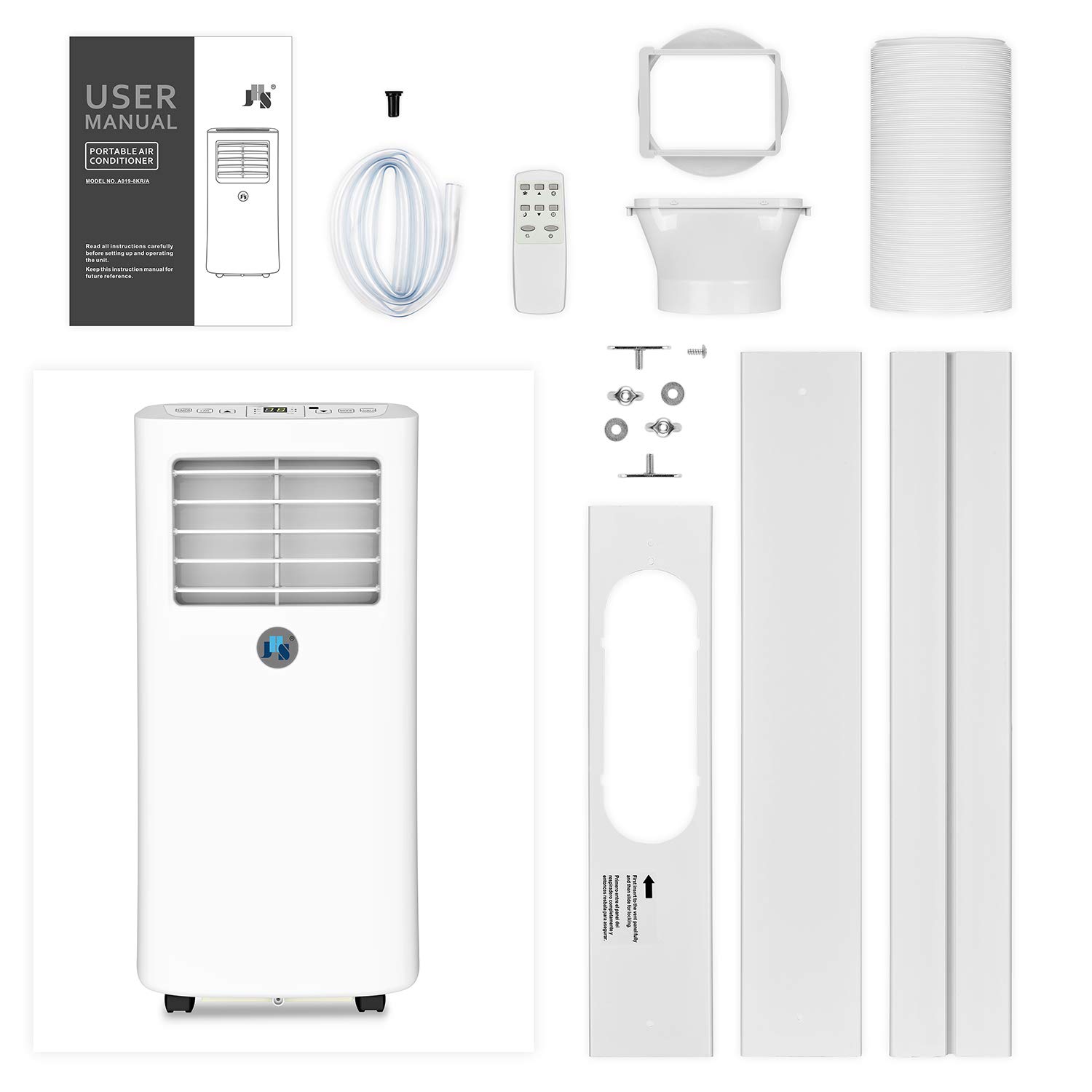
Figure 3.1: Contents of the JHS Portable Air Conditioner package, including the main unit, remote, window kit, exhaust hose, and drainage kit.
4. Product Overview
Familiarize yourself with the main components and controls of your portable air conditioner.

Figure 4.1: Front view of the JHS Portable Air Conditioner.
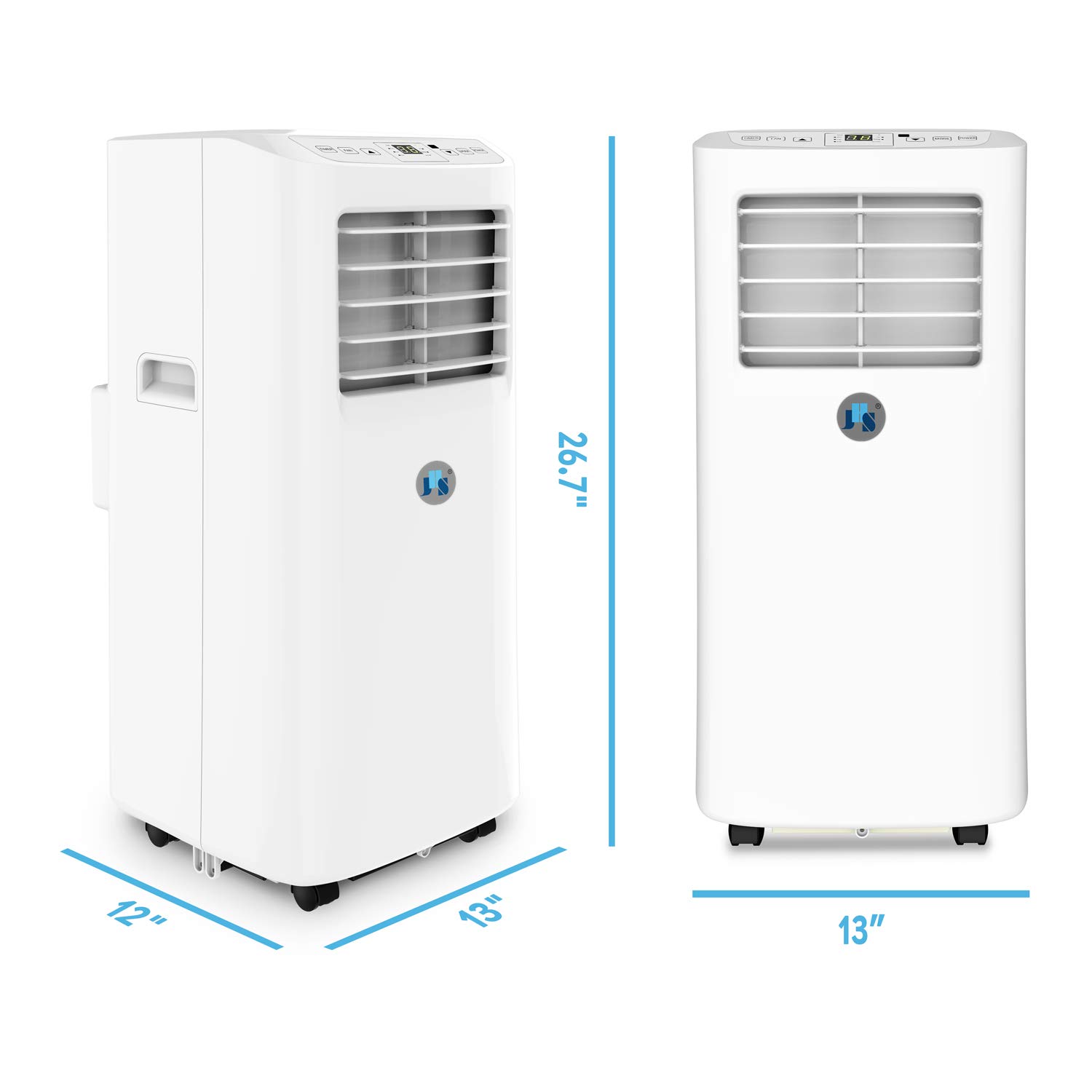
Figure 4.2: Dimensions of the JHS Portable Air Conditioner.
Control Panel and Digital LED Display
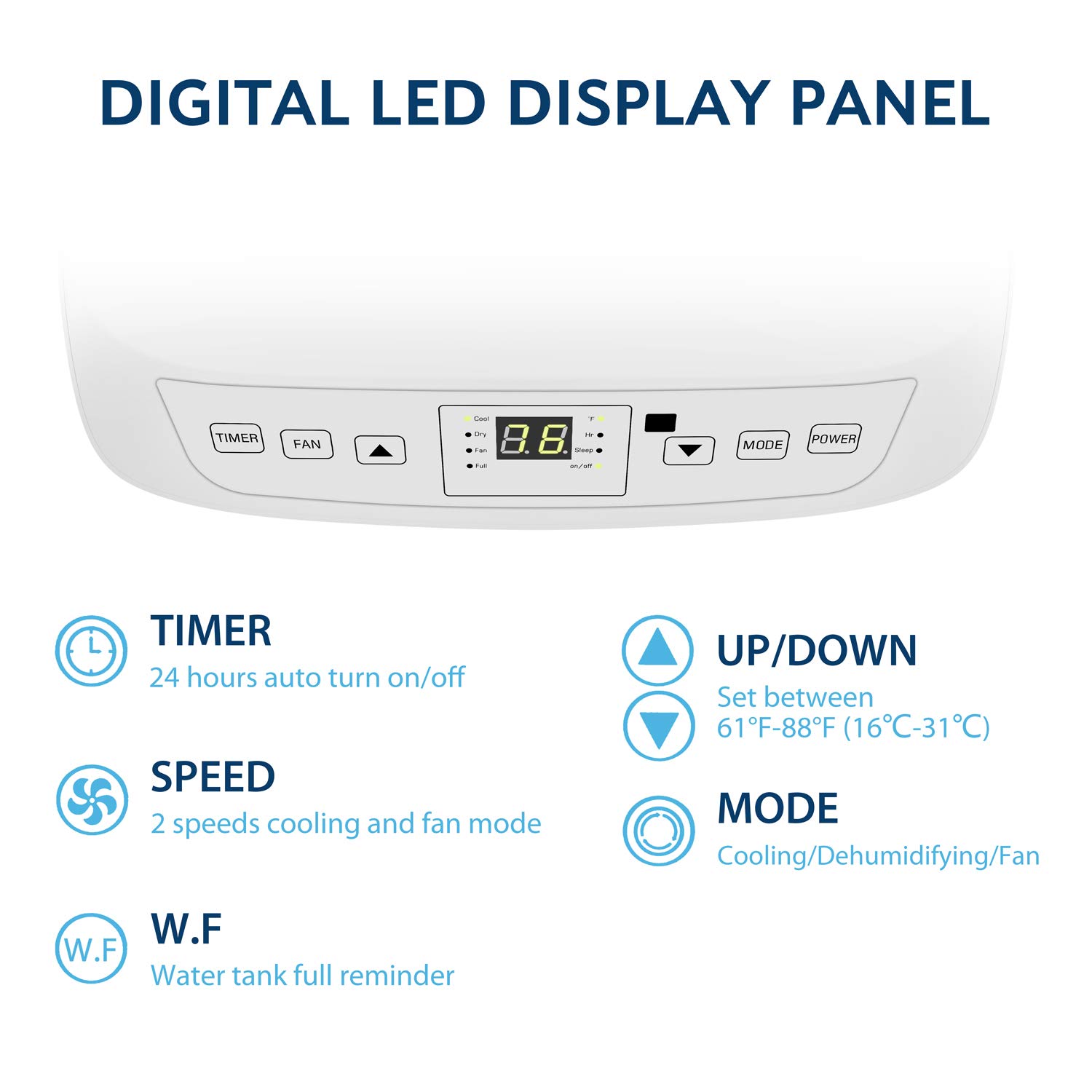
Figure 4.3: Digital LED Display Panel with control buttons.
- TIMER: 24-hour auto turn on/off programmable timer.
- FAN: Adjusts fan speed (2 speeds available).
- UP/DOWN Arrows: Set temperature between 61°F ~ 88°F (16℃~31℃).
- MODE: Selects operating mode (Cooling, Dehumidifying, Fan).
- POWER: Turns the unit on or off.
- Indicator Lights: Cool, Dry, Fan, Full (water tank full reminder), Hr (timer active), Sleep (sleep mode active), On/Off.
5. Setup and Installation
The JHS Portable Air Conditioner is designed for easy setup. Follow these steps for proper installation:
- Positioning the Unit: Place the unit on a flat, stable surface. Ensure there is at least 20 inches of space around the unit for proper airflow. The unit is equipped with 4 stainless spindle casters for easy mobility.

Figure 5.1: Stainless Spindle Casters for Easy Mobility.
- Install the Exhaust Hose:
- Screw the exhaust hose onto the exhaust hose adapter.
- Connect the other end of the exhaust hose to the exhaust outlet on the back of the unit.
- Install the Window Kit:
- Adjust the window kit to fit your window opening. The extendable window kit can adjust from 9 to 57 inches.
- Secure the window kit in place.
- Attach the exhaust hose adapter with the hose to the opening in the window kit. Ensure a tight seal to prevent hot air from re-entering the room.
- Power Connection: Plug the power cord into a standard 115V/60Hz electrical outlet. The power cord is 60 inches long.
6. Operating Instructions
Your JHS Portable Air Conditioner offers three main functions: Cooling, Fan, and Dehumidifier.
Turning On/Off
- Press the POWER button on the control panel or remote control to turn the unit on or off.
Selecting a Mode
- Press the MODE button repeatedly to cycle through the available modes:
- Cool Mode: For cooling the room. The display will show the set temperature.
- Dry Mode (Dehumidifier): For removing moisture from the air. The unit will operate in low fan speed. Dehumidifying capacity is 31.7 pints/day.
- Fan Mode: For air circulation without cooling. The display will show "FA" or "F1/F2" depending on fan speed.
Adjusting Temperature (Cool Mode Only)
- In Cool Mode, use the UP or DOWN arrow buttons to set your desired temperature. The temperature range is 61°F ~ 88°F (16℃~31℃).
Adjusting Fan Speed (Cool and Fan Modes)
- Press the FAN button to select between 2 fan speeds (Low, High).
Timer Function
- Press the TIMER button to set a 24-hour programmable timer for automatic turn on/off. Use the UP/DOWN arrows to adjust the desired time.
Sleep Mode
- Activate Sleep Mode for quieter operation and gradual temperature adjustment during sleep. Refer to the full user manual for detailed instructions on activating and using Sleep Mode.
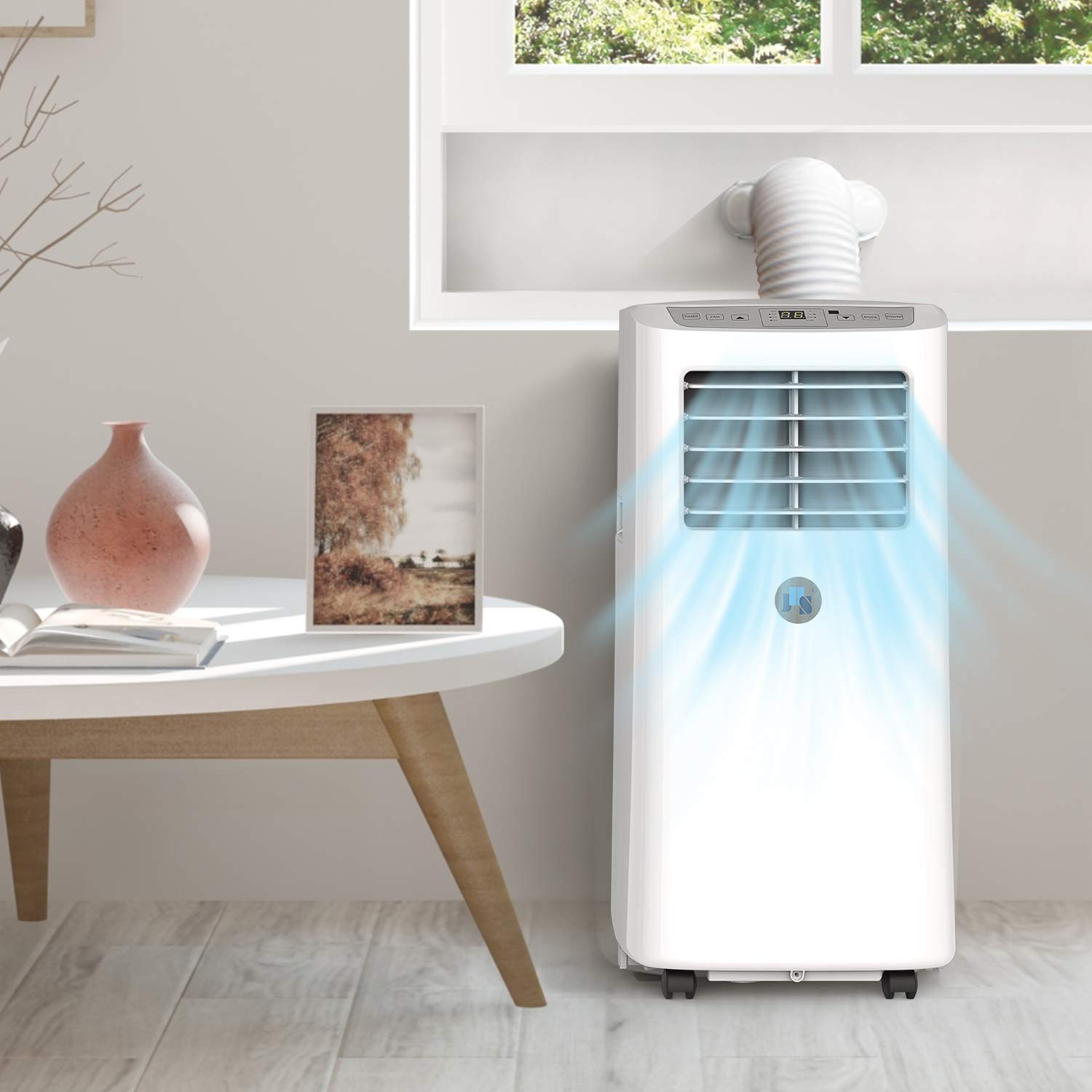
Figure 6.1: JHS Portable Air Conditioner in operation, demonstrating airflow.
7. Maintenance
Regular maintenance ensures optimal performance and longevity of your unit.
Filter Cleaning
- The unit features a 3-in-1 filter that effectively filters large dust and bacteria.
- Clean the air filter every two weeks or more frequently if the unit is used in a dusty environment.
- To clean, remove the filter from the back of the unit. Wash it with warm, soapy water, rinse thoroughly, and allow it to air dry completely before reinserting.
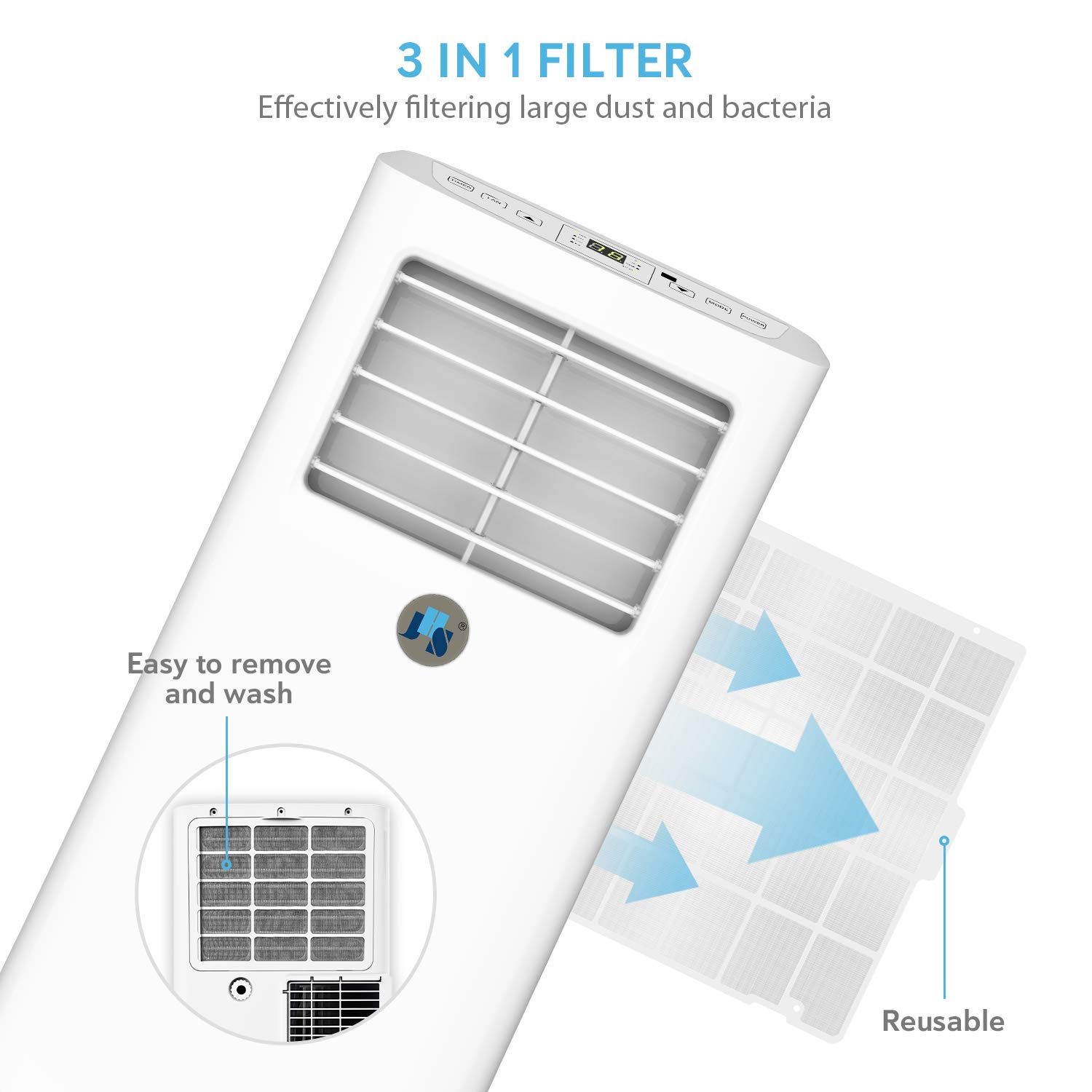
Figure 7.1: Filter removal and cleaning process.
Drainage
- The unit features auto-evaporation drainage. However, in high humidity conditions, manual drainage may be required.
- When the "Full" indicator light illuminates, the water tank is full and needs to be drained.
- Connect the drainage kit hose to the drainage outlet and place the other end into a suitable container or floor drain.
Storage
- Before long-term storage, drain all water from the unit.
- Clean the air filter and ensure the unit is dry.
- Store the unit in an upright position in a cool, dry place.
8. Troubleshooting
Before contacting customer support, try these common troubleshooting steps:
| Problem | Possible Cause | Solution |
|---|---|---|
| Unit does not turn on. | No power, tripped circuit breaker, full water tank. | Check power cord, reset breaker, drain water tank. |
| Unit is not cooling effectively. | Dirty air filter, blocked air intake/exhaust, room size too large, open doors/windows. | Clean filter, clear obstructions, ensure room is sealed, consider unit capacity for room size. |
| Water leaking from unit. | Drainage hose not properly connected, unit not level, water tank full. | Ensure hose is secure, place unit on level surface, drain water tank. |
| Unit is noisy. | Unit not on a level surface, internal components vibrating. | Ensure unit is on a flat, stable surface. Some operational noise is normal. |
9. Specifications
| Feature | Specification |
|---|---|
| Cooling Capacity | 8,000 BTU |
| Estimated Cooling Area | Up to 200 sq. ft. |
| Power Supply | 115V/60Hz |
| Maximum Power Consumption | 920W/8.0A |
| Refrigerant | CFC free green R-410A |
| Digital Thermostat Control Range | 61°F ~ 88°F (16℃~31℃) |
| Timer | 24-hour ON/OFF programmable |
| Dehumidifying Capacity | 31.7 pints/day |
| Drainage | Auto-evaporation or manual |
| Air Flow (at high speed) | 185CFM |
| Air Louvers | Manual 2-way directional |
| Noise level | ≤54dBA |
| Display Panel | LCD |
| Unit Dimensions (D×W×H) | 13×12×26.7 in. |
| Extendable Exhaust Hose Diameter | 5.9 in. |
| Extendable Exhaust Hose Max Length | 59 in. |
| Extendable Window Kit Range | 9-57 in. |
| Power Cord Length | 60 in. |
| Unit Weight | 44 lbs. |
| Certifications | UL certified (Electronic plug), RoHS compliant (Component), CSA certified (Machine) |
10. Warranty and Support
Your JHS Portable Air Conditioner comes with a 1-year limited warranty.
For warranty claims, technical assistance, or any questions regarding your product, please contact JHS Customer Support. Refer to the contact information provided with your purchase or visit the official JHS website for details.
You can also find additional support resources and FAQs on the JHS Store on Amazon.
Related documentsA019-8KR/A


Ask a question about this manual
Ask about setup, troubleshooting, compatibility, parts, safety, or missing instructions. Manuals+ will review the question and use this page’s manual context to help answer it.