
1. Introduction
Thank you for choosing the JHS A018-12KR/C 12,000 BTU Portable Air Conditioner. This versatile 3-in-1 unit is designed to provide powerful cooling, efficient dehumidification, and effective air circulation for your living spaces. With its user-friendly features and portable design, it offers a convenient solution for maintaining a comfortable indoor environment. Please read this manual thoroughly before operation to ensure proper use, maintenance, and safety.

Figure 1: Front view of the JHS A018-12KR/C Portable Air Conditioner, showcasing its sleek white design and digital display.
2. Product Features
- Powerful Cooling: 12,000 BTU capacity effectively cools areas up to 400 sq. ft. with a top air-outlet design for wider and faster cool air distribution.
- 3-in-1 Functionality: Offers Air Conditioner, 3-speed Fan, and Dehumidifier modes for versatile climate control.
- Efficient Dehumidification: Built-in dehumidifier removes up to 59.2 pints of moisture per day, helping to keep your room dry and comfortable.
- Portable Design: Equipped with all-direction stainless casters and handles for easy mobility between rooms.
- User-Friendly Controls: Features a 24-hour programmable timer, 61°F - 88°F adjustable thermostat, LED digital control panel, and a remote control for convenient operation.
- Hassle-Free Installation: Quick setup in 5-10 minutes with the included exhaust hose and window kit.
- Auto-Evaporation: Designed for auto-evaporation of condensate, minimizing the need for manual drainage.
3. Components Overview
The JHS Portable Air Conditioner comes with all necessary components for immediate setup and operation. Familiarize yourself with the parts before installation.
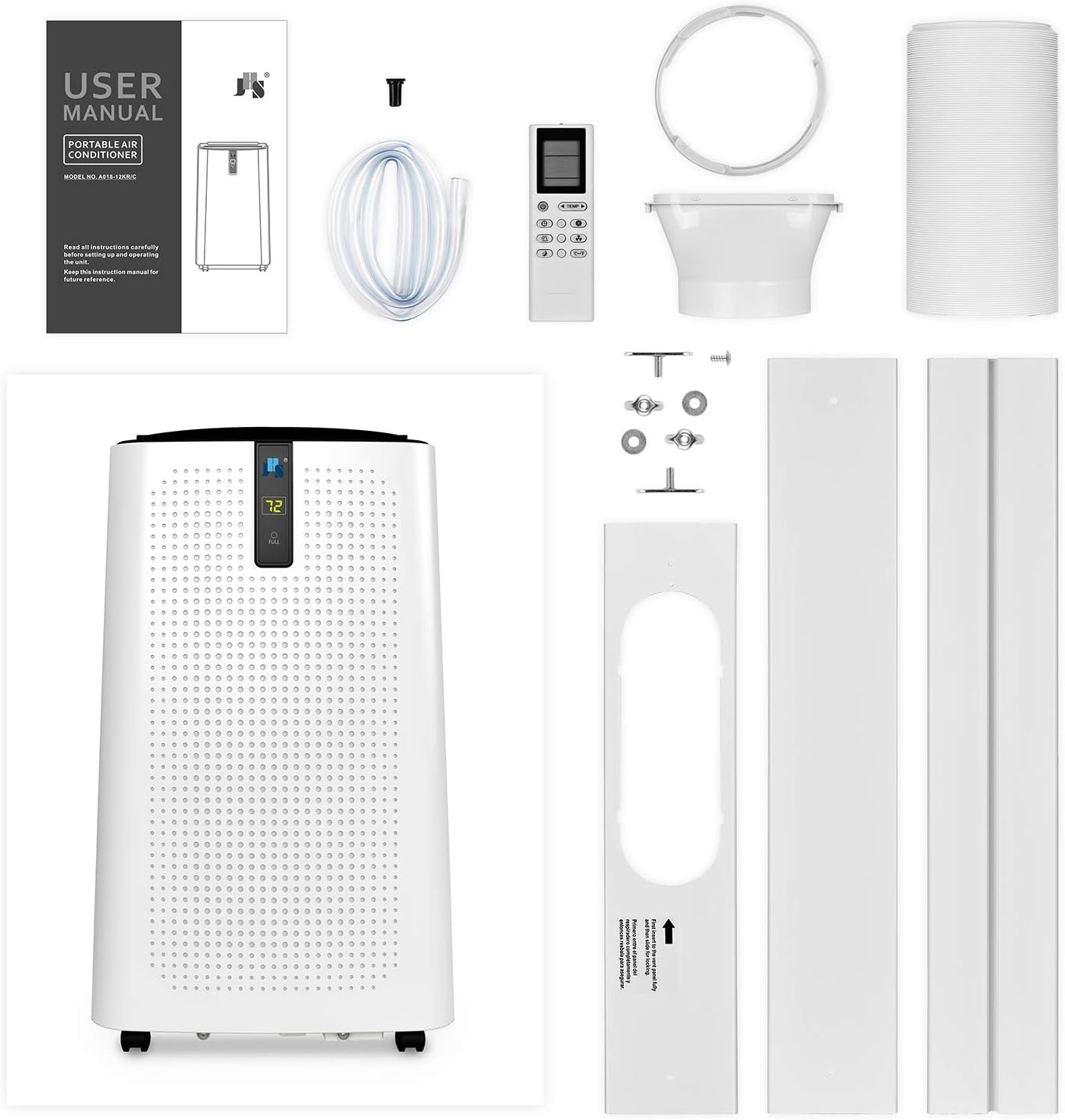
Figure 2: Package contents include the main portable AC unit, LCD remote control (batteries not included), window kit, exhaust hose, and user manual.
Unit Dimensions:
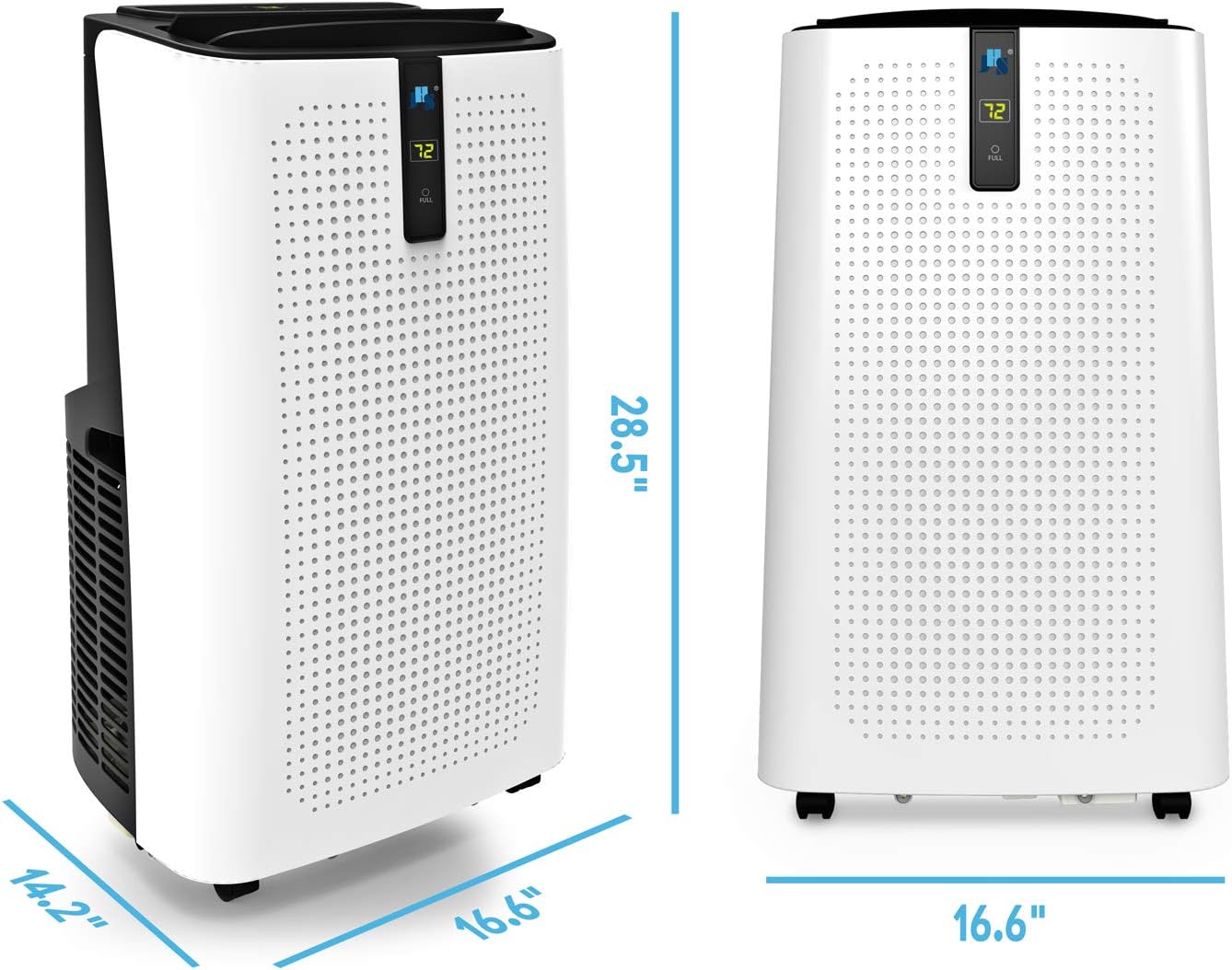
Figure 3: The unit measures 14.2" D x 16.6" W x 28.5" H, making it compact for various room sizes.
Mobility:

Figure 4: The unit is equipped with 4-stainless spindle casters, allowing for easy movement and repositioning within your home.
4. Setup
Setting up your JHS Portable Air Conditioner is a straightforward process. Follow these steps for quick installation:
- Unpack: Carefully remove the unit and all accessories from the packaging.
- Positioning: Place the unit on a flat, stable surface near a window and a power outlet. Ensure there is adequate space around the unit for proper airflow.
- Attach Exhaust Hose: Connect one end of the exhaust hose to the air outlet on the back of the unit.
- Install Window Kit: Assemble the adjustable window kit and place it securely in your window opening.
- Connect Hose to Window Kit: Attach the other end of the exhaust hose to the opening in the window kit, ensuring a tight seal to prevent hot air from re-entering the room.
- Power On: Plug the power cord into a grounded 115V/60Hz electrical outlet.

Figure 5: The portable AC unit is shown in a typical setup, with the exhaust hose extending to a window panel for heat expulsion.
5. Operating Instructions
Your JHS Portable Air Conditioner offers multiple modes and settings for optimal comfort. Use the digital control panel or the remote control to adjust settings.

Figure 6: The digital LED display panel provides intuitive controls for all functions.
Control Panel Functions:
- Power Button: Turns the unit ON or OFF.
- Mode Button: Cycles through Cooling, Dehumidifying, and Fan modes.
- Up/Down Buttons: Adjust the desired temperature (61°F - 88°F / 16°C - 31°C) or timer settings.
- Fan Button: Selects fan speed (Low, Medium, High).
- Timer Button: Sets the 24-hour ON/OFF programmable timer.
- Sleep Mode: Activate by pressing the Fan and Up buttons simultaneously. This mode adjusts temperature and fan speed for quiet operation during sleep.
- "Full" Indicator (W.F): Lights up when the internal water tank is full, indicating that manual drainage is required if auto-evaporation is insufficient.
Remote Control:
The included LCD remote control provides full functionality from a distance. Ensure batteries (AAA R03 1.5V*2, not included) are installed correctly.
6. Maintenance
Regular maintenance ensures optimal performance and longevity of your JHS Portable Air Conditioner.
Filter Cleaning:
The unit features a 3-in-1 filter system that effectively captures dust and bacteria. Regular cleaning is essential.

Figure 7: The reusable 3-in-1 filter is easily accessible for removal and washing.
- Access Filter: Locate the filter cover on the back of the unit.
- Remove Filter: Gently pull out the filter.
- Clean: Wash the filter with lukewarm water and mild detergent. Rinse thoroughly.
- Dry: Allow the filter to air dry completely before reinserting. Do not use a dryer or direct sunlight.
- Reinstall: Place the dry filter back into its slot and secure the cover.
Water Drainage:
While the unit features auto-evaporation, manual drainage may be required, especially in high humidity environments or when the "Full" indicator lights up.
- Manual Drainage: Locate the drainage port at the bottom rear of the unit. Place a shallow pan or connect a drainage hose (not included for continuous drainage) to collect water. Remove the drain plug to allow water to flow out. Replace the plug once drainage is complete.
7. Troubleshooting
If you encounter issues with your JHS Portable Air Conditioner, refer to the following common troubleshooting tips:
- Unit Not Turning On:
- Check if the power cord is securely plugged into a working outlet.
- Ensure the "Full" indicator is not lit; if it is, drain the water tank.
- Verify that the circuit breaker has not tripped.
- Insufficient Cooling:
- Check if the exhaust hose is properly installed and sealed to the window kit.
- Ensure the air filter is clean and not obstructed.
- Confirm that the room size is within the unit's cooling capacity (up to 400 sq. ft.).
- Close all doors and windows in the room to prevent warm air from entering.
- Adjust the temperature setting to a lower value.
- Unit is Noisy:
- Ensure the unit is placed on a flat, stable surface to minimize vibrations.
- Check for any obstructions in the air intake or exhaust vents.
- Normal operating sounds include fan noise and compressor hum.
- "Full" Indicator is On:
- The internal water tank is full. Perform manual drainage as described in the Maintenance section.
For more detailed troubleshooting or persistent issues, please refer to the official User Manual PDF or contact JHS support.
8. Specifications
| Feature | Specification |
|---|---|
| Cooling Capacity | 12,000 BTU |
| Estimated Cooling Area | 400 sq. ft. max |
| Power Supply | 115V/60Hz |
| Maximum Power Consumption | 1320W/11.5A |
| Refrigerant | CFC free green R-410A |
| Digital Thermostat Control Range | 61°F ~ 88°F (16°C ~ 31°C) |
| Timer | 24-hour ON/OFF programmable timer |
| Dehumidifying Capacity | 59.2 pints/day |
| Drainage | Auto-evaporation or manual |
| Air Flow (at high speed) | 220CFM |
| Air Louvers | Auto 2-way directional |
| Noise Level | ≤ 54dBA |
| Display Panel | LCD |
| Unit Dimensions | 16.6×14.2×28.5 in. |
| Unit Weight | 60 lbs. |
| Extendable Exhaust Hose Diameter | 5.9 in. |
| Extendable Exhaust Hose Max Length | 59 in. |
| Extendable Window Kit | 9-57 in. |
| Power Cord Length | 60 in. |
9. Warranty & Support
Your JHS A018-12KR/C Portable Air Conditioner comes with a 1 Year Limited Warranty.
For any difficulties, questions, or support needs, please do not hesitate to contact the JHS support team. You can also refer to the official documentation:
Always ensure you have your model number (A018-12KR/C) and purchase information ready when contacting support.


