
Introduction
The Plantronics Voyager 3240 Bluetooth Earpiece is designed for seamless communication on the go. This manual provides essential information for setting up, operating, and maintaining your device, ensuring optimal performance and longevity.
What's in the Box
Verify that all items are present in your package:
- Plantronics Voyager 3240 Bluetooth Earpiece
- Portable Charging Case
- Micro USB Charge Cable
- Ergonomic Ear Tips (various sizes)
- Optional Clip-on Ear Loop

Image: The Plantronics Voyager 3240 Bluetooth Earpiece shown alongside its portable charging case. The earpiece is black with a textured finish, and the charging case is a matching dark gray with a subtle pattern. An optional clear ear hook is visible on the earpiece.
Setup
1. Charging the Headset and Case
Before first use, fully charge your headset and charging case. The charging case provides additional talk time for your headset.
- Connect the micro USB cable to the charging case and the other end to a USB wall charger or computer USB port.
- Place the headset into the charging case.
- Charging indicators on the case and headset will illuminate. A full charge typically takes approximately 90 minutes for the headset and longer for the case.
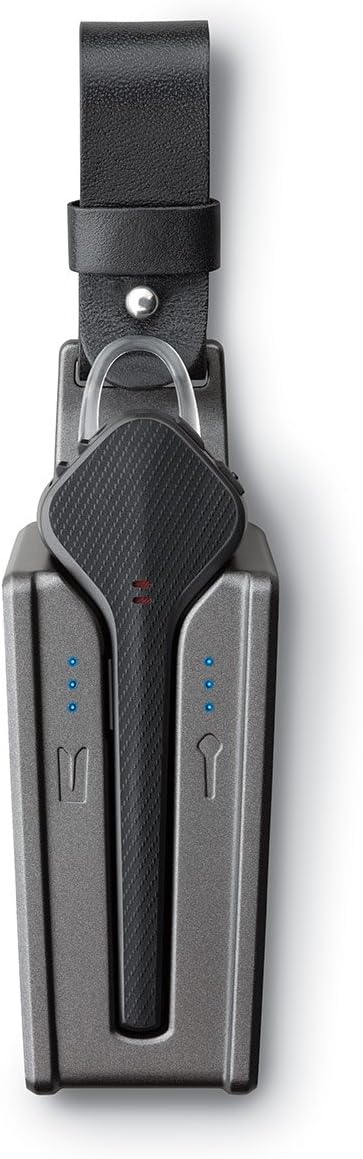
Image: A top-down view of the Plantronics Voyager 3240 earpiece docked inside its charging case. Blue LED lights on the case indicate charging status for both the earpiece and the case itself. The earpiece is securely seated in its compartment.
2. Pairing with a Device
The headset can be paired with Bluetooth-enabled devices such as smartphones, tablets, and computers.
- First Time Pairing: When you first turn on your headset, it automatically enters pairing mode. The indicator light will flash red and blue.
- Manual Pairing: If the headset is not in pairing mode, press and hold the Call button until the indicator light flashes red and blue.
- On your device, enable Bluetooth and search for new devices.
- Select "PLT V3200 Series" from the list of available devices.
- If prompted for a passcode, enter "0000" (four zeros).
- Once paired, the headset indicator light will stop flashing and you will hear "pairing successful."
The headset can connect to two phones simultaneously and answer calls from either one.
Operating the Headset
Controls and Functions
| Control | Function |
|---|---|
| Call Button | Press to answer/end a call. Press and hold for 2 seconds to reject a call. Double-press to redial last number. |
| Volume Up/Down | Adjust call or media volume. |
| Mute Button | Press to mute/unmute the microphone during a call. Voice alerts will confirm mute status. |
| Power Switch | Slide to turn the headset On or Off. |
| Voice Command Button | Press to activate voice assistant (Siri, Google Assistant, Cortana). |
Smart Sensors
The Voyager 3240 features smart sensors that react to how you wear the headset:
- Answering Calls: Put on the headset to automatically answer an incoming call.
- Transferring Audio: Remove the headset to transfer audio back to your phone. Put it back on to transfer audio to the headset.
- Pausing Media: Remove the headset to pause streaming audio. Put it back on to resume.
Voice Announcements
The headset provides voice alerts for various statuses:
- Caller name announcement (if enabled on your phone).
- Mute on/off status.
- Connection status (e.g., "Headset connected").
- Battery level (e.g., "Battery high").
Maintenance
Proper care ensures the longevity and performance of your headset.
- Cleaning: Gently wipe the earpiece and ear tips with a soft, dry, lint-free cloth. Do not use harsh chemicals or abrasive materials.
- Storage: When not in use, store the headset in its charging case to protect it and keep it charged. Avoid extreme temperatures.
- Battery Care: For optimal battery life, avoid fully discharging the battery frequently. Charge the headset regularly.
Troubleshooting
| Problem | Solution |
|---|---|
| Headset not pairing |
|
| No audio or poor audio quality |
|
| Smart sensors not working |
|
Specifications
| Feature | Detail |
|---|---|
| Model Name | 207360-01 |
| Connectivity Technology | Wireless (Bluetooth) |
| Bluetooth Version | 4.1 |
| Bluetooth Range | Up to 30 meters (98 feet) |
| Battery Life (Headset) | Up to 6 hours talk time |
| Charging Case Battery | Provides an extra 10 hours of talk time |
| Noise Control | Active Noise Cancellation (Triple-mic technology with enhanced DSP) |
| Compatible Devices | All Bluetooth 4.1 ready devices (phones, computers, tablets) |
| Control Type | Call Control, Voice Control |
| Weight | Approximately 0.8 ounces (22.7 grams) |
| Material | Plastic, Silicone |
Warranty and Support
For warranty information and technical support, please refer to the official Plantronics (Poly) website or contact their customer service. Keep your proof of purchase for warranty claims.
Online Resources:


