
1. Introduction
This manual provides comprehensive instructions for the Monster Solara Solar Powered Wireless Indoor/Outdoor Bluetooth Speaker. It covers setup, operation, and maintenance to ensure optimal performance of its 360° sound and ambient lighting features.
The Monster Solara speaker is designed for versatile use, offering both indoor and outdoor functionality with solar charging capabilities and multi-speaker connectivity.
2. Package Contents
Please verify that all items are present in the package:
- Monster Solara Speaker
- Power Adapter (for initial charging)
- User Manual (this document)
3. Product Overview
The Monster Solara speaker features a robust design suitable for various environments. Key components include:
- Solar Panel: Located on the top surface for continuous charging in sunlight.
- 360° Speaker Grille: Delivers immersive audio.
- Ambient Light Panel: Provides customizable 360° lighting.
- Control Panel: Buttons for power, light, timer, source selection, volume, and EZ-Play functions.
- Input Ports: AUX In, USB (5V-1A), DC In.

Figure 1: Top-down view of the Monster Solara speaker, highlighting the integrated solar panel for charging.

Figure 2: Detailed view of the control panel, showing buttons for power, light, timer, AUX In, USB, and DC In ports.
4. Setup and Charging
4.1 Initial Charging
Before first use, fully charge the speaker using the provided power adapter. Connect the adapter to the DC In port and plug it into a standard wall outlet. The charging indicator light will show the charging status.
4.2 Solar Charging
The Monster Solara speaker is equipped with a solar panel for convenient outdoor charging. Place the speaker in direct sunlight to utilize this feature. Solar charging is ideal for maintaining battery life during outdoor use.

Figure 3: The Monster Solara speaker positioned outdoors, demonstrating its solar charging capability.
5. Operation
5.1 Power On/Off
- Press and hold the Power button (⏻) to turn the speaker on or off.
5.2 Bluetooth Pairing
- Ensure the speaker is powered on.
- Press the Source button until the Bluetooth indicator light flashes, indicating pairing mode.
- On your device (smartphone, tablet, etc.), enable Bluetooth and search for "Monster Solara".
- Select "Monster Solara" to connect. The Bluetooth indicator will become solid when paired.
5.3 EZ-Play Multi-Speaker Pairing
The EZ-Play feature allows you to connect up to 8 compatible Monster Solara speakers for synchronized audio playback, extending your sound coverage up to 100 feet from the main speaker.
- Pair your primary Monster Solara speaker to your Bluetooth device as described in Section 5.2. This will be your "Transmitting" (TX) speaker.
- On the primary (TX) speaker, press the EZ-Play button. The TX indicator light will illuminate.
- For each additional Monster Solara speaker you wish to connect (up to 7), power it on and press its EZ-Play button. The RX (Receiving) indicator light will illuminate when successfully connected to the primary speaker.
- Adjust volume and playback from your connected Bluetooth device or the primary speaker.
Video 1: Demonstration of Monster Solara speaker features, including solar power, 360° sound, Bluetooth connectivity, EZ-Play multi-speaker pairing, and ambient lighting. This video illustrates the speaker's capabilities and how multiple units can create a synchronized audio and light experience.

Figure 4: An example of using the Monster EZ-Play app to control multiple Solara speakers, including light settings, in an outdoor environment.
5.4 Ambient Light Control
The speaker features a 360° ambient light panel with multiple color options and brightness levels.
- Press the Light button (💡) to cycle through different light modes and colors.
- Use the Color button to select specific colors or color-changing modes.
- Adjust brightness using the Low, 1, 2, 3 settings on the control panel.

Figure 5: The Monster Solara speaker displaying its ambient light feature with a yellow glow.
5.5 Light Timer
Set a timer for the ambient light to automatically turn off after a specified duration.
- Press the Timer button to select 2h, 4h, 6h, or 8h. The corresponding indicator light will illuminate.
5.6 Auxiliary Input (AUX In)
Connect external audio devices using a 3.5mm audio cable (not included) to the AUX In port.
- Connect one end of the audio cable to your device's headphone jack and the other end to the speaker's AUX In port.
- Press the Source button until the AUX indicator light illuminates.
5.7 USB Charging Out
The USB port (5V-1A) can be used to charge other small electronic devices.
- Connect your device's USB charging cable to the speaker's USB port.
- Ensure the Monster Solara speaker has sufficient battery charge.
6. Maintenance and Care
To ensure the longevity and optimal performance of your Monster Solara speaker, follow these guidelines:
- Cleaning: Wipe the speaker with a soft, damp cloth. Avoid harsh chemicals or abrasive cleaners.
- Water Resistance: The speaker is designed for outdoor use and is resistant to splashes and light rain. However, it is not fully submersible. Avoid prolonged exposure to heavy rain or submersion in water.
- Solar Panel Care: Keep the solar panel clean and free of debris to maximize charging efficiency.
- Storage: When not in use for extended periods, store the speaker in a cool, dry place. Ensure it is fully charged before storage to preserve battery health.
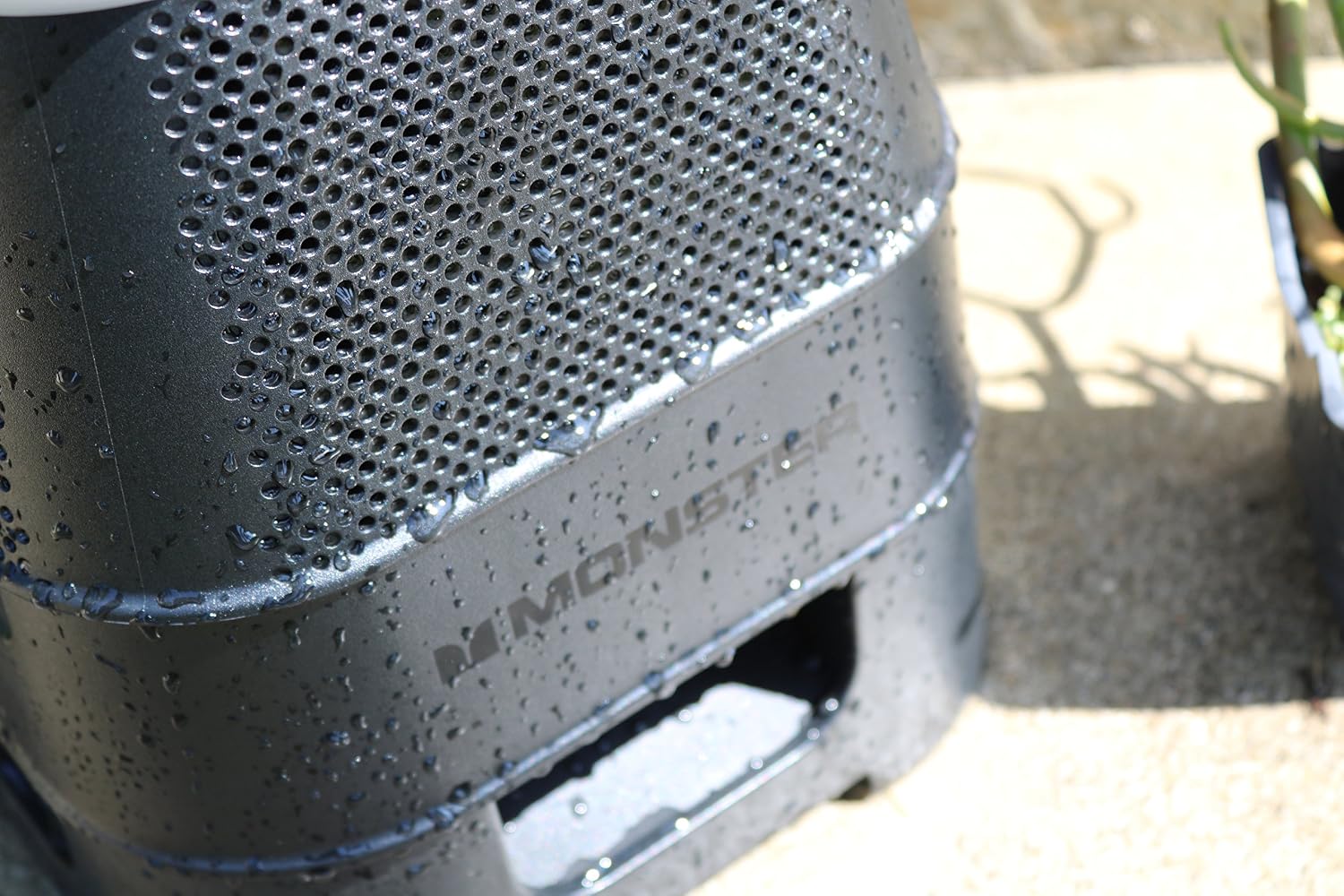
Figure 6: The Monster Solara speaker demonstrating its water-resistant properties with water droplets on its surface.
7. Troubleshooting
If you encounter issues with your Monster Solara speaker, refer to the following common solutions:
| Problem | Possible Solution |
|---|---|
| Speaker does not power on. | Ensure the battery is charged. Connect the power adapter and allow it to charge for at least 30 minutes before attempting to power on again. |
| Bluetooth device cannot find the speaker. |
|
| No sound or low volume. |
|
| Solar charging is not effective. |
|
| EZ-Play speakers not connecting. |
|
8. Specifications
| Feature | Detail |
|---|---|
| Model Number | MNSOL-BLK |
| Power Output | 20W |
| Connectivity | Bluetooth, AUX In |
| Special Features | Solar Powered, EZ-Play Multi-Speaker Pairing (up to 8 speakers), 360° Sound, 360° Ambient Light, USB Charging Out (5V-1A) |
| Dimensions (L x W x H) | 12 x 12 x 15 inches |
| Weight | 11.45 pounds |
| Battery | Product Specific batteries required (included) |
| Manufacturer | Monster |
| First Available | June 30, 2017 |
9. Warranty and Support
For warranty information and technical support, please refer to the official Monster product website or contact their customer service. Keep your purchase receipt as proof of purchase for warranty claims.
For further assistance, visit the Monster Store on Amazon.


