
Hamilton Beach HB-P70B20AP-C7
Hamilton Beach HB-P70B20AP-C7 0.7 cu. ft. Microwave Oven User Manual
Model: HB-P70B20AP-C7
Introduction
This manual provides essential instructions for the safe and efficient operation of your Hamilton Beach HB-P70B20AP-C7 0.7 cubic feet microwave oven. Please read all instructions carefully before using the appliance and retain this manual for future reference.
Important Safety Information
When using electrical appliances, basic safety precautions should be followed, including the following:
- Read all instructions before use.
- Do not operate the oven if it has a damaged cord or plug, if it is not working properly, or if it has been damaged or dropped.
- Do not heat liquids or other foods in sealed containers as they are liable to explode.
- Do not use corrosive chemicals or vapors in this appliance.
- Close supervision is necessary when the appliance is used by or near children.
- Only use utensils suitable for microwave ovens.
- Do not attempt to service or repair this appliance yourself. Contact qualified service personnel.
- Ensure proper ventilation around the microwave.
Product Overview
Familiarize yourself with the components and control panel of your microwave oven.
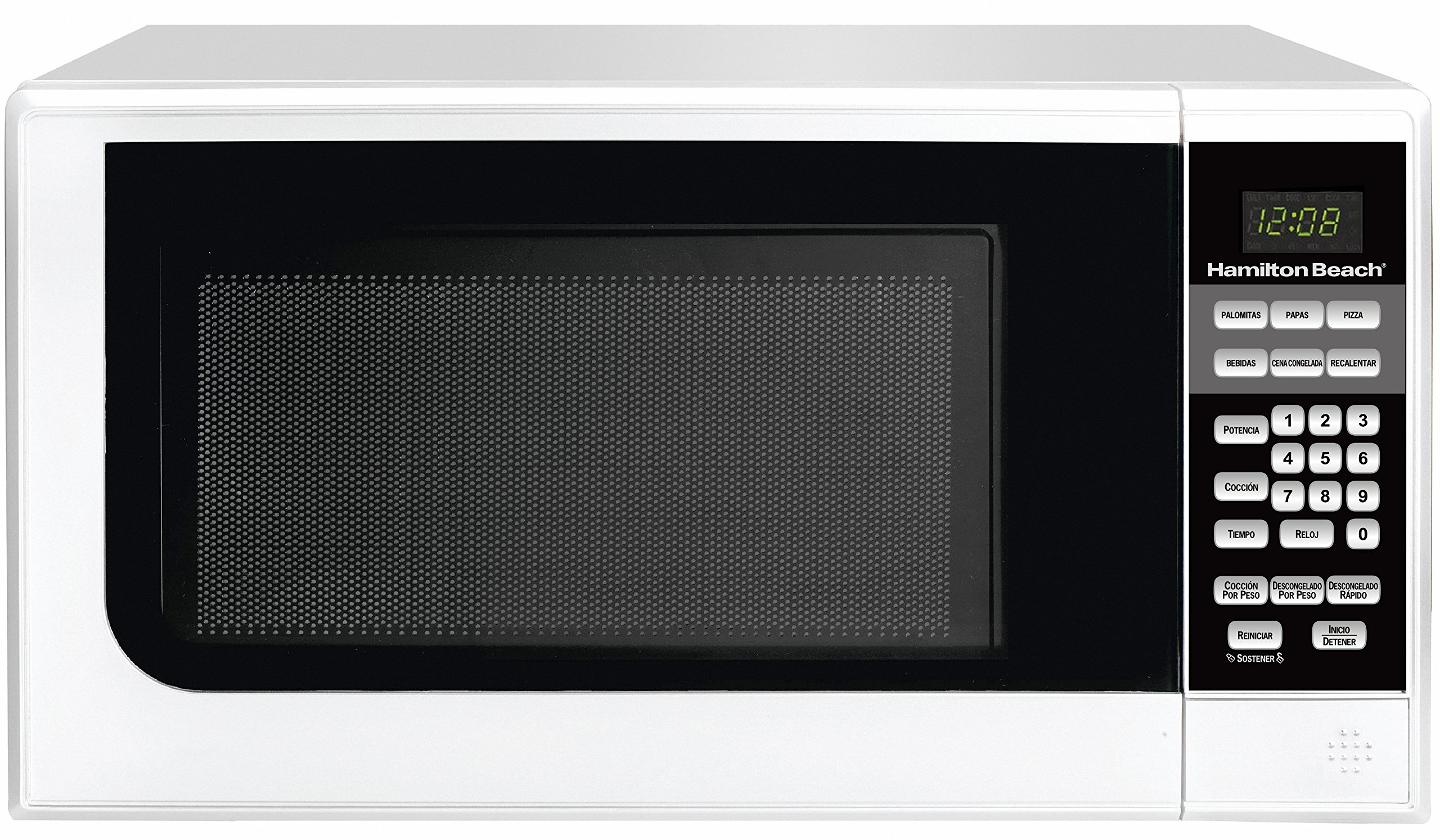
Image: Front view of the Hamilton Beach HB-P70B20AP-C7 microwave oven, showing the door, control panel, and digital display.
Control Panel Features
The control panel includes a digital display and various buttons for setting cooking functions and time.
- Digital Display: Shows time of day, cooking time, and power level.
- Number Pads (0-9): Used to enter cooking times, clock time, and weight for defrosting.
- POTENCIA (Power): Selects cooking power levels.
- COCCIÓN (Cook): Initiates cooking.
- TIEMPO (Time): Sets cooking time.
- RELOJ (Clock): Sets the current time.
- PALOMITAS (Popcorn): Pre-set function for popcorn.
- PAPAS (Potato): Pre-set function for potatoes.
- PIZZA: Pre-set function for pizza.
- BEBIDAS (Beverage): Pre-set function for beverages.
- CENA CONGELADA (Frozen Dinner): Pre-set function for frozen dinners.
- RECALENTAR (Reheat): Pre-set function for reheating food.
- COCCIÓN POR PESO (Cook by Weight): Cooks food based on entered weight.
- DESCONGELADO POR PESO (Defrost by Weight): Defrosts food based on entered weight.
- DESCONGELADO RÁPIDO (Speed Defrost): Quick defrost function.
- REINICIAR (Reset): Clears current settings.
- INICIO/DETENER (Start/Stop): Starts or pauses/stops cooking.
- SOSTENER (Hold): Function for holding settings (often combined with Start/Stop for pause).
Setup and Installation
Unpacking
Carefully remove the microwave oven from its packaging. Remove all packing materials, including any protective film on the oven surfaces and accessories. Check the oven for any damage, such as dents or a misaligned door. Do not operate the oven if it is damaged.
Placement
- Place the microwave on a flat, stable surface strong enough to hold its weight.
- Ensure there is adequate ventilation. Leave at least 10 cm (4 inches) of space at the back, 5 cm (2 inches) at the sides, and 20 cm (8 inches) above the oven for proper airflow.
- Do not block air vents.
- Keep the microwave away from heat sources and strong magnetic fields.
Electrical Connection
Plug the microwave into a grounded 120 Volt, 60 Hz AC outlet. Do not use extension cords or adapters. Ensure the electrical circuit is dedicated to the microwave to prevent overloading.
Operating Instructions
Setting the Clock
- Press the RELOJ button once.
- Use the number pads to enter the current time (e.g., 1-2-3-0 for 12:30).
- Press the RELOJ button again to confirm.
Basic Microwave Cooking
- Place food in a microwave-safe container on the turntable.
- Close the oven door.
- Enter the desired cooking time using the number pads (e.g., 1-0-0 for 1 minute).
- Press the INICIO/DETENER button to start cooking.
Adjusting Power Level
The microwave has 10 power levels. By default, cooking is at 100% power.
- Enter the desired cooking time.
- Press the POTENCIA button.
- Use the number pads to select a power level from 1 to 10 (10 being 100%, 1 being 10%). For example, press '5' for 50% power.
- Press the INICIO/DETENER button to start cooking.
Pre-set Cooking Menus
The microwave features 6 pre-set menus for common food items.
- PALOMITAS (Popcorn): Press the button, then select the desired quantity if prompted.
- PAPAS (Potato): Press the button, then select the number of potatoes.
- PIZZA: Press the button, then select the desired quantity/size.
- BEBIDAS (Beverage): Press the button, then select the number of servings.
- CENA CONGELADA (Frozen Dinner): Press the button, then select the desired quantity.
- RECALENTAR (Reheat): Press the button, then select the desired quantity/weight.
After selecting the pre-set and quantity, press INICIO/DETENER to start.
Defrosting Functions
The microwave offers two defrosting methods:
- DESCONGELADO POR PESO (Defrost by Weight):
- Press the DESCONGELADO POR PESO button.
- Enter the food's weight in grams using the number pads.
- Press INICIO/DETENER to start.
- DESCONGELADO RÁPIDO (Speed Defrost):
- Press the DESCONGELADO RÁPIDO button.
- Enter the desired defrosting time.
- Press INICIO/DETENER to start.
Maintenance and Cleaning
Regular cleaning helps maintain the performance and longevity of your microwave oven.
- Interior Cleaning: Wipe the interior with a damp cloth after each use. For stubborn stains, place a bowl of water with lemon slices inside and microwave for 5-10 minutes to loosen food particles, then wipe clean.
- Exterior Cleaning: Clean the exterior with a soft, damp cloth. Avoid abrasive cleaners.
- Turntable: The glass turntable and roller ring can be removed and washed in warm, soapy water or in the dishwasher. Ensure they are completely dry before placing them back in the oven.
- Door Seals: Keep the door seals clean to ensure proper closure.
- Always unplug the microwave before cleaning.
Troubleshooting
If you encounter issues with your microwave, refer to the following common problems and solutions:
| Problem | Possible Cause | Solution |
|---|---|---|
| Oven does not start. | Door not closed properly; Power cord unplugged; Fuse blown or circuit breaker tripped. | Ensure door is securely closed; Check power cord connection; Check household fuse or reset circuit breaker. |
| Food is not cooking. | Cooking time or power level set incorrectly; Door not closed properly. | Verify cooking time and power level settings; Ensure door is securely closed. |
| Light inside oven is not working. | Bulb needs replacement. | Contact qualified service personnel for bulb replacement. |
| Turntable is noisy or not rotating. | Turntable or roller ring not positioned correctly; Debris under turntable. | Re-position turntable and roller ring; Clean under the turntable. |
If the problem persists after attempting these solutions, please contact Hamilton Beach customer support.
Specifications
| Brand | Hamilton Beach |
| Model Number | HB-P70B20AP-C7 |
| Capacity | 0.7 cubic feet |
| Color | White |
| Power Levels | 10 |
| Voltage | 120 Volts |
| Material | Stainless Steel (interior) |
| Product Dimensions | 45.2 x 32 x 26.2 cm (17.8 x 12.6 x 10.3 inches) |
| Product Weight | 9 kg (19.8 lbs) |
| Control Type | Buttons |
Warranty and Support
This Hamilton Beach microwave oven is covered by a standard manufacturer's warranty. For detailed warranty information, product registration, or technical support, please visit the official Hamilton Beach website or contact their customer service department.
Please retain your proof of purchase for warranty claims.
Related documentsHB-P70B20AP-C7


Ask a question about this manual
Ask about setup, troubleshooting, compatibility, parts, safety, or missing instructions. Manuals+ will review the question and use this page’s manual context to help answer it.