
Product Overview
The Kaito KA390 is a versatile portable radio designed for comprehensive reception of AM, FM, shortwave, and NOAA weather channels. It features a built-in LED flashlight and is suitable for both indoor and outdoor use, providing reliable access to news, entertainment, and critical weather alerts.
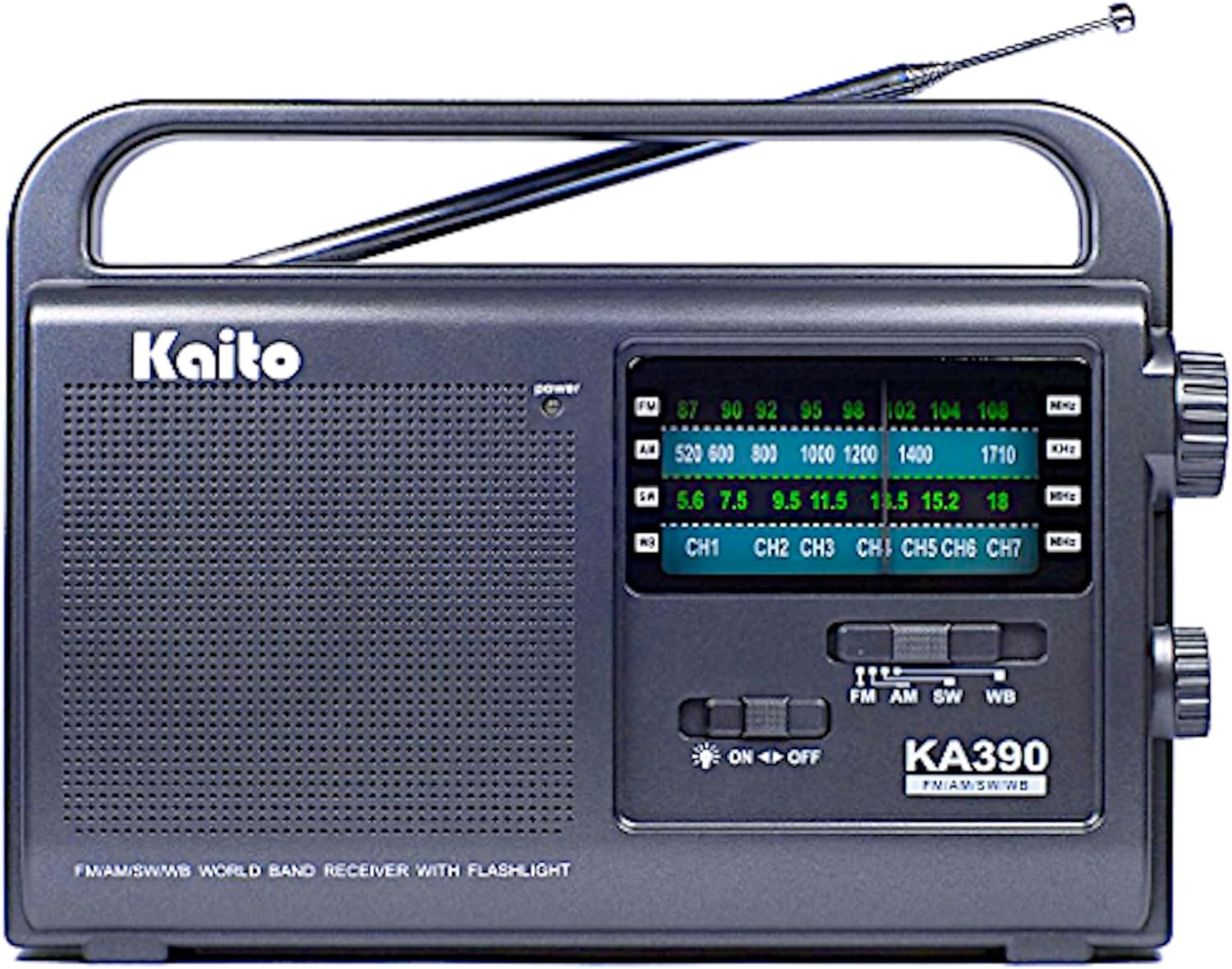
Figure 1: Front view of the Kaito KA390 radio with its telescopic antenna extended.
Key Features
- Comprehensive Band Coverage: Receives AM, FM, shortwave, and 7 NOAA weather channels for diverse listening options and 24/7 real-time weather forecasts (USA and Canada ONLY).
- High Sensitivity Reception: Equipped with a 32-inch telescopic antenna and advanced semiconductor circuitry for precise tuning.
- Clear Audio Output: Features a 3-inch dynamic speaker for loud and clear sound, even in noisy environments. Includes a 3.5mm earphone jack for private listening.
- Durable Construction: Made from impact-resistant and water-resistant ABS material, suitable for various environments.
- Flexible Power Options: Can be powered by 3 D-size batteries (not included) or an optional 5V/6V AC/DC power adapter (sold separately).
- Integrated LED Flashlight: Provides convenient illumination when needed.
Included Components
Upon unboxing your Kaito KA390 radio, please ensure all the following components are present:
- Kaito KA390 Portable Radio Unit
- Owner's Manual (this document)
- Power Adapter (if purchased as part of a bundle, otherwise sold separately)
Setup
1. Powering the Radio
The Kaito KA390 offers two power options:
- Battery Power:
Locate the battery compartment on the back of the radio. Open the cover and insert three (3) D-size batteries, ensuring correct polarity (+/-) as indicated inside the compartment. Close the cover securely. Batteries are not included.

Figure 2: Rear view of the Kaito KA390, highlighting the battery compartment.
- AC/DC Adapter Power:
If using an optional 5V/6V AC/DC power adapter (sold separately), plug the adapter into the DC 5V-6V 300mA input jack located on the left side of the radio. Then, plug the adapter into a standard wall outlet.

Figure 3: Left side view of the Kaito KA390, showing the DC power input, flashlight switch, and earphone jack.
2. Antenna Positioning
For optimal reception, especially for FM, Shortwave, and NOAA Weather bands, fully extend the telescopic antenna. For AM reception, the built-in ferrite bar antenna is typically sufficient, and the telescopic antenna may not need to be extended.

Figure 4: Kaito KA390 with its telescopic antenna fully extended for improved reception.
Operating Instructions
1. Power On/Off and Volume Control
The power and volume controls are integrated into a single rotary knob located on the right side of the radio.
- To turn the radio ON, rotate the knob clockwise from the "OFF" position. You will hear a click.
- Continue rotating clockwise to increase the volume.
- Rotate counter-clockwise to decrease the volume.
- To turn the radio OFF, rotate the knob counter-clockwise until it clicks into the "OFF" position.

Figure 5: Right side view of the Kaito KA390, illustrating the combined volume and power knob.
2. Band Selection
Use the slide switch on the front panel to select your desired frequency band: FM, AM, SW (Shortwave), or WB (Weather Band).

Figure 6: Front view of the Kaito KA390, showing the band selection switch (FM, AM, SW, WB) and tuning dial.
3. Tuning to a Station
Once a band is selected, rotate the large tuning knob on the right side of the radio to scan through frequencies. Observe the frequency dial on the front panel to locate your desired station. The tuning indicator light (if present) may illuminate when a strong signal is received.
4. NOAA Weather Channels (WB)
When the band switch is set to "WB", you can tune into one of the seven NOAA weather channels. These channels provide continuous weather broadcasts and alerts for the USA and Canada. Tune carefully to find the clearest signal for your region (CH1-CH7).
5. Using the LED Flashlight
To activate the built-in LED flashlight, locate the flashlight switch on the left side of the radio (refer to Figure 3). Slide the switch to the "ON" position to turn on the light, and to "OFF" to turn it off.
6. Private Listening (Earphone Jack)
For private listening, plug any standard 3.5mm stereo earphones or headphones into the earphone jack located on the left side of the radio (refer to Figure 3). The internal speaker will automatically mute when earphones are connected.
Maintenance
- Cleaning: Use a soft, dry cloth to clean the radio's exterior. Do not use abrasive cleaners, waxes, or solvents.
- Battery Care: If the radio will not be used for an extended period, remove the batteries to prevent leakage and corrosion.
- Storage: Store the radio in a cool, dry place away from direct sunlight, extreme temperatures, and high humidity.
- Water Resistance: While the radio is water-resistant, it is not waterproof. Avoid submerging it in water or exposing it to heavy rain.
Troubleshooting
If you encounter issues with your Kaito KA390 radio, please refer to the following table for common problems and their solutions:
| Problem | Possible Cause | Solution |
|---|---|---|
| No power | Batteries are dead or incorrectly inserted; AC adapter not connected or faulty. | Replace batteries, check polarity. Ensure AC adapter is securely plugged in and functional. |
| Poor reception / Static | Antenna not extended; weak signal; interference from other electronics. | Fully extend the telescopic antenna. Reposition the radio for better signal. Move away from electronic devices that may cause interference. |
| No sound from speaker (earphones work) | Earphones still plugged in. | Unplug earphones from the jack. |
| Flashlight not working | Flashlight switch is off; low battery power. | Ensure flashlight switch is in the "ON" position. Check and replace batteries if necessary. |
Specifications
| Feature | Detail |
|---|---|
| Brand | Kaito |
| Model Number | KA390 (Item model number: 4330350809) |
| Product Dimensions (L x W x H) | 7.75" x 2.25" x 6" (approx. 7.9 x 2.6 x 5.9 inches) |
| Item Weight | 15 ounces |
| Color | Black |
| Tuner Technology | AM, FM, Shortwave, NOAA Weather Band (WB) |
| Radio Bands Supported | AM, FM, SW, WB (7 NOAA channels) |
| Special Feature | NOAA Weather Alert, LED Flashlight |
| Connectivity Technology | Auxiliary (3.5mm earphone jack) |
| Power Source | Battery Powered (3 x D batteries required, not included) or optional 5V/6V AC/DC adapter (sold separately) |
| Included Components | Owner's Manual, Power Adapter (if bundled) |
Warranty and Support
Kaito products are manufactured with quality and reliability in mind. For specific warranty information regarding your KA390 radio, please refer to the warranty card included with your purchase or visit the official Kaito website.
For technical support, troubleshooting assistance beyond this manual, or inquiries about replacement parts, please contact Kaito customer service directly. Contact details can typically be found on the manufacturer's website or on the product packaging.
Please retain your proof of purchase for any warranty claims.


