
1. Introduction
This manual provides detailed instructions for the installation, operation, and maintenance of the Taida NRF51822 Bluetooth 4.0 Micro Module with Antenna. This compact module is designed for integration into various electronic projects requiring Bluetooth Low Energy (BLE) connectivity. Please read this manual thoroughly before using the module to ensure proper functionality and safe operation.
2. Features
- Utilizes 1.27mm stamp hole patch welding for easy integration.
- Incorporates Murata inductance and capacitor components for stable performance.
- Integrated antenna design ensures superior high-frequency performance.
- Compact dimensions: 8.4 mm x 11.3 mm.
- Supports Bluetooth 4.0 (BLE) data link protocol.
- Includes 1 Analog Input Reference Voltage.
- Features 2 AD channels.
- Provides 10 General Purpose Input/Output (GPIO) pins.
- Reserved DC-DC power supply mode for flexible power management.
3. Specifications
| Specification | Value |
|---|---|
| Model Number | Yu-xldz770 |
| Manufacturer | Taida |
| Hardware Interface | Bluetooth 4.0 |
| Data Link Protocol | Bluetooth |
| Compatible Devices | Desktop (for development/integration) |
| Module Dimensions (approx.) | 8.4 mm x 11.3 mm |
| Package Dimensions | 1.97 x 1.57 x 1.18 inches |
| Item Weight | 15.8 ounces |
| Date First Available | January 6, 2017 |
4. Module Overview

Figure 1: This image shows the compact size of the NRF51822 Bluetooth module, positioned beside a Chinese Yuan coin to illustrate its small dimensions.
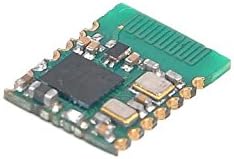
Figure 2: An angled perspective of the module, showcasing the integrated antenna on the right side and various surface-mount components, including the main chip and Murata capacitors.

Figure 3: The bottom view of the module reveals the stamp hole patch welding pads and the intricate circuit traces, designed for integration into a larger system.
5. Setup and Integration
The NRF51822 module is designed for integration into custom circuit boards. Due to its small form factor and stamp hole design, professional soldering equipment and expertise are recommended for mounting.
5.1 Pinout and Connections
While a detailed pinout diagram is not provided in the product information, the module features 10 GPIO pins, 2 AD channels, and 1 Analog Input Reference Voltage. Users should refer to the NRF51822 datasheet from Nordic Semiconductor for comprehensive pin configuration and electrical characteristics when designing their host PCB.
5.2 Power Supply
The module supports a reserved DC-DC power supply mode. Ensure the power supply voltage and current meet the NRF51822 specifications to prevent damage and ensure stable operation. Proper decoupling capacitors should be used near the module's power input pins.
5.3 Software Development
Development for the NRF51822 typically involves using the Nordic Semiconductor SDK (Software Development Kit) and a compatible development environment. This allows for programming custom Bluetooth Low Energy applications.
6. Operating Instructions
Once integrated and programmed, the module operates as a Bluetooth Low Energy device. Its operation is dictated by the firmware loaded onto the NRF51822 chip. Typical operations include:
- Advertising: Broadcasting its presence to other Bluetooth devices.
- Scanning: Discovering other Bluetooth devices.
- Connecting: Establishing a connection with another compatible Bluetooth device.
- Data Exchange: Sending and receiving data over the established BLE connection using GATT (Generic Attribute Profile) services and characteristics.
Refer to your specific application's documentation for detailed operational procedures.
7. Maintenance
The NRF51822 Bluetooth module is a sealed electronic component and generally requires no user maintenance. However, observe the following guidelines to ensure its longevity:
- Environmental Conditions: Operate and store the module within specified temperature and humidity ranges. Avoid extreme conditions.
- Cleanliness: Keep the module free from dust, dirt, and moisture. Do not use liquid cleaners directly on the module.
- Physical Handling: Handle the module with care to avoid physical damage to the components or solder joints. Use anti-static precautions when handling.
- Power Supply: Ensure a stable and clean power supply to prevent electrical stress.
8. Troubleshooting
If you encounter issues with the NRF51822 module, consider the following troubleshooting steps:
- No Power: Verify that the power supply is correctly connected and providing the specified voltage and current. Check for any short circuits on the host board.
- Module Not Responding: Ensure the module is correctly soldered to the host PCB. Check for proper programming and firmware integrity.
- Bluetooth Connectivity Issues:
- Verify that the module's antenna is not obstructed or damaged.
- Check for excessive interference from other 2.4 GHz devices.
- Ensure the firmware is correctly configured for advertising or scanning.
- Confirm that the device attempting to connect is compatible with Bluetooth 4.0 (BLE).
- Unexpected Behavior: Review your firmware code for logical errors. Use debugging tools provided by the SDK to diagnose issues.
For complex issues, consult the Nordic Semiconductor NRF51822 documentation and relevant developer forums.
9. Warranty and Support
Specific warranty information for this product is not provided in the available documentation. For details regarding warranty coverage, returns, or technical support, please contact the seller or manufacturer directly. It is recommended to retain your purchase receipt for any warranty claims.