Introduction
This manual provides essential instructions for the proper use and maintenance of your Casio AEQ-100W-1BVCF Analog-Digital Watch. Please read this manual thoroughly to ensure optimal performance and longevity of your timepiece.

Image: Front view of the Casio AEQ-100W-1BVCF watch, showcasing its analog hands, digital displays, and world map design on the dial.
Key Features
- Analog and Digital Display: Combines traditional analog hands with digital readouts for versatile timekeeping.
- 100-Meter Water Resistance: Suitable for swimming and snorkeling, but not for diving.
- World Time: Displays current time in major cities and specific areas around the world.
- Tele Memo: Memory capacity for storing telephone numbers.
- Stopwatch: Measures elapsed time, split time, and two finishes.
- Countdown Timer: Functions as a countdown from a specified time.
- Alarms: Features three daily alarms and an hourly time signal.
- Full Auto-Calendar: Pre-programmed until the year 2099.
- 12/24-Hour Format: Time display can be switched between 12-hour and 24-hour formats.
- Long Battery Life: Approximately 10 years on a CR2025 battery.

Image: A badge indicating "10 Year Battery Life", highlighting a key feature of the watch.
Setup and Initial Configuration
Button Functions
Your watch has four buttons: ADJUST (top left), MODE (bottom left), SET (-) (top right), and SET (+) (bottom right).
- Entering Timekeeping Mode: Press the MODE button repeatedly until the current time is displayed on the digital screen.
- Setting the Digital Time and Date:
- In Timekeeping Mode, hold down the ADJUST button until the city code starts flashing. This indicates the setting screen.
- Use the SET (+) and SET (-) buttons to select your Home City code.
- Press MODE to cycle through the settings: DST (Daylight Saving Time), 12/24-hour format, Seconds, Hour, Minute, Year, Month, Day.
- Use SET (+) and SET (-) to change the flashing value.
- Press ADJUST to exit the setting screen.
- Adjusting Analog Hands:
- In Timekeeping Mode, press the MODE button until you reach the Hand Setting Mode (indicated by "H.SET" or similar on the digital display).
- Hold down the ADJUST button until the digital time starts flashing.
- Use SET (+) to advance the analog hands. Hold it down for high-speed movement.
- Once the analog hands match the digital time, press ADJUST to exit.
Operating Modes
Press the MODE button to cycle through the following modes:
- Timekeeping Mode: Displays current time and date.
- World Time Mode:
- In World Time Mode, use SET (+) and SET (-) to view times in different time zones.
- The world map on the watch face indicates the current time zone.
- Tele Memo Mode:
- Allows storage and recall of up to 30 sets of name and telephone number data.
- To enter data, hold ADJUST, then use SET (+) and SET (-) to input characters.
- Stopwatch Mode:
- Press SET (+) to start/stop the stopwatch.
- Press SET (-) to reset.
- Countdown Timer Mode:
- To set the countdown time, hold ADJUST, then use SET (+) and SET (-).
- Press SET (+) to start/stop the countdown.
- Alarm Mode:
- Cycle through AL1, AL2, AL3, SNZ (Snooze), and SIG (Hourly Time Signal) using SET (+).
- To set an alarm, hold ADJUST, then use SET (+) and SET (-) to set the alarm time.
- Press ADJUST to turn alarms ON/OFF.
Maintenance and Care
- Water Resistance: The watch is water resistant to 100 meters. Avoid operating buttons underwater. Do not use for scuba diving.
- Cleaning: Wipe the watch with a soft, dry cloth. For resin bands, use a soft brush with a mild soap and water solution, then rinse thoroughly and dry.
- Temperature Exposure: Avoid exposing the watch to extreme temperatures (hot or cold) for prolonged periods.
- Chemicals: Keep the watch away from gasoline, cleaning solvents, aerosol sprays, adhesives, paints, etc. These can cause discoloration, deterioration, or damage.
- Battery Replacement: The watch uses one CR2025 lithium metal battery. Battery replacement should be performed by a qualified technician to ensure water resistance is maintained.
Troubleshooting
| Problem | Solution |
|---|---|
| Analog hands do not match digital time. | Enter Hand Setting Mode and adjust the analog hands to match the digital time. Refer to "Adjusting Analog Hands" in the Setup section. |
| Digital display is blank or dim. | The battery may be low or depleted. Replace the battery (CR2025) by a qualified technician. |
| Watch buttons are unresponsive. | Ensure the watch is not underwater when attempting to operate buttons. If the issue persists, a reset may be required (consult support). |
| Incorrect time displayed after travel. | Adjust the Home City setting or use World Time Mode to view the correct time zone. |
Specifications
- Model Number: AEQ-100W-1BV
- Case Dimensions: 47.75mm diameter (approximate, based on product images and general watch sizing).
- Product Dimensions: 4.3 x 3.4 x 2.2 inches; 1.76 ounces (packaging dimensions).
- Water Resistance: 100 meters (330 feet).
- Battery Type: CR2025 (Lithium Metal).
- Battery Life: Approximately 10 years.
- Movement: Quartz.
- Case/Band Material: Resin.
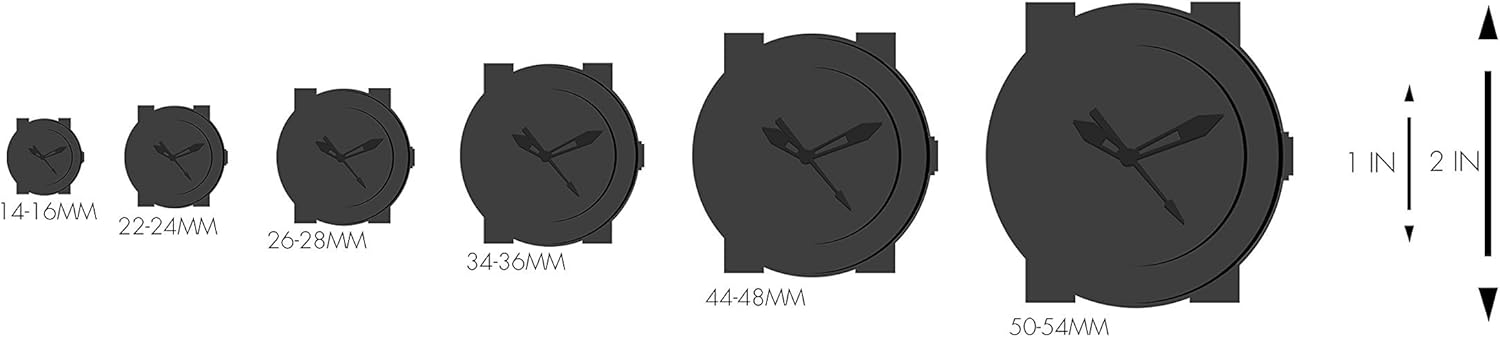
Image: A visual guide comparing different watch case sizes, illustrating the relative size of the watch.
Warranty and Support
For detailed warranty information, please refer to the warranty card included with your purchase or visit the official Casio website.
If you require further assistance or encounter issues not covered in this manual, please contact Casio customer support.
An official user manual in PDF format can be found here: Casio AEQ-100W-1BVCF User Manual (PDF)