Introduction
This manual provides comprehensive instructions for the safe and effective operation, maintenance, and troubleshooting of your Human Touch HT-5320 WholeBody Massage Chair. Please read this manual thoroughly before using the product and retain it for future reference.
The Human Touch HT-5320 is designed to provide a full-body massage experience, incorporating advanced features such as an extendable, vibrating foot and calf massager, stowable arm and thigh massage sleeves, and a 3D remote control for personalized massage. Its Acupoint Detection sensors automatically locate acupressure points, and the patented Robotic Massage System emulates professional massage techniques to alleviate pain, tension, and fatigue.
Safety Information
Always adhere to the following safety precautions to prevent injury or damage to the product:
- Ensure the chair is placed on a stable, level surface.
- Keep children and pets away from the chair during operation.
- Do not use the chair if it has been damaged or submerged in water.
- Unplug the chair from the power outlet before cleaning or maintenance.
- Consult a physician before use if you have pre-existing medical conditions.
- Do not attempt to disassemble or repair the chair yourself. Contact authorized service personnel.
Product Features
The HT-5320 massage chair is equipped with several advanced features for a comprehensive massage experience:
- Robotic Massage System: Emulates professional massage techniques.
- Acupoint Detection System: Automatically locates acupressure points for precise massage.
- Extendable Foot and Calf Massager: Provides two-speed vibration for enhanced circulation and soothing.
- Stowable Arm and Thigh Massage Sleeves: Adjustable air sleeves for arm and thigh massage.
- Full-Body Stretch: Gently holds legs and slowly reclines to stretch the spine.
- Pulsating Seat Massage System: Provides a relaxing air massage to the seat area.
- 3D Remote Control: For full control over massage programs and intensity.
- Power-Recline Backrest: Allows for easy adjustment of the recline position.
- Contoured-Comfort Neck Pillow: Provides additional head and neck support.
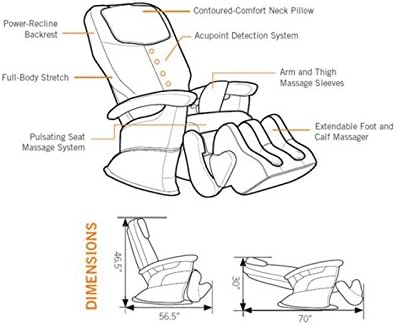
Figure 1: Key features of the HT-5320 massage chair. This diagram illustrates the various components and their functions, including the Acupoint Detection System, arm and thigh massage sleeves, extendable foot and calf massager, and the full-body stretch capability.
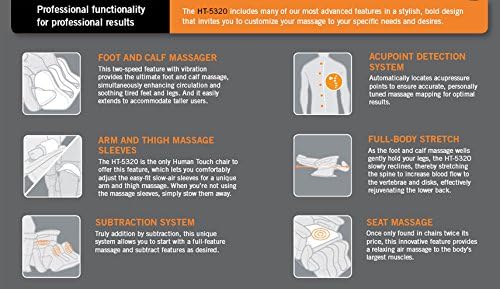
Figure 2: Detailed explanation of HT-5320 functionalities. This image provides a breakdown of how each feature, such as the foot and calf massager and acupoint detection, contributes to the overall massage experience.
Setup
Unpacking and Placement
- Carefully remove the massage chair from its packaging.
- Place the chair on a flat, stable surface in your desired location. Ensure there is sufficient space around the chair for full recline (approximately 70 inches in length when fully reclined).
- Connect the power cord to the chair's power input, then plug it into a grounded electrical outlet.
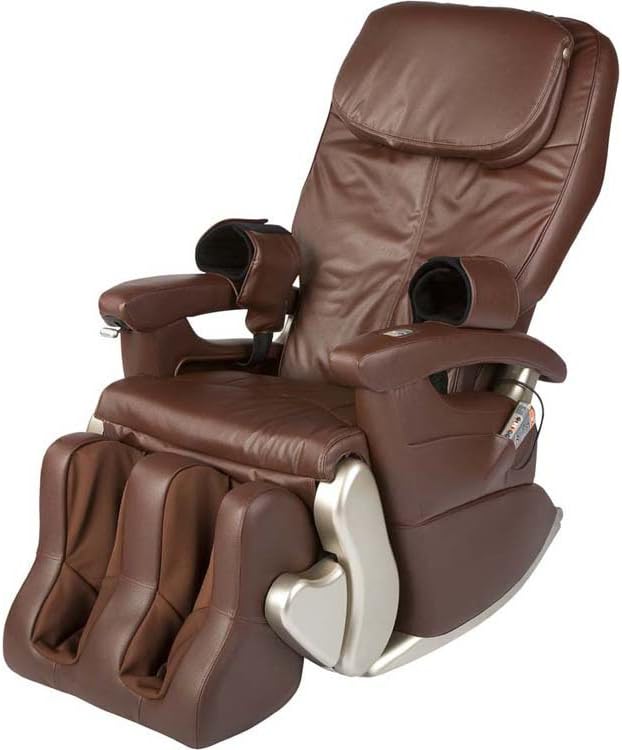
Figure 3: The HT-5320 massage chair in its upright position. This image shows the overall appearance of the chair before use.

Figure 4: Upright dimensions of the HT-5320 massage chair. The image indicates the chair's width (32"), depth (57"), and height (47") for proper placement.

Figure 5: The HT-5320 massage chair in a reclined position. This view demonstrates the extended footrest and the full recline capability of the chair.
Operating Instructions
Using the 3D Remote Control
The HT-5320 is operated via its intuitive 3D remote control. Familiarize yourself with the remote's layout and functions:
- Power Button: Turns the chair on or off.
- Recline/Upright Buttons: Adjust the backrest and footrest position.
- Massage Programs: Select from pre-programmed massage routines.
- Manual Control: Adjust massage type (e.g., kneading, tapping), intensity, and target specific back zones.
- Foot and Calf Massager: Activate and adjust vibration speed.
- Arm and Thigh Massage: Activate and adjust air pressure for the sleeves.
- Acupoint Detection: Initiate the body scan for personalized massage.
To begin a massage, sit comfortably in the chair, power it on, and select a desired program or manually adjust settings using the remote. The Acupoint Detection system will automatically scan your back to customize the massage to your body's contours.
Maintenance and Care
Proper maintenance ensures the longevity and optimal performance of your massage chair.
- Cleaning: Spot wash the chair's upholstery as needed. Use a soft, damp cloth and mild detergent. Do not use abrasive cleaners or solvents.
- Storage: When not in use for extended periods, unplug the chair and store it in a cool, dry place away from direct sunlight.
- Inspection: Periodically check the power cord and all connections for any signs of damage.
Troubleshooting
If you encounter issues with your HT-5320 massage chair, refer to the following common problems and solutions:
| Problem | Possible Cause | Solution |
|---|---|---|
| Chair does not power on. | Power cord not securely plugged in; no power from outlet. | Ensure power cord is fully inserted. Check if the outlet is functional by plugging in another device. |
| Massage intensity is too weak/strong. | Incorrect setting on remote control. | Adjust intensity settings using the 3D remote control. |
| Foot and calf massager not vibrating. | Feature not activated or connection issue. | Ensure the foot and calf massager is activated via the remote. Check for any obstructions. |
If the problem persists after attempting these solutions, please contact Human Touch customer support for assistance.
Specifications
| Attribute | Detail |
|---|---|
| Brand | Human Touch |
| Model Name | HT-5320 |
| Item Model Number | HT-100-5320-002 |
| Color | Brown (Dark Chocolate) |
| Product Dimensions (Upright) | 57"D x 32"W x 47"H (144.78 cm D x 81.28 cm W x 119.38 cm H) |
| Product Dimensions (Reclined) | Approx. 70"L x 30"H (177.8 cm L x 76.2 cm H) |
| Item Weight | 275 pounds (124.74 kg) |
| Maximum Weight Recommendation | 280 Pounds (127 kg) |
| Product Care Instructions | Spot Wash |
| Included Components | Remote |
| UPC | 066243192292 |
Warranty and Support
For warranty information, product registration, or technical support, please contact Human Touch customer service. You can find more information and contact details on the official Human Touch website or through their Amazon store page.
Human Touch Store: Visit the Human Touch Store on Amazon
Returns: This product is eligible for 30-day easy returns.


