
Introduction
Thank you for choosing the EasyAcc Mini Handheld and Desk Fan. Designed for versatility and convenience, this portable fan offers powerful cooling with a compact, foldable design. It's ideal for various scenarios, from indoor use at your desk to outdoor activities and travel. This manual will guide you through its features and ensure optimal performance.
Key Features:
- Strong Airflow: Features 3 adjustable speed levels with an updated 6-blade design for enhanced airflow and reduced noise.
- Extended Battery Life: Provides up to 10 hours of wireless operation on the lowest speed setting.
- Multipurpose Design: Functions as both a handheld fan and a foldable desk fan.
- Portable: Compact size and foldable handle make it easy to carry in a handbag or backpack.
- USB Rechargeable: Compatible with all USB output devices for convenient charging.
Setup
Battery Installation:
Before initial use, locate the battery compartment. IMPORTANT: Remove the insulating sheet from the battery before operating the fan. Failure to do so will prevent the fan from functioning.
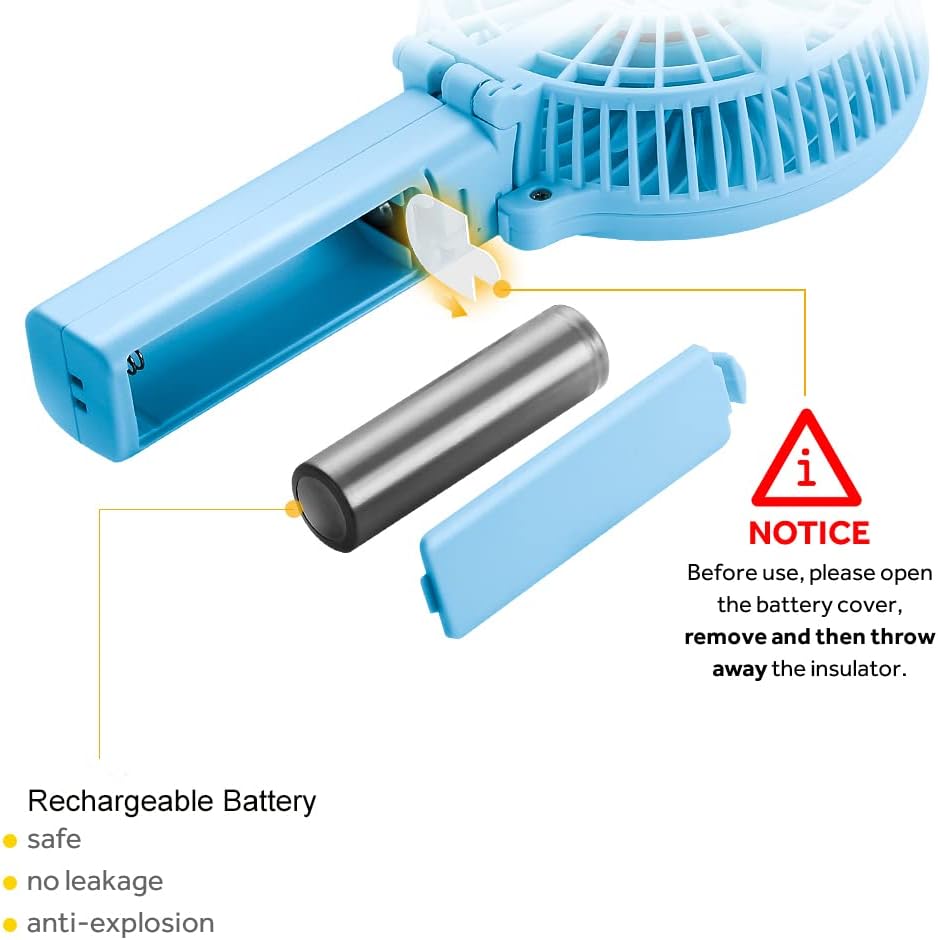
Image: Illustration of battery insertion and removal of the insulating sheet.
Charging the Fan:
Connect the provided USB charging cable to the fan's charging port. Plug the other end into any standard USB power source (e.g., computer, USB wall adapter, power bank). The LED charging indicator will illuminate during charging.

Image: Various methods of charging the fan using a USB cable.
Operating Instructions
Power On/Off and Speed Adjustment:
Press the power button located on the handle to turn the fan on. Each subsequent press will cycle through the 3 available speed settings (Low, Medium, High). Pressing the button after the highest speed will turn the fan off.
Video: Demonstrates powering on the fan and cycling through its speed settings.
Handheld Mode:
Hold the fan by its handle for personal cooling on the go. Its lightweight design ensures comfortable use.

Image: The fan being used in handheld mode.
Desk Fan Mode:
The fan features a foldable handle that allows it to convert into a stable desk fan. Simply fold the handle to create a base, and place it on any flat surface.

Image: Visual guide on how to fold the fan into desk mode.

Image: The fan in use as a desk fan.
Maintenance
- Cleaning: Ensure the fan is turned off and unplugged before cleaning. Use a soft, dry cloth to wipe the exterior of the fan. Do not use water or any liquid cleaners directly on the fan.
- Storage: When not in use for extended periods, store the fan in a cool, dry place.
Troubleshooting
- Fan not turning on:
- Check if the battery insulating sheet has been removed.
- Ensure the fan is fully charged.
- Weak airflow:
- Verify the fan is set to a higher speed setting.
- Ensure the fan blades are clean and free from obstructions.
- Charging issues:
- Confirm the USB cable is securely connected to both the fan and the power source.
- Try a different USB cable or power adapter.
Specifications
| Brand | EasyAcc |
| Model Name | FNHD |
| Color | Blue |
| Electric Fan Design | Table Fan |
| Power Source | Battery Powered |
| Style | Handheld and Desk Folding Fan |
| Product Dimensions | 2.36"D x 4.06"W x 4.33"H |
| Item Weight | 6.2 ounces (0.18 Kilograms) |
| Special Feature | Foldable, Handheld Travel, Lightweight, Portable, Rechargeable Battery |
| Number of Blades | 6 |
| Speed | 3600 RPM (Max) |
| Voltage | 5 Volts |
| Wattage | 4 watts |
| Number of Power Levels | 3 |
| Battery Type | 1 Lithium Polymer battery (included) |
| Wireless Working Time | 3-10 Hours (depending on speed) |
| Control Method | Touch |
| Indoor/Outdoor Usage | Outdoor |
Warranty and Support
EasyAcc provides a lifetime warranty for this product, reflecting our commitment to quality and customer satisfaction. We also offer lifetime excellent customer support. For any inquiries or assistance, please refer to the contact information provided with your purchase or visit the official EasyAcc website.
This product has passed FCC, RoHS, and CE certification standards, ensuring a reliable and safe choice.