
Awei A880BL
Awei A880BL Wireless Sports Headset User Manual
Model: A880BL
Introduction
Thank you for choosing the Awei A880BL Wireless Sports Headset. This manual will guide you through the features, setup, and operation of your new headset. Please read it carefully before use and retain it for future reference.

Image: The Awei A880BL Wireless Sports Headset with a blue connecting cable, designed for in-ear use with ear hooks for secure fit.
Important Safety Information
- Do not expose the headset to extreme temperatures or humidity.
- Avoid dropping or subjecting the headset to strong impacts.
- Do not disassemble or modify the headset. This will void the warranty.
- Keep the headset away from children and pets.
- Use only the provided charging cable or a certified equivalent.
- Prolonged listening at high volume levels may cause hearing damage.
Package Contents
Please check that all items are present in your package:
- Awei A880BL Wireless Sports Headset
- USB Charging Cable
- Multiple sizes of Ear Tips
- User Manual (this document)

Image: Contents of the Awei A880BL package, showing the black headset with yellow cable, a white USB charging cable, three pairs of gold-colored ear tips, and a small yellow instruction card, all next to the product box.
Product Overview
The Awei A880BL headset features a secure over-ear hook design, in-ear earbuds, and an integrated control panel for easy access to functions.
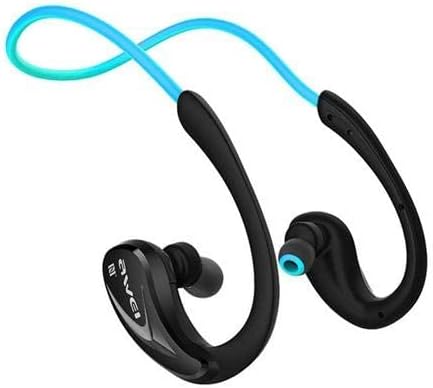
Image: A close-up view of one side of the Awei A880BL headset, highlighting the in-ear earbud and the ergonomic ear hook design.
Setup
1. Charging the Headset
Before first use, fully charge the headset. Connect the USB charging cable to the headset's charging port and a power source (e.g., computer USB port or USB wall adapter). The indicator light will show charging status and turn off or change color when fully charged.
2. Bluetooth Pairing
- Ensure the headset is turned off.
- Press and hold the Multi-function button (usually the power button) until the indicator light flashes red and blue alternately, indicating pairing mode.
- On your device (smartphone, tablet, etc.), enable Bluetooth and search for available devices.
- Select "Awei A880BL" from the list of found devices.
- Once paired, the indicator light will flash blue slowly or turn solid blue.
3. NFC Speed Pairing (if supported by your device)
The Awei A880BL supports NFC for quick pairing with compatible devices.
- Ensure NFC is enabled on your device and the headset is in pairing mode or powered on.
- Tap your NFC-enabled device against the NFC area on the headset (refer to product diagram if available for exact location).
- Confirm the pairing request on your device.
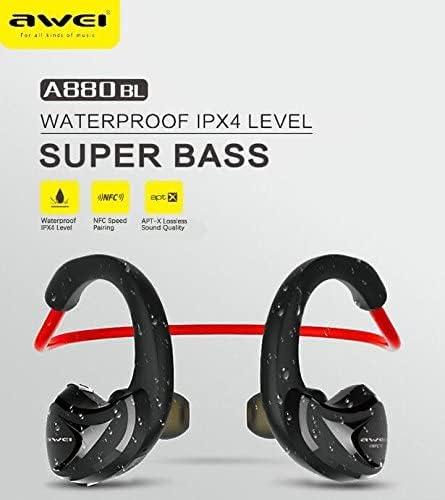
Image: A graphic highlighting key features of the Awei A880BL, including "WATERPROOF IPX4 LEVEL", "NFC Speed Pairing", and "APT-X Lossless Sound Quality".
4. Wearing the Headset
For optimal comfort and sound quality, ensure the headset is worn correctly.
- Step 1: Hold the headset with both hands, with the earbuds facing inwards.
- Step 2: Gently place the earbuds into your ears, guiding the ear hooks over the top of your ears.
- Step 3: Adjust the flexible cable behind your neck for a secure and comfortable fit.
- Step 4: The headset should sit comfortably and securely, even during physical activity.

Image: A four-panel image demonstrating the steps to correctly wear the Awei A880BL headset, showing how to position the earbuds and adjust the neckband.
Operating Instructions
Power On/Off
- Power On: Press and hold the Multi-function button for approximately 3 seconds until you hear a power-on prompt and the indicator light flashes blue.
- Power Off: Press and hold the Multi-function button for approximately 5 seconds until you hear a power-off prompt and the indicator light turns red and then off.
Music Playback
- Play/Pause: Short press the Multi-function button.
- Next Track: Long press the Volume Up (+) button.
- Previous Track: Long press the Volume Down (-) button.
- Volume Up: Short press the Volume Up (+) button.
- Volume Down: Short press the Volume Down (-) button.
Call Management
- Answer Call: Short press the Multi-function button when a call comes in.
- End Call: Short press the Multi-function button during a call.
- Reject Call: Long press the Multi-function button when a call comes in.
- Redial Last Number: Double-press the Multi-function button.
Voice Assistant
- Activate Voice Assistant: Triple-press the Multi-function button (functionality depends on your connected device).
Maintenance and Care
- Cleaning: Wipe the headset with a soft, dry cloth. Do not use abrasive cleaners or solvents.
- Storage: Store the headset in a cool, dry place away from direct sunlight and extreme temperatures.
- Battery Care: To prolong battery life, charge the headset regularly, even if not in frequent use. Avoid fully discharging the battery for extended periods.
- Water Resistance: The Awei A880BL is rated IPX4 waterproof, meaning it is resistant to splashing water from any direction. It is suitable for sports and light rain but should not be submerged in water.
Troubleshooting
| Problem | Solution |
|---|---|
| Headset does not power on. | Ensure the headset is fully charged. Connect it to a power source and try again. |
| Cannot pair with device. |
|
| No sound or low volume. |
|
| Intermittent connection. |
|
Specifications
| Feature | Detail |
|---|---|
| Model Number | A880BL |
| Connectivity | Wireless (Bluetooth, NFC) |
| Headphone Type | In-ear, Sports Headset (with ear hooks) |
| Microphone | Yes |
| Noise Cancellation | Active Noise Cancellation (ANC) |
| Frequency Response Range | 20 - 22000 Hz |
| Sensitivity | 110 ± 3 dB |
| Impedance | 16 Ohm |
| Water Resistance | IPX4 Level (Splash-proof) |
| Supported Audio Codecs | APT-X |
| Control Type | Button Control (Volume, Play/Pause, Call, Voice Assistant) |
| Charging Port | USB |
| Cable Length | 0.6 meters (Charging cable) |
| Weight | 30 grams |
| Material | Plastic |
| Sound System | Balanced Armature Driver |
| App Support | Yes |
| Memory Card Support | No |
Warranty and Support
For warranty information and technical support, please refer to the warranty card included in your package or contact Awei customer service through their official website or authorized distributors. Keep your purchase receipt as proof of purchase.
Related documentsA880BL


Ask a question about this manual
Ask about setup, troubleshooting, compatibility, parts, safety, or missing instructions. Manuals+ will review the question and use this page’s manual context to help answer it.