
1. Introduction and Overview
This manual provides instructions for the installation, operation, and maintenance of your AdirOffice Key Lock Box, Model ADI681-2. This wall-mounted key cabinet is designed to securely store and organize up to 30 keys, making it suitable for various environments including homes, offices, property management, and businesses requiring key organization.
The key lock box features a durable 16-gauge heavy-duty steel construction with a scratch-resistant finish, ensuring long-term reliability. It includes a combination lock for secure access and comes with key tags for efficient organization.

Image 1.1: AdirOffice Key Lock Box (Model ADI681-2) with its door open, displaying the internal key hooks and organized keys. The front of the closed box shows the combination lock.
2. Safety Information
Please read and understand all safety instructions before installing and operating the key lock box. Failure to follow these instructions may result in property damage or injury.
- Ensure the lock box is securely mounted to a sturdy wall surface capable of supporting its weight and the weight of its contents.
- Keep the combination code confidential and store it in a secure location separate from the lock box.
- Do not attempt to force the lock or the door, as this may damage the unit and compromise its security.
- Keep small parts, such as key tags, away from children to prevent choking hazards.
3. Package Contents
Verify that all components are present before beginning installation:
- AdirOffice Key Lock Box (Model ADI681-2)
- Key Tags (quantity sufficient for 30 keys)
- Mounting Hardware (screws and wall anchors)

Image 3.1: Visual representation of the AdirOffice Key Lock Box highlighting its features, including the combination lock, 16-gauge steel construction, metal hooks, and included key tags and number stickers.
4. Setup and Installation
The AdirOffice Key Lock Box is designed for wall mounting. Follow these steps for secure installation:
- Choose a Location: Select a suitable wall location that is secure, easily accessible, and away from excessive moisture or extreme temperatures.
- Mark Drilling Points: Hold the key lock box against the wall at the desired height. Use a pencil to mark the locations of the pre-drilled mounting holes on the back of the unit.
- Drill Pilot Holes: Using an appropriate drill bit for your wall type (e.g., masonry bit for concrete, wood bit for studs), drill pilot holes at the marked locations. If installing into drywall without a stud, use the provided wall anchors.
- Insert Wall Anchors (if needed): If using wall anchors, gently tap them into the pilot holes until they are flush with the wall surface.
- Mount the Lock Box: Align the lock box's mounting holes with the drilled holes (or anchors). Insert the provided screws and tighten them securely. Do not overtighten.

Image 4.1: The AdirOffice Key Lock Box shown with the included mounting hardware (screws and wall anchors), illustrating the ease of installation.
4.1 Setting the Combination Lock
Your AdirOffice Key Lock Box comes with a pre-set combination. To set or change the combination:
- Open the Lock Box: Use the current combination to open the lock box door.
- Locate the Reset Lever: On the inside of the lock mechanism, locate the small reset lever or button.
- Set New Combination: While the reset lever is in the 'set' position (or button is pressed), dial your desired new combination. Ensure the numbers are clearly aligned.
- Release Reset Lever: Return the reset lever to its original position (or release the button). Your new combination is now set.
- Test the Combination: Close the door and scramble the dials. Then, enter your new combination to ensure it opens correctly before securing any keys.
Important: Do not close the door and scramble the dials before testing the new combination. If you forget your combination, there is no master key or override code to open the lock box.
5. Operation
5.1 Opening the Lock Box
- Align the dials to your correct combination.
- Turn the knob or pull the latch to open the door.
5.2 Storing Keys
- Attach keys to the provided key tags for easy identification.
- Hang the key tags onto the designated hooks inside the cabinet. The cabinet's depth accommodates larger key rings.
- Organize keys logically using the numbered hooks or by grouping similar keys.
5.3 Closing and Securing the Lock Box
- Ensure all keys are properly hung on their hooks.
- Close the door firmly.
- Scramble the combination dials to secure the lock box.
6. Maintenance
Regular maintenance helps ensure the longevity and proper functioning of your key lock box.
- Cleaning: Wipe the exterior and interior surfaces with a damp cloth. Avoid abrasive cleaners or solvents that could damage the finish.
- Lock Mechanism: Periodically check the combination lock for smooth operation. Do not lubricate the lock mechanism unless specifically instructed by the manufacturer.
- Mounting Security: Periodically check the mounting screws to ensure they remain tight and the lock box is securely attached to the wall.
7. Troubleshooting
If you encounter issues with your AdirOffice Key Lock Box, refer to the following common solutions:
- Lock Box Will Not Open:
- Ensure the combination is entered correctly and the dials are precisely aligned.
- Verify you are using the most recently set combination.
- If the combination is forgotten, the lock box cannot be opened without professional assistance or destructive entry.
- Door Is Stiff or Difficult to Close:
- Check for any obstructions inside the cabinet that might be preventing the door from closing fully.
- Ensure the lock box is mounted squarely and not warped, which could affect door alignment.
- Keys Do Not Fit on Hooks:
- The cabinet is designed to accommodate larger key rings. Ensure keys are properly attached to the provided key tags.
8. Specifications
| Brand | AdirOffice |
| Model Number | ADI681-2 |
| Capacity | 30 Key Hooks |
| Material | 16-Gauge Heavy-Duty Steel, Alloy Steel |
| Color | Black |
| Lock Type | Combination Lock |
| Mounting Type | Wall Mount |
| Product Dimensions (D x W x H) | 7.6 cm x 16.3 cm x 20.3 cm (3.0 in x 6.4 in x 8.0 in) |
| Item Weight | 1.03 kg (2.27 lbs) |
| Special Feature | Lockable, Scratch-Resistant Finish |
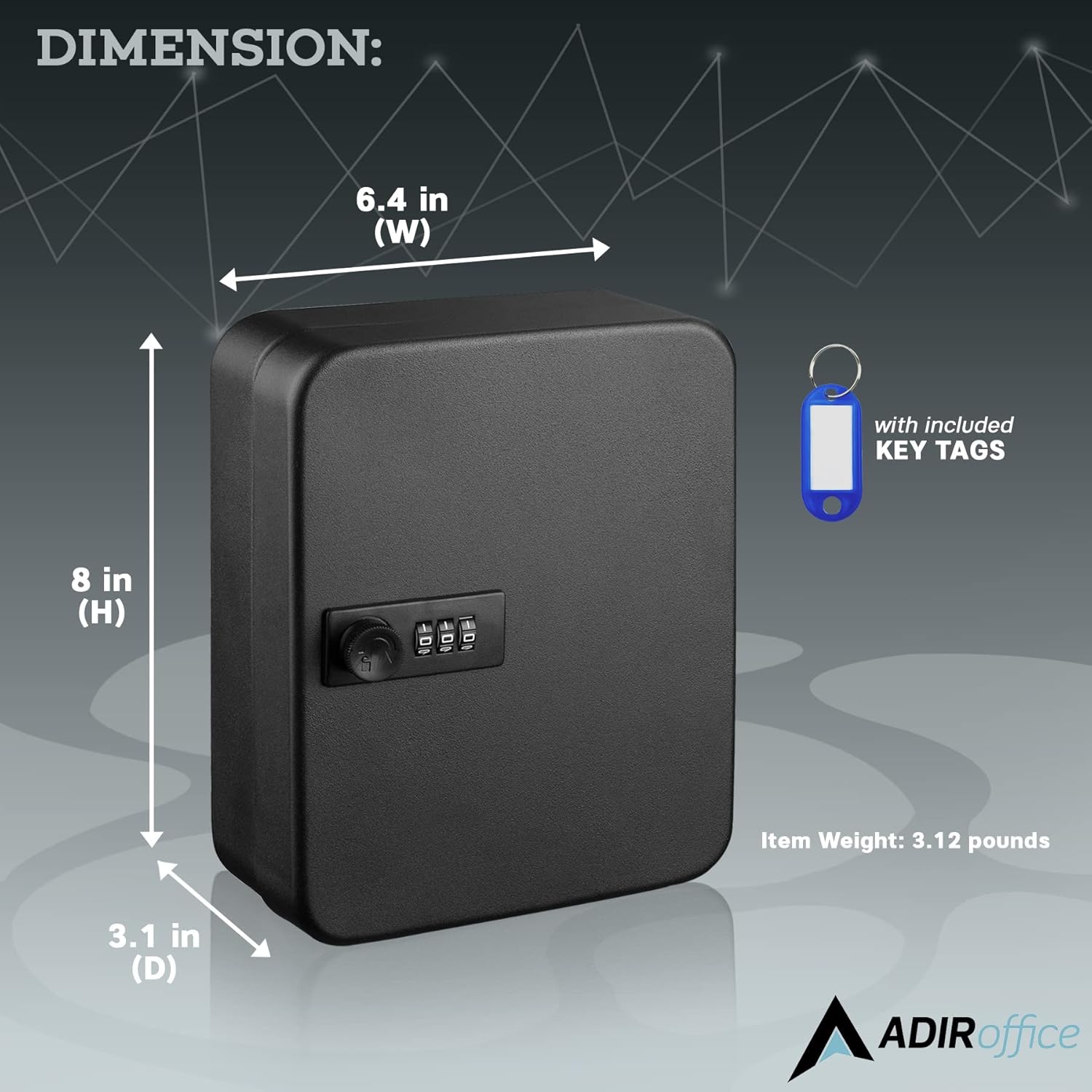
Image 8.1: Dimensional view of the AdirOffice Key Lock Box, showing its width, height, and depth, along with its weight.
9. Warranty and Support
The AdirOffice Key Lock Box Model ADI681-2 comes with a 1 Year Limited Coverage. For specific warranty details or technical support, please refer to the contact information provided with your purchase or visit the official AdirOffice website.

Image 9.1: Warranty information indicating 1 Year Limited Coverage.

