
ENEGON EN-LP-E5
ENEGON LP-E5 Battery and Dual Charger User Manual
Model: EN-LP-E5
Introduction
This manual provides essential instructions for the safe and efficient use of your ENEGON LP-E5 Replacement Battery (2-Pack) and Rapid Dual Charger. Please read this guide thoroughly before operation and retain it for future reference.
Important Safety Information
- Do not connect improperly.
- Do not dispose of in fire or expose to excessive heat.
- Do not crush, puncture, incinerate, or short circuit external contacts.
- Keep out of reach of children.
- Use only with compatible devices as specified.
Package Contents
Verify that all items are present in your package:
- 2 x ENEGON LP-E5 Replacement Batteries (1400mAh)
- 1 x Rapid Dual Battery Charger
- 1 x Micro-USB Cable

Image: Contents of the ENEGON LP-E5 battery and charger kit.
Setup and First Use
1. Charging the Batteries
- Connect the provided Micro-USB cable to the charger and a USB power source (e.g., wall adapter, car charger, power bank, or computer USB port).
- Insert the ENEGON LP-E5 batteries into the charging slots. Ensure correct orientation.
- The LED indicator for each slot will turn RED to indicate charging is in progress.
- When charging is complete, the LED indicator will turn GREEN.
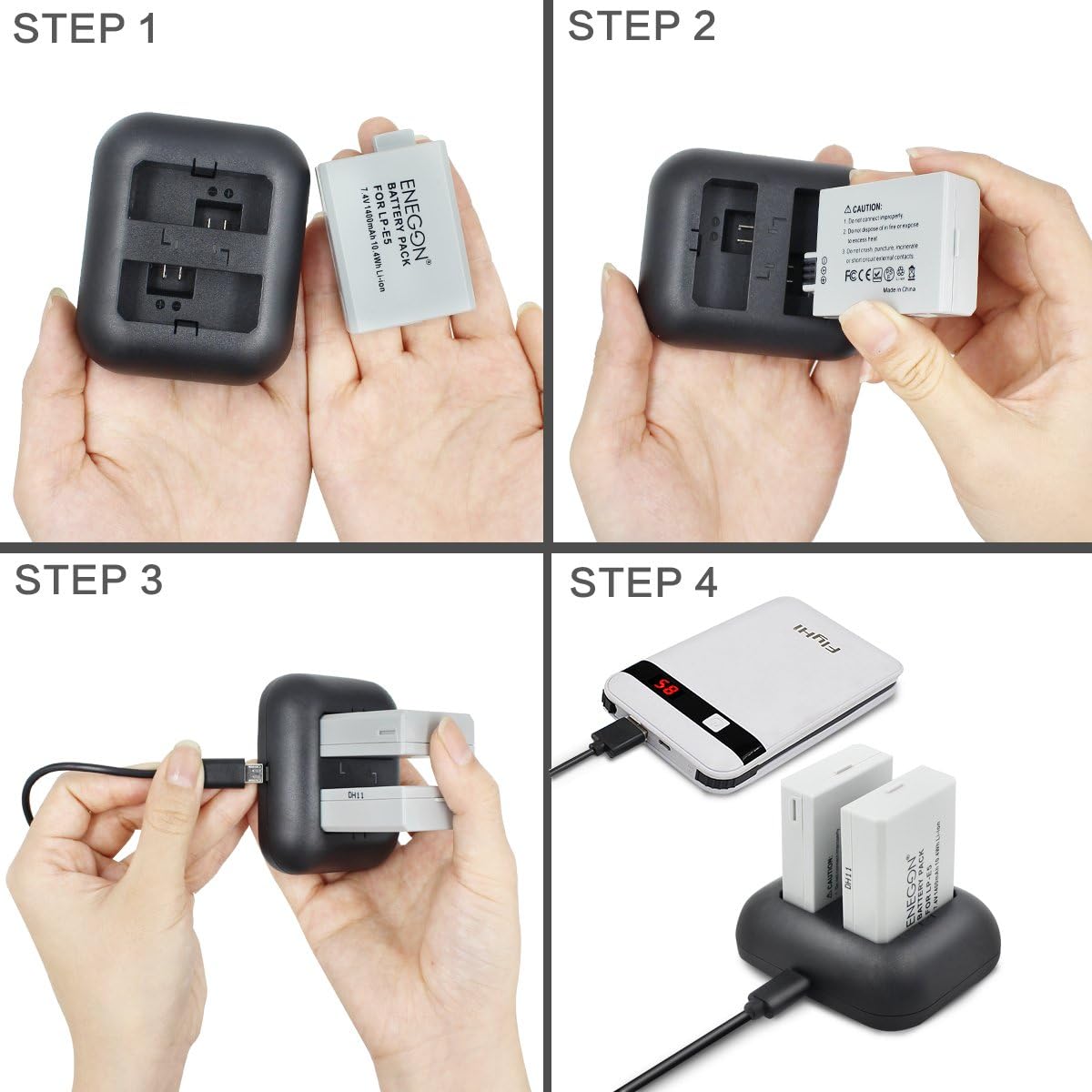
Image: Visual guide for connecting the charger and inserting batteries.

Image: LED indicators on the charger showing charging (red) and fully charged (green) status.
2. Inserting Batteries into Your Camera
Refer to your Canon camera's instruction manual for specific steps on how to correctly insert the LP-E5 battery. Ensure the battery is fully charged before insertion.

Image: Compatible Canon camera models and ENEGON LP-E5 batteries.
Operating Instructions
Battery Usage
- The 1400mAh capacity provides extended shooting time for photos and videos.
- Always carry spare charged batteries for prolonged use.
- Monitor your camera's battery indicator to know when to replace or recharge batteries.
Charger Functionality
- The rapid dual charger allows simultaneous charging of two LP-E5 batteries.
- The charger is designed with multiple circuit protections to prevent over-charging, short-circuiting, high-temperature, and surge damage.

Image: Illustration of continuous stable power delivery from ENEGON batteries.

Image: Overview of built-in safety protections for the ENEGON charger.
Maintenance
- Store batteries in a cool, dry place away from direct sunlight and extreme temperatures.
- Avoid fully discharging batteries for extended periods to prolong their lifespan.
- Clean battery contacts and charger terminals periodically with a dry, soft cloth to ensure optimal connection.
- Do not attempt to disassemble the batteries or charger.
Troubleshooting
| Problem | Possible Cause | Solution |
|---|---|---|
| Battery not charging | Loose cable connection, faulty USB power source, incorrect battery insertion. | Ensure Micro-USB cable is securely connected. Try a different USB power source. Re-insert battery correctly. |
| LED indicator not lighting up | No power to charger, charger malfunction. | Check power source. Try a different USB cable. Contact customer service if issue persists. |
| Battery not recognized by camera | Incorrect battery insertion, dirty battery contacts. | Ensure battery is fully seated in the camera. Clean battery contacts with a dry cloth. |
Specifications
| Model Number | EN-LP-E5 |
| Battery Type | Lithium Ion |
| Battery Capacity | 1400 mAh |
| Battery Voltage | 7.4 Volts |
| Charger Input | 5V/2A |
| Charger Output | 8.4V/0.8A*2 |
| Compatible Camera Models | Canon EOS Rebel XS, Rebel T1i, Rebel XSi, 1000D, 500D, 450D, Kiss X3, KissX2, KissF |
Warranty and Customer Support
ENEGON provides an 18-month manufacturer warranty for this product. For any inquiries, technical assistance, or warranty claims, please contact our customer service team. We offer 24-hour customer service to ensure your satisfaction.
For further assistance, please visit the official ENEGON store or contact your retailer.
Related documentsEN-LP-E5


Ask a question about this manual
Ask about setup, troubleshooting, compatibility, parts, safety, or missing instructions. Manuals+ will review the question and use this page’s manual context to help answer it.