
Sauermann KT 220-N
Sauermann KT 220-N Multi-Function Data Logger
User Instruction Manual
1. Introduction
This manual provides essential information for the proper installation, operation, and maintenance of your Sauermann KT 220-N Multi-Function Data Logger. Please read this manual thoroughly before using the device to ensure safe and efficient operation. Keep this manual for future reference.
2. Product Overview
The Sauermann KT 220-N is a versatile multi-function data logger designed for various measurement applications, particularly temperature monitoring. It features a universal probe input, allowing connection of different types of probes (not included) to suit specific measurement needs. This model operates without an integrated display, relying on software for configuration and data retrieval.
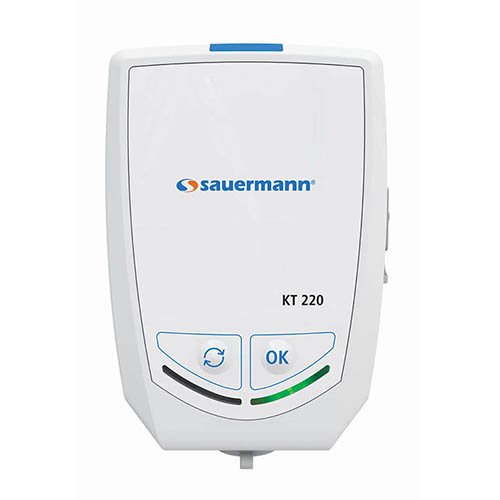
Figure 2.1: Front view of the Sauermann KT 220-N Data Logger. Note the 'OK' and 'Cycle' buttons at the bottom.
Key Features:
- Multi-function data logging capabilities.
- Universal probe input for various sensor types.
- Compact and robust design.
- Internal temperature measurement.
- Battery-powered operation.
3. Setup
- Unpacking: Carefully remove the data logger from its packaging. Verify that all components are present and undamaged.
- Battery Installation: The KT 220-N typically comes with batteries pre-installed. If not, locate the battery compartment (usually on the rear or side) and insert the specified batteries, observing correct polarity.
- Probe Connection: Connect your desired measurement probe (e.g., temperature, humidity) to the universal input port on the data logger. Ensure a secure connection.
- Software Installation: Install the Sauermann data logging software (e.g., KILOG) on your computer. This software is essential for configuring the logger, starting/stopping measurements, and downloading data. Refer to the software's specific manual for installation instructions.
- Initial Configuration: Connect the data logger to your computer via the appropriate interface (e.g., USB). Use the software to set up logging parameters such as measurement interval, start mode, and alarm thresholds.
4. Operating Instructions
The KT 220-N is primarily controlled and configured via its dedicated software. The physical buttons on the device provide basic control over logging status.
- Starting a Measurement Campaign:
- Ensure the logger is configured via the software.
- Depending on the configured start mode (e.g., immediate, delayed, button press), the logger will begin recording data.
- If configured for button press start, press the 'OK' button (refer to Figure 2.1) to initiate logging.
- Stopping a Measurement Campaign:
- Logging can be stopped via the software or, if configured, by pressing and holding the 'OK' button.
- The logger will automatically stop when its memory is full or if a programmed stop time is reached.
- Checking Status (if applicable): The KT 220-N does not have a display. Status indicators (LEDs) may provide basic information on logging activity or battery status. Consult the software for detailed status.
- Data Download: Connect the logger to your computer and use the software to download recorded data. Data can then be viewed, analyzed, and exported.
5. Maintenance
- Cleaning: Clean the exterior of the data logger with a soft, damp cloth. Do not use abrasive cleaners or solvents. Ensure no liquid enters the device.
- Battery Replacement: When the battery indicator (if present, or via software) shows low battery, replace the batteries with new ones of the specified type. Ensure the device is off before replacing batteries.
- Storage: Store the data logger in a cool, dry place, away from direct sunlight and extreme temperatures. If storing for extended periods, remove the batteries to prevent leakage.
- Probe Care: Refer to the specific probe's manual for cleaning and maintenance instructions.
6. Troubleshooting
| Problem | Possible Cause | Solution |
|---|---|---|
| Device not responding | Low or dead batteries; incorrect battery installation. | Replace batteries; check polarity. |
| Cannot connect to computer | Incorrect USB cable; driver not installed; software not running. | Use correct cable; install drivers; open software. |
| No data being logged | Logging not started; incorrect configuration; full memory. | Start logging via software/button; reconfigure settings; download data and clear memory. |
| Inaccurate readings | Faulty probe; probe not calibrated; environmental interference. | Check probe connection; calibrate probe; ensure stable environment. |
7. Specifications
- Model: KT 220-N
- Type: Multi-Function Data Logger
- Input: Universal Probe Input
- Display: None
- Power Source: Batteries (type specified in battery compartment)
- Manufacturer: Sauermann
- ASIN: B06XC7G96T
- Date First Available: March 1, 2017
8. Warranty and Support
Sauermann products are designed for reliability and performance. For information regarding warranty coverage, technical support, or service, please refer to the official Sauermann website or contact your authorized distributor. Keep your purchase receipt as proof of purchase for warranty claims.
For further assistance, please visit the Sauermann Group website.
Related documentsKT 220-N


Ask a question about this manual
Ask about setup, troubleshooting, compatibility, parts, safety, or missing instructions. Manuals+ will review the question and use this page’s manual context to help answer it.