
Buffalo CN295
Buffalo CN295 Coffee Percolator 15L User Manual
Model: CN295 | Brand: Buffalo
1. Introduction
This manual provides essential information for the safe and efficient operation of your Buffalo CN295 Coffee Percolator. Please read it thoroughly before first use and keep it for future reference.
The Buffalo CN295 is a robust 15-liter coffee percolator designed for commercial and large-scale use. Key features include:
- Water level indicator for easy monitoring.
- Fast brewing time of approximately 62 minutes when full.
- Boil-dry safety cut-out to prevent damage.
- Integrated drip tray to minimize spills.
- Secure locking lid for safety during operation.
2. Safety Information
Always follow basic safety precautions when using electrical appliances to reduce the risk of fire, electric shock, and injury.
- Ensure the appliance is connected to a grounded power outlet.
- Do not immerse the appliance in water or other liquids.
- Keep hands and face away from the steam vent during operation.
- Always unplug the percolator before cleaning or when not in use.
- Do not operate the appliance with a damaged cord or plug.
- This appliance is for commercial use and should be operated by trained personnel.
- Ensure the lid is securely locked before brewing.
- Use caution when handling hot liquids and surfaces.
3. Product Overview and Components
Familiarize yourself with the different parts of your Buffalo CN295 Coffee Percolator.

Figure 3.1: Front View of the Buffalo CN295 Coffee Percolator. This image shows the overall design of the percolator, including the main body, water level indicator, dispensing tap, and the base with control lights and power switch.

Figure 3.2: Percolator in Use with Coffee Cup. This image illustrates the percolator dispensing coffee into a cup, highlighting the functionality of the tap and the drip tray.

Figure 3.3: Power Switch and Indicator Lights. A detailed view of the red ON/OFF switch and the green "READY" and red "BOIL" indicator lights located on the base of the unit.
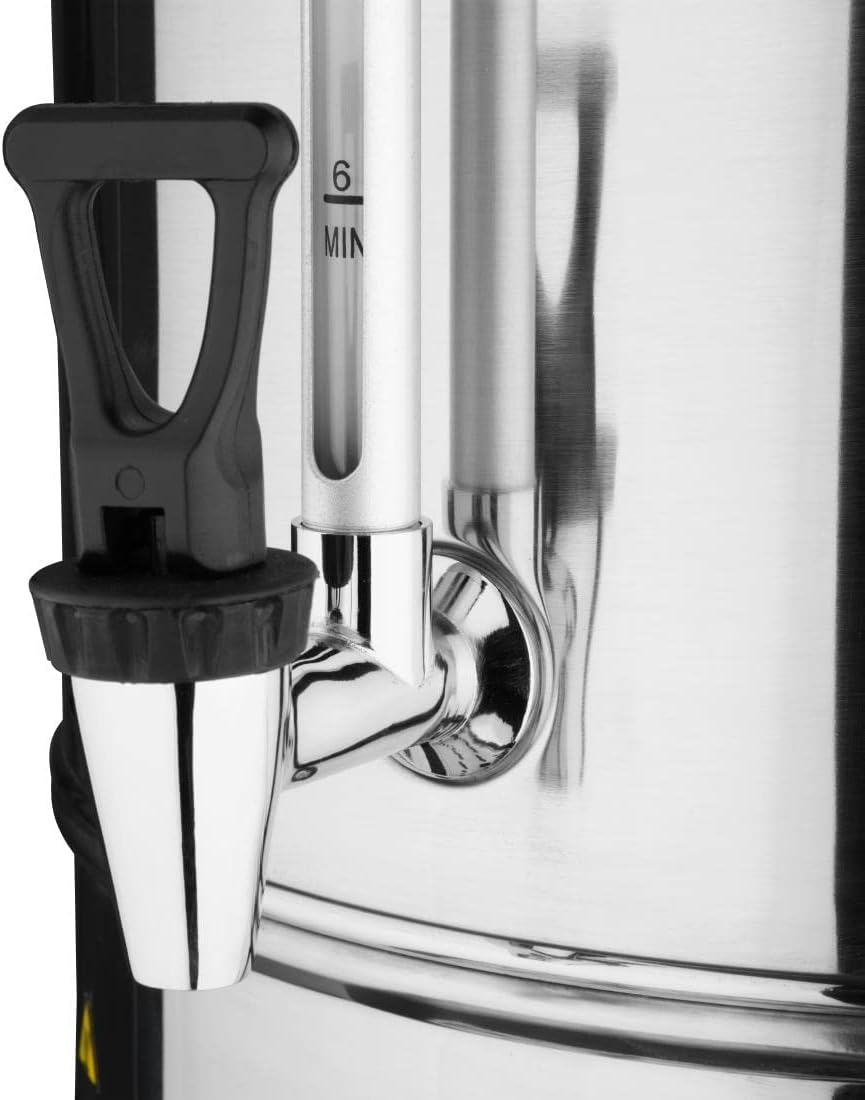
Figure 3.4: Water Level Indicator and Dispensing Tap. This image provides a closer look at the transparent water level tube with markings and the black dispensing tap, showing how liquid is drawn from the percolator.

Figure 3.5: Internal Coffee Basket. An overhead view showing the perforated coffee basket inside the percolator, where ground coffee is placed for brewing.
4. Setup
- Unpacking: Carefully remove the percolator and all accessories from the packaging. Retain packaging for future storage or transport.
- Initial Cleaning: Before first use, wash the coffee basket, lid, and internal components with warm, soapy water. Rinse thoroughly and dry. Wipe the exterior of the percolator with a damp cloth.
- Placement: Place the percolator on a stable, level, heat-resistant surface, away from walls and other appliances to allow for proper ventilation. Ensure the power cord can reach a grounded outlet without strain.
- First Use (Water Only): Fill the percolator with clean water up to the MAX fill line. Do not add coffee. Close the lid securely. Plug the unit into a suitable power outlet and turn it ON. Allow the water to complete a full brewing cycle. Dispense all water through the tap. This process cleans the internal system and removes any manufacturing residues. Repeat if necessary.
5. Operating Instructions
- Prepare Coffee Grounds: Use coarse ground coffee suitable for percolators. Fine grounds may clog the filter. For a 15L capacity, refer to coffee-to-water ratio guidelines (e.g., 1:18 ratio, approximately 830g of coffee for 15L of water).
- Add Water: Remove the lid and coffee basket assembly. Fill the percolator with cold, fresh water up to the desired level, observing the water level indicator. Do not exceed the MAX fill line.
- Add Coffee: Place the coffee grounds into the coffee basket. Ensure the basket is properly seated on the percolator's central tube.
- Secure Lid: Place the lid back on the percolator and twist or latch it securely to prevent steam escape and ensure proper percolation.
- Power On: Plug the percolator into a grounded power outlet. Flip the ON/OFF switch to the 'ON' position. The red "BOIL" indicator light will illuminate, indicating the heating process has begun.
- Brewing Process: Water will heat and rise through the central tube, showering over the coffee grounds. This process will continue until the coffee is brewed. The brewing time for a full 15L capacity is approximately 62 minutes.
- Ready Indicator: Once brewing is complete, the red "BOIL" light will turn off, and the green "READY" light will illuminate, indicating the coffee is ready to serve and will be kept warm.
- Serving: Place a cup under the dispensing tap and push the lever to dispense coffee. Release the lever to stop.
- After Use: Turn the ON/OFF switch to 'OFF' and unplug the percolator from the power outlet. Allow the unit to cool completely before cleaning.
6. Maintenance and Cleaning
Regular cleaning ensures optimal performance and extends the life of your percolator.
- Daily Cleaning:
- Ensure the percolator is unplugged and completely cool.
- Remove the lid, coffee basket, and central tube. Discard used coffee grounds.
- Wash the coffee basket, lid, and central tube with warm, soapy water. Rinse thoroughly.
- Wipe the interior of the percolator with a damp cloth to remove any coffee residue.
- Clean the exterior with a damp cloth. Do not use abrasive cleaners or scouring pads.
- Empty and clean the drip tray.
- Dry all parts thoroughly before reassembling or storing.
- Descaling: Over time, mineral deposits (limescale) can build up, affecting performance.
- Descale the percolator regularly, depending on water hardness and frequency of use (e.g., monthly).
- Fill the percolator with a solution of equal parts white vinegar and water, or use a commercial descaling solution according to its instructions.
- Turn the percolator ON and allow the solution to heat, but do not let it boil dry. Turn OFF and unplug.
- Let the solution sit for 30-60 minutes, or longer for heavy buildup.
- Drain the solution through the tap.
- Rinse the percolator thoroughly by filling it with clean water and running several brewing cycles with water only, dispensing through the tap each time, until the vinegar smell is gone.
7. Troubleshooting
| Problem | Possible Cause | Solution |
|---|---|---|
| Percolator does not turn on. | Not plugged in; power switch OFF; no power at outlet; internal fuse tripped. | Ensure plug is fully inserted. Turn switch ON. Check outlet with another appliance. Contact qualified service personnel if fuse is suspected. |
| Coffee is not brewing. | Insufficient water; coffee basket not properly seated; unit not heating. | Add water to appropriate level. Ensure coffee basket and central tube are correctly assembled. Check power connection and indicator lights. |
| Coffee tastes weak or too strong. | Incorrect coffee-to-water ratio; coffee grind too fine/coarse; brewing cycle interrupted. | Adjust coffee quantity. Use coarse grind for percolators. Ensure full brewing cycle completes. |
| Leaking from tap. | Tap not fully closed; seal worn or damaged. | Ensure tap is pushed fully closed. If problem persists, contact service for replacement parts. |
| Slow brewing or no percolation. | Limescale buildup; central tube clogged. | Perform descaling procedure. Clean central tube thoroughly. |
8. Specifications
| Feature | Detail |
|---|---|
| Brand | Buffalo |
| Model Number | CN295 |
| Capacity | 15 Liters |
| Power | 1.5 KW |
| Voltage | 230 Volts |
| Material | Aluminium |
| Color | Silver |
| Item Weight | 5.9 Kilograms |
| Filter Type | Reusable |
| Included Components | Drip tray, Reusable filter |
| Operation Mode | Semi-automatic |
| Country of Origin | China |
9. Warranty and Support
For warranty information and technical support, please refer to the documentation provided with your purchase or contact Buffalo customer service. Keep your proof of purchase for warranty claims.
While specific warranty details are not provided in this manual, Buffalo products typically come with a manufacturer's warranty covering defects in materials and workmanship. Please visit the official Buffalo website or contact your retailer for detailed warranty terms and conditions.
For assistance with troubleshooting beyond this manual, spare parts, or service, please contact Buffalo customer support or an authorized service center.
Related documentsCN295


Ask a question about this manual
Ask about setup, troubleshooting, compatibility, parts, safety, or missing instructions. Manuals+ will review the question and use this page’s manual context to help answer it.