
1. Overview
The Donner Bluetooth Page Turner Pedal is a versatile and essential accessory for musicians, presenters, and anyone needing hands-free control of digital content. This wireless foot pedal connects seamlessly to tablets, phones, and PCs, providing intuitive control over various applications.
Key Features:
- Multi-Platform Compatibility: Adaptable to Mac, PC, Android tablets, and other systems.
- Hands-Free Operation: Frees your hands for playing instruments or presenting.
- Multiple Functions: Controls music reading, score scrolling, lyrics, guitar tabs, teleprompting, and media.
- Long Battery Life: Over 50 hours of continuous use on a single charge.
- Extended Wireless Range: Connects up to 30 feet away.
2. Setup
2.1 Unboxing and Initial Charge
Upon unboxing, ensure all components are present: the Donner Bluetooth Page Turner Pedal and the included USB charging cable. It is recommended to fully charge the device before first use.

Image: The Donner Bluetooth Page Turner Pedal, showcasing its two foot pedals and central control unit.
Connect the USB charging cable to the pedal's charging port and a compatible USB power source. The LED indicator will show charging status. A green light indicates battery level above 60%, blue above 30%, and red above 20%.
2.2 Bluetooth Pairing
To pair the pedal with your device (iPhone, Android tablet, PC, etc.):
- Turn on the Bluetooth function on your host device.
- Turn on the Donner Page Turner Pedal. The LED indicator will flash, indicating it is in pairing mode.
- On your device, search for and select "Bluetooth Music Pedal" from the list of available Bluetooth devices.
- Once the system prompts "Connected", the pairing is successful.

Image: Visual instructions for connecting the pedal via Bluetooth on a tablet, showing the Bluetooth settings screen and successful connection.
3. Operating
3.1 Modes of Operation
The pedal features five distinct modes, each configured for different commands, making it compatible with a wide range of applications. A small yellow LED indicator on the central unit shows the currently selected mode.

Image: A table detailing the five modes of operation, showing the corresponding commands for the left and right pedals (e.g., Pg Up/Pg Dn, Left Arrow/Right Arrow, Up Arrow/Down Arrow, Left Mouse Click/Right Mouse Click, Space/Enter).
To switch modes, press the mode button on the central control unit until the desired mode's indicator light is active. Experiment with different modes to find the best fit for your preferred application.
3.2 Page Turning and Control
In Mode 1 (Page Up/Page Down), a light tap on the left pedal will turn the page up, and a light tap on the right pedal will turn the page down. The pedals are designed for quiet operation and responsive feedback.

Image: A musician using the Donner Wireless Page Turner Pedal with a tablet, demonstrating hands-free music control.
3.3 Battery Life and Power Management
The pedal boasts over 50 hours of battery life on a single charge. It features an automatic power-off function after 25 minutes of inactivity to conserve battery. To reactivate, simply tap either pedal.

Image: A band performing, with the Donner Page Turner Pedal visible, highlighting its long battery life for live performance.
4. Maintenance
To ensure the longevity and optimal performance of your Donner Bluetooth Page Turner Pedal, follow these maintenance guidelines:
- Cleaning: Wipe the pedal with a soft, dry cloth. Avoid using harsh chemicals or abrasive cleaners.
- Storage: Store the pedal in a cool, dry place away from direct sunlight and extreme temperatures.
- Charging: Recharge the pedal when the red LED indicator appears, indicating low battery. Avoid overcharging for extended periods.
- Physical Care: The pedal is designed with rubber anti-skid pads for stability. Ensure these are clean and intact for proper grip.
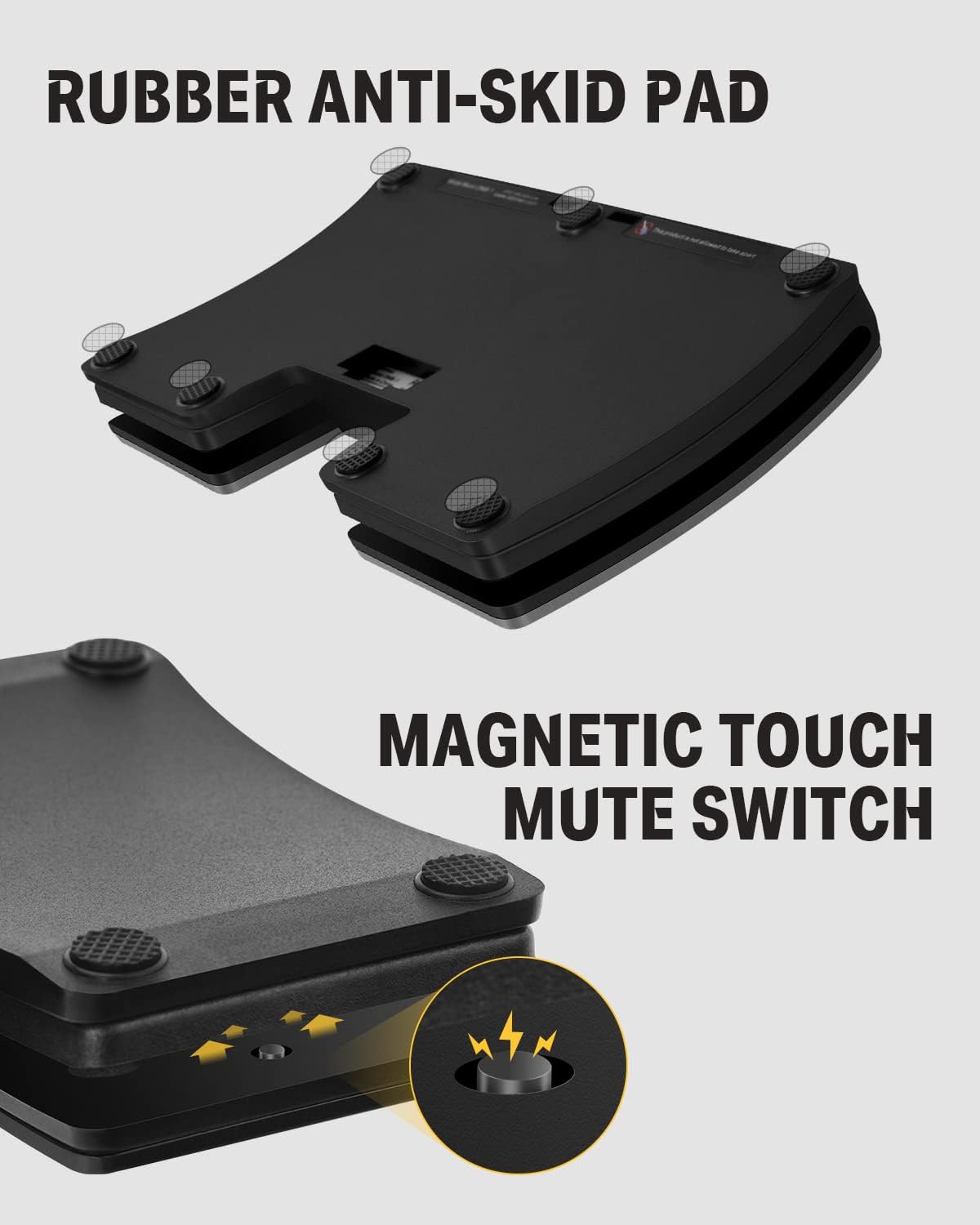
Image: Close-up view of the pedal's underside, showing the rubber anti-skid pads and the magnetic touch mute switch mechanism.
5. Troubleshooting
If you encounter issues with your Donner Bluetooth Page Turner Pedal, consider the following:
- Not Pairing: Ensure Bluetooth is enabled on your device and the pedal is charged. Try restarting both the pedal and your device.
- Intermittent Connection: Check the distance between the pedal and your device; ensure it's within the 30-foot range. Minimize interference from other wireless devices.
- Incorrect Functionality: Verify that the correct mode is selected on the pedal for your application. Refer to the "Modes of Operation" table.
- No Response: Confirm the pedal is powered on and has sufficient battery charge.
For persistent issues, please refer to the official Donner support resources.
6. Specifications
| Feature | Detail |
|---|---|
| Item Weight | 14 ounces |
| Product Dimensions | 8.74 x 7.8 x 1.57 inches |
| Model Number | EC960-1 |
| Color | Silver |
| Compatible Devices | PC, Tablet |
| Hardware Platform | Tablet |
| Operating System | Android |
| Power Source | Battery Powered |
| Connectivity Technology | Bluetooth, Wireless |
| Included Components | USB Cable |

Image: A diagram illustrating the precise dimensions of the Donner Bluetooth Page Turner Pedal in both inches and centimeters.
7. Warranty and Support
For information regarding product warranty, returns, and exchanges, please refer to the retailer's policy at the time of purchase. Donner Music offers a 30-day return and exchange policy through authorized channels.
For additional support and resources, visit the official Donner Store: Donner Store on Amazon.


