
Introduction
The Soundstream SPT.20 Pro Audio Tweeters are designed to deliver clear and crisp high-frequency sound reproduction for your car audio system. These 1-inch aluminum tweeters are built for performance, featuring a 4-ohm impedance and a wide frequency response range. This manual provides essential information for proper installation, operation, and maintenance to ensure optimal performance and longevity of your tweeters.

Image: Front view of a single Soundstream SPT.20 Pro Audio Tweeter, showcasing its design and terminal connections.
Safety Information
Please read all safety instructions before installing or operating the tweeters. Failure to do so may result in personal injury or damage to the product or vehicle.
- Always disconnect the vehicle's battery before performing any electrical work.
- Ensure proper wiring and connections to prevent short circuits or electrical fires.
- Avoid installing tweeters in locations that obstruct driver visibility or interfere with vehicle safety features.
- Professional installation is recommended for optimal safety and performance.
- Do not expose the tweeters to excessive moisture or extreme temperatures.
- This product contains chemicals known to the State of California to cause cancer and birth defects or other reproductive harm (Proposition 65 warning).
Package Contents
Verify that all items are present in the package before beginning installation:
- (2) Soundstream SPT.20 Pro Audio Tweeters
- Wiring
- Mounting Hardware
- Instruction Manual (this document)
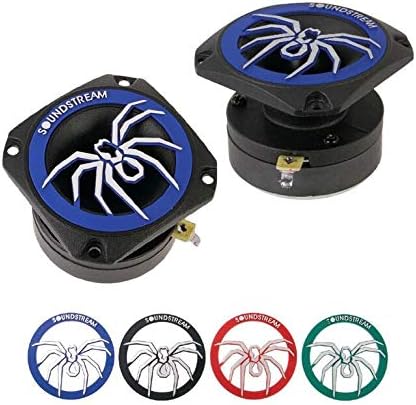
Image: A pair of Soundstream SPT.20 Pro Audio Tweeters, as typically included in the package.
Setup and Installation
Proper installation is crucial for the performance and longevity of your tweeters. It is recommended to have this installation performed by a qualified professional.
Mounting
The SPT.20 tweeters are designed for flush mounting. Choose a mounting location that provides optimal sound dispersion and does not obstruct vehicle operation or safety features. Common locations include door panels, A-pillars, or dashboard. Ensure there is sufficient depth behind the mounting surface for the tweeter body.
- Carefully mark the desired mounting location.
- Cut an appropriate size hole using a hole saw or similar tool, ensuring a snug fit for the tweeter body. Refer to the specifications section for exact dimensions.
- Secure the tweeter in place using the provided mounting hardware.

Image: Side view of the Soundstream SPT.20 tweeter, illustrating the flush mount design and mounting points.
Wiring
The SPT.20 tweeters have a 4-ohm impedance. They should be connected to an appropriate amplifier channel, typically through a passive crossover network (not included) or an active crossover from your head unit or amplifier. Always ensure correct polarity (+ to + and - to -) to prevent phase issues and ensure optimal sound quality.
- Connect the positive (+) terminal of the tweeter to the positive output of your amplifier/crossover.
- Connect the negative (-) terminal of the tweeter to the negative output of your amplifier/crossover.
- Use appropriate gauge wiring for your installation to minimize power loss and ensure stable connections.
Operating Instructions
Once properly installed and connected, the Soundstream SPT.20 tweeters will function as part of your car's audio system. They are designed to reproduce high-frequency audio signals (treble).
- System Power On: Turn on your car's audio system.
- Audio Playback: Play audio through your head unit. The tweeters will reproduce the high-frequency components of the sound.
- Volume Adjustment: Adjust the volume through your head unit or amplifier. Avoid excessively high volumes that cause distortion, as this can damage the tweeters.
- Sound Customization: Use your head unit's or amplifier's equalizer and crossover settings to fine-tune the sound to your preference. Ensure the tweeters are receiving a high-pass filtered signal to prevent damage from low frequencies.
Maintenance
The Soundstream SPT.20 tweeters require minimal maintenance to ensure long-lasting performance.
- Cleaning: Gently wipe the tweeter surface with a soft, dry cloth to remove dust. Do not use harsh chemicals or abrasive cleaners.
- Inspection: Periodically check wiring connections to ensure they are secure and free from corrosion.
- Environmental Protection: Avoid exposing the tweeters to direct sunlight for extended periods or extreme temperatures, which can degrade materials over time.
Troubleshooting
If you experience issues with your Soundstream SPT.20 tweeters, refer to the following common problems and solutions:
| Problem | Possible Cause | Solution |
|---|---|---|
| No sound from tweeters |
|
|
| Distorted or harsh sound |
|
|
| One tweeter not working |
|
|
Specifications
Detailed technical specifications for the Soundstream SPT.20 Pro Audio Tweeters:
| Model Name | SPT.20 |
| Speaker Type | Tweeter |
| Speaker Size | 1 Inch (Aluminum) |
| Max Power Handling | 350 Watts |
| RMS Power Handling | 175 Watts |
| Impedance | 4 Ohms |
| Frequency Response | 2 kHz - 20 kHz |
| Mounting Type | Flush Mount |
| Material | Aluminum |
| Special Feature | Noise Canceling |
| Connectivity Technology | Auxiliary |
| Audio Output Mode | Stereo |
| Number of Items | 2 (Pair) |
| Item Weight (Pair) | 1.2 Pounds |
| Product Dimensions (Package) | 14.5"D x 4"W x 3.2"H |
Warranty Information
The Soundstream SPT.20 Pro Audio Tweeters come with a Limited Warranty. The specific terms and conditions of this warranty are typically provided with the product packaging or can be found on the official Soundstream website. This warranty generally covers manufacturing defects and material flaws under normal use.
Please retain your proof of purchase for any warranty claims. Unauthorized modifications or improper installation may void the warranty.
Customer Support
For further assistance, technical support, or inquiries regarding your Soundstream SPT.20 Pro Audio Tweeters, please contact Soundstream customer service or visit their official website.
- Official Website: www.soundstream.com (Note: This is a placeholder URL, please refer to your product packaging or official documentation for the correct website.)
- Contact Information: Refer to the Soundstream website for current contact details, including phone numbers and email support.


