
Cornelius 75182
Cornelius Aquarian Phoenix 18' x 52" Steel-Frame Above-Ground Pool Kit Instruction Manual
Model: 75182
Introduction
This manual provides essential instructions for the safe and efficient setup, operation, and maintenance of your Cornelius Aquarian Phoenix 18' x 52" Steel-Frame Above-Ground Pool Kit. Please read all instructions carefully before beginning assembly and retain this manual for future reference.
The kit includes an 18-foot diameter, 52-inch high above-ground pool, a sand filter pump, a pool liner, an A-frame ladder, a thru-wall skimmer, and a net cleaner.
Safety Information
WARNING: Failure to follow these instructions can result in serious injury or death. Always supervise children around the pool. Do not dive or jump into the pool. Ensure proper fencing and safety barriers are in place according to local regulations.
- Never leave children unattended in or near the pool.
- Install appropriate safety barriers around the pool.
- Ensure the pool area is well-lit if used at night.
- Keep emergency equipment (e.g., life preserver, shepherd's hook) readily accessible.
- Do not use electrical appliances near the pool.
- Regularly check the pool and equipment for damage or wear.
Setup and Installation
1. Site Preparation
Select a flat, level area for your pool. The ground must be level within an inch to ensure structural integrity and proper water distribution. Clear the area of any sharp objects, rocks, or debris. Consider using a ground cloth or padding for added protection under the liner.

Figure 1: Aquarian Phoenix 18' x 52" Above-Ground Pool.
2. Unpacking and Inventory
Carefully unpack all components and verify that all parts listed in your product manual are present. Refer to the included parts list to identify each item.
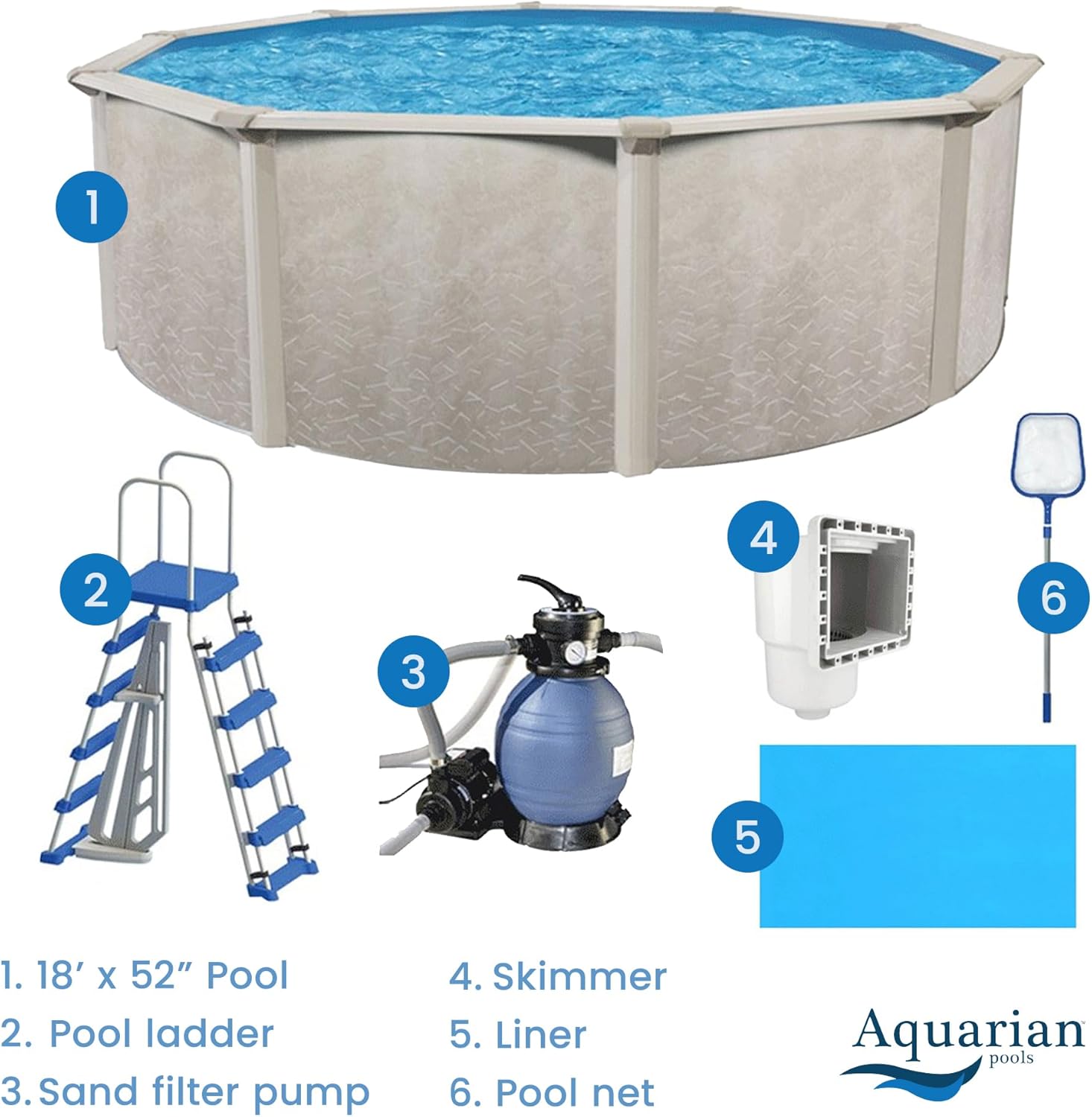
Figure 2: Included components of the pool kit.
3. Pool Wall Assembly
The pool wall is constructed from corrosion-resistant galvanized steel. Unroll the wall carefully into the bottom track. This step typically requires multiple individuals to manage the wall's weight and ensure it remains upright. Secure the ends of the wall as per the detailed instructions in your physical manual.
The pool features 6-inch steel top rails and 5-inch vertical pillars for structural support. High-impact resin connectors and robust steel rails facilitate assembly.

Figure 3: Detail of steel frame construction.
4. Liner Installation
Install the pool liner according to the manufacturer's instructions. Ensure the liner is centered and smooth, with no wrinkles. Begin filling the pool slowly, adjusting the liner as needed to remove any remaining wrinkles.
5. Pump and Skimmer Installation
Connect the sand filter pump and thru-wall skimmer as detailed in their respective manuals. Ensure all connections are secure and watertight. The sand filter pump is designed for efficient water circulation and filtration.

Figure 4: Sand filter pump system.
6. Ladder Assembly
Assemble the A-frame ladder following the provided instructions. Position the ladder securely on a stable surface outside the pool and ensure it is firmly placed inside the pool. Always test the ladder's stability before use.

Figure 5: A-frame pool ladder.
Operation
1. Filling the Pool
Once the liner is installed and smooth, begin filling the pool with water. Monitor the water level and ensure the pool structure remains stable during filling. The pool has a capacity of 8,602 gallons.
2. Filter Pump Operation
Operate the sand filter pump daily to ensure proper water circulation and filtration. Refer to the pump's specific manual for detailed operating instructions, including backwashing and rinsing procedures. The pump helps maintain water clarity and hygiene.
3. Water Chemistry
Regularly test and balance your pool's water chemistry. This includes pH, alkalinity, calcium hardness, and sanitizer levels (e.g., chlorine). Proper water chemistry is crucial for swimmer safety and equipment longevity.
Maintenance
1. Skimming and Cleaning
Use the included net cleaner to remove leaves and debris from the water surface. The thru-wall skimmer will also collect surface debris, reducing the load on your filter system. Empty the skimmer basket regularly.
2. Liner Care
Inspect the pool liner periodically for any signs of wear, tears, or punctures. Address any damage promptly to prevent leaks. Avoid using sharp objects in the pool that could damage the liner.
3. Winterization
Before freezing temperatures arrive, properly winterize your pool according to local guidelines and the instructions in your physical manual. This typically involves lowering the water level, cleaning the pool, adding winterizing chemicals, and disconnecting/storing the pump and filter.
Troubleshooting
| Problem | Possible Cause | Solution |
|---|---|---|
| Water is cloudy or dirty | Insufficient filtration, unbalanced water chemistry, high debris load. | Run filter pump longer, backwash filter, test and adjust water chemistry, skim pool regularly. |
| Water level dropping | Evaporation, splash-out, or a leak in the liner or plumbing. | Check for visible leaks, perform a bucket test for evaporation, inspect liner for punctures. |
| Pump not operating | Power supply issue, clogged impeller, motor malfunction. | Check power connection and circuit breaker, clear any debris from the pump basket and impeller. Consult pump manual for further steps. |
| Ladder feels unstable | Improper assembly, uneven ground, loose connections. | Re-check all connections and ensure they are tightened. Verify the ground beneath the ladder is firm and level. |
Specifications
- Brand: Cornelius
- Model Number: 75182
- Product Dimensions (L x W x H): 216" x 216" x 52" (18 ft diameter, 52 in height)
- Shape: Round
- Capacity: 8,602 Gallons
- Material Type: Alloy Steel, Resin
- Item Weight: 255 Pounds
- Included Components: Pool, Sand Filter Pump, Pool Liner, A-Frame Ladder, Thru-Wall Skimmer, Net Cleaner
- Indoor/Outdoor Usage: Outdoor
Video Resources
Video 1: Overview of the Aquarian Phoenix Steel Frame Above-Ground Pool Kit. This video provides a general visual introduction to the pool and its features, demonstrating its appearance and key components.
Warranty and Support
For specific warranty information, please refer to the documentation included with your product or contact Cornelius customer support directly. If you encounter any issues not covered in this manual, please reach out to the manufacturer's support team for assistance.
Manufacturer: Cornelius
Contact Information: Please refer to the contact details provided in your product packaging or on the official Cornelius website.
Ask a question about this manual
Ask about setup, troubleshooting, compatibility, parts, safety, or missing instructions. Manuals+ will review the question and use this page’s manual context to help answer it.