
1. Introduction
Thank you for choosing the awei A845BL Bluetooth 4.1 Wireless In-Ear Neckband Sports Headphone. This manual provides detailed instructions on how to set up, operate, and maintain your new headphones. Please read this manual carefully before use to ensure optimal performance and longevity of your device.
2. Product Overview
The awei A845BL headphones feature a lightweight neckband design, offering a secure and comfortable fit for sports and active lifestyles. They incorporate Bluetooth 4.1 technology for stable wireless connectivity, stereo audio, and a built-in microphone for hands-free calls. The design also includes noise reduction capabilities for an enhanced listening experience.
2.1 Key Features
- Bluetooth 4.1 for stable wireless connection.
- Stereo sound quality.
- In-ear neckband design for secure fit.
- Built-in microphone for hands-free calling.
- Noise reduction technology.
- Lightweight and comfortable for extended wear.
- Integrated controls for music and calls.
2.2 Product Components
The package typically includes the awei A845BL headphones, ear cushions, and a charging cable. Please check all contents upon unboxing.

Figure 1: awei A845BL Wireless In-Ear Neckband Sports Headphone. This image displays the overall design of the headphones, featuring the black neckband and in-ear components with integrated controls.
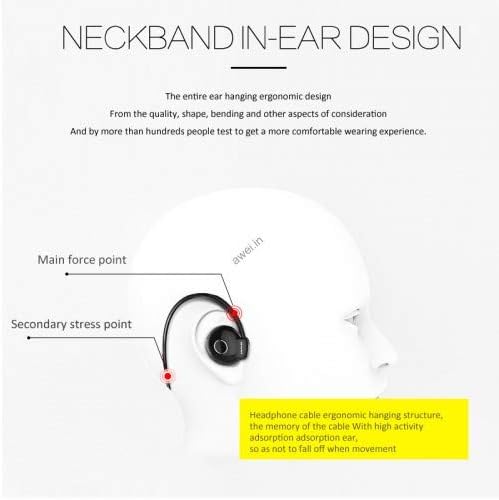
Figure 2: Neckband In-Ear Design. This diagram illustrates the ergonomic design of the neckband and in-ear components, highlighting the main force points and secondary stress points for a secure and comfortable fit during movement.
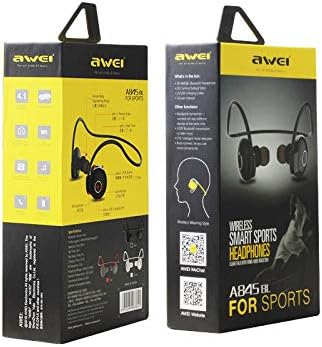
Figure 3: awei A845BL Product Packaging. This image shows the retail packaging of the awei A845BL headphones, displaying branding and key features on the box.
3. Setup
3.1 Charging the Headphones
Before first use, fully charge your awei A845BL headphones. Use the provided charging cable to connect the headphones to a USB power source (e.g., computer USB port, wall adapter).
- Charging Time: Approximately 2 hours for a full charge.
- Battery Capacity: 100mAh.
- Playing Time: Up to 8 hours on a full charge.
- Standby Time: Up to 200 hours.
The LED indicator on the headphones will typically show red during charging and turn blue or off when fully charged. Refer to the specific LED behavior in your product's quick start guide if available.
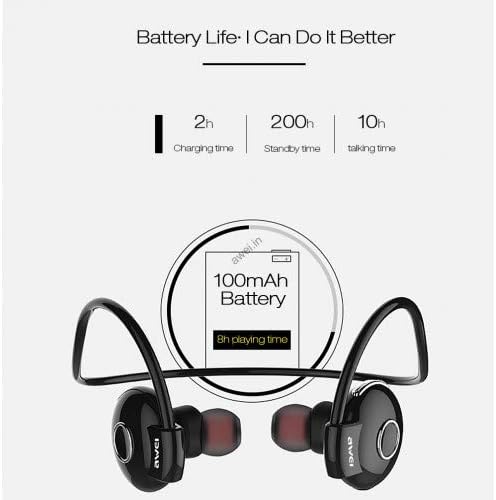
Figure 4: Battery Life Information. This graphic details the battery specifications, including a 2-hour charging time, 200-hour standby time, 10-hour talk time, and 8-hour playing time from a 100mAh battery.
3.2 Pairing with a Bluetooth Device
- Ensure the headphones are fully charged and turned off.
- Press and hold the Multi-function button (usually the power button) on the headphones for approximately 5-7 seconds until the LED indicator flashes red and blue alternately. This indicates pairing mode.
- On your mobile phone or Bluetooth-enabled device, go to the Bluetooth settings and turn Bluetooth on.
- Search for available devices. You should see "AWEI A845BL" or a similar name appear in the list.
- Select "AWEI A845BL" to connect. Once successfully paired, the LED indicator on the headphones will typically flash blue slowly or turn off, and you may hear an audible confirmation.
- If prompted for a password, enter "0000" (four zeros).
The headphones will automatically attempt to reconnect to the last paired device when turned on, if the device's Bluetooth is active and within range.
4. Operating Instructions
4.1 Power On/Off
- Power On: Press and hold the Multi-function button for about 3 seconds until the LED flashes blue and you hear a power-on prompt.
- Power Off: Press and hold the Multi-function button for about 3-4 seconds until the LED flashes red and you hear a power-off prompt.
4.2 Music Playback
- Play/Pause: Press the Multi-function button once.
- Next Track: Press and hold the Volume Up (+) button.
- Previous Track: Press and hold the Volume Down (-) button.
- Volume Up: Press the Volume Up (+) button briefly.
- Volume Down: Press the Volume Down (-) button briefly.
4.3 Phone Calls
- Answer Call: Press the Multi-function button once when a call comes in.
- End Call: Press the Multi-function button once during a call.
- Reject Call: Press and hold the Multi-function button for about 2 seconds when a call comes in.
- Redial Last Number: Double-press the Multi-function button when not on a call.
5. Maintenance
Proper maintenance ensures the longevity and performance of your headphones.
- Cleaning: Use a soft, dry cloth to clean the headphones. Do not use harsh chemicals or abrasive materials.
- Storage: Store the headphones in a cool, dry place away from direct sunlight and extreme temperatures.
- Water Exposure: While designed for sports, avoid submerging the headphones in water. Wipe off sweat immediately after use.
- Charging: Only use the provided charging cable or a certified equivalent. Avoid overcharging.
6. Troubleshooting
If you encounter issues with your awei A845BL headphones, refer to the following common solutions:
- Headphones not turning on: Ensure the headphones are fully charged.
- Cannot pair with device:
- Ensure the headphones are in pairing mode (flashing red and blue).
- Make sure Bluetooth is enabled on your device.
- Move the headphones closer to your device.
- Turn off and on both the headphones and your device's Bluetooth.
- Clear previous Bluetooth connections on your device and try pairing again.
- No sound or intermittent sound:
- Check the volume levels on both the headphones and your connected device.
- Ensure the headphones are within the effective Bluetooth range (typically 10 meters/33 feet).
- Restart both devices.
- Ensure there are no strong interferences (e.g., Wi-Fi routers, other Bluetooth devices) nearby.
- Microphone not working:
- Ensure the headphones are properly connected and selected as the audio input device on your phone.
- Check for any obstructions covering the microphone.
7. Specifications
| Model Number | A845BL |
| Brand | awei |
| Connectivity Technology | Wireless (Bluetooth 4.1) |
| Ear Placement | In-Ear (with Over-Ear hook design) |
| Form Factor | In Ear |
| Noise Control | Active Noise Cancellation (ANC) |
| Microphone | Included |
| Battery Capacity | 100 mAh |
| Charging Time | Approx. 2 hours |
| Music Playback Time | Up to 8 hours |
| Standby Time | Up to 200 hours |
| Color | Black |
| Package Dimensions | 16.4 x 9.8 x 4.4 cm |
| Item Weight | 140 g |
8. Warranty and Support
For warranty information and customer support, please refer to the documentation included with your purchase or contact the retailer where the product was acquired. Keep your proof of purchase for any warranty claims.