
Omron D4GS-NK1
OMRON D4GS-NK1 Slim Safety Door Switch Instruction Manual
Model: D4GS-NK1 | Brand: Omron
1. Introduction
The OMRON D4GS-NK1 is a slim safety door switch designed to monitor the open/closed status of safety doors, gates, and covers on machinery. It plays a critical role in ensuring operator safety by preventing machine operation when a protective barrier is not properly closed. This manual provides essential information for the safe and correct installation, operation, and maintenance of the D4GS-NK1 switch.

Figure 1: OMRON D4GS-NK1 Slim Safety Door Switch. This image shows the compact design of the safety door switch, featuring its metallic body and two red-ringed mounting points.
2. Safety Information
Read and understand all instructions before installing, operating, or performing maintenance on the D4GS-NK1 switch. Failure to follow these instructions may result in serious injury or death, and damage to equipment.
- Qualified Personnel Only: Installation and maintenance should only be performed by qualified and authorized personnel familiar with electrical wiring and safety standards.
- Disconnect Power: Always disconnect all power to the machine before performing any installation, wiring, or maintenance.
- Proper Wiring: Ensure all wiring is correct and secure according to local electrical codes and the provided wiring diagrams.
- Intended Use: Use this product only for its intended purpose as a safety door switch. Do not modify the switch or use it for applications outside its specified ratings.
- Regular Inspection: Periodically inspect the switch and its wiring for damage or wear. Replace damaged components immediately.
3. Setup and Installation
Proper installation is crucial for the reliable operation of the safety door switch.
3.1 Mounting
- Identify a suitable mounting location on the machine frame and the movable guard/door, ensuring proper alignment between the switch body and its actuator.
- Mount the switch body securely using appropriate fasteners. Refer to the dimensional drawing for mounting hole specifications.
- Mount the actuator (if separate) on the movable guard/door so that it engages with the switch body when the guard is closed. Ensure the actuator enters the switch correctly and fully.
- Verify that the switch operates reliably across the full range of door movement.
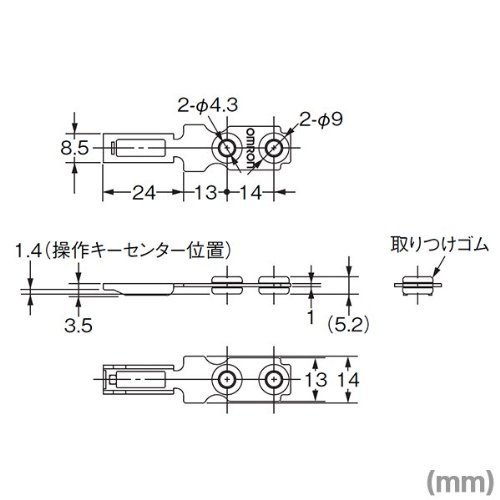
Figure 2: Dimensional drawing of the OMRON D4GS-NK1. This diagram provides precise measurements in millimeters for mounting and integration, including hole diameters and overall dimensions.
3.2 Wiring
- Connect the switch terminals to the machine's safety circuit according to the machine manufacturer's wiring diagram and relevant safety standards.
- Ensure all connections are tight and secure. The D4GS-NK1 uses screw terminals for wiring.
- Verify correct polarity and voltage supply.
4. Operating Instructions
The OMRON D4GS-NK1 operates as a limit switch, detecting the presence or absence of its actuator. When the safety door is closed, the actuator engages the switch, allowing the machine to operate. When the safety door is opened, the actuator disengages, causing the switch to open its safety contacts and stop machine operation.
4.1 Functional Check
- With the machine power on (but in a safe, non-operating state), close the safety door and ensure the machine's safety circuit indicates a 'safe' condition.
- Slowly open the safety door. The machine's safety circuit should immediately indicate an 'unsafe' condition, preventing or stopping machine operation.
- Repeat this test periodically as part of your machine's safety protocol.
5. Maintenance
Regular maintenance ensures the longevity and reliable operation of the safety door switch.
- Visual Inspection: Periodically check the switch body, actuator, and wiring for any signs of physical damage, corrosion, or excessive wear.
- Cleaning: Keep the switch free from dust, dirt, and debris. Use a soft, dry cloth for cleaning. Avoid using harsh chemicals or abrasive materials.
- Connection Check: Ensure all screw terminals are tight and that wires are securely connected. Loose connections can lead to intermittent operation or failure.
- Actuator Alignment: Verify that the actuator aligns correctly with the switch entry point. Misalignment can cause premature wear or unreliable operation.
6. Troubleshooting
If the safety door switch is not functioning as expected, perform the following basic checks:
- Switch Not Activating:
- Check for proper alignment of the actuator with the switch.
- Ensure the actuator is fully engaging the switch when the door is closed.
- Inspect the switch for physical damage.
- Intermittent Operation:
- Verify all wiring connections are secure and free from corrosion.
- Check for excessive vibration that might affect switch engagement.
- No Power to Switch:
- Confirm power supply to the safety circuit.
- Check fuses or circuit breakers in the control panel.
If issues persist after performing these checks, consult a qualified technician or contact Omron support.
7. Specifications
| Feature | Detail |
|---|---|
| Model Number | D4GS-NK1 |
| Product Dimensions | 3.94 x 7.87 x 11.81 inches; 0.32 ounces |
| Operation Mode | Manual |
| Connector Type | Screw |
| Terminal | Screw |
| Circuit Type | 1-way |
| Actuator Type | Push Button |
| Contact Material | Copper |
| International Protection Rating | IP00 |
| Number of Positions | 1 |
| Manufacturer | OMRON |
8. Warranty and Support
This OMRON product is subject to the seller's return policy, which typically includes a 30-day refund/replacement period from the date of purchase. For specific warranty details, please refer to the terms and conditions provided by your point of purchase.
For technical support, product inquiries, or further assistance, please visit the official Omron website or contact your local Omron distributor. You can also find more information on the Omron Store on Amazon.
Related documentsD4GS-NK1


Ask a question about this manual
Ask about setup, troubleshooting, compatibility, parts, safety, or missing instructions. Manuals+ will review the question and use this page’s manual context to help answer it.