
PerfectPrime GA0080
PerfectPrime GA0080 Portable Gas Leak Detector User Manual
Model: GA0080
1. Introduction
The PerfectPrime GA0080 is a portable gas leak detector designed to identify the presence of natural gas (NG), methane, propane, and butane. This device utilizes a catalytic method gas sensor to provide a quick and reliable indication of gas leaks, enhancing safety in residential and commercial environments. It features a visible LED alarm system and a clear display for gas concentration readings.
2. Important Safety Information
Please read all instructions carefully before using the PerfectPrime GA0080. Failure to follow these instructions may result in inaccurate readings, property damage, or personal injury.
- This device is intended for detecting combustible gases such as natural gas, methane, propane, and butane. It is not designed to detect carbon monoxide or other toxic gases.
- Do not expose the device to extreme temperatures, humidity, or direct sunlight.
- Keep the device away from strong electromagnetic fields.
- Do not attempt to repair or modify the device. Refer all servicing to qualified personnel.
- Ensure proper ventilation when investigating a gas leak. If a significant leak is suspected, evacuate the area, shut off the gas supply, and contact emergency services.
- Always replace batteries with new ones of the specified type (AA 1.5V).
3. Package Contents
Verify that all items are present in your package:
- PerfectPrime GA0080 Portable Gas Leak Detector
- User Manual
- Note: 2 x AA 1.5V batteries are required and typically not included.
4. Product Overview
Familiarize yourself with the components of your GA0080 gas leak detector.

Figure 4.1: Overall view of the PerfectPrime GA0080 Portable Gas Leak Detector, highlighting the digital display and power button.

Figure 4.2: Close-up of the sensor end of the GA0080, showing the protective grille and ventilation holes for gas detection.
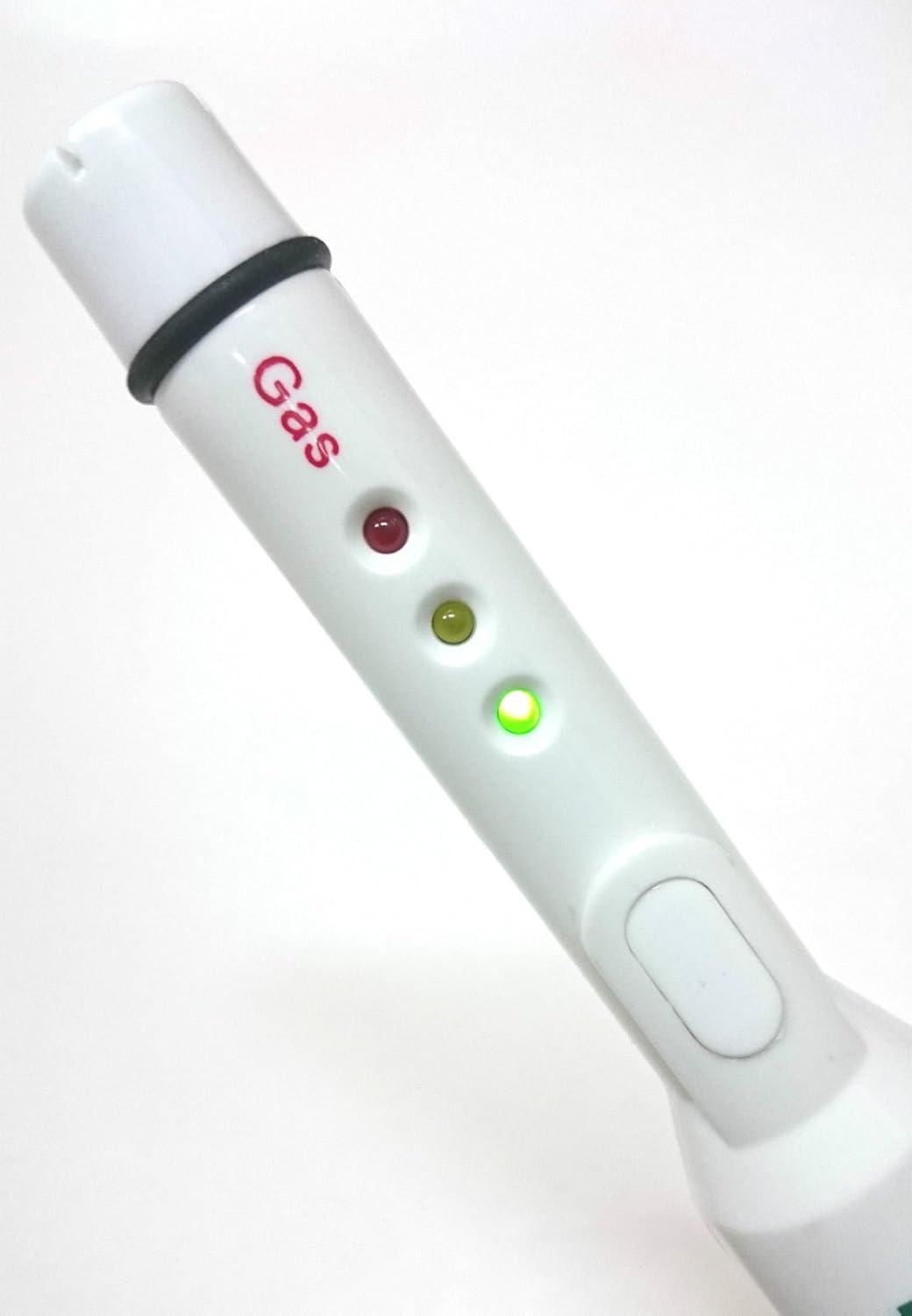
Figure 4.3: Side view of the GA0080, illustrating the three LED indicators (green, yellow, red) for visual alarm signals.
- Sensor Head: Located at the tip, responsible for detecting gas.
- Digital Display: Shows gas concentration in ppm.
- Power Button: Turns the device on/off.
- LED Indicators: Provide visual alarm signals (Green, Yellow, Red).
- Battery Compartment: Houses two AA 1.5V batteries.
5. Setup
5.1 Battery Installation
- Locate the battery compartment cover on the back of the device.
- Slide or unclip the cover to open the compartment.
- Insert two (2) AA 1.5V batteries, ensuring correct polarity (+/-).
- Close the battery compartment cover securely.
Note: Always use fresh batteries for optimal performance. Remove batteries if the device will not be used for an extended period.
6. Operation
6.1 Powering On and Warm-up
- Press and hold the Power button until the device turns on.
- The device will enter a warm-up phase, which takes approximately 200 seconds. During this time, the display may show a countdown or "Warm Up".
- Once warm-up is complete, the device is ready for use, and the display will show "0 ppm" or a low background reading.
6.2 Detecting Gas Leaks
- Move the sensor head slowly along gas lines, connections, and potential leak points.
- The device detects gas in the range of 0 to 9999 ppm with a resolution of 100 ppm.
- Visual Alarm Indicators:
- Green LED: Indicates normal operation or very low gas levels.
- Yellow LED: Illuminates when gas concentration reaches approximately 2% LEL (Lower Explosive Limit), indicating a potential leak.
- Red LED: Illuminates when gas concentration reaches approximately 10% LEL, indicating a significant leak and a higher risk.
- An audible alarm (2.713kHz / 100ms) will also sound when gas levels exceed the alarm thresholds.
- The digital display will show the detected gas concentration in parts per million (ppm).
6.3 Powering Off
Press and hold the Power button until the device turns off.
7. Maintenance
- Cleaning: Wipe the device with a soft, dry cloth. Do not use abrasive cleaners or solvents.
- Storage: Store the device in a cool, dry place away from direct sunlight and extreme temperatures. Remove batteries if storing for extended periods.
- Sensor Care: Avoid exposing the sensor head to liquids, dust, or harsh chemicals, as this can affect its accuracy and lifespan.
8. Troubleshooting
| Problem | Possible Cause | Solution |
|---|---|---|
| Device does not power on. | Dead or incorrectly installed batteries. | Replace batteries with new AA 1.5V batteries, ensuring correct polarity. |
| Inaccurate or inconsistent readings. | Sensor not fully warmed up; sensor contamination; low battery. | Allow full warm-up time (200 seconds). Ensure sensor head is clean. Replace batteries. |
| Device constantly alarms in a clean environment. | High background gas levels; sensor malfunction. | Move to a well-ventilated area to check if the alarm stops. If the issue persists, contact customer support. |
| No alarm when gas is present. | Gas concentration below alarm threshold; device malfunction. | Ensure gas concentration is sufficient to trigger an alarm (2% LEL for yellow, 10% LEL for red). Test with a known gas source if safe to do so. Contact customer support if malfunction is suspected. |
9. Specifications
| Detection Gases | Natural Gas (NG), Methane, Propane, Butane |
| Sensor Type | Catalytic Method Gas Sensor |
| Warm-up Time | Within 200 seconds |
| Detection Range | 0 ~ 9999 ppm |
| Resolution | 100 ppm |
| Alarm LED | Three colors (Green, Yellow, Red) |
| Alarm Thresholds | Yellow LED: ~2% LEL; Red LED: ~10% LEL |
| Audible Alarm | 2.713kHz / 100ms |
| Working Temperature | -20°C ~ 70°C (-4°F ~ 158°F) |
| Working Humidity | Less than 90% RH |
| Power Source | 2 x AA 1.5V Batteries (not included) |
| Dimensions (L x W x H) | 220 x 20 x 20 mm (8.66" x 0.79" x 0.79") |
| Weight | Approx. 80g (2.82 oz) |
10. Warranty and Support
For warranty information or technical support, please contact PerfectPrime customer service. Refer to the product packaging or the official PerfectPrime website for the most current contact details.
Website: www.perfectprime.com
Ask a question about this manual
Ask about setup, troubleshooting, compatibility, parts, safety, or missing instructions. Manuals+ will review the question and use this page’s manual context to help answer it.