
1. Product Overview
The Ingenuity Boutique Collection Plush Modern Baby Rocker & Stationary Seat is designed to provide comfort and entertainment for infants and toddlers. This versatile seat offers multiple recline positions, gentle vibrations, nature sounds, and melodies. It can function as a rocking seat or be converted into a stationary seat. The design emphasizes plush fabrics and easy portability with its flat-folding feature.

Image: The Ingenuity Bella Teddy Rocker and Stationary Seat with a baby comfortably seated.
Key Features:
- Premium, plush fabrics for softness.
- Converts from a rocking seat to a stationary seat.
- Three distinct recline positions for baby's comfort.
- Features soothing vibrations, music, and nature sounds with volume control.
- Includes an adorable character headrest for smaller babies, removable as baby grows.
- Removable toy bar for easy access.
- Folds flat for compact storage and transport.
- Wipeable fabrics for easy cleaning.
Video: An overview of the Ingenuity Boutique Collection Rocking Seat, highlighting its features and design.
2. Safety Information
Read all instructions before assembly and use of the product. Keep this instruction manual for future reference. Failure to follow these warnings and instructions could result in serious injury or death.
- WARNING: Never leave child unattended.
- WARNING: Always use the restraint system.
- WARNING: This product is not intended for prolonged periods of sleep.
- WARNING: Do not use this product once your child can sit up unaided or weighs more than 40 lbs (18 kg), whichever comes first.
- WARNING: Do not move or lift this product with the child inside.
- WARNING: Always place the product on a flat, level surface.
- WARNING: Discontinue use if any components are broken or missing.
- WARNING: Keep children away from the product during assembly and disassembly.
3. Parts List
Ensure all parts are present before beginning assembly. If any parts are missing or damaged, do not use the product and contact customer support.
- Main Frame Assembly
- Seat Pad
- Infant Headrest
- Toy Bar with Hanging Toys
- Vibration/Sound Unit (integrated into seat)
- Harness System

Image: The Ingenuity Bella Teddy Rocker and Stationary Seat, showing all its components.
4. Setup Instructions
4.1 Assembly
- Unfold the main frame until it locks into place.
- Attach the seat pad to the frame, ensuring all snaps and loops are securely fastened.
- Insert the infant headrest into the designated slots on the seat pad.
- Attach the toy bar to the frame by aligning the connectors and pressing firmly until it clicks.

Image: A baby seated in the fully assembled Ingenuity Bella Teddy Rocker.
4.2 Battery Installation
- Locate the battery compartment on the underside of the vibration/sound unit, typically found at the front of the seat.
- Using a screwdriver, open the battery compartment cover.
- Insert the required batteries (check product label for type and quantity, usually C batteries), ensuring correct polarity (+/-).
- Replace the battery compartment cover and secure it with the screw.
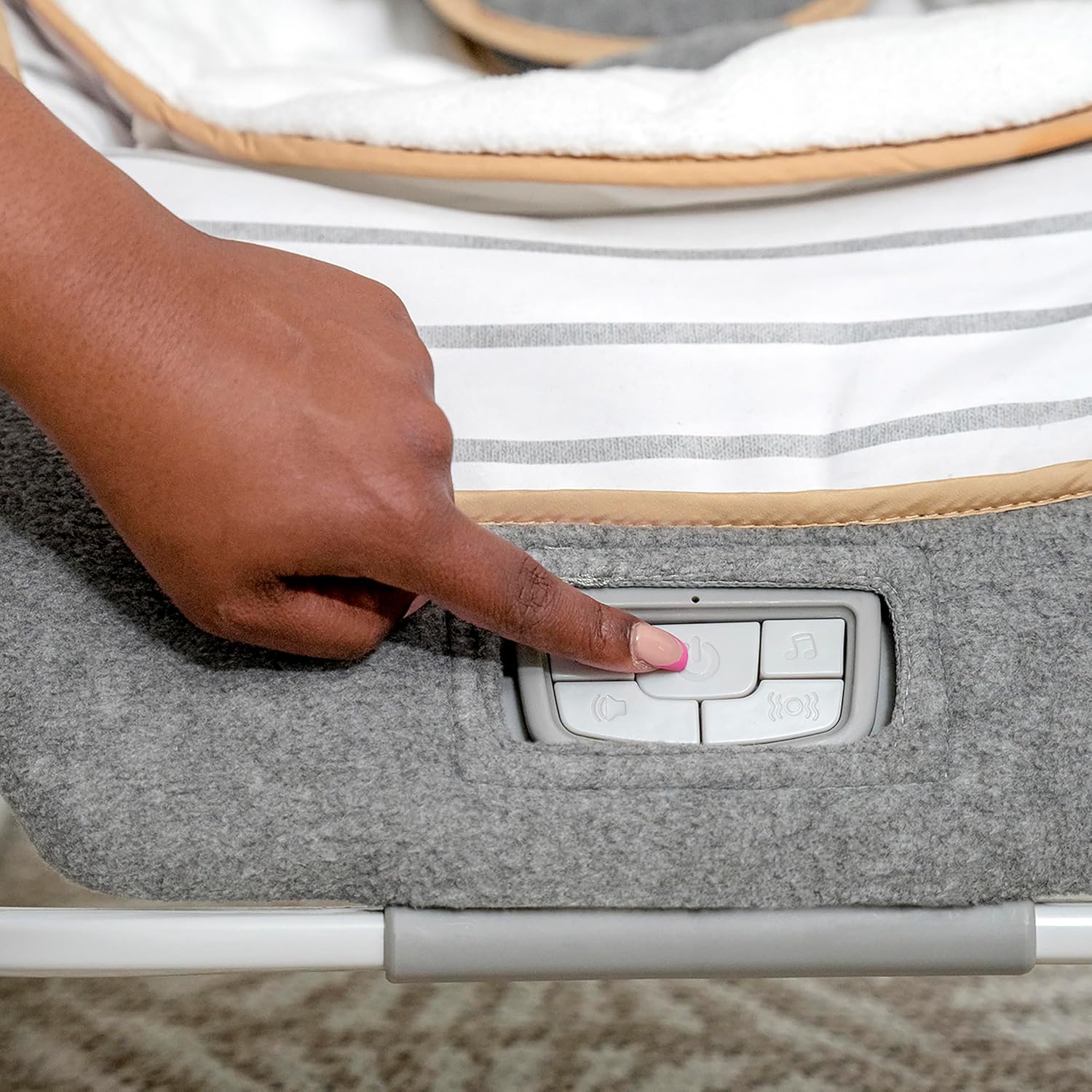
Image: A hand interacting with the control panel for the vibration and sound features.
5. Operating Instructions
5.1 Rocker Mode
To use the product in rocker mode, ensure the kickstand at the base is retracted. The curved base allows for gentle rocking motion, which can be initiated manually.
5.2 Stationary Seat Mode
To convert to a stationary seat, extend the kickstand at the base until it locks into position. This will prevent the seat from rocking.

Image: A toddler using the Ingenuity Bella Teddy Rocker in its stationary seat configuration.
5.3 Recline Positions
The seat offers three distinct recline positions. To adjust, locate the recline adjustment mechanism (usually levers or buttons on the side of the frame) and simultaneously press/lift while moving the seat to the desired position. Ensure it locks securely before placing the child in the seat.

Image: Visual representation of the three recline positions available on the rocker.
5.4 Vibration and Sound Functions
The integrated control panel allows you to activate gentle vibrations, play nature sounds, and various melodies. Use the dedicated buttons to turn the unit on/off, adjust volume, and cycle through sound options. Refer to the icons on the control panel for specific functions.
Video: Demonstration of the vibration and sound functions of the Ingenuity Bella Teddy Rocker.
5.5 Toy Bar Usage
The toy bar can be easily attached or removed. To attach, align the connectors and push until it clicks. To remove, press the release buttons (if present) or pull firmly upwards. The hanging toys provide visual and tactile stimulation for the child.

Image: A close-up view of the toy bar with its hanging toys.
Video: A demonstration of how to remove the toy bar from the rocker.
6. Folding and Storage
The Ingenuity Rocker is designed to fold almost completely flat for convenient storage and transport. Locate the folding mechanisms (typically buttons or levers on the side of the frame) and follow the instructions to collapse the frame. Ensure all parts are securely folded before moving or storing.
Video: A demonstration of the easy folding mechanism for storage and transport.
7. Care and Maintenance
7.1 Cleaning Instructions
The seat pad and headrest are machine washable. Remove them from the frame according to the assembly instructions. Wash with cold water on a gentle cycle. Do not bleach. Tumble dry on low heat. The frame and plastic parts can be wiped clean with a damp cloth and mild soap. Do not immerse the vibration/sound unit in water.

Image: A close-up view of the plush fabric and harness system, highlighting the materials.
8. Troubleshooting
If you encounter any issues with your Ingenuity Rocker, please refer to the table below for common problems and solutions.
| Issue | Possible Cause | Solution |
|---|---|---|
| Vibrations/Sounds not working | Dead or incorrectly installed batteries. Unit not turned on. | Check and replace batteries if necessary. Ensure the power button is pressed. |
| Rocker feels unstable | Frame not fully locked. Kickstand not properly engaged/disengaged. | Ensure all frame components are securely locked. Verify kickstand position for desired mode. |
| Baby slides down in seat | Harness not properly adjusted or too loose. | Adjust the harness straps to be snug against the child's body. Ensure the crotch strap is positioned correctly. |
| Toy bar detaches easily | Not securely attached. | Ensure the toy bar connectors are fully engaged and clicked into place. |
9. Product Specifications
- Brand: Ingenuity
- Model Number: 10986-3-W11
- Color: Bella Teddy
- Material Type: Polyester, Metal, Plastic
- Item Weight: 3.18 kg (7 lbs)
- Item Dimensions (D x W x H): 17.2"D x 30.75"W x 29.2"H (43.7cm D x 78.1cm W x 74.2cm H)
- Maximum Weight Recommendation: 40 lbs (18 kg)
- Age Range Description: 0-30 Months

Image: A visual guide to the product's dimensions and weight/age limits.
10. Warranty and Support
10.1 Warranty Information
This product is covered by a manufacturer's warranty. Please refer to the warranty card included with your purchase or visit the official Ingenuity website for detailed information regarding warranty terms, conditions, and registration.
10.2 Customer Support
For further assistance, technical support, or to inquire about replacement parts, please contact Ingenuity customer service. You can find contact information and frequently asked questions on the official Ingenuity website:


