Introduction
The Emerson Sensi Touch Wi-Fi Smart Thermostat is designed to provide precise temperature control and energy efficiency for your home's HVAC system. With its intuitive touchscreen interface and smart features, you can manage your home comfort from anywhere using the Sensi mobile app. This manual provides essential information for installation, operation, maintenance, and troubleshooting to ensure optimal performance of your thermostat.

Figure 1: Emerson Sensi Touch Wi-Fi Smart Thermostat
Key Features
- Privacy Protection: Sensi does not sell your personal information to third parties.
- Easy DIY Installation: Features a built-in level, illuminated easy-click terminals, and step-by-step app instructions for simplified setup.
- Energy Savings: ENERGY STAR-certified, capable of helping save approximately 23% on HVAC energy through flexible scheduling, remote access, and usage reports.
- Sleek, Modern Design: Large color touchscreen display with easy-to-read temperatures and intuitive menus.
- Control From Anywhere: Remotely manage your home comfort using the Sensi mobile app for Android and iOS devices.
- Smart Maintenance: Monitors HVAC system performance and efficiency, providing usage reports, equipment alerts, and maintenance reminders.
Setup and Installation
Compatibility Requirements
The Sensi Touch Wi-Fi Smart Thermostat is compatible with most conventional heating and cooling systems, including gas furnaces, air conditioners, electric furnaces, boilers, heat pumps, dual fuel, and geothermal systems. A common wire (c-wire) is required for all functions. It is not compatible with line voltage systems or millivolt (mV) systems. Sensi thermostat is rated for 20-30 VAC.

Figure 2: HVAC System Compatibility Overview
Included Components
Your Sensi Touch Wi-Fi Smart Thermostat package includes the following items:
- Sensi Touch Wi-Fi Smart Thermostat
- Installation Guide
- Mounting Hardware (screws and anchors)
- Owner's Manual
- Warranty Booklet

Figure 3: Included Components
Installation Steps
For detailed, step-by-step installation instructions, it is highly recommended to use the Sensi mobile app. The app provides a guided process, including wiring diagrams specific to your existing setup. A common wire (c-wire) is required for the thermostat to function. If your system does not have a c-wire, consult a qualified HVAC professional or refer to the detailed installation guide for alternative solutions.

Figure 4: Easy DIY Installation
Wi-Fi Connectivity
The Sensi Touch thermostat connects to your home Wi-Fi network for remote control and smart features. Ensure your router is compatible. Some common compatible router manufacturers include Actiontec, ARRIS, ASUS, Cisco, Mikrotik, and Open Mesh. If you encounter connectivity issues, refer to the router compatibility list or contact customer support.
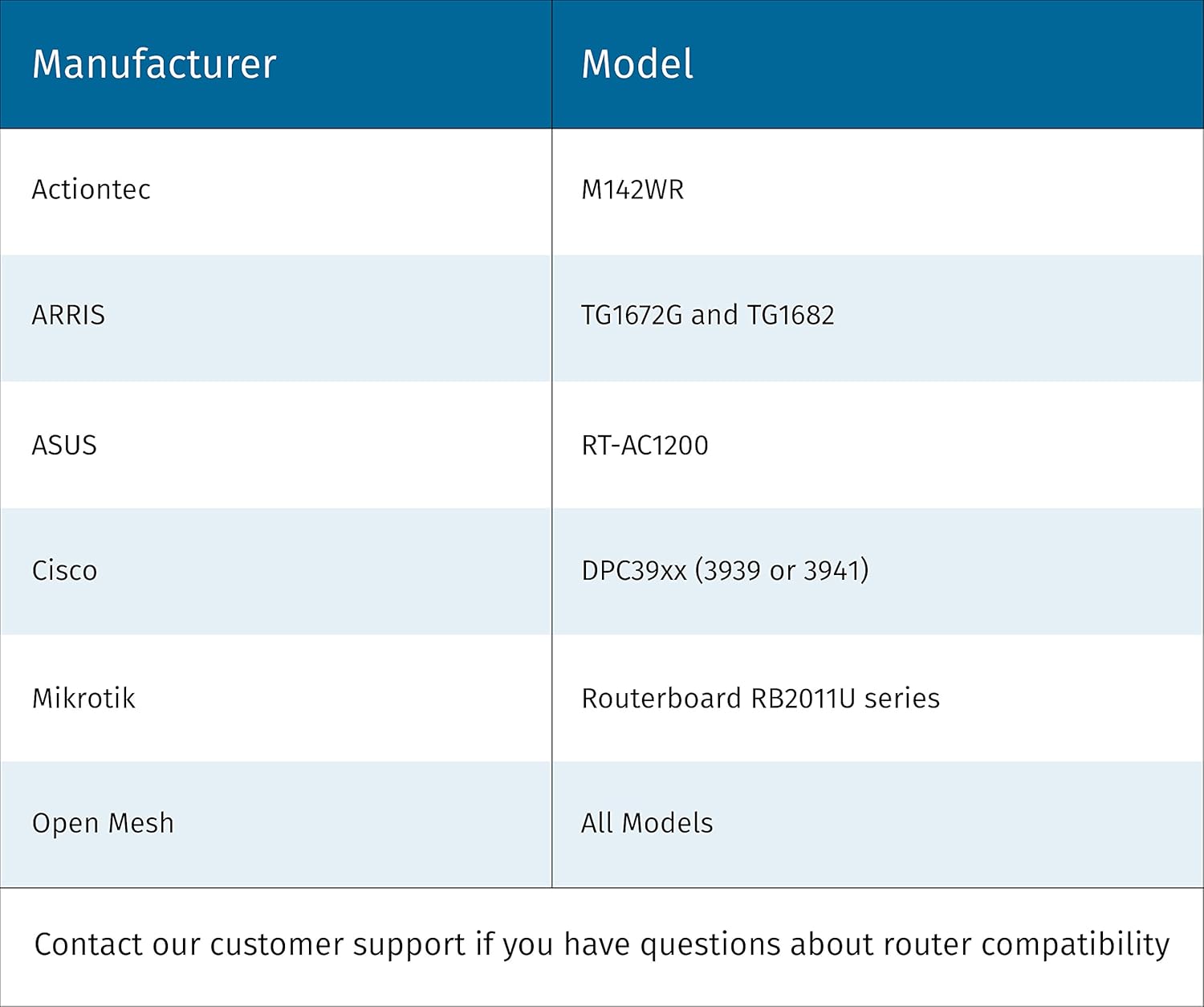
Figure 5: Router Compatibility
Operating Instructions
Touchscreen Interface
The thermostat features a responsive color touchscreen display. You can adjust temperature settings, switch between modes (Heat, Cool, Auto, Off), and control the fan (Auto, On) directly from the screen. The display also shows current time, humidity, and set temperature.
Remote Control via Sensi App
Download the Sensi mobile app from the App Store (iOS) or Google Play (Android) to control your thermostat from anywhere. The app allows you to:
- Adjust temperature settings remotely.
- Create and manage flexible schedules.
- View usage reports to monitor energy consumption.
- Receive alerts and reminders.

Figure 6: Remote Control via Sensi App
Smart Home Integration
The Sensi Touch thermostat seamlessly integrates with popular smart home platforms, including Amazon Alexa, Apple HomeKit, Google Assistant, SmartThings, and Vera. This allows for voice control and inclusion in broader home automation routines.

Figure 7: Smart Home Platform Integration
Energy Saving Features
Utilize the thermostat's programmable scheduling and remote access features to optimize your HVAC usage and save energy. The Energy Star certification indicates its efficiency in reducing energy consumption.
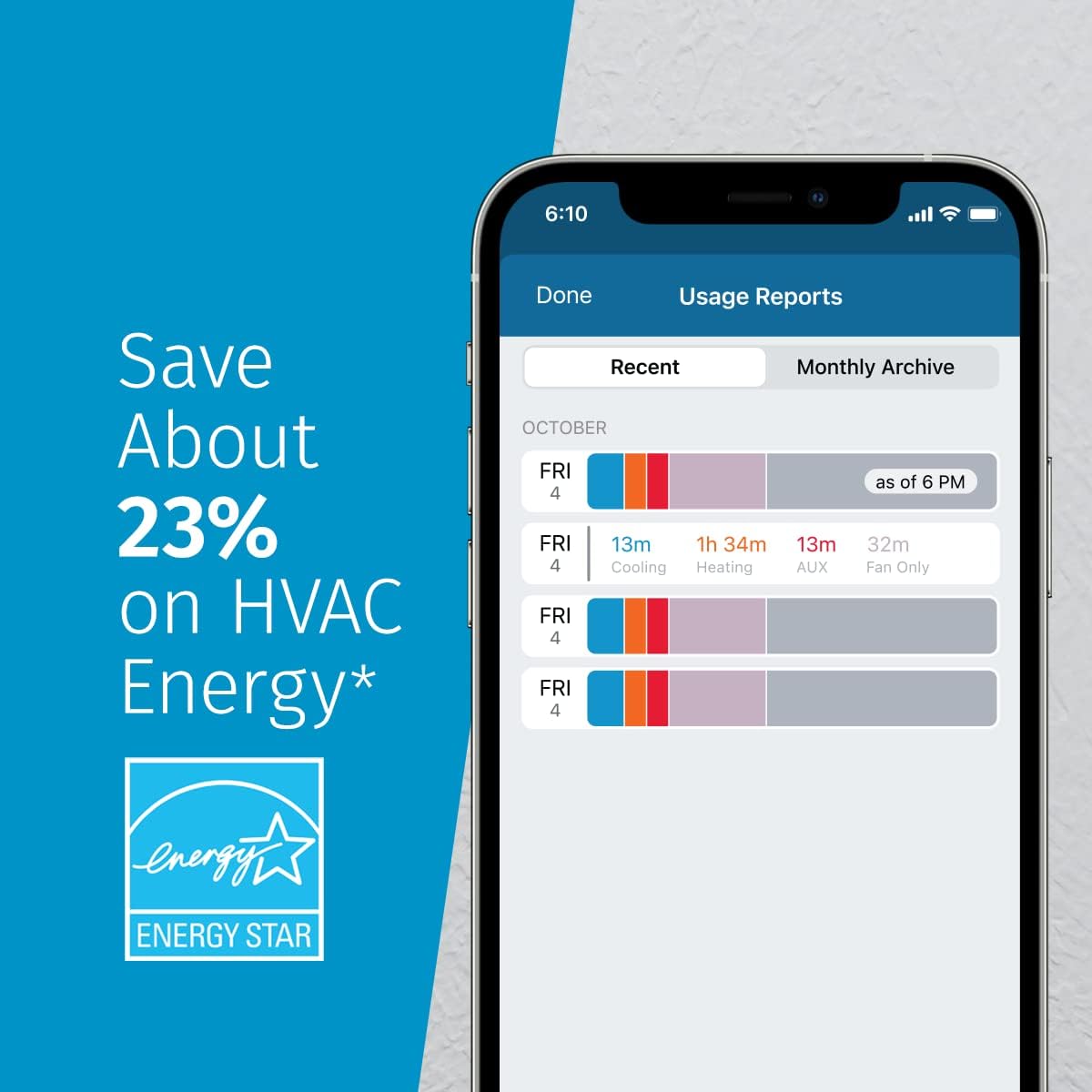
Figure 8: Energy Savings Features
Privacy Protection
Emerson is committed to protecting your privacy. Sensi thermostats are designed with data privacy in mind, ensuring your personal information is not sold to third parties and thermostat activity data is not used for targeting or advertising purposes.

Figure 9: Data Privacy Commitment
Maintenance
The Sensi Touch thermostat offers smart maintenance features to help you keep your HVAC system running efficiently. It provides valuable usage reports, alerts about your equipment's performance, and reminders for routine maintenance tasks such as filter replacement. Regularly check the Sensi app for these notifications.
For general cleaning, gently wipe the touchscreen and exterior with a soft, damp cloth. Avoid using abrasive cleaners or solvents.
Troubleshooting
If you experience issues with your Sensi Touch thermostat, consider the following common troubleshooting steps:
- No Power/Display Off: Ensure the c-wire is properly connected and receiving power. Check your circuit breaker.
- Wi-Fi Disconnection: Verify your home Wi-Fi network is active and the thermostat is within range. Try restarting your router. Reconnect the thermostat to Wi-Fi via the Sensi app's setup process.
- Incorrect Temperature Readings: Ensure the thermostat is not exposed to direct sunlight, drafts, or heat sources that could affect its internal sensor.
- HVAC System Not Responding: Check all wiring connections at the thermostat and your HVAC system. Ensure the system mode (Heat/Cool/Off) is correctly selected.
For persistent issues or complex problems, refer to the detailed User Manual or contact Emerson customer support.
Specifications
| Attribute | Value |
|---|---|
| Brand | Emerson |
| Model Name | Touch Wi-Fi Thermostat |
| Product Dimensions | 1.17"D x 5.63"W x 3.2"H |
| Controller Type | Amazon Alexa, Apple HomeKit, Google Assistant, SmartThings, Vera |
| Special Feature | Auto Changeover, Daylight Savings Time Ready, Filter Indicator, Geofence Technology, Programmable |
| Color | Black |
| Specific Uses For Product | Air Conditioner, Boiler, Furnace, Heat Pump |
| Temperature Control Type | programmable |
| Connectivity Technology | Wi-Fi |
| Included Components | Installation Guide, Mounting Hardware, Owner's Manual, Thermostat, Warranty Booklet |
| Power Source | AC/DC |
| Item Weight | 0.85 Pounds |
| Voltage | 30 Volts |
| Material | Plastic |
| Shape | Rectangular |
| Display Type | Touchscreen |
| Screen Size | 4.3 Inches |
| Control Type | App Control |
| Control Method | Voice |
| Connectivity Protocol | Wi-Fi |
| Mounting Type | Wall Mount |
| Style | Black |
| Backlight | Yes |
| Specification Met | Energy Star |
| Manufacturer | Emerson Thermostats |
| UPC | 786710554841 |

Figure 10: Product Dimensions
Warranty and Support
Warranty Information
The Emerson Sensi Touch Wi-Fi Smart Thermostat comes with a 3-year limited warranty. Please refer to the included Warranty Booklet for full terms and conditions.
Product Documentation
For additional information and detailed guides, please refer to the following PDF documents:
Customer Support
If you have any questions or require further assistance, please contact Emerson customer service. Their team of HVAC experts is available to help you with any inquiries regarding your Sensi thermostat.