
Soundstream MHU-32SXM
Soundstream MHU-32SXM Marine Grade Digital Media Player User Manual
Model: MHU-32SXM
Introduction
This manual provides detailed instructions for the installation, operation, and maintenance of your Soundstream MHU-32SXM Marine Grade Digital Media Player. Designed for marine environments, this unit offers robust performance with features like 32GB USB playback, Bluetooth 4.0, 2-Zone audio, and SiriusXM readiness. Please read this manual thoroughly before operating the device to ensure proper use and longevity.
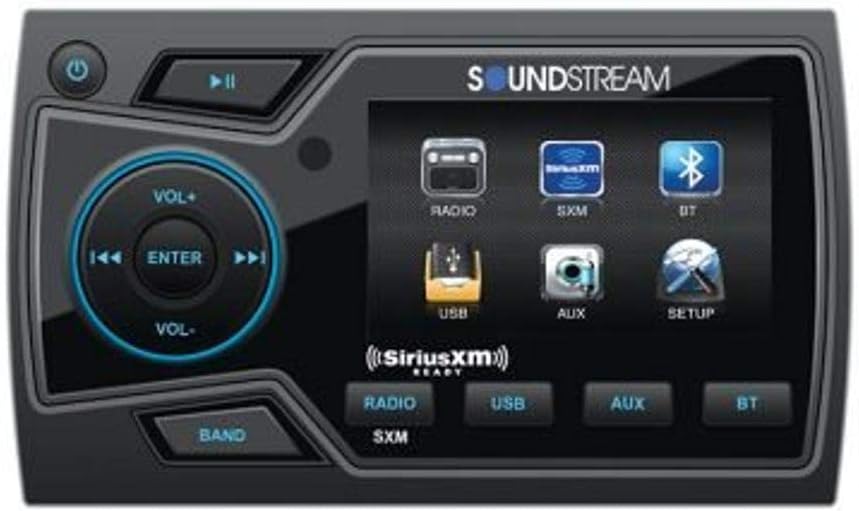
Image: Front view of the Soundstream MHU-32SXM Marine Grade Digital Media Player, showing the display, control knob, and various buttons for power, playback, and band selection. The screen displays icons for Radio, SXM, BT, USB, AUX, and Setup.
Key Features
- Marine Grade IP65 Watertight Enclosure: Ensures durability and protection against water ingress in marine environments.
- Conformal Coated Printed Circuit Boards and Components: Provides enhanced protection against moisture and corrosion.
- Zero Current Draw EEPROM Memory: Retains all presets and settings even when power is disconnected.
- Quick Disconnect Wire Harness: Facilitates easy pre-wire installations and removal.
- Aluminum U-Bracket Mounting Hardware: Included for secure installation.
- 2" Color TFT LCD Display: Features an interactive graphic user interface for easy navigation.
- Digital Media Player: Supports AM/FM and Weather Band tuner.
- Bluetooth v4.0: Enables hands-free calling and A2DP wireless audio playback from compatible devices.
- Rear USB Input: For MP3 and other audio file playback (supports up to 32GB USB).
- Second Zone Audio Output: With independent volume level control.
- 2-Band Equalizer: With audio staging controls for sound customization.
- SiriusXM Ready: Requires SXV300 tuner (sold separately).
Specifications
| Feature | Detail |
|---|---|
| Model Number | MHU-32SXM |
| Product Dimensions | 5.72 x 14.94 x 7.62 cm |
| Item Weight | 680 g |
| Wireless Communication | Bluetooth v4.0 |
| Connectivity Technologies | Bluetooth, USB |
| Special Features | Equalizer, FM Radio, 2-Zone Audio |
| Display | 2" Color TFT LCD |
| Supported Internet Services | SiriusXM (with optional tuner) |
| Audio Format | MP3 Audio |
| Number of Channels | 4 |
| Manufacturer | Soundstream |
Setup and Installation
Proper installation is crucial for the performance and longevity of your MHU-32SXM unit. It is recommended that installation be performed by a qualified marine electronics technician.
Mounting Considerations
- Choose a location that is protected from direct exposure to extreme weather conditions, though the unit is marine-grade.
- Ensure adequate ventilation around the unit to prevent overheating.
- Use the included aluminum U-bracket mounting hardware for secure installation.
- Verify sufficient depth behind the mounting surface for the unit and wiring.
Wiring Connections
The MHU-32SXM features a quick disconnect wire harness for simplified wiring. Refer to the wiring diagram (not provided in this manual, typically found in a separate installation guide) for specific connections. Key connections include:
- Power (Yellow): Constant 12V DC (Battery +)
- Ground (Black): Chassis Ground (Battery -)
- Accessory/Ignition (Red): Switched 12V DC
- Remote Turn-On (Blue/White): For external amplifiers or accessories
- Speaker Outputs: Connect to marine-grade speakers (4 channels available).
- RCA Outputs: For connecting to external amplifiers (Front, Rear, Subwoofer, Zone 2).
- USB Input: Rear connection for USB media.
- AUX Input: Rear connection for external audio sources.
- SiriusXM Tuner Port: For optional SXV300 tuner.
Ensure all connections are secure and properly insulated to prevent short circuits and corrosion.
Operating Instructions
Basic Controls
- Power Button (): Press to turn the unit ON/OFF.
- Volume Knob (VOL+/VOL-): Rotate clockwise to increase volume, counter-clockwise to decrease. Press the knob to ENTER menu selections.
- Skip/Track Buttons ( / ): Use to skip tracks, tune radio stations, or navigate menus.
- Play/Pause Button (): For media playback control.
- BAND Button: Cycles through available radio bands (AM/FM/WB).
Source Selection
From the main menu on the 2" color TFT LCD display, select your desired audio source using the corresponding icons or buttons:
- RADIO: For AM/FM/Weather Band tuner.
- SXM: For SiriusXM satellite radio (requires SXV300 tuner).
- BT (Bluetooth): For wireless audio streaming and hands-free calling.
- USB: For playback from a connected USB device.
- AUX: For external audio devices connected via the auxiliary input.
Bluetooth Operation
- Pairing:
- Ensure Bluetooth is enabled on your mobile device.
- Select "BT" source on the MHU-32SXM.
- Search for "Soundstream MHU-32SXM" (or similar) on your device's Bluetooth settings.
- Select the unit to pair. A confirmation message will appear on the display.
- Hands-Free Calling: Once paired, you can make and receive calls through the unit. Use the volume knob to adjust call volume.
- Audio Streaming (A2DP): Play music from your paired device. Use the unit's playback controls (Play/Pause, Skip) or your device's controls.
USB Playback
Connect a USB flash drive (up to 32GB) containing MP3 or other supported audio files to the rear USB input. The unit will automatically switch to USB mode and begin playback. Use the skip buttons to navigate tracks.
2-Zone Audio Control
The MHU-32SXM features a second zone audio output with independent volume control. This allows you to control the volume of a separate set of speakers or an amplifier in a different area of your vessel independently from the main zone. Access zone controls through the "SETUP" menu on the display.
Equalizer and Audio Settings
Access the 2-band equalizer and audio staging controls via the "SETUP" menu. Adjust bass and treble levels, and fine-tune audio staging to optimize sound quality for your listening environment.
Maintenance
Regular maintenance ensures the longevity and optimal performance of your marine digital media player.
- Cleaning: Use a soft, damp cloth to clean the unit's surface. Avoid abrasive cleaners or solvents.
- Connections: Periodically inspect all wiring connections for corrosion or looseness, especially in a marine environment. Clean and re-secure as necessary.
- Storage: If the vessel is stored for an extended period, ensure the unit is powered off and, if possible, disconnected from the main power source to prevent battery drain.
- Water Exposure: While marine-grade, avoid direct high-pressure water spray. Ensure the protective cover (if applicable) for the USB port is securely closed when not in use.
Troubleshooting
| Problem | Possible Cause | Solution |
|---|---|---|
| No Power | Blown fuse; Incorrect wiring; Low battery voltage. | Check and replace fuse; Verify power and ground connections; Check battery charge. |
| No Sound | Volume too low; Mute activated; Speaker wires disconnected; Amplifier not turning on. | Increase volume; Deactivate mute; Check speaker connections; Verify remote turn-on wire to amplifier. |
| Bluetooth Not Pairing | Device not in pairing mode; Unit already paired to another device; Interference. | Ensure unit is in BT pairing mode; Disconnect other devices; Move closer to unit; Restart both devices. |
| USB Playback Error | Unsupported file format; USB drive corrupted; USB drive too large. | Ensure files are MP3 or supported format; Reformat USB drive; Use a USB drive 32GB or smaller. |
| Poor Radio Reception | Antenna not connected; Damaged antenna; Interference. | Check antenna connection; Inspect antenna for damage; Move away from sources of electrical interference. |
Warranty and Support
Soundstream products are designed and manufactured to the highest quality standards. For specific warranty information, please refer to the warranty card included with your product or visit the official Soundstream website. Keep your proof of purchase for warranty claims.
For technical support or service inquiries, please contact Soundstream customer service. Contact details are typically available on the manufacturer's website or product packaging.
Related documentsMHU-32SXM


Ask a question about this manual
Ask about setup, troubleshooting, compatibility, parts, safety, or missing instructions. Manuals+ will review the question and use this page’s manual context to help answer it.