
RAYSON TD-1500B34
Rayson TD-1500B34 Binding Machine User Manual
Model: TD-1500B34 | Brand: RAYSON
1. Introduction
This manual provides detailed instructions for the safe and efficient operation of your Rayson TD-1500B34 Binding Machine. Please read this manual thoroughly before operating the machine to ensure optimal performance and longevity.
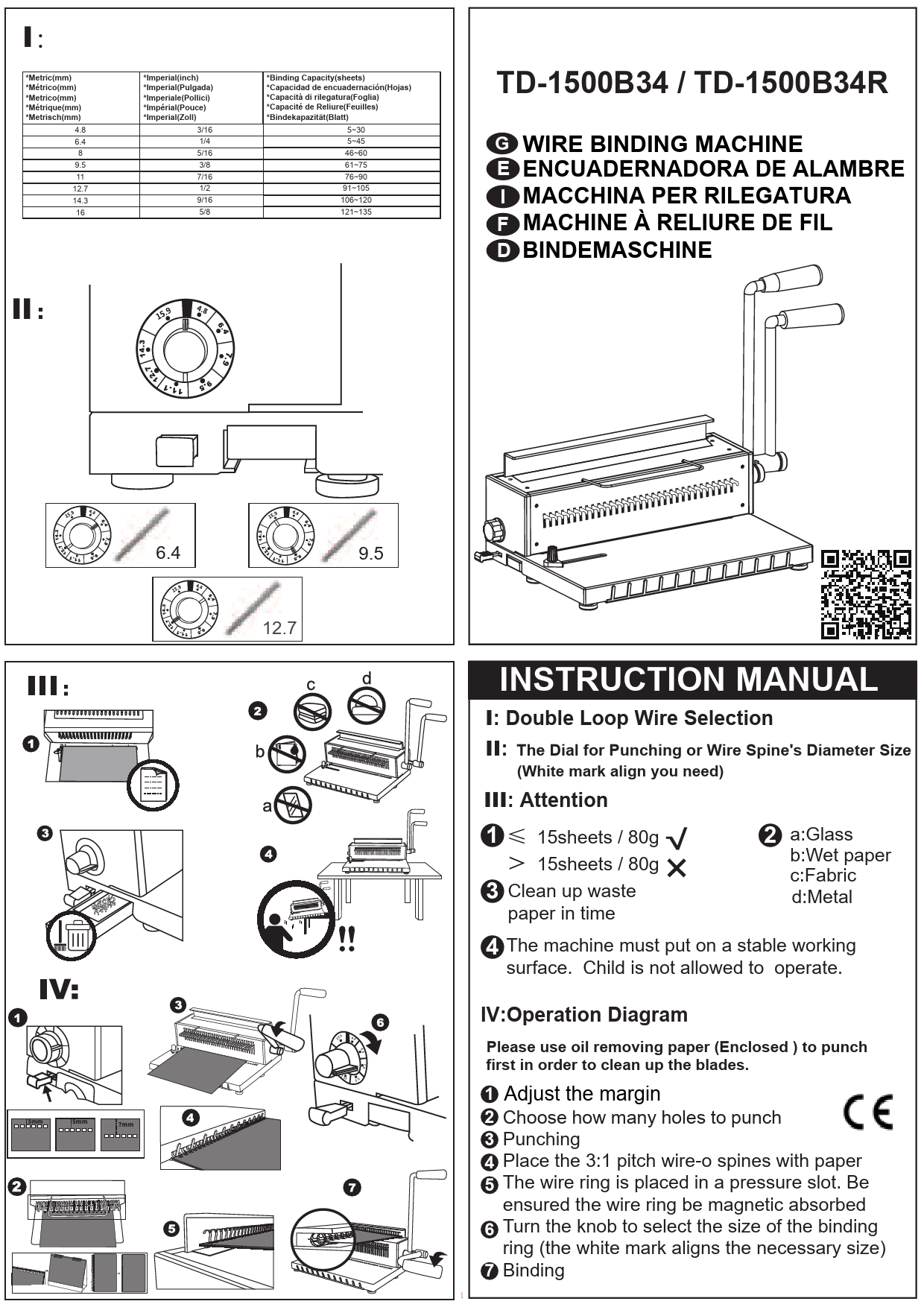
The Rayson TD-1500B34 is a robust binding machine designed for medium-sized document binding tasks. It features square holes with a 3:1 pitch, capable of punching up to 15 sheets and binding up to 130 sheets.
2. Safety Instructions
- Always operate the machine on a stable, flat surface.
- Keep hands and loose clothing away from moving parts during operation.
- Do not exceed the maximum punching capacity (15 sheets of 80gsm paper or 2 sheets of 0.2mm PVC cover) to prevent damage to the machine.
- Unplug the machine from the power outlet before cleaning or maintenance.
- Keep out of reach of children.
3. Product Components

- Punching Plate: Area where paper is inserted for punching.
- Binding Handle: Lever used to operate the punching mechanism.
- Binding Plate: Area where the binding comb is placed for document insertion.
- Disengaging Dies: Individual punch pins that can be disengaged for custom paper sizes.
- Wire Size Selector: Dial to adjust the wire closing mechanism based on wire diameter.
- Paper Margin Adjustment: Lever to set the distance of the punched holes from the paper edge.
- Paper Scrap Drawer: Collects paper waste from punching.
- Paper Stopper: Guide to ensure consistent paper alignment.
4. Setup
- Unpacking: Carefully remove the binding machine from its packaging.
- Handle Installation: Insert the punching and binding handles into their respective slots and secure them.
- Initial Punching: Before first use, punch several sheets of scrap paper (at least 6 times) to remove any excess oil from the punching dies. This ensures clean punches for your documents.
5. Operating Instructions
5.1. Adjusting Paper Margin
The paper margin adjustment allows you to control the distance of the punched holes from the edge of your document. This is crucial for a professional finish and to ensure pages turn smoothly.
- Locate the paper margin adjustment knob on the side of the machine.
- Pull and push the colored tab to select the desired margin depth (e.g., 0.12 inch / 3mm, 0.19 inch / 5mm, 0.27 inch / 7mm).
- Ensure the selected margin is consistent for all pages in your document.

5.2. Punching Documents
The TD-1500B34 can punch up to 15 sheets of 80gsm paper or 2 sheets of 0.2mm PVC cover at once. It supports various paper sizes including A4, Letter, A5, A6, B5, and B6.
- Adjust the paper stopper to the desired paper size (e.g., A4 or Letter).
- For custom sizes or to avoid half-punches, disengage specific dies by pulling them out. The machine has 34 holes, and individual dies can be disengaged.
- Insert the paper squarely into the punching slot, aligning it with the paper stopper.
- Press the punching handle down firmly and completely to punch the holes.
- Release the handle and remove the punched paper.
- Repeat for all pages.


5.3. Binding Documents
The machine can bind up to 130 sheets of 80gsm paper using 5/8-inch wire binding spines.
- Select the appropriate wire binding spine size based on the number of sheets to be bound. Use the wire size selector dial on the machine for guidance.
- Place the wire binding spine onto the binding plate, ensuring the open side of the wire faces upwards.
- Carefully insert the punched pages onto the open wire spine. Start with the back cover, then the main document pages, and finally the front cover.
- Once all pages are on the spine, remove the document from the binding plate.
- Insert the document (with the wire spine) into the wire closing mechanism, ensuring the spine is properly seated.
- Pull the binding handle to close the wire spine. Adjust the wire size selector if the closure is not perfect.
- Remove the bound document.


6. Maintenance
- Cleaning: Regularly empty the paper scrap drawer located at the bottom of the machine. Use a soft, dry cloth to wipe down the exterior.
- Lubrication: Periodically punch a few sheets of waxed paper to lubricate the punching dies and keep them sharp.
- Storage: Store the machine in a dry, dust-free environment when not in use.
7. Troubleshooting
| Problem | Possible Cause | Solution |
|---|---|---|
| Incomplete or Jagged Punches | Overloading the machine; dull dies; paper not inserted squarely. | Reduce the number of sheets per punch; lubricate dies with waxed paper; ensure paper is aligned correctly. |
| Wire Spine Not Closing Properly | Incorrect wire size selected; wire not seated correctly in the closing mechanism; wire closing mechanism needs adjustment. | Verify wire size matches document thickness; ensure wire is fully seated; adjust wire size selector dial. |
| Paper Jam | Overloading; misaligned paper. | Do not force the handle; carefully remove jammed paper; reduce sheet count for subsequent punches. |
8. Specifications
- Model: TD-1500B34
- Punching Capacity: 15 sheets (80gsm paper) / 2 sheets (0.2mm PVC cover)
- Binding Capacity: 130 sheets (80gsm paper) with 5/8-inch wire binding spines
- Hole Type: Square holes
- Pitch: 3:1
- Number of Holes: 34
- Adjustable Margin: Yes (2.5mm, 3.5mm, 4.5mm)
- Disengageable Dies: Yes
- Construction: All-metal
- Dimensions: 18.11 x 10.24 x 13.78 inches
- Weight: 20 pounds
- Color: White+black
9. Warranty and Support
For warranty information and customer support, please refer to the documentation included with your purchase or visit the official RAYSON website. Keep your purchase receipt as proof of purchase for any warranty claims.
For additional assistance, you may contact Roger's shop, the seller, through the Amazon platform.
Related documentsTD-1500B34


Ask a question about this manual
Ask about setup, troubleshooting, compatibility, parts, safety, or missing instructions. Manuals+ will review the question and use this page’s manual context to help answer it.