
1. Introduction
This manual provides essential instructions for the safe and efficient operation of your STANLEY PI120PS 120W Power Inverter. This device converts your vehicle's 12V DC power into 120V AC household power and includes a USB charging port, allowing you to power and charge various electronic devices on the go. Please read this manual thoroughly before use and retain it for future reference.
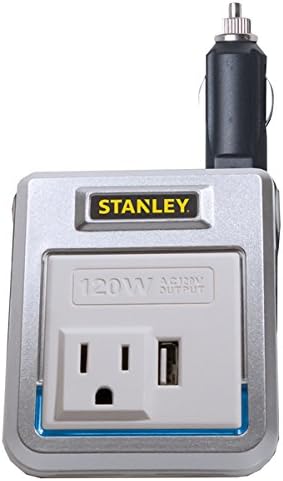
Figure 1: Front view of the STANLEY PI120PS 120W Power Inverter, showing the AC outlet and USB port.
2. Safety Information
Always observe the following safety precautions to prevent injury or damage to the inverter or connected devices:
- Ventilation: Ensure adequate ventilation around the inverter. Do not cover the inverter or block its ventilation openings.
- Dry Environment: Do not expose the inverter to water, rain, or spray. Operate it in a dry environment only.
- Correct Voltage: Connect the inverter only to a 12V DC power source. Connecting to other voltages may damage the inverter or vehicle.
- Avoid Overload: Do not exceed the inverter's rated output of 120W. Overloading can cause damage to the inverter and connected devices.
- No Disassembly: Do not attempt to open or modify the inverter. There are no user-serviceable parts inside.
- Heat: The inverter may become warm during operation. Ensure it is placed in an area where heat can dissipate.
- Children: Keep the inverter out of reach of children.
3. Package Contents
Verify that all items are present:
- STANLEY PI120PS 120W Power Inverter
- User Manual (this document)
4. Product Features and Components
The STANLEY PI120PS Power Inverter is designed for convenience and efficiency:
- 120W AC Power: Provides standard household power for small electronics.
- 1 AC Outlet: A single 3-prong AC outlet for connecting devices.
- 1 USB Port: A 1 Amp USB port for charging smartphones, tablets, and other USB-powered devices.
- Pivoting Plug: The 12V DC plug pivots for flexible positioning and easy access in your vehicle's power outlet.
- Power/Fault LED Indicator: Illuminates to indicate operational status or fault conditions.
- Low-Battery Protection: Designed to prevent excessive drain on your vehicle's battery.
5. Setup and Installation
Follow these steps to set up your power inverter:
- Locate Vehicle Power Outlet: Identify the 12V DC accessory outlet (cigarette lighter socket) in your vehicle.
- Insert Inverter: Plug the inverter's 12V DC plug firmly into your vehicle's 12V DC accessory outlet. The pivoting plug allows you to adjust the inverter's position for optimal placement and to avoid obstructing other controls.
- Verify Power: The Power/Fault LED indicator on the inverter should illuminate, indicating that the inverter is receiving power and is ready for use.

Figure 2: The STANLEY PI120PS Power Inverter plugged into a vehicle's 12V DC outlet, demonstrating its compact size and pivoting plug feature.
6. Operation
Once the inverter is properly installed and powered, you can connect your devices:
- AC Devices: Plug your 120V AC device directly into the inverter's AC outlet. Ensure the device's power consumption does not exceed 120W.
- USB Devices: Connect your USB-powered device to the inverter's USB port using a compatible USB cable. The USB port provides 1 Amp of charging power.
- Monitoring: Observe the Power/Fault LED indicator. A steady light indicates normal operation. Refer to the Troubleshooting section if the light indicates a fault.
- Low-Battery Protection: The inverter includes a low-battery protection feature. If your vehicle's battery voltage drops too low, the inverter may shut off to prevent complete battery discharge.
7. Maintenance
Proper maintenance ensures longevity and optimal performance:
- Cleaning: Periodically wipe the exterior of the inverter with a soft, dry cloth. Do not use liquid cleaners or solvents.
- Storage: When not in use, store the inverter in a cool, dry place, away from direct sunlight and moisture.
- Inspection: Regularly inspect the 12V DC plug and the inverter's casing for any signs of damage. Do not use if damaged.
8. Troubleshooting
If you encounter issues with your STANLEY PI120PS Power Inverter, refer to the following common problems and solutions:
| Problem | Possible Cause | Solution |
|---|---|---|
| Inverter not powering on (LED off) | Loose connection, no power from vehicle outlet, blown fuse in vehicle. | Ensure the inverter is firmly plugged into the 12V DC outlet. Check if the vehicle's 12V outlet is active (e.g., by testing with another device). Consult your vehicle's manual for fuse location and replacement. |
| Connected device not receiving power | Device power consumption exceeds 120W, device is faulty, inverter fault. | Verify the device's wattage. If it exceeds 120W, it cannot be powered by this inverter. Test the device with a known working power source. If the inverter's LED indicates a fault, refer to the next point. |
| Power/Fault LED indicates a fault (e.g., flashing or red) | Overload, low battery voltage, overheating. | Disconnect all devices and restart the inverter. Reduce the load if an overload is suspected. Check your vehicle's battery voltage. Ensure the inverter has adequate ventilation. |
| USB port not charging | Faulty USB cable, device not compatible, inverter not powered. | Try a different USB cable. Ensure the inverter is powered on. Some devices may require more than 1 Amp for charging. |
9. Specifications
| Specification | Detail |
|---|---|
| Model | PI120PS |
| Input Voltage | 12V DC |
| Output Voltage | 120V AC |
| Continuous Power Output | 120 Watts |
| USB Output | 5V DC, 1 Amp |
| AC Outlets | 1 |
| Dimensions | Approximately 9.7 x 2.8 x 6.6 inches |
| Weight | Approximately 10.4 ounces |
10. Warranty and Support
For warranty information or technical support, please refer to the documentation included with your purchase or visit the official STANLEY website. Keep your proof of purchase for warranty claims.
For further assistance, you may contact STANLEY customer service through their official channels.


