
1. Introduction
The Raimondi A Frame Cart, Model 169CML, is an advanced device designed for the efficient and safe transport and handling of large format tiles. It facilitates tasks such as moving tiles across a worksite and positioning them for back-buttering. This manual provides essential information for the proper assembly, operation, maintenance, and safety of your A Frame Cart.
For optimal safety and ease of use when handling large format tiles, it is recommended to use this transport cart in conjunction with the Raimondi EASY-MOVE or T-MOVE Vacuum Transport Systems.
2. Safety Information
Always prioritize safety when operating the Raimondi A Frame Cart. Failure to follow these guidelines may result in injury or damage to the equipment or materials.
- Read the Manual: Before initial use, thoroughly read and understand all instructions in this manual.
- Weight Capacity: Do not exceed the maximum weight capacity of 551 lbs (250 kg). Overloading can lead to instability and equipment failure.
- Stable Surface: Operate the cart on a level and stable surface. Avoid uneven terrain or inclines that could cause the cart to tip.
- Secure Load: Always ensure tiles are securely positioned and supported by the adjustable hooks and rubber supports before moving the cart.
- Brakes: Engage the wheel brakes when loading, unloading, or when the cart is stationary to prevent unintended movement.
- Personal Protective Equipment (PPE): Wear appropriate PPE, including safety gloves and footwear, when handling large tiles and operating the cart.
- Two-Person Operation: For very large or heavy tiles, always use two or more people for safe loading, unloading, and maneuvering.
3. Product Overview
The Raimondi A Frame Cart is constructed from lightweight aluminum, ensuring durability and ease of movement. Key features include:
- Adjustable Hooks: Two height-adjustable hooks are provided for securely holding T-MOVE or EASY-MOVE frames.
- Rubber Supports: Adjustable rubber-edged wooden planes provide secure support for tiles, preventing damage during transport and storage.
- Pivoting Wheels with Brakes: Equipped with pivoting wheels for easy maneuverability and integrated brakes for stability.
- Compact Storage: The cart can be quickly disassembled for convenient storage and transport.

Figure 1: The Raimondi A Frame Cart (Model 169CML) in its empty configuration, highlighting its robust aluminum frame, adjustable hooks, and pivoting wheels with brakes.

Figure 2: Detailed view of key components including the adjustable hook, a suction cup handle (part of an EASY-MOVE frame), and the tile support bracket.
4. Setup and Assembly
The Raimondi A Frame Cart is designed for quick assembly and disassembly. While specific step-by-step instructions are typically provided with the product packaging, the general process involves:
- Unpack Components: Carefully remove all parts from the packaging.
- Assemble Frame: Connect the main aluminum frame sections according to the provided diagrams, ensuring all fasteners are tightened securely.
- Attach Wheels: Securely attach the pivoting wheels to the base of the cart. Ensure brakes are functional.
- Install Hooks and Supports: Mount the adjustable hooks and rubber-edged wooden supports onto the frame. Adjust their height and position as needed for the size of tiles you will be handling.

Figure 3: Close-up of a pivoting wheel and the base support, illustrating the robust construction.
5. Operating Instructions
5.1 Transporting Large Format Tiles
- Prepare the Cart: Ensure the cart is on a stable, level surface and the wheel brakes are engaged. Adjust the height of the hooks and supports to match the dimensions of your tile and the EASY-MOVE/T-MOVE frame.
- Attach Tile to Frame: Securely attach the large format tile to a Raimondi EASY-MOVE or T-MOVE vacuum transport system frame.
- Load Tile onto Cart: Carefully lift and position the tile (attached to its frame) onto the A Frame Cart. The adjustable hooks are designed to hold the transport frame, while the rubber supports cradle the tile itself. Ensure the tile is balanced and stable.
- Secure the Load: Double-check that the tile and frame are firmly seated on the cart's supports and hooks. Make any necessary adjustments to prevent shifting during transport.
- Transport: Disengage the wheel brakes. Slowly and carefully push or pull the cart to its destination. Use smooth movements to avoid sudden jolts.
- Unload: Once at the destination, engage the wheel brakes. Carefully remove the tile and frame from the cart.

Figure 4: A large format tile mounted on the A Frame Cart using a Raimondi EASY-MOVE frame, demonstrating secure transport.

Figure 5: Detail of a hand gripping a suction cup handle, illustrating the secure attachment of the tile to the transport frame.
5.2 Facilitating Back-Buttering
The A Frame Cart is designed to hold large format tiles in an upright, slightly angled position, making the back-buttering process more ergonomic and efficient.
- Position Tile: Load the tile onto the cart as described in Section 5.1. Ensure it is stable and at a comfortable working height.
- Engage Brakes: Firmly engage all wheel brakes to prevent any movement during the back-buttering process.
- Apply Adhesive: Apply adhesive to the back of the tile using appropriate tools. The cart's design allows for easy access to the entire surface.
- Clean Up: After back-buttering, carefully remove the tile from the cart for installation. Clean any adhesive residue from the cart immediately.

Figure 6: A worker preparing to back-butter a large tile held securely on the A Frame Cart.

Figure 7: Two workers simultaneously back-buttering large tiles, demonstrating the efficiency of using multiple A Frame Carts.
5.3 Tile Storage
The A Frame Cart can also be used for temporary, secure storage of large format tiles, preventing accidental damage.
- Load Tiles: Carefully place tiles onto the cart, ensuring they rest firmly against the rubber-edged wooden supports.
- Engage Brakes: Engage all wheel brakes to keep the cart stationary.
- Prevent Tipping: Ensure the cart is on a level surface and the tiles are balanced to prevent tipping.
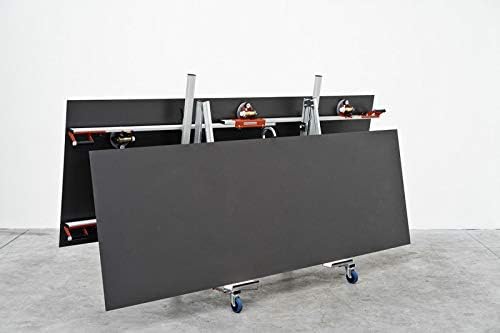
Figure 8: The A Frame Cart securely storing two large format tiles in an upright position.
6. Maintenance
Regular maintenance ensures the longevity and safe operation of your Raimondi A Frame Cart.
- Cleaning: After each use, clean any dust, debris, or adhesive residue from the cart's frame, wheels, and rubber supports. Use a damp cloth and mild detergent if necessary.
- Inspect Components: Periodically inspect all bolts, fasteners, and connections to ensure they are tight. Tighten any loose components.
- Wheel Check: Check the wheels for smooth rotation and ensure the brakes engage and disengage properly. Lubricate moving parts of the wheels if needed.
- Rubber Supports: Inspect the rubber-edged wooden supports for wear or damage. Replace if they show signs of significant deterioration to maintain secure tile handling.
- Storage: When not in use, store the cart in a clean, dry place. If disassembling for storage, ensure all parts are kept together.
7. Troubleshooting
If you encounter issues with your Raimondi A Frame Cart, consider the following common troubleshooting steps:
- Cart Instability: Ensure all frame connections are tight. Verify the cart is on a level surface. Check that tiles are balanced and centered on the supports.
- Difficulty Moving: Check for debris in the wheels. Ensure wheel brakes are fully disengaged. Lubricate wheel axles if necessary.
- Tiles Slipping: Confirm that the adjustable hooks are properly engaged with the transport frame (if used). Ensure the rubber supports are clean and free of slippery residue. Adjust the supports to firmly cradle the tile.
- Brakes Not Holding: Inspect the brake mechanism for wear or damage. Ensure the brake lever is fully engaged.
If problems persist after attempting these steps, please contact Raimondi customer support.
8. Specifications
| Specification | Value |
|---|---|
| Part Number | 169CML |
| Item Model Number | 169CML |
| Item Weight | 67 pounds (approx. 30.4 kg) |
| Maximum Weight Capacity | 551 lbs (250 kg) |
| Item Package Quantity | 1 |
9. Warranty and Support
For information regarding warranty coverage, technical support, or replacement parts for your Raimondi A Frame Cart, please refer to the warranty documentation included with your purchase or visit the official Raimondi website. You may also contact Raimondi customer service directly for assistance.
Contact Information: Please refer to your product packaging or the official Raimondi website for the most current customer support contact details.