
1. Product Overview
The EASYGUARD ES002 is a smart push engine start module designed to integrate with existing car alarm systems or keyless entry systems. It provides a convenient push-button start/stop function and an optional remote engine start feature for compatible vehicles.
Key Features:
- Push button start/stop functionality.
- Ability to switch between ACC, ON, and OFF modes.
- Remote engine start (optional, for automatic transmission cars).
- Remote engine stop.
- Compatible with most DC12V vehicles, including petrol and diesel, manual and automatic transmissions.
2. Important Safety Information and Warnings
- Professional Installation Recommended: Installation of this system requires advanced automotive electrical knowledge. It is highly recommended to have it installed by a professional car alarm installer.
- Steering Lock Release: If your vehicle has a steering lock, it must be released during installation.
- Automatic Transmission Only for Remote Start: The remote engine start function is exclusively for automatic transmission vehicles.
- Remote Start Signal Requirement: To use the remote engine start function on automatic transmission cars, your existing remote (key fob) must provide a 3-time lock signal when the lock button is pressed three times. If this signal is not present, the remote engine start function cannot be utilized.
- Bypass Module for Chip Keys: If your original car remote control (key) contains a chip immobilizer, an additional bypass module (e.g., ASIN: B00MEHBVIC or other universal versions) is required for proper functionality.
3. Package Contents
Please verify that all items are present in the package:
- Brain Unit x 1
- Push Button x 1
- 6P Ignition Harness x 1
- Wire Harness x 1
- English User Manual & Installation Guide x 1

Image 3.1: Overview of the EASYGUARD ES002 system components, including the main control unit, push start button, and various wiring harnesses.
4. Installation Guide
As noted in the safety section, professional installation is strongly recommended due to the complexity of automotive wiring. This section provides general guidance.
4.1 Component Identification

Image 4.1.1: Angled view of the main control unit, showing various ports for connecting harnesses.

Image 4.1.2: Top view of the main control unit, highlighting the DIP switches (red) for configuration.
4.2 Wiring Harnesses

Image 4.2.1: The 6-pin ignition harness, used for connecting to the vehicle's ignition system.

Image 4.2.2: The main wire harness, containing multiple colored wires for various connections.
4.3 General Installation Steps (Consult a Professional)
- Disconnect Battery: Always disconnect the vehicle's battery before beginning any electrical work.
- Mount Brain Unit: Securely mount the main control unit in a hidden, dry location within the vehicle.
- Install Push Button: Install the push start button in a convenient and accessible location on the dashboard.
- Wiring Connections: Carefully connect the 6P ignition harness and the main wire harness to the vehicle's electrical system according to the detailed wiring diagram provided in the included installation guide. This typically involves connections to ACC, ON, START, ground, and other relevant circuits.
- Steering Lock Release: Ensure the steering lock is properly released. This may involve removing the original ignition cylinder or using a key in the ignition.
- Bypass Module (if needed): If your vehicle has a chip immobilizer, install the bypass module and integrate it with the ES002 system as per the bypass module's instructions.
- Test System: Reconnect the battery and thoroughly test all functions of the ES002 system before reassembling the vehicle's interior.
5. Operation Instructions
5.1 Push Button Start/Stop

Image 5.1.1: Visual guide for starting and stopping the vehicle using the push button.
Method 1: Quick Start
- Ensure the system is disarmed.
- Step on the foot brake pedal.
- Short press the push start button once. The car will start.
Method 2: Hold to Start
- Ensure the system is disarmed.
- Keep holding the push start button for 3 seconds while stepping on the foot brake pedal. The car will start.
To Shut Off the Car:
- Once the car is started, step on the foot brake pedal.
- Short press the push start button once. The engine will shut off.
5.2 ACC-ON-OFF Switching
- Without pressing the foot brake, short press the push button to cycle through ACC, ON, and OFF modes.
5.3 Remote Engine Start (Optional)
- This function is only available for automatic transmission vehicles that meet the 3-time lock signal requirement from the existing key fob.
- To initiate remote start, press the lock button on your existing key fob three times in quick succession.
5.4 Remote Engine Stop
- To stop the engine remotely after a remote start, press the lock button on your existing key fob three times again.
5.5 Push Button Indicator Colors

Image 5.5.1: Illustration of the push button's dimensions and its color changes.
- When the system is disarmed, or the ACC/ON modes are active, the engine start button will illuminate in blue.
- Once the car engine has successfully started, the engine start button will change to green.
- When the car is locked, the push button's blue light will turn off, and it will not be possible to turn on ACC or start the car.
6. Maintenance
The EASYGUARD ES002 system is designed for minimal maintenance. Ensure all connections remain secure and free from corrosion. Avoid exposing the main unit to excessive moisture or extreme temperatures.
7. Troubleshooting
If you encounter issues with your ES002 system, consider the following common problems and solutions:
- System Does Not Respond:
- Check all wiring connections for looseness or corrosion.
- Ensure the vehicle battery is fully charged.
- Verify the system is disarmed before attempting to start.
- Remote Engine Start Not Working:
- Confirm your vehicle is an automatic transmission.
- Verify your existing key fob sends a 3-time lock signal when pressed three times.
- Ensure the system is properly armed before attempting remote start.
- Engine Starts but Shuts Off Immediately:
- This often indicates an issue with the immobilizer bypass. Ensure the bypass module is correctly installed and functioning, especially if your vehicle has a chip key.
- Push Button Stays ON (Blue Light):
- This could indicate an issue with the lock/unlock signal integration. Review the wiring for the lock/unlock signals to ensure they are correctly connected and functioning with your car's alarm/keyless entry system.
For persistent issues, please contact technical support.
8. Specifications
| Product Dimensions | 6.3 x 5.71 x 1.97 inches |
| Item Weight | 12.7 ounces |
| Model Number | ES002 |
| Brand | EASYGUARD |
| Special Feature | Universal |
| Color | Black |
| Compatible Devices | Most DC12V cars, including diesel and petrol cars with manual and automatic transmissions |
| Connectivity Technology | Infrared, Radio Frequency |
| Manufacturer | easyguard electronics co.,ltd |
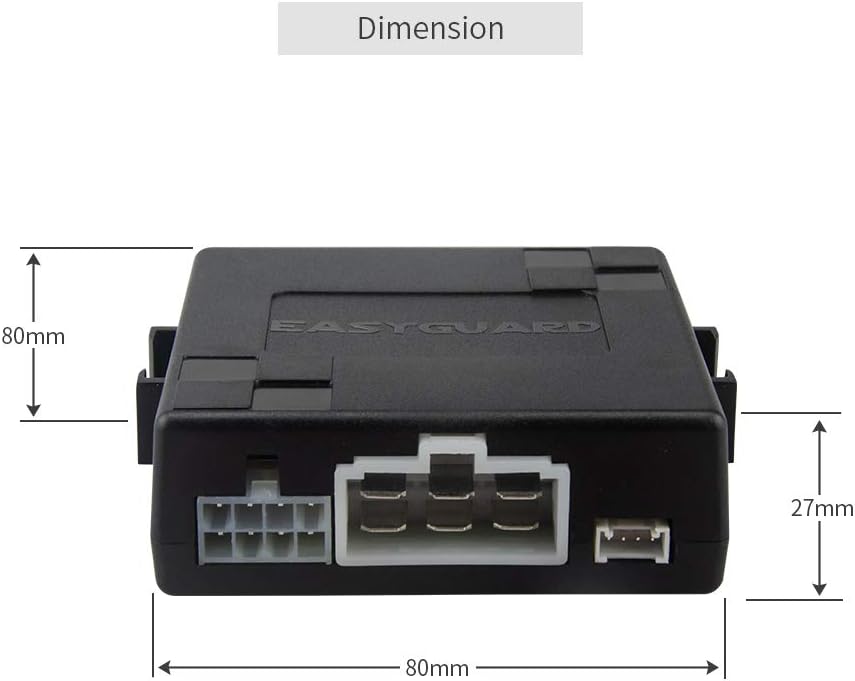
Image 8.1: Dimensions of the main control unit (80mm x 80mm x 27mm).
9. Warranty and Support
EASYGUARD is committed to providing quality products and support. While specific warranty details are not provided in this manual, technical support is available for assistance with installation or troubleshooting.
For technical assistance, please refer to the contact information provided with your purchase or visit the official EASYGUARD website.


