
1. Introduction
This manual provides essential information for the safe and effective operation of your Holmes Desktop HEPA-Type Air Purifier, Model HAP242B-U. This air purifier is designed to improve indoor air quality by capturing airborne particles and reducing odors in small rooms.
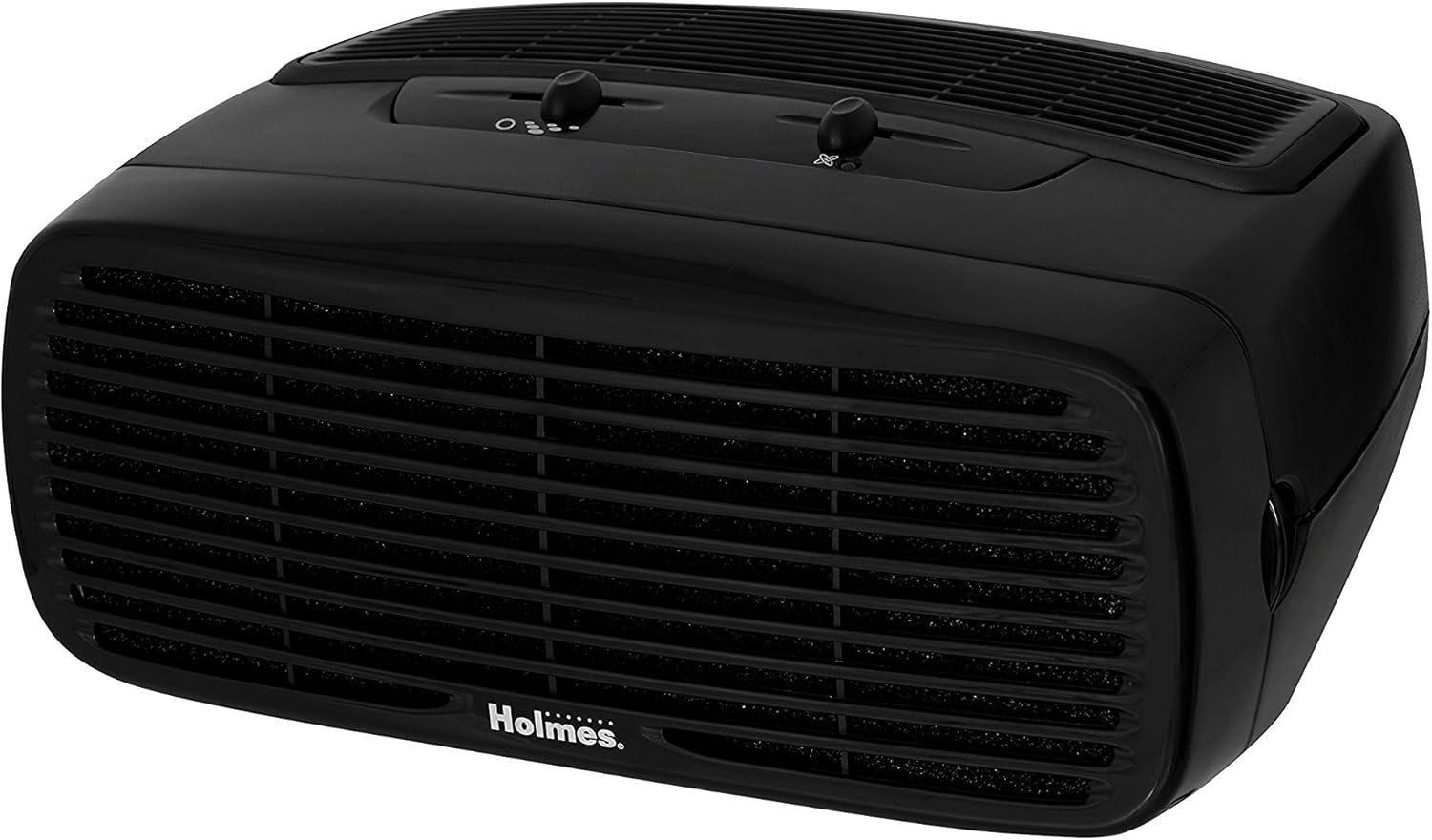
Figure 1: Holmes Desktop HEPA-Type Air Purifier (HAP242B-U)
2. Product Features
- HEPA-Type Filtration: Captures up to 99% of airborne particles as small as 2 microns, including pollen, dust, mold, pet dander, and smoke.
- Optional Ionizer: Helps bind negative ions to airborne particles, making them easier to capture and assisting in odor reduction.
- Three Speed Settings: Allows for customizable airflow and purification intensity.
- Compact Design: Suitable for rooms up to 109 sq. ft. and can be positioned vertically or horizontally.
- Quiet Operation: Designed to operate quietly, especially on lower settings.
3. Setup
- Unpack the Unit: Carefully remove the air purifier from its packaging.
- Remove Protective Packaging: Open the front grille by pressing the release tabs (if applicable) or gently pulling the cover. Remove any plastic bags or protective materials from the filter(s).
- Install Filter: Insert the HEPA-Type filter into the designated slot. Ensure it is seated correctly.
- Replace Front Grille: Securely close the front grille until it clicks into place.
- Position the Unit: Place the air purifier on a flat, stable surface. It can be positioned either vertically or horizontally. Ensure there is adequate space around the air intake and outlet for optimal airflow.
- Plug In: Connect the power cord to a standard electrical outlet.

Figure 2: Airflow and Filter System Diagram
4. Operating Instructions
- Power On/Off: Turn the fan speed dial to the desired setting (1, 2, or 3) to power on the unit. Turn the dial to 'Off' to power off.
- Adjust Fan Speed: Select from three fan speeds:
- Speed 1 (Low): For quiet operation and continuous use.
- Speed 2 (Medium): For general air purification.
- Speed 3 (High): For rapid air purification.
- Activate Ionizer (Optional): Locate the ionizer switch on the control panel. Slide the switch to the 'On' position to activate the ionizer. An indicator light will illuminate when the ionizer is active. Slide to 'Off' to deactivate.

Figure 3: Control Panel
5. Maintenance
Filter Replacement
The HEPA-Type filter should be replaced approximately every 3 to 6 months, depending on usage and air quality. The unit may have a filter indicator light to signal when replacement is needed.
- Power Off and Unplug: Ensure the air purifier is turned off and unplugged from the electrical outlet.
- Remove Front Grille: Gently press the release tabs or pull the front grille to detach it from the main unit.
- Remove Old Filter: Carefully pull out the used HEPA-Type filter. Dispose of the old filter responsibly.
- Install New Filter: Insert a new Holmes HEPA-Type filter (Model HAPF30AT-U or compatible) into the unit. Ensure the filter is oriented correctly according to the arrows on the filter frame.
- Replace Front Grille: Reattach the front grille, ensuring it snaps securely into place.
- Reset Filter Indicator (if applicable): If your unit has a filter reset button, press and hold it for a few seconds until the indicator light turns off.

Figure 4: Replacement HEPA-Type Filter
Cleaning the Exterior
- Wipe the exterior surfaces with a soft, damp cloth. Do not use abrasive cleaners or solvents.
- Ensure the unit is completely dry before plugging it back in.
6. Troubleshooting
| Problem | Possible Cause | Solution |
|---|---|---|
| Unit does not turn on. | Not plugged in; power outage; fan speed dial is off. | Ensure unit is securely plugged into a working outlet; check circuit breaker; turn fan speed dial to 1, 2, or 3. |
| Reduced airflow or poor purification. | Clogged filter; unit placed too close to walls or furniture. | Replace the HEPA-Type filter; ensure adequate clearance around the unit. |
| Unusual noise. | Filter not installed correctly; foreign object inside unit. | Check filter installation; unplug unit and inspect for obstructions. |
| Odor persists. | Ionizer off; filter needs replacement. | Ensure ionizer is on; replace the HEPA-Type filter. |
7. Specifications
| Feature | Detail |
|---|---|
| Model Number | HAP242B-U |
| Brand | HOLMES |
| Color | Black |
| Product Dimensions | 7.2"D x 14.6"W x 11.3"H |
| Item Weight | 5.79 pounds |
| Wattage | 45 watts |
| Noise Level | 70 Decibels |
| Filter Class | HEPA-Type |
| CADR | 70 (Clean Air Delivery Rate) |
| Recommended Room Size | Up to 109 sq. ft. |
| Controller Type | Button Control |
| Special Feature | Programmable |
8. Warranty and Support
This Holmes Desktop HEPA-Type Air Purifier (Model HAP242B-U) comes with a 3-year limited warranty from the date of purchase. This warranty covers defects in materials and workmanship under normal household use.
For warranty claims, technical support, or replacement parts, please contact Holmes customer service. Refer to the product packaging or the official Holmes website for the most current contact information.
Please retain your proof of purchase for warranty purposes.


