
Introduction
Thank you for choosing the STANLEY 10-788 Retractable Blade Utility Knife. This manual provides essential information for the safe and effective use, maintenance, and care of your new tool. Please read these instructions thoroughly before operation and retain for future reference.
The STANLEY 10-788 is a contractor-grade utility knife designed for durability and ease of use. It features a robust cast metal core, bi-material soft panels for a secure grip, and a convenient tool-free push-button blade change mechanism.
Important Safety Information
WARNING: Utility knives are sharp and can cause severe injury if not handled properly. Always exercise extreme caution.
- Always wear appropriate personal protective equipment, such as safety glasses and gloves, when using or changing blades.
- Keep fingers and body parts away from the blade's path.
- Ensure the blade is fully retracted when not in use.
- Do not use excessive force when cutting. Let the blade do the work.
- Never throw or drop the knife.
- Store the knife in a secure location, out of reach of children and unauthorized users.
- Dispose of dull or broken blades safely in a designated container.
- This product contains chemicals known to the State of California to cause cancer and birth defects or other reproductive harm (Proposition 65 warning). Wash hands after handling.
Package Contents
Verify that all items are present in your package:
- 1 x STANLEY 10-788 Retractable Blade Utility Knife
- 3 x Stainless Steel Utility Blades (pre-installed or in storage compartment)
Setup: Loading and Changing Blades
The STANLEY 10-788 features a tool-free push-button blade change mechanism and integrated blade storage.
- Accessing Blade Storage: Locate the swing-out blade storage compartment on the handle. Gently open it to access new blades. The knife can store up to 10 blades.
- Removing an Old Blade:
- Ensure the blade is fully extended.
- Press the yellow push-button located near the front of the knife.
- While holding the button, carefully slide the old blade out from the front of the knife. Dispose of the old blade safely.
- Inserting a New Blade:
- With the yellow push-button still pressed, insert a new standard utility blade into the front slot.
- Slide the blade fully into position until it clicks securely.
- Release the push-button. Gently pull on the blade to ensure it is locked in place.

Image 1: The STANLEY 10-788 Retractable Blade Utility Knife. Note the yellow push-button for blade release and the overall ergonomic design.
Operation
Retracting and Extending the Blade
- To extend the blade, push the black slider forward until the blade locks into the desired cutting position.
- To retract the blade, pull the black slider backward until the blade is fully enclosed within the handle. Always retract the blade when not actively cutting.
Using the Utility Knife
- Ensure the blade is sharp and securely locked.
- Place the material to be cut on a stable, protected surface.
- Hold the knife firmly with a sure grip, utilizing the bi-material soft panels and curved handle for comfort and control.
- Apply steady, even pressure and guide the blade along the cutting line. Make multiple passes if necessary for thicker materials.
- After cutting, immediately retract the blade.
Integrated String Cutter
The STANLEY 10-788 includes an integrated string cutter located at the base of the blade housing. This feature allows for quick cutting of string, cord, or thin materials even when the main blade is fully retracted.
- To use, simply place the string or cord into the V-shaped notch of the cutter and pull.
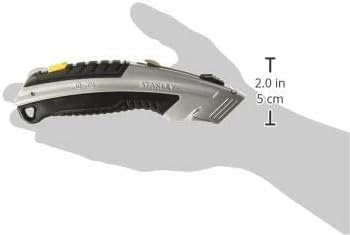
Image 2: The STANLEY 10-788 Utility Knife held in a hand, illustrating its compact size and ergonomic design for comfortable use.
Maintenance
- Cleaning: Periodically wipe down the knife with a dry cloth to remove dust, debris, or residue. Avoid using harsh chemicals or abrasive cleaners.
- Blade Condition: Regularly inspect the blade for dullness or damage. A dull blade requires more force and increases the risk of injury. Replace blades as needed.
- Storage: Store the utility knife in a dry environment to prevent corrosion. Ensure the blade is fully retracted before storage. The large hang hole allows for convenient pegboard storage.
Troubleshooting
| Problem | Possible Cause | Solution |
|---|---|---|
| Blade does not extend or retract smoothly. | Debris in the blade channel; damaged slider mechanism. | Clean the blade channel. If the issue persists, the mechanism may be damaged, and replacement might be necessary. |
| Blade feels loose or wobbly. | Blade not fully seated; incorrect blade type; worn blade retention mechanism. | Ensure the blade is correctly inserted and the push-button is released. Use standard utility blades. If the problem continues, the knife may need replacement. |
| Difficulty cutting materials. | Dull blade; incorrect cutting technique. | Replace the blade with a new, sharp one. Review operating instructions for proper cutting technique. |
Specifications
| Model Number | 10-788 |
| Brand | STANLEY |
| Style | Retractable |
| Blade Material | Metal, Stainless Steel |
| Handle Material | Rubber |
| Body Material | Alloy Steel (Cast Metal Core) |
| Color | Black/Silver |
| Item Length | 140 Millimeters |
| Item Weight | 4.54 g (0.16 ounces) |
| Blade Storage Capacity | Up to 10 blades |
| UPC | 714602344645 |
Warranty and Support
For information regarding warranty coverage, product support, or to purchase replacement parts, please visit the official STANLEY website or contact their customer service department.
Online Support: www.stanleytools.com
Please have your model number (10-788) and purchase date available when contacting support.

