
1. Introduction
The KERUI G18 is a sophisticated wireless GSM home alarm system designed to provide comprehensive security for your property. This system integrates a main control panel with various wireless sensors and remote controls, offering robust protection against intrusions. It utilizes GSM technology for remote communication, allowing you to monitor and control your home security from anywhere.
2. Product Overview
2.1. System Components
The KERUI G18 system typically includes the following components:
- 1 x Control Panel / Control Unit: The central hub of the alarm system.
- 8 x Wireless Door/Window Sensors: Detect opening and closing of doors and windows.
- 3 x PIR Motion Detectors: Detect movement within a designated area.
- 4 x Curtain PIR Motion Detectors: Specialized motion detectors for narrow, vertical detection zones.
- 4 x Remote Controls: For arming, disarming, and emergency functions.
- 1 x Outdoor Siren: Provides an audible alarm when triggered.
- 1 x EU Power Adapter: For the alarm panel.
- 1 x English Manual: (This document).
2.2. Key Features
- Automatic Dialing and SMS: Calls and sends SMS to 6 designated phone numbers sequentially upon security breach.
- High Capacity: Supports up to 150 wireless sensors and 150 remote controls.
- 99 Zones with 8 Attributes: Choose from Normal, Home Arming, Intelligent, Emergency, Closed, Chime, Welcome, and Senior Help zone types. Intelligent zones require two triggers within 30 seconds, suitable for homes with pets.
- Scheduled Arm/Disarm: Program up to 4 groups for automatic arming and disarming.
- Tamper Switch and Memory Function: Integrated tamper switch protects the panel from unauthorized removal.
- Custom Voice Message: Record a 10-second personalized message.
- Backup Battery: The main panel includes a rechargeable lithium backup battery providing 6-8 hours of operation during power outages.
- Custom Access Code: A personalized code locks the panel and is required to disarm the alarm.
- Remote Monitoring: Intercom function allows remote monitoring and two-way communication via phone.
- Configurable Delays: Arm delay (time to exit) and alarm delay (time to enter code before siren sounds).
- Expandable System: Compatible with RFID keypads and wireless sirens.
- Mobile App Control: Free "G18 Alarm System" mobile app for remote control (arming, disarming, zone settings) via a standard 2G GSM SIM card.
- No Monthly Fees: A self-monitored system without recurring costs.
3. Setup Guide
3.1. Main Control Panel Overview

Figure 1: KERUI G18 Control Panel with labeled components. Key components include the ON/OFF switch, power port, wired siren jack, SIM card slot, microphone, keypad, and menu buttons. The tamper switch is located on the back.
- ON/OFF Switch: Located on the side to power the unit.
- Power Port (DC 5V): Connects the power adapter.
- Wired Siren Jack: For connecting an optional wired siren.
- SIM Card Slot: Insert your 2G GSM SIM card here.
- MIC: Built-in microphone for intercom function.
- Keypad: Numeric keys (0-9) for code entry.
- Arm/Home Arm Button: To arm the system or set home arm mode.
- Disarm Button: To disarm the system.
- Back Button: To navigate menus.
- Enter Button: To confirm selections.
- MENU Button: To access system settings.
- Tamper Switch: On the back, triggers an alarm if the panel is removed from its mounting.
3.2. Inserting the SIM Card
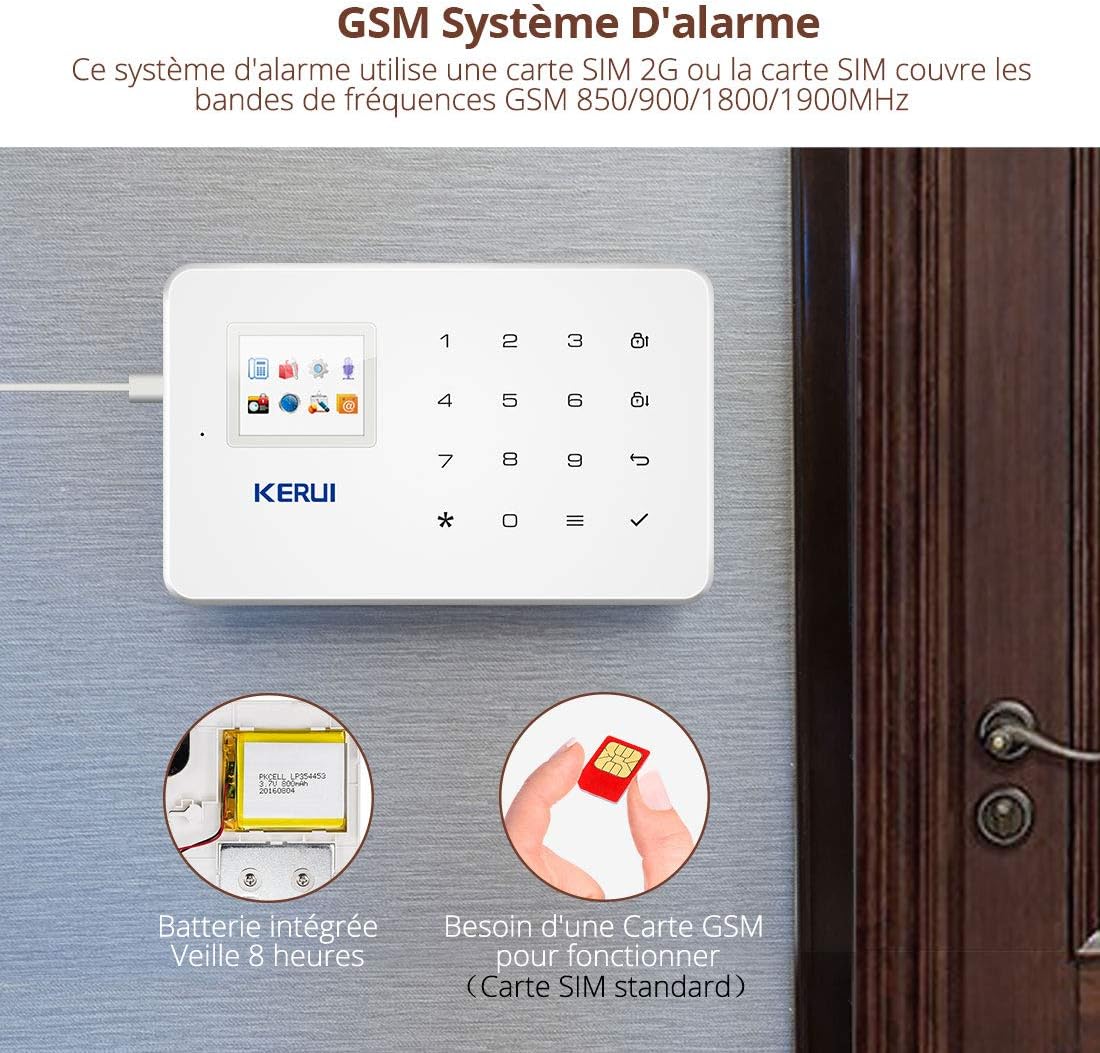
Figure 2: The KERUI G18 system requires a standard 2G GSM SIM card for remote communication. The image also shows the integrated backup battery.
- Ensure the control panel is powered off.
- Locate the SIM card slot on the side of the panel (refer to Figure 1).
- Insert a standard 2G GSM SIM card into the slot. Ensure the SIM card has sufficient credit for calls and SMS.
- Power on the control panel. The system will automatically detect the SIM card.
Note: Only 2G GSM SIM cards are supported. Ensure your chosen SIM card provider offers 2G GSM service in your area.
3.3. Powering the Control Panel
- Connect the EU power adapter to the DC 5V power port on the control panel.
- Plug the adapter into a standard wall outlet.
- Flip the ON/OFF switch to the "ON" position. The panel will power on and display its status.
3.4. Installing Sensors
All sensors are wireless and typically come pre-paired or can be easily paired with the main panel. Refer to the specific sensor's mini-manual for battery installation and pairing instructions if needed.
- Door/Window Sensors: Mount one part on the door/window frame and the other on the moving part, ensuring they are aligned and within 1cm of each other when closed.
- PIR Motion Detectors: Install in corners of rooms or hallways, ensuring a clear line of sight to the area you wish to monitor. Avoid placing near heat sources or direct sunlight.
- Curtain PIR Motion Detectors: Ideal for protecting specific vertical areas like windows or doorways.
Important: Do not install door sensors on metal doors, as this may affect wireless signal transmission.

Figure 3: The KERUI G18 system is expandable, supporting various 1527 series detectors and up to 99 detectors and remote controls, including door sensors, motion detectors, and cameras.
3.5. Mobile App Installation
Download the "G18 Alarm System" app from your smartphone's app store (available for both Android and iOS). Follow the in-app instructions to connect your alarm panel to the app using the SIM card number.
4. Operating Instructions
4.1. Arming and Disarming the System
The system can be armed or disarmed using the control panel, remote controls, or the mobile app.
- Arm (Away Mode): Activates all sensors. Press the Arm button on the panel or remote, or select "Arm" in the app.
- Home Arm (Stay Mode): Activates perimeter sensors (e.g., door/window sensors) while allowing free movement inside. Press the Home Arm button on the panel or remote, or select "Home Arm" in the app.
- Disarm: Deactivates all sensors. Enter your access code on the panel and press Disarm, or press the Disarm button on the remote, or select "Disarm" in the app.

Figure 4: The mobile app provides remote control over the alarm system, allowing users to arm, disarm, and adjust settings from their smartphone.
4.2. Scheduled Arming/Disarming
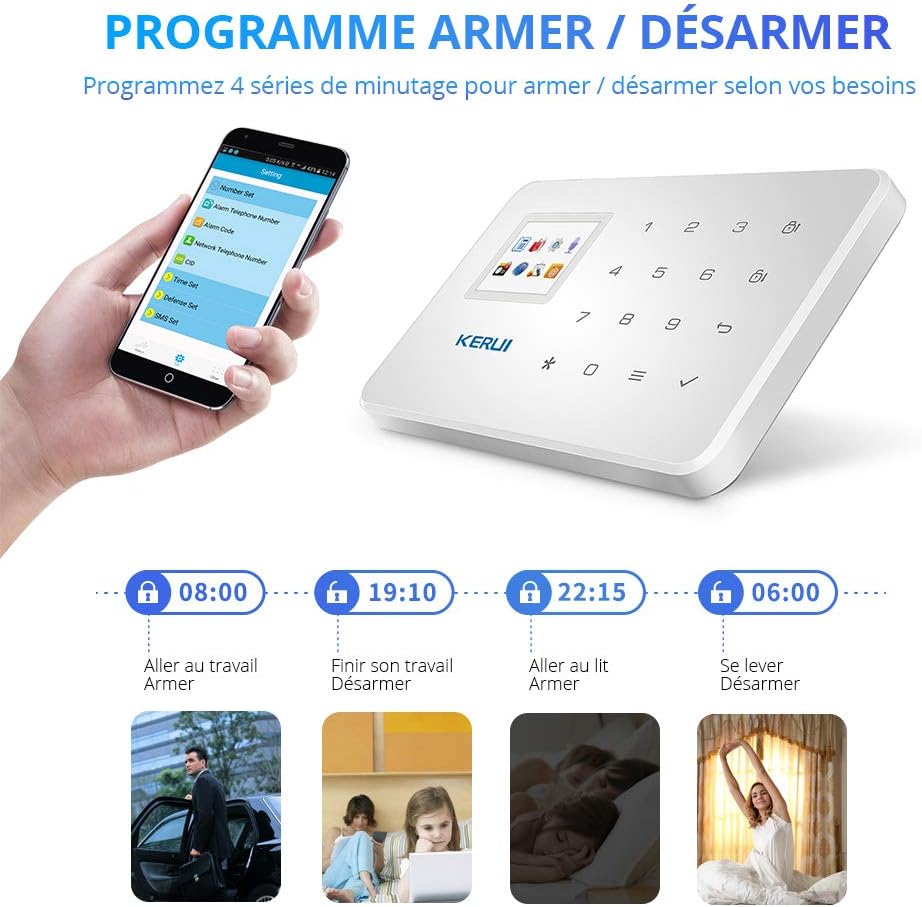
Figure 5: The system allows programming up to 4 timed schedules for automatic arming and disarming, adapting to your daily routine.
You can set up to 4 daily schedules for the system to automatically arm or disarm. Access this feature through the control panel's menu or the mobile app's settings. Follow the on-screen prompts to set desired times for each schedule.
4.3. Zone Attributes
Each of the 99 zones can be assigned one of 8 attributes:
- Normal: Triggers an immediate alarm when activated.
- Home Arming: Active only when the system is in Home Arm mode.
- Intelligent: Requires two triggers within 30 seconds to activate the alarm, reducing false alarms from pets.
- Emergency: Always active, triggers an alarm regardless of arming status.
- Closed: Zone is disabled.
- Chime: Plays a chime sound when triggered, without activating the alarm.
- Welcome: Plays a welcome sound when triggered.
- Senior Help: Designed for elderly assistance, can trigger specific alerts.
Configure zone attributes via the control panel's menu or the mobile app.
4.4. Remote Monitoring and Intercom
When an alarm is triggered, the system will call your pre-set phone numbers. You can answer the call to listen in on the premises or engage in two-way communication through the panel's microphone and speaker. You can also remotely disarm the system during the call.
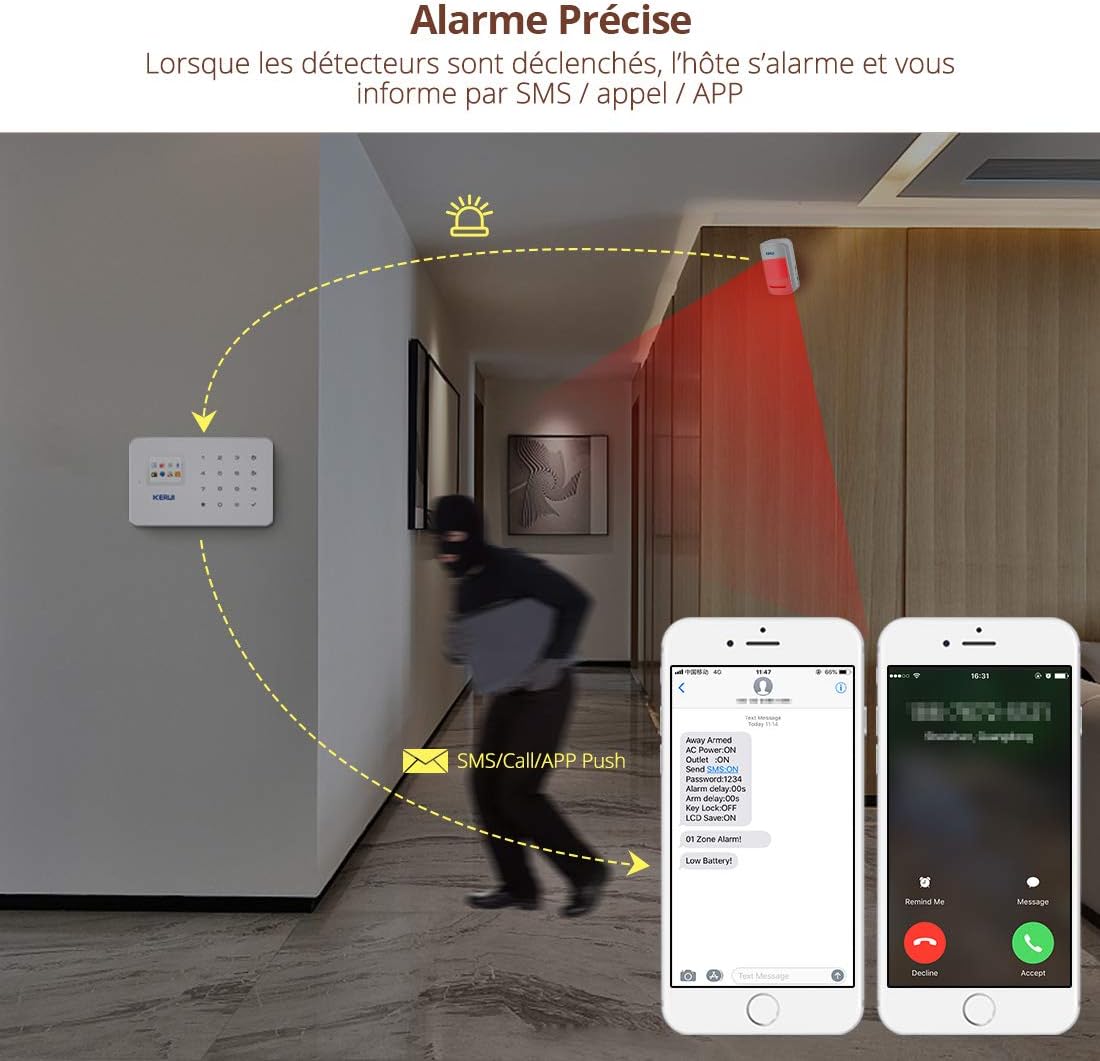
Figure 6: When detectors are triggered, the host alarms and notifies you via SMS, call, or app push notification, providing precise alarm information.
4.5. Recording a Custom Voice Message
The system allows you to record a 10-second voice message that will play when the system calls a designated number during an alarm event. Access the recording function through the control panel's menu and follow the instructions.
5. Maintenance
- Sensor Battery Replacement: Wireless sensors are powered by batteries (e.g., 23A 12V for door sensors, AAA for PIR detectors). Replace batteries when the low battery indicator appears on the control panel or app.
- Main Panel Backup Battery: The integrated lithium battery provides backup power. If the panel frequently runs on backup power, ensure the main power adapter is securely connected and functioning.
- SIM Card Credit: Regularly check the credit balance of your GSM SIM card to ensure uninterrupted call and SMS notification services.
- Cleaning: Gently wipe the control panel and sensors with a soft, dry cloth. Avoid using abrasive cleaners or solvents.
6. Troubleshooting
| Problem | Possible Cause | Solution |
|---|---|---|
| System does not power on. | Power adapter disconnected or faulty; ON/OFF switch off. | Check power adapter connection and wall outlet. Ensure ON/OFF switch is in the "ON" position. |
| No SMS/Call notifications. | No SIM card; SIM card out of credit; 2G GSM network unavailable; incorrect phone numbers programmed. | Ensure SIM card is inserted and has credit. Verify 2G GSM coverage. Check programmed phone numbers in settings. |
| Sensors not triggering alarm. | Sensor battery low/dead; sensor out of range; sensor not paired; zone attribute set to "Closed" or "Chime". | Replace sensor batteries. Relocate sensor closer to the panel. Re-pair sensor if necessary. Check zone attribute settings. |
| False alarms. | PIR sensor placed near heat source/direct sunlight; pet interference; sensitive zone settings. | Relocate PIR sensors. Use "Intelligent" zone attribute for areas with pets. Adjust sensor sensitivity if possible. |
| Mobile app not connecting. | Incorrect panel ID/SIM number; network issues on phone or panel. | Verify panel ID and SIM number in the app. Check phone's internet connection and panel's GSM signal. |
7. Specifications
- Brand: KERUI
- Model Number: G18
- Power Source: Wireless (Main panel: DC 5V adapter with 6-8 hour lithium backup battery; Sensors: Battery operated)
- Compatible Devices: Smartphone, Tablet
- Connectivity Technology: IR (for some sensors), GSM (for main panel communication)
- Alert Type: Audio, Motion, SMS, Call
- Voltage: 12 Volts (for certain components, main adapter is 5V)
- UPC: 611801438338
- Wireless Sensor Capacity: Up to 99
- Remote Control Capacity: Up to 150
- Zone Capacity: 99 zones with 8 configurable attributes
- SIM Card Requirement: Standard 2G GSM (not included)
- Wireless Transmission Distance (Open Space):
- Motion Sensor: 150m
- Door Sensor: 100m
- Remote Control: 100m
8. Warranty and Support
KERUI provides free lifetime technical support and friendly customer service for the G18 alarm system. For assistance, please contact KERUI customer support through their official channels or the retailer where the product was purchased.


