
1. Introduction
Thank you for choosing the Baseus Encok WM01 Black Wireless Earphones. This manual provides essential information for the proper use, setup, and maintenance of your new earphones. Please read it carefully before use to ensure optimal performance and longevity of the product.
The Baseus Encok WM01 earphones feature Bluetooth V.5 connectivity, offering up to 5 hours of continuous music playback and an extended 25 hours with the included charging case. Designed for comfort and convenience, they are suitable for various activities including commuting, travel, office work, making calls, controlling music, and activating voice assistants.
2. What's in the Box
Upon opening your Baseus Encok WM01 package, you should find the following items:
- 1 x Pair of Baseus Encok WM01 Wireless Earphones
- 1 x Charging Case
- 3 x Pairs of Protective Eartips (various sizes)
- 1 x USB Type-C Charging Cable
- 1 x User Manual

Image: The retail packaging for the Baseus Encok WM01 earphones, displaying the earphones and charging case.
3. Product Overview
The Baseus Encok WM01 earphones are designed for a comfortable in-ear fit and intuitive touch controls. The compact charging case provides additional battery life, making them ideal for on-the-go use.

Image: The Baseus Encok WM01 earphones resting in their open charging case, showing the internal design and charging contacts.

Image: The two Baseus Encok WM01 earphones displayed alongside their closed charging case, highlighting their compact form factor.
Key Features:
- Bluetooth V.5: For stable and efficient wireless connectivity.
- Extended Battery Life: Up to 5 hours of playback per charge, with 25 hours total using the charging case.
- Touch Control: Intuitive touch sensors for managing music, calls, and voice assistants.
- Compact Design: Mini portable design that easily fits into pockets.
- Active Noise Cancellation: Provides an immersive audio experience by reducing ambient noise.

Image: A visual representation of the Baseus Encok WM01 earphones and their charging case in multiple colors, illustrating their mini portable design.
4. Setup Instructions
4.1 Initial Charging
- Open the charging case and place both earphones inside.
- Connect the USB Type-C charging cable to the charging port on the case and plug the other end into a USB power source (e.g., wall adapter, computer).
- The indicator light on the charging case will illuminate to show charging status. Allow the earphones and case to fully charge before first use.
4.2 Pairing with a Device
- Ensure the earphones are charged and placed inside the charging case.
- Open the charging case. The earphones will automatically enter pairing mode, indicated by a flashing light on the earphones.
- On your device (smartphone, tablet, laptop), go to the Bluetooth settings.
- Search for available devices and select "Baseus Encok WM01" from the list.
- Once connected, the earphone indicator lights will stop flashing. You are now ready to use your earphones.
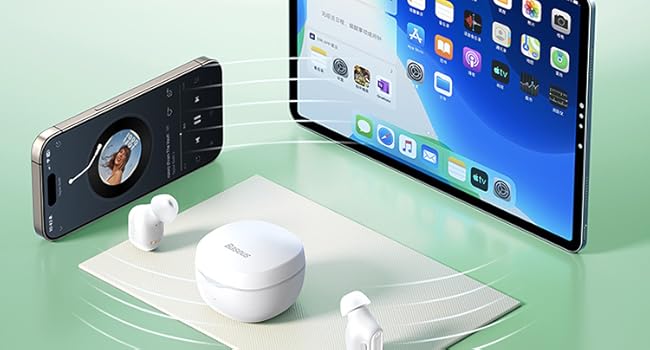
Image: The Baseus Encok WM01 earphones demonstrating wireless connectivity to both a smartphone and a tablet simultaneously.
5. Operating Instructions
The Baseus Encok WM01 earphones feature intuitive touch controls on each earbud.
5.1 Basic Controls
| Action | Function |
|---|---|
| Single Tap (Left/Right Earbud) | Play/Pause Music, Answer/End Call |
| Double Tap (Right Earbud) | Next Track |
| Double Tap (Left Earbud) | Previous Track |
| Long Press (Left/Right Earbud, 2 seconds) | Activate Voice Assistant (Siri, Google Assistant, etc.) |
| Long Press (Left/Right Earbud, during call) | Reject Call |
5.2 Power On/Off
- Power On: Open the charging case, and the earphones will automatically power on.
- Power Off: Place the earphones back into the charging case and close the lid. They will automatically power off and begin charging.
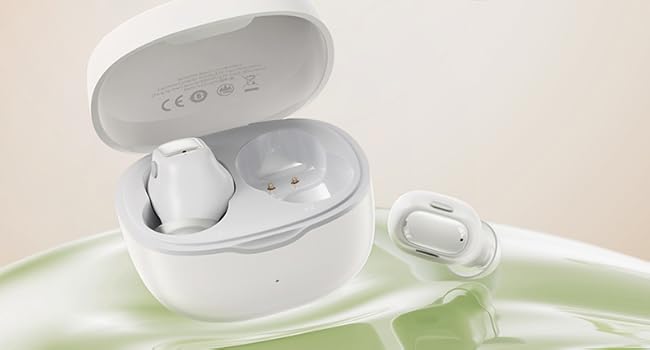
Image: A woman demonstrating the touch control feature of the Baseus Encok WM01 earphone to activate a voice assistant like Siri or Google Assistant.
6. Maintenance
Proper maintenance ensures the longevity and optimal performance of your Baseus Encok WM01 earphones.
- Cleaning: Regularly clean the earphones and charging case with a soft, dry, lint-free cloth. Do not use harsh chemicals or abrasive materials.
- Eartips: Remove and clean the silicone eartips periodically with mild soap and water. Ensure they are completely dry before reattaching.
- Charging Contacts: Gently clean the charging contacts on both the earphones and inside the case with a dry cotton swab to prevent charging issues.
- Storage: When not in use, store the earphones in their charging case to protect them from dust and damage.
- Avoid Water: The earphones are not waterproof. Avoid exposure to water, moisture, or extreme temperatures.
7. Troubleshooting
If you encounter issues with your Baseus Encok WM01 earphones, refer to the following common solutions:
7.1 No Sound or Disconnection
- Ensure the earphones are charged.
- Check if Bluetooth is enabled on your device and if the earphones are connected.
- Try re-pairing the earphones with your device (forget the device in Bluetooth settings and pair again).
- Ensure the earphones are within the Bluetooth range of your device (typically 10 meters).
7.2 Earphones Not Charging
- Verify that the charging cable is securely connected to both the case and the power source.
- Check for any debris or obstruction on the charging contacts of the earphones and inside the case.
- Try using a different USB Type-C cable or power adapter.
7.3 One Earbud Not Working
- Place both earphones back into the charging case, close the lid, wait a few seconds, then open it again.
- Ensure both earphones are charged.
- Try resetting the earphones (refer to the manufacturer's website for specific reset instructions if needed, as this varies by model).
8. Specifications
| Feature | Detail |
|---|---|
| Model | NGWM01-01 |
| Brand | Baseus |
| Connectivity Technology | Bluetooth V.5 |
| Wireless Communication Technology | Bluetooth |
| Ear Placement | In-ear |
| Headphone Form Factor | In-ear |
| Control Type | Touch Control |
| Noise Control | Active Noise Cancellation |
| Material | Acrylonitrile Butadiene Styrene (ABS) |
| Color | Black |
| Product Weight | 50 Grams |
| Product Dimensions | 10 x 2 x 3 cm |
| Charging Port | USB Type-C |
| Manufacturer | Baseus |
9. Warranty and Support
9.1 Manufacturer Warranty
The Baseus Encok WM01 Wireless Earphones come with a 6-month manufacturer warranty from the date of purchase. This warranty covers manufacturing defects and malfunctions under normal use. Please retain your proof of purchase for warranty claims.
The warranty does not cover damage caused by misuse, accidents, unauthorized modifications, or normal wear and tear.
9.2 Customer Support
For technical assistance, warranty claims, or any questions regarding your Baseus Encok WM01 earphones, please contact Baseus customer support through their official website or the retailer where the product was purchased.
You can visit the official Baseus store on Amazon for more information: Baseus Official Store


