
1. Introduction
Thank you for choosing the JAMARA Whelon 4WD Monstertruck. This 1:12 scale remote-controlled vehicle is designed for outdoor fun, featuring robust construction and advanced electronics. Its splash-proof design, steel wheel axles, and high-grip tires allow it to handle various terrains, including sand, dirt, and puddles. The powerful 500 motor and lithium-ion batteries ensure dynamic performance. This manual provides essential information for safe operation, setup, maintenance, and troubleshooting.

Image 1.1: The JAMARA Whelon Monstertruck, 2.4 GHz remote control, battery charger, and two lithium-ion batteries.
2. Safety Information
WARNING: This product contains small parts and is not suitable for children under 14 years of age. Adult supervision is recommended during operation.
- Always operate the vehicle in open areas, away from people, pets, and obstacles.
- Do not operate near public roads, water bodies, or high-voltage power lines.
- Ensure all batteries are correctly installed and charged before use.
- Avoid exposing the vehicle or remote control to extreme temperatures or direct sunlight for extended periods.
- Do not modify the vehicle or its components, as this may void the warranty and create safety hazards.
- Disconnect batteries when the vehicle is not in use or during storage.
3. Package Contents
Please check the package contents to ensure all items are present:
- JAMARA Whelon 4WD Model Vehicle
- 2.4 GHz Pistol Grip Remote Control
- 2 x Lithium-Ion Batteries (1500 mAh)
- 230V Battery Charger
- Pre-installed Electric Motor
- Pre-installed Electronic Speed Controller (ESC)
- Pre-installed Servo
- Painted Body Shell
- Instruction Manual (this document)
4. Vehicle Overview
The Whelon Monstertruck features a robust chassis and advanced components for optimal performance.
- Splash-proof Electronics: Fully protected against water splashes.
- Encapsulated Gearbox: Protected from dirt and debris.
- Front Cardan Drive Shaft: Ensures efficient power transfer.
- Front and Rear Shock Absorbers: Provide excellent damping over rough terrain.
- Fully Suspended Chassis: With adjustable damper angle and track width.
- SuperSoft High Grip Performance Tires: For superior traction.
- 500 Brush Motor: Powerful electric motor.
- CNC Machined Aluminum Motor Cooler: For efficient heat dissipation.
- Robust Plastic Chassis: Durable and lightweight.
- Balanced Chassis: Centralized motor, ESC, and servo for optimal weight distribution.
- External Battery Compartments: For quick battery changes.
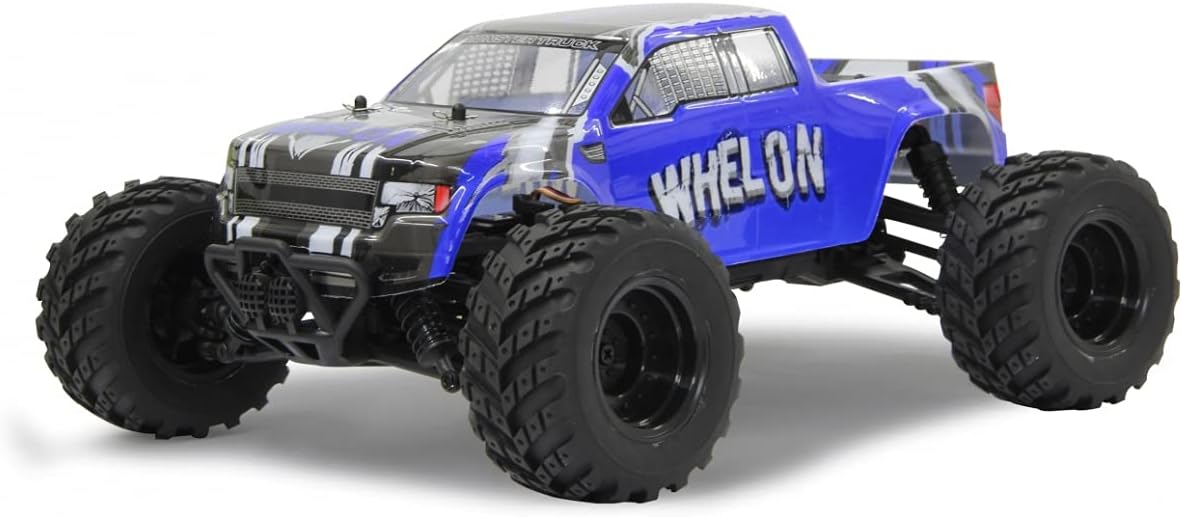
Image 4.1: Front view of the Whelon Monstertruck, highlighting its robust bumper and large tires.

Image 4.2: Underside view of the Whelon chassis, showing the drivetrain, motor, and suspension components.
5. Remote Control Overview
The 2.4 GHz pistol grip remote control provides precise command over your Whelon Monstertruck.
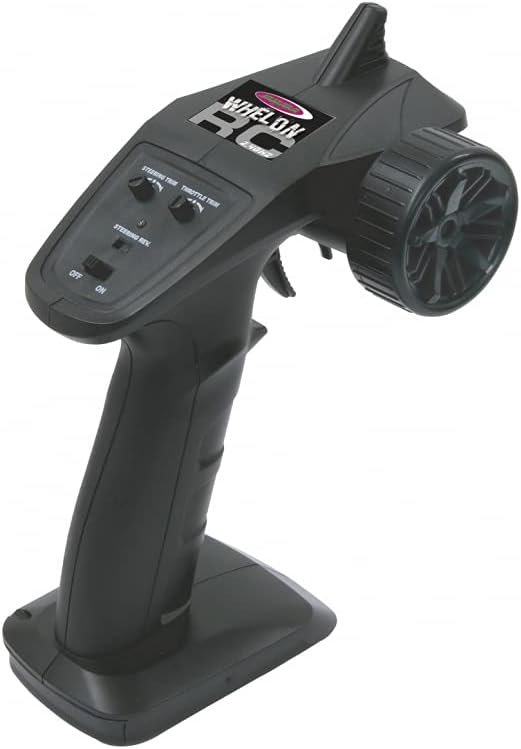
Image 5.1: Top view of the remote control, showing the steering wheel, throttle trigger, and trim adjustments.
- Steering Wheel: Controls left and right steering.
- Throttle Trigger: Pull for forward, push for reverse/brake.
- Steering Trim: Adjusts the neutral steering position.
- Throttle Trim: Adjusts the neutral throttle position.
- Steering Reverse (ST.REV): Reverses the steering direction.
- Throttle Reverse (TH.REV): Reverses the throttle direction.
- ON/OFF Switch: Powers the remote control on or off.
6. Setup and First Use
6.1. Battery Charging
- Connect the 230V charger to a power outlet.
- Connect one of the provided Lithium-Ion batteries to the charger.
- Allow the battery to charge fully. Refer to the charger's indicator light for charging status (typically red for charging, green for fully charged).
- Once charged, disconnect the battery from the charger. Repeat for the second battery.
6.2. Battery Installation (Vehicle)
- Locate the external battery compartments on the vehicle chassis.
- Carefully insert a charged Lithium-Ion battery into each compartment, ensuring correct polarity.
- Secure the battery compartment covers.
- Connect the battery connectors to the vehicle's ESC.
6.3. Battery Installation (Remote Control)
- Open the battery compartment on the underside of the remote control.
- Insert 4 x AA batteries (not included) according to the polarity markings.
- Close the battery compartment cover.
6.4. Binding the Remote Control and Vehicle
The remote control and vehicle are typically pre-bound. If re-binding is necessary:
- Ensure both the vehicle and remote control are switched off.
- Turn on the remote control.
- Turn on the vehicle. The vehicle's indicator light should flash and then become solid, indicating a successful connection.
- If the connection is not established, repeat the steps or consult the specific binding instructions in the full manual (if provided separately).
7. Operating Instructions
7.1. Basic Controls
- Forward: Gently pull the throttle trigger towards you.
- Brake/Reverse: Push the throttle trigger away from you. A quick push will activate the brake, a second push will engage reverse.
- Steering: Turn the steering wheel left or right to control the vehicle's direction.
7.2. Adjustments
- Steering Trim: If the vehicle pulls to one side when the steering wheel is centered, use the Steering Trim dial to adjust until it drives straight.
- Throttle Trim: If the vehicle moves slightly forward or backward when the throttle trigger is at neutral, use the Throttle Trim dial to adjust until it remains stationary.
- Steering Reverse (ST.REV): If the steering direction is opposite to your input, use this switch to reverse it.
- Throttle Reverse (TH.REV): If the throttle direction is opposite to your input, use this switch to reverse it.
8. Maintenance
Regular maintenance ensures the longevity and performance of your Whelon Monstertruck.
- Cleaning: After each use, especially in dirty or wet conditions, clean the vehicle with a soft brush or compressed air. Avoid using water directly on electronics.
- Inspection: Regularly check for loose screws, damaged parts, or worn tires. Replace any damaged components promptly.
- Drivetrain: Inspect the gears and drive shafts for debris or wear. Keep moving parts free of obstructions.
- Battery Care: Store Lithium-Ion batteries in a cool, dry place. Do not overcharge or over-discharge them. Disconnect batteries from the vehicle when not in use.
- Lubrication: Apply appropriate RC-grade lubricant to moving metal parts as needed, avoiding electrical components.
9. Troubleshooting
If you encounter issues, refer to the following common problems and solutions:
| Problem | Possible Cause | Solution |
|---|---|---|
| Vehicle does not respond | Low battery in vehicle or remote; Not bound; Power switch off | Charge/replace batteries; Re-bind remote; Ensure power switches are ON |
| Poor steering control | Steering trim incorrect; Damaged servo/linkage; Low battery | Adjust steering trim; Inspect/replace parts; Charge batteries |
| Vehicle moves slowly or inconsistently | Low vehicle battery; Motor/ESC issue; Debris in drivetrain | Charge vehicle battery; Check motor/ESC connections; Clean drivetrain |
| Remote control indicator light off | Remote control batteries low or incorrectly installed | Replace/install AA batteries correctly |
10. Specifications
| Feature | Detail |
|---|---|
| Model Number | 053355 |
| Brand | Jamara |
| Scale | 1:12 |
| Product Dimensions (L x W x H) | 340 x 280 x 158 mm (13.4 x 11 x 6.2 inches) |
| Weight | 1020 g (2.25 lbs) |
| Motor | 500 Brush Motor |
| Battery Type | Lithium-Ion (2 x 3.7V 1500 mAh included) |
| Remote Control Type | 2.4 GHz Pistol Grip |
| Servo Torque | 1 x 4.5 kg |
| Main Material | Plastic |
| Recommended Age | 14 years and up |
| Country of Origin | China |
11. Warranty and Support
For warranty information, technical support, or spare parts, please contact your retailer or the manufacturer directly. Keep your proof of purchase for warranty claims. Availability of spare parts may vary.


