
1. Introduction
Thank you for choosing the Baseus Encok S16 Neck Hung Bluetooth Wireless In-Ear Earphone. This manual provides detailed instructions for setup, operation, and maintenance to ensure optimal performance and longevity of your device. Please read this manual thoroughly before use.
2. Package Contents
Verify that all items are present in the package:
- 1 x Baseus Encok S16 Wireless Earphone
- 1 x Charging Cable
- 1 x User Manual
- 1 x Warranty Card

Image: Contents of the Baseus Encok S16 earphone package, showing the earphones, charging cable, user manual, and warranty card.
3. Product Overview
The Baseus Encok S16 earphones feature a neck-hung design for comfortable and secure wear. Key features include:
- Magnetic Fixation: Earbuds can be magnetically joined when not in use, preventing tangling and loss.
- Adjustable Coils: The earphone line length can be adjusted by sliding for a customized fit.
- High Fidelity Sound: Equipped with a dynamic speaker unit, composite diaphragm, and independent tune trope structure for clear audio.
- Efficient Power: Utilizes a British CSR chip and 120mAh battery for low power consumption and extended battery life.
- Universal Compatibility: Smartly matches with smartphones and tablet PCs, compatible with all Bluetooth 4.0 enabled devices.

Image: Close-up of the Baseus Encok S16 earbuds demonstrating their magnetic connection capability.
4. Setup
4.1 Charging the Earphones
- Connect the provided charging cable to the charging port on the earphone's control unit.
- Connect the other end of the charging cable to a USB power source (e.g., computer USB port, USB wall adapter).
- The indicator light will illuminate during charging and turn off or change color when fully charged.
- A full charge typically takes approximately 1.5 to 2 hours.
4.2 Bluetooth Pairing
- Ensure the earphones are fully charged.
- Press and hold the Power button on the control unit until the indicator light flashes red and blue alternately, indicating pairing mode.
- On your smartphone or Bluetooth-enabled device, go to the Bluetooth settings.
- Search for available devices and select "Baseus Encok S16" from the list.
- Once connected, the indicator light will flash blue slowly or turn solid blue.
- If prompted for a password, enter "0000".
5. Operating Instructions
5.1 Basic Controls
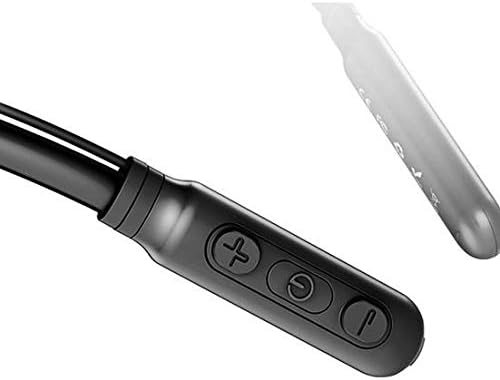
Image: Close-up of the Baseus Encok S16 earphone's inline control unit, showing the power/multi-function button, volume up, and volume down buttons.
| Button | Function |
|---|---|
| Power Button (Center) |
|
| Volume Up (+) |
|
| Volume Down (-) |
|
5.2 Wearing the Earphones
Place the neckband around your neck, ensuring the control unit is easily accessible. Insert the earbuds comfortably into your ears. Adjust the earphone line length using the sliding coils for a secure and comfortable fit.
6. Maintenance
- Clean the earbuds and control unit regularly with a soft, dry cloth.
- Avoid exposing the earphones to extreme temperatures, humidity, or corrosive liquids.
- Store the earphones in a cool, dry place when not in use. The magnetic earbuds can help prevent tangling during storage.
- Do not attempt to disassemble or repair the earphones yourself, as this will void the warranty.
7. Troubleshooting
| Problem | Solution |
|---|---|
| Cannot power on | Ensure the earphones are fully charged. Press and hold the Power button for 3 seconds. |
| Cannot pair with device |
|
| No sound or low volume |
|
| Intermittent connection |
|
8. Specifications
| Feature | Detail |
|---|---|
| Brand | Baseus |
| Model Number | FWP-E-S16 |
| Connectivity Technology | Bluetooth |
| Bluetooth Version | 4.0 (compatible with devices enabling Bluetooth 4.0) |
| Form Factor | In Ear, Neck Hung |
| Control Type | Voice Control, Touch (via buttons) |
| Battery Capacity | 120mAh |
| Weight | 30 Grams |
| Included Components | Wireless Earphone, Charging Cable, User Manual, Warranty Card |
9. Warranty and Support
This product comes with a Limited Warranty. Please refer to the included Warranty Card for detailed terms and conditions regarding coverage and duration.
For technical support or warranty claims, please contact your retailer or visit the official Baseus website for customer service information.
Global Trade Identification Number (GTIN): 06953156264489