
WINGONEER 12V Hi-Fi Stereo Digital Audio Amplifier
WINGONEER 12V Hi-Fi Stereo Digital Audio Amplifier User Manual
Model: 12V Hi-Fi Stereo Digital Audio Amplifier
1. Introduction
Thank you for purchasing the WINGONEER 12V Hi-Fi Stereo Digital Audio Amplifier. This compact and versatile amplifier is designed to provide high-quality audio for various applications, including car, motorcycle, boat, or home use. It features multiple input options such as Bluetooth, USB, SD card, and auxiliary input, along with an integrated FM radio tuner. This manual provides detailed instructions for setup, operation, and maintenance to ensure optimal performance and longevity of your device.
2. Important Safety Instructions
- Read all instructions carefully before operating the device.
- Keep this manual for future reference.
- Do not expose the amplifier to rain, moisture, or extreme temperatures.
- Ensure proper ventilation to prevent overheating. Do not block any ventilation openings.
- Use only a 12V DC power supply. This amplifier does not include a power adapter.
- Disconnect power before making any connections or disconnections.
- Do not attempt to repair or modify the device yourself. Refer all servicing to qualified personnel.
- Keep out of reach of children.
3. Package Contents
Please check the package for the following items:
- 1x WINGONEER 12V Hi-Fi Stereo Digital Audio Amplifier
- 1x Remote Control
- 1x User Manual (this document)
Note: A 12V DC power adapter is not included and must be purchased separately.
4. Product Overview
4.1 Front and Rear Panels
Familiarize yourself with the controls and connections on the amplifier's front and rear panels.
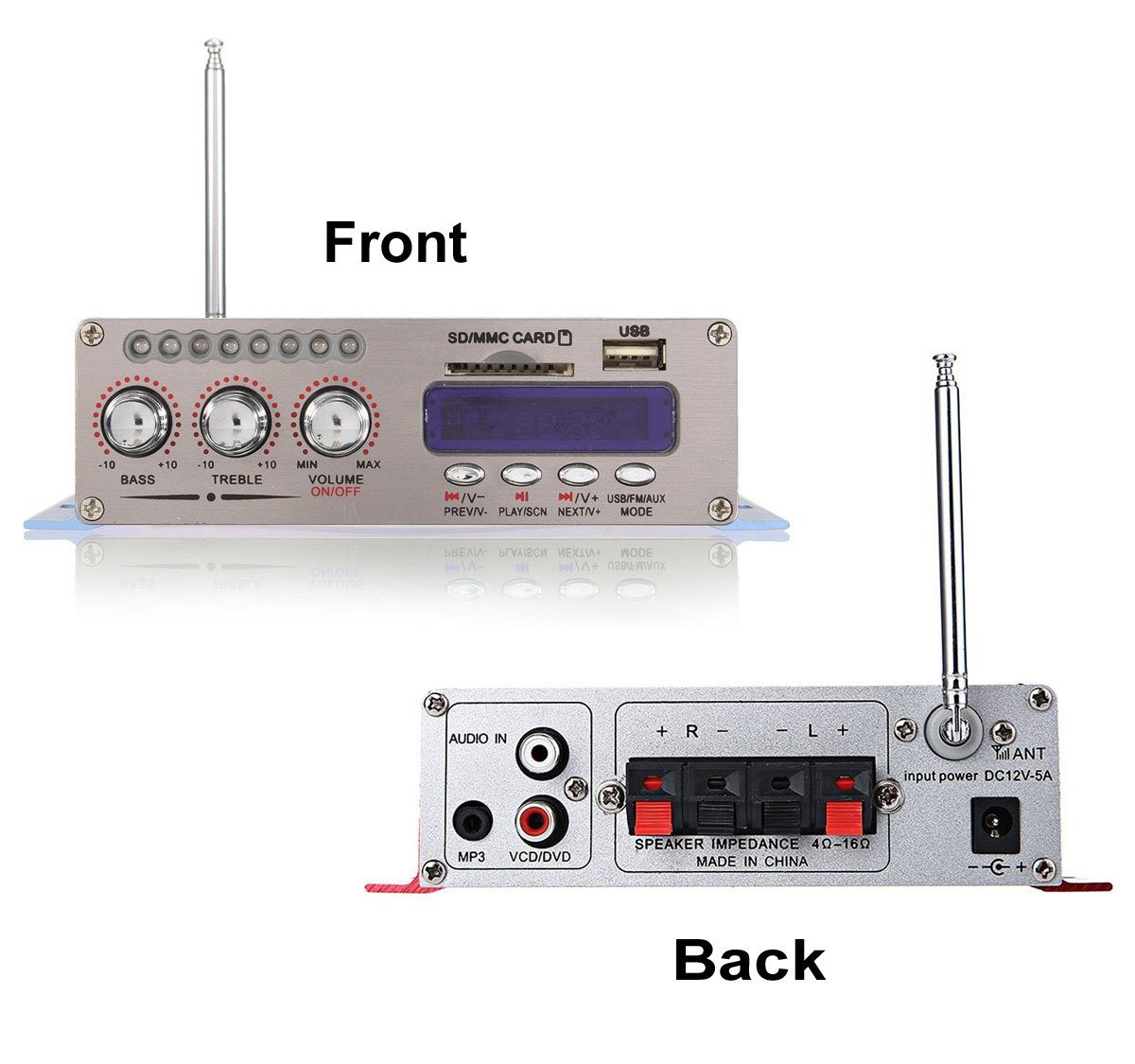
Image 1: Front and Rear view of the WINGONEER 12V Hi-Fi Stereo Digital Audio Amplifier. This image displays the overall layout of the amplifier, showing the front panel with controls and the rear panel with input/output connections.
Front Panel Controls:
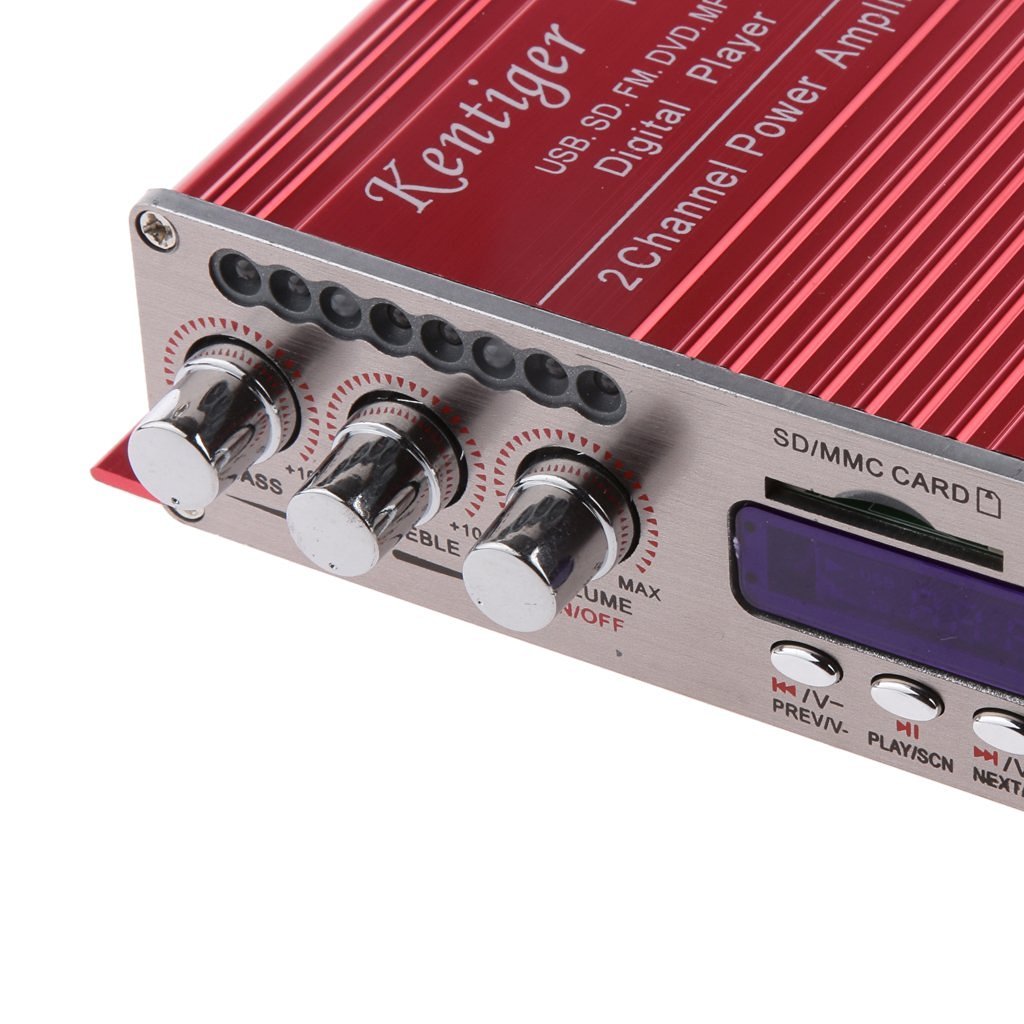
Image 2: Close-up view of the amplifier's front panel controls. This image highlights the Bass, Treble, and Volume/On/Off knobs, along with the digital display, USB port, SD/MMC card slot, and mode/playback buttons.
- BASS Knob: Adjusts the low-frequency audio output.
- TREBLE Knob: Adjusts the high-frequency audio output.
- VOLUME ON/OFF Knob: Controls the master volume and powers the unit on/off.
- Digital Display: Shows current mode, track number, FM frequency, etc.
- USB Port: For connecting USB flash drives.
- SD/MMC CARD Slot: For inserting SD or MMC memory cards.
- MODE Button: Switches between USB, SD, FM, AUX, and Bluetooth input modes.
- PREV/V- Button: Short press for previous track/station; long press for volume down.
- PLAY/SCN Button: Plays/pauses audio; in FM mode, short press for auto-scan.
- NEXT/V+ Button: Short press for next track/station; long press for volume up.
Rear Panel Connections:

Image 3: Close-up view of the amplifier's rear panel connections. This image shows the Audio In (RCA) ports, Speaker Output terminals (L+/L-, R+/R-), 12V DC power input, and the antenna connection.
- AUDIO IN (RCA): Left and Right RCA inputs for external audio sources (e.g., DVD player, VCD, MP3 player).
- SPEAKER OUTPUT (L+/L-, R+/R-): Terminals for connecting passive speakers. Ensure correct polarity.
- INPUT POWER DC 12V-5A: Power input jack for a 12V DC power supply.
- ANT (Antenna): Connection point for the FM radio antenna.
4.2 Remote Control
The included remote control allows for convenient operation from a distance.
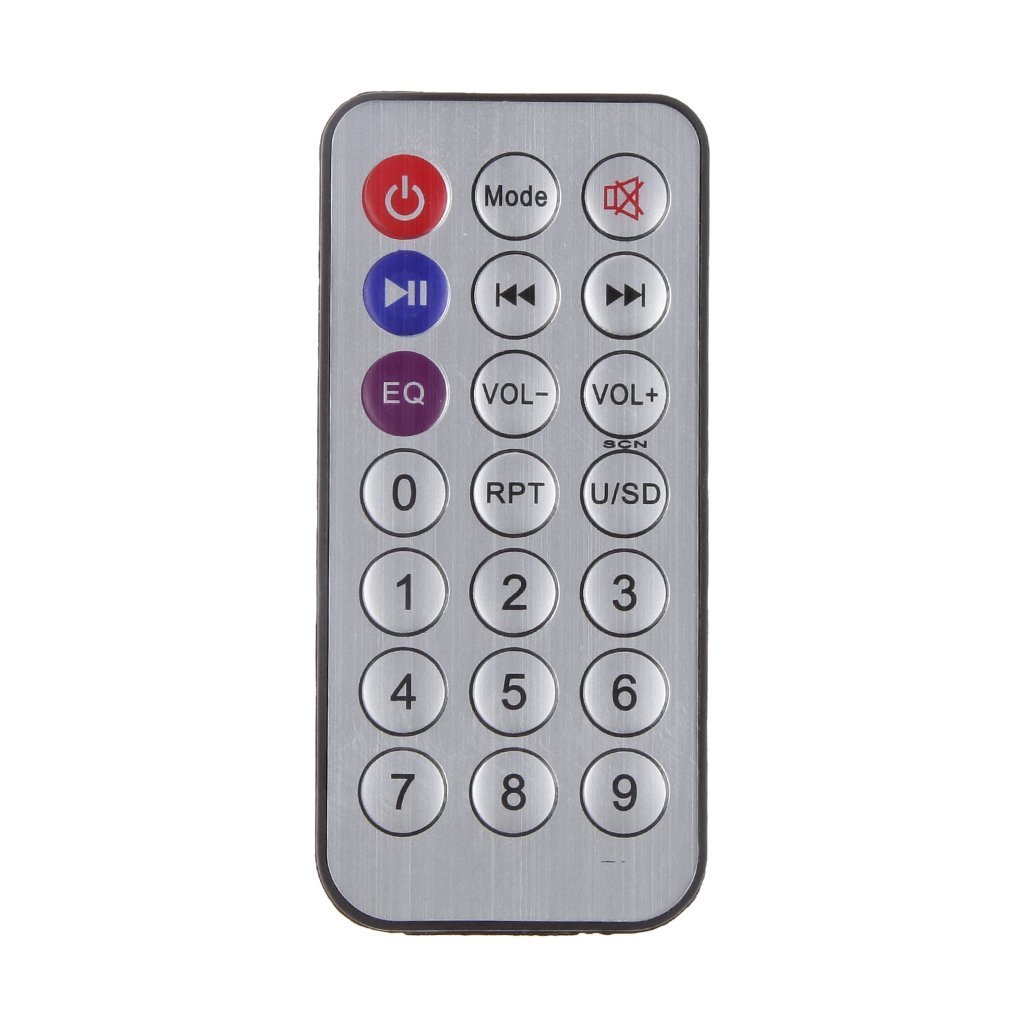
Image 4: Remote control for the WINGONEER 12V Hi-Fi Stereo Digital Audio Amplifier. This image displays the layout of the remote control buttons, including power, mode, playback controls, volume, EQ, and number buttons.
- Power Button: Turns the amplifier on or off.
- Mode Button: Cycles through input modes (USB, SD, FM, AUX, Bluetooth).
- Mute Button: Mutes or unmutes the audio.
- Play/Pause Button: Plays or pauses audio playback.
- Previous/Next Track Buttons: Skips to the previous or next track/station.
- VOL-/VOL+ Buttons: Decreases or increases the volume.
- EQ Button: Cycles through equalizer presets.
- RPT Button: Repeats current track or all tracks.
- U/SD Button: Switches between USB and SD card input (if both are inserted).
- Number Buttons (0-9): For direct track selection or FM frequency input.
5. Setup Instructions
Follow these steps to set up your amplifier:
- Connect Speakers: Connect your passive speakers to the SPEAKER OUTPUT terminals on the rear panel. Ensure correct polarity (+ to + and - to -) for each speaker.
- Connect Audio Source (Optional): If using an external audio source (e.g., DVD player), connect it to the AUDIO IN (RCA) ports on the rear panel using appropriate RCA cables.
- Connect FM Antenna: Attach the FM antenna to the ANT connection on the rear panel for improved radio reception.
- Connect Power: Connect a 12V DC power supply (not included) to the INPUT POWER DC 12V-5A jack. Ensure the power supply meets the specified voltage and current requirements.
- Power On: Turn the VOLUME ON/OFF knob clockwise to power on the amplifier. The digital display will illuminate.
6. Operating Instructions
6.1 Basic Operation
- Power On/Off: Rotate the VOLUME ON/OFF knob clockwise to turn on, counter-clockwise to turn off. Alternatively, use the Power button on the remote.
- Volume Adjustment: Rotate the VOLUME ON/OFF knob or use the VOL-/VOL+ buttons on the remote/front panel.
- Bass/Treble Adjustment: Use the BASS and TREBLE knobs on the front panel to adjust audio tone.
- Mode Selection: Press the MODE button on the front panel or remote to cycle through input sources: USB, SD, FM, AUX, Bluetooth.
6.2 USB/SD Card Playback
- Insert a USB flash drive into the USB port or an SD/MMC card into the SD/MMC CARD slot.
- The amplifier will automatically switch to USB or SD mode and begin playing MP3 files. If not, press the MODE button to select the correct source.
- Use the PREV/V-, PLAY/SCN, and NEXT/V+ buttons on the front panel or remote to control playback (previous/next track, play/pause).
- Use the RPT button on the remote for repeat functions.
6.3 FM Radio Operation
- Press the MODE button until "FM" appears on the digital display.
- Auto Scan: Press the PLAY/SCN button on the front panel or remote to automatically scan and save available FM stations. The amplifier will store stations and play the first one found.
- Manual Tuning/Station Selection: Use the PREV/V- and NEXT/V+ buttons to navigate through saved stations.
6.4 Bluetooth Operation
- Press the MODE button until "BLUE" or "BT" appears on the digital display. The amplifier is now in Bluetooth pairing mode.
- On your Bluetooth-enabled device (e.g., smartphone, tablet), search for available Bluetooth devices.
- Select "BT" or a similar name from the list to pair. Once paired, you will hear a confirmation tone.
- Start playing audio on your connected device. The sound will be transmitted through the amplifier.
- Use your connected device or the amplifier's controls (PREV/V-, PLAY/SCN, NEXT/V+) to control playback.
6.5 AUX Input Operation
- Connect your external audio source (e.g., MP3 player, CD player) to the AUDIO IN (RCA) ports on the rear panel.
- Press the MODE button until "AUX" appears on the digital display.
- Play audio from your connected device. The amplifier will output the sound.
7. Specifications
| Feature | Specification |
|---|---|
| Input Voltage | DC 12V |
| Output Power | RMS 2 x 20W (1KHz) / 100W (Peak) |
| Speaker Impedance | 4.0 - 16 Ohms |
| Frequency Response | 20 Hz - 20 kHz |
| Signal-to-Noise Ratio (SNR) | > 85 dB |
| Harmonic Distortion | < 0.05% |
| FM Radio Frequency Range | 87.5 ~ 108 MHz |
| High Control (Treble) | 12 dB +/- 10 kHz |
| Bass Control | 12 dB +/- 100 Hz |
| Signal Level | 220 MV 47 K |
| Supported Audio Formats | MP3 (via USB/SD) |
| Material | Lightweight Aluminum |
| Dimensions (approx.) | 18.2 x 12.8 x 5.2 cm |
| Weight (approx.) | 340 grams |
8. Troubleshooting
| Problem | Possible Cause | Solution |
|---|---|---|
| No power | Power supply not connected or faulty; amplifier off. | Ensure 12V DC power supply is correctly connected and functional. Turn VOLUME ON/OFF knob clockwise. |
| No sound output | Volume too low; incorrect input mode; speakers not connected or faulty; audio source issue. | Increase volume. Press MODE to select correct input. Check speaker connections and polarity. Verify audio source is playing. |
| Poor sound quality / Distortion | Volume too high; incorrect Bass/Treble settings; poor audio source quality; speaker impedance mismatch. | Reduce volume. Adjust Bass/Treble. Use a higher quality audio source. Ensure speakers are 4-16 Ohms. |
| USB/SD card not playing | Incorrect format (only MP3 supported); card/drive faulty; incorrect mode selected. | Ensure files are MP3. Try a different USB/SD card. Press MODE to select USB/SD. |
| FM radio poor reception | Antenna not connected or positioned poorly; weak signal. | Connect and extend the FM antenna. Reposition the antenna for better reception. |
| Bluetooth not pairing | Amplifier not in Bluetooth mode; device too far; device already paired to another unit. | Press MODE to select Bluetooth. Ensure device is within range. Disconnect from other Bluetooth devices. |
| Remote control not working | Battery depleted; line of sight blocked; remote faulty. | Replace remote battery. Ensure clear line of sight to the amplifier's IR receiver. |
9. Maintenance
- Cleaning: Wipe the amplifier with a soft, dry cloth. Do not use liquid cleaners or abrasive materials.
- Ventilation: Ensure the ventilation openings are clear of dust and debris to prevent overheating.
- Storage: When not in use for extended periods, store the amplifier in a cool, dry place away from direct sunlight.
10. Warranty and Support
For warranty information or technical support, please refer to the retailer where you purchased this product. Keep your proof of purchase for any warranty claims.
Manufacturer: WINGONEER
ASIN: B01L1DJ2HG
UPC: 662578900078
Ask a question about this manual
Ask about setup, troubleshooting, compatibility, parts, safety, or missing instructions. Manuals+ will review the question and use this page’s manual context to help answer it.