
1. Product Overview
The KERUI G18 is a wireless GSM home alarm system designed to provide comprehensive security for your property. It features GSM transmission for remote alerts, support for numerous wireless sensors, and can be controlled via a mobile application. The system includes a main control panel, various sensors, remote controls, and an outdoor solar-powered siren.
Key Features:
- GSM Transmission: Automatically calls and sends SMS to up to 6 designated phone numbers upon security breach.
- Wireless Connectivity: Supports up to 99 wireless sensors and 150 remote controls.
- Zone Attributes: 8 selectable zone attributes including Normal, Home Armed, Intelligent, Emergency, Closed, Chime, Welcome, and Senior Help.
- Scheduled Arm/Disarm: Program up to 4 groups of scheduled arming/disarming times.
- Mobile App Control: Control the system remotely via the "Système d'alarme G18" app (requires GSM SIM card).
- Two-Way Intercom: Remote monitoring and two-way intercom via phone.
- Tamper Switch: Integrated tamper switch on the main panel.
- Battery Backup: Main panel includes a rechargeable lithium battery providing 6-8 hours of backup power.
- Outdoor Solar Siren: 110 dB siren with flashing strobe, solar-powered, water and UV resistant.
2. Components
The KERUI G18 system typically includes the following components:
- 1 x Main Control Panel (G18)
- 6 x Door/Window Sensors (powered by 12V 23A battery)
- 6 x Motion Detectors (powered by 3 AAA batteries)
- 4 x Remote Controls
- 1 x RFID Keypad
- 4 x RFID Cards
- 1 x Outdoor Solar Siren
- 1 x EU Power Adapter for Alarm Panel
- 1 x Internal Alarm (if 'Alarme F' refers to an internal siren)
3. Setup Instructions
3.1 Main Control Panel Setup
- Identify Panel Components: Familiarize yourself with the main control panel's layout. The image below highlights key features.

Image: Diagram of the KERUI G18 main control panel, showing the keypad, display, ON/OFF switch, power port, wired siren jack, SIM card slot, microphone, and tamper switch location on the back.
- Insert SIM Card: Locate the SIM card slot on the side of the main panel. Insert a standard 2G GSM SIM card with credit. This is essential for remote call and SMS notifications. The system supports GSM 850/900/1800/1900MHz frequency bands. Without a SIM card, the system functions as a local alarm only.
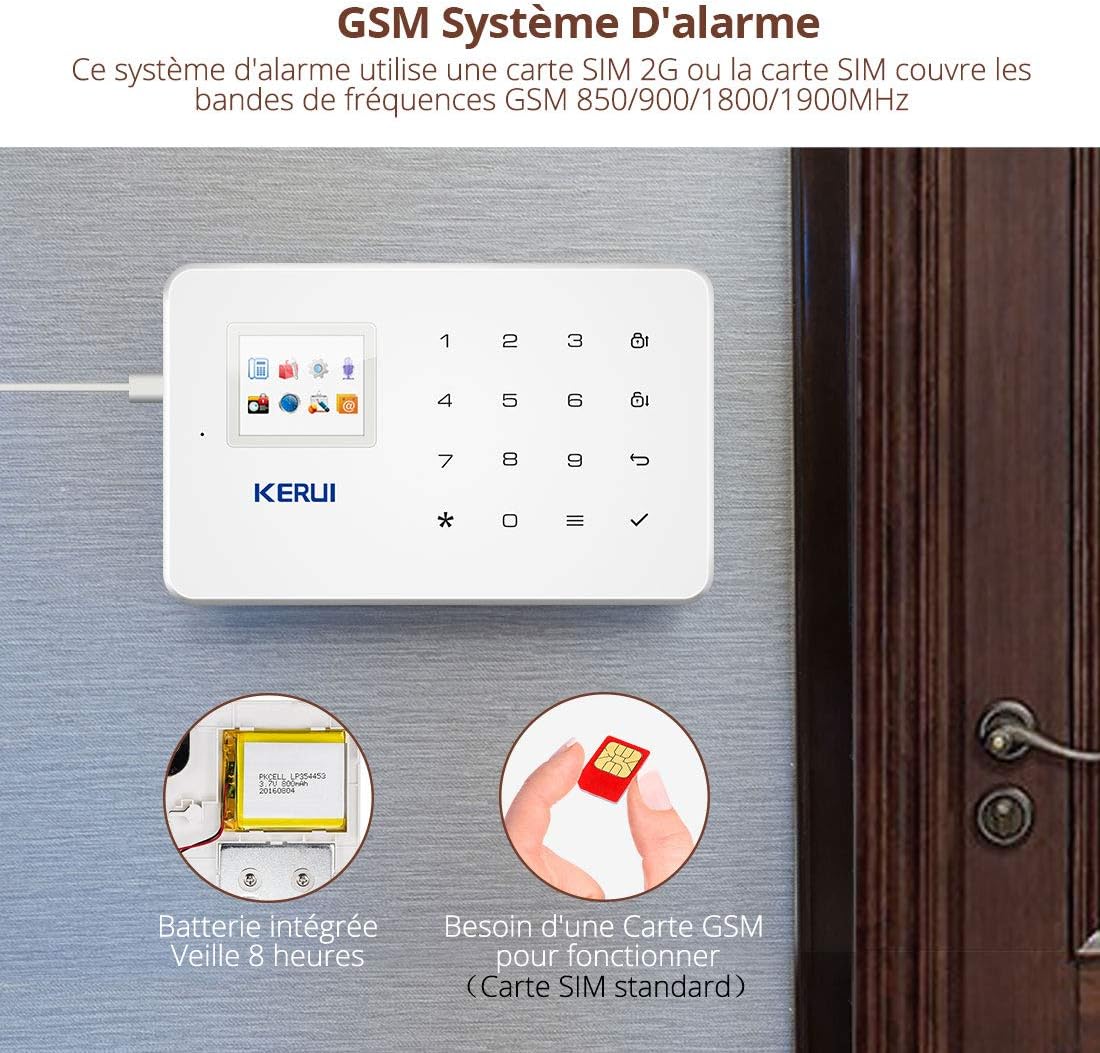
Image: The KERUI G18 main panel with an illustration of a SIM card being inserted and the internal battery, indicating 8 hours of standby time.
- Connect Power: Connect the provided EU power adapter to the 'Port d'alimentation' (Power Port) on the main panel and plug it into a wall outlet.
- Power On: Locate the ON/OFF switch on the side of the panel and switch it to the 'ON' position. The panel has an integrated rechargeable lithium battery for backup power during outages.
3.2 Sensor Installation
The system is designed for DIY installation and comes pre-programmed. All batteries are pre-installed in the sensors.
- Door/Window Sensors: Install these sensors on doors and windows. Ensure the two parts of the sensor are aligned and within 1 cm of each other when the door/window is closed. Important: Do not install door sensors on metal doors, as this may interfere with signal transmission.
- Motion Detectors: Mount motion detectors in areas where intruders are likely to pass. Position them to cover entry points and high-traffic areas. Ensure they are not obstructed by furniture or curtains.
- Remote Controls & RFID Keypad/Cards: These are typically pre-paired. Test their functionality after setting up the main panel.
3.3 Outdoor Solar Siren Installation
The outdoor solar siren is designed for external use and is powered by solar energy.
- Placement: Install the siren in an open location that receives ample daylight to ensure its solar panel can charge the internal battery effectively. It should be visible from outside your property to act as a deterrent.
- Mounting: Securely mount the siren using appropriate hardware. The casing is water and UV resistant.
- Wired Siren (Optional): If using a wired siren, connect it to the 'Sirène Filaire Jack' (Wired Siren Jack) on the main panel.
3.4 System Expansion
The KERUI G18 system is expandable. It can learn accessories from the 1527 series and supports up to 99 detectors and remote controls. The main panel can be programmed with a maximum of 150 sensors.

Image: Diagram illustrating the extensibility of the KERUI G18 system, showing various sensors (door, motion), an outdoor siren, and integration with a security camera, all controlled by the main panel and mobile app.
4. Operating Instructions
4.1 Arming and Disarming the System
The system can be armed or disarmed using the keypad, remote controls, or the mobile application.
- Keypad: Use the dedicated buttons on the main panel for 'Bras/Bras de Maison' (Arm/Home Arm) and 'Désarmer' (Disarm). Enter your personalized access code when prompted.
- Remote Control: Press the arm or disarm buttons on your remote control.
- Mobile App: Use the "Système d'alarme G18" app to arm, disarm, or set to home arm mode remotely.
4.2 Scheduled Arming/Disarming
You can program up to 4 groups of scheduled times for the system to arm or disarm automatically.
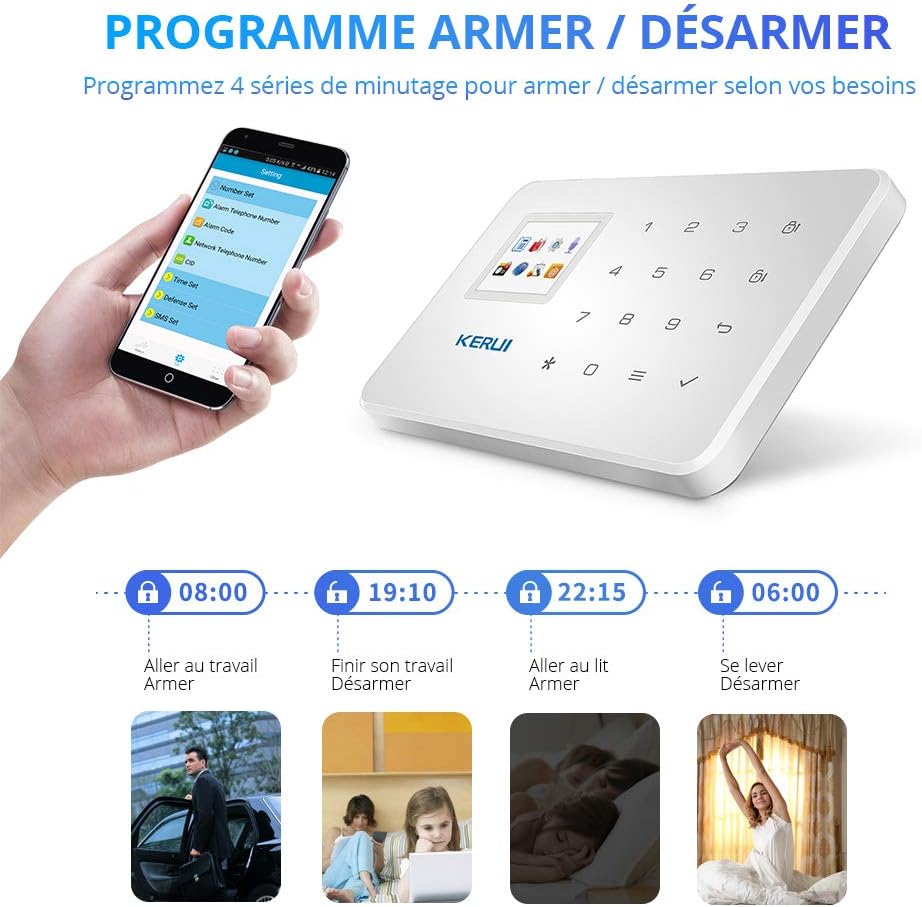
Image: Illustration of the scheduled arm/disarm feature, showing examples of setting times for daily routines like going to work, finishing work, going to bed, and waking up.
4.3 Zone Attributes
The system offers 8 zone attributes for customization:
- Normal: Standard alarm zone.
- Home Armed: Sensors in this zone are active when the system is in home arm mode (e.g., perimeter sensors).
- Intelligent: Requires a sensor to be triggered twice within 30 seconds to activate the alarm. Useful for homes with pets to prevent false alarms.
- Emergency: Triggers an immediate alarm regardless of arming status.
- Closed: Zone is always active.
- Chime: Triggers a chime sound when activated, without an alarm.
- Welcome: Triggers a welcome sound when activated.
- Senior Help: Designed for elderly assistance, specific trigger actions can be configured.
4.4 Alarm Notifications and Intercom
When an alarm is triggered, the system will:
- Auto-Dial & SMS: Call and send SMS messages to the 6 pre-programmed phone numbers, indicating the triggered zone.
- Siren Activation: The internal and external sirens will sound at 110 dB, and the outdoor siren's strobe light will flash.
- Remote Monitoring: You can use the intercom function to listen to the location of your main panel via phone.
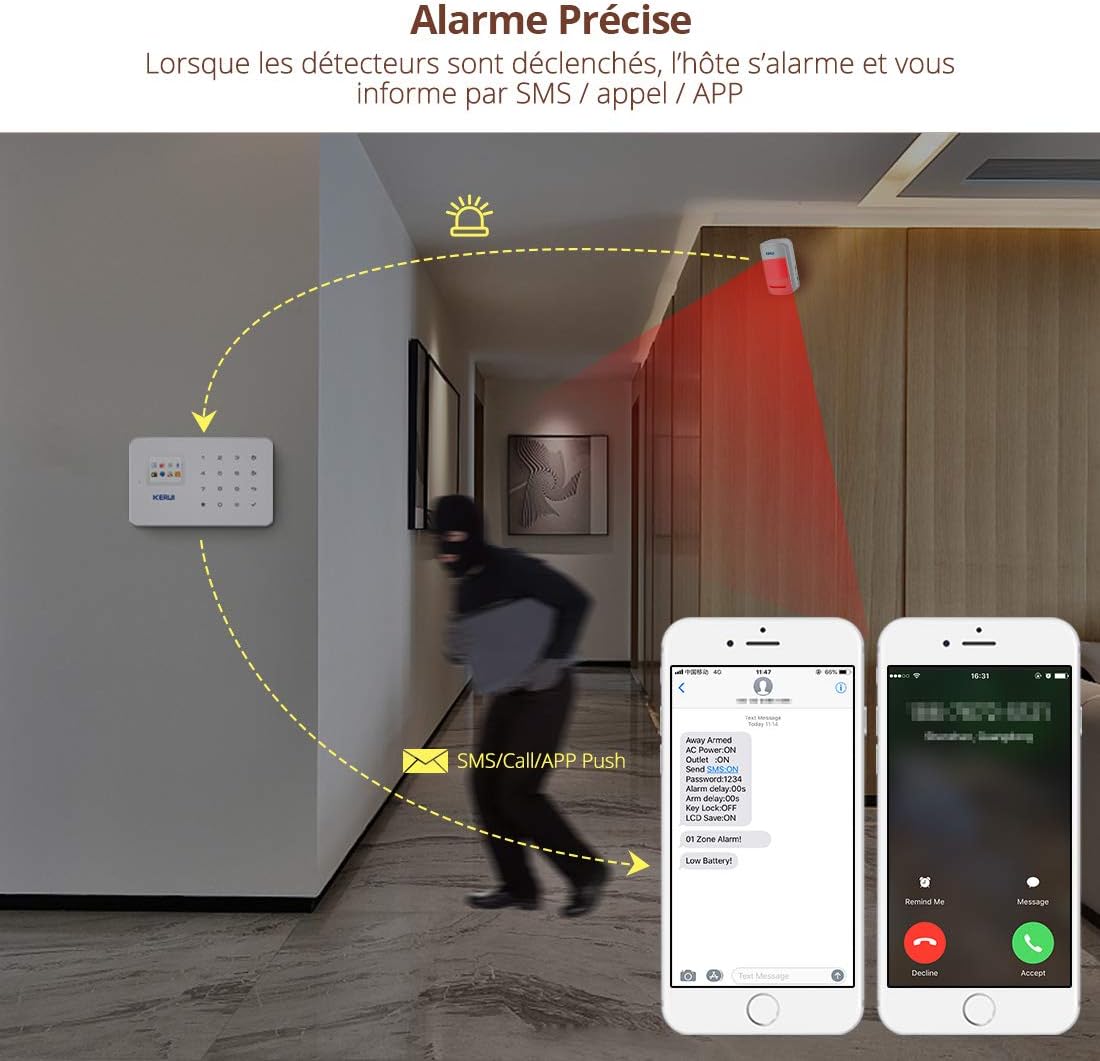
Image: Illustration showing the KERUI G18 system detecting an intruder and sending SMS/call notifications to a smartphone.
4.5 Mobile Application Control
The "Système d'alarme G18" mobile app allows for remote control of your alarm system.
- Download App: Search for "Système d'alarme G18" in your smartphone's app store.
- SIM Card Requirement: Ensure a standard 2G GSM SIM card with credit is inserted in the main panel. Recommended providers in France include Orange (GSM), Free, and SFR (GSM).
- Remote Functions: Use the app to arm, disarm, home arm, adjust zone attributes, and manage other settings from anywhere.

Image: Screenshot of the KERUI G18 mobile application interface, showing options for settings, disarming, arming, and home arming.
5. Maintenance
Regular maintenance ensures the optimal performance and longevity of your KERUI G18 alarm system.
- Battery Check: Periodically check the batteries in your wireless sensors (door/window sensors use 12V 23A, motion detectors use AAA batteries). Replace them when the low battery indicator appears or when performance degrades.
- Main Panel Battery: The main panel's internal lithium battery provides backup power. Ensure the panel is regularly connected to the power adapter to keep this battery charged.
- Solar Siren: Keep the solar panel on the outdoor siren clean and free from obstructions (dirt, leaves, snow) to ensure efficient charging. While designed to be water-resistant, ensure proper sealing during installation to prevent water ingress.
- System Testing: Test your alarm system regularly (e.g., monthly) by triggering a sensor to ensure sirens activate and notifications are sent.
- Software Updates: Check for any available firmware or app updates to ensure your system has the latest features and security enhancements.
6. Troubleshooting
If you encounter issues with your KERUI G18 system, refer to the following common troubleshooting steps:
- No SMS/Call Notifications:
- Ensure a 2G GSM SIM card is correctly inserted into the main panel.
- Verify the SIM card has sufficient credit and is active.
- Check if the pre-programmed phone numbers are correct in the system settings.
- Confirm your mobile network supports 2G GSM services.
- Sensors Not Triggering Alarm:
- Check sensor battery levels and replace if necessary.
- Ensure sensors are within the wireless transmission range (Motion Sensor: 150m open space; Door Sensor: 100m open space; Remote Control: 100m open space).
- Verify that the sensor is correctly paired with the main panel.
- For door/window sensors, ensure the two parts are properly aligned and not installed on metal surfaces.
- False Alarms:
- Adjust motion detector sensitivity or placement to avoid triggering by pets or environmental factors (e.g., curtains moving).
- Consider using the 'Intelligent' zone attribute for areas with pets.
- Check for loose wiring or faulty sensors.
- Outdoor Solar Siren Issues:
- Ensure the solar panel is clean and receiving direct sunlight for adequate charging.
- Check for any physical damage or water ingress into the siren unit.
- Verify the siren is properly paired with the main panel.
- App Control Not Working:
- Confirm the main panel has an active 2G GSM SIM card.
- Ensure your smartphone has an internet connection.
- Verify the app is updated to the latest version.
7. Specifications
| Feature | Specification |
|---|---|
| Brand | KERUI |
| Model Number | G18 |
| Color | White |
| Connectivity Technology | Wireless (GSM 2G) |
| Control Method | Application, Keypad, Remote Control |
| Power Source (Main Panel) | AC Adapter, Lithium-ion Battery Backup |
| Power Source (Outdoor Siren) | Solar Powered |
| Voltage | 12 Volts |
| Compatible Devices | Smartphone, Tablet |
| Installation Type | Wireless DIY |
| Alert Type | Audio and Movement |
| Max Wireless Sensors | 99 (up to 150 total sensors) |
| Max Remote Controls | 150 |
| Motion Sensor Range | 150m (open space) |
| Door Sensor Range | 100m (open space) |
| Remote Control Range | 100m (open space) |
| Smart Home Compatibility | Compatible with smart home systems |
| Recommended Uses | Home, Business |
8. Warranty and Support
KERUI provides comprehensive support for its products.
- Technical Support: Lifetime free technical support is available for the KERUI G18 alarm system.
- Customer Service: Friendly customer service is provided to assist with any inquiries or issues.
For assistance, please refer to the contact information provided with your product packaging or visit the official KERUI support website.


