
Introduction
The Shark Rocket DuoClean Ultra-Light Corded Vacuum (Model HV382) is designed for versatile cleaning across various floor types. It features DuoClean Technology with two brushrolls working in unison to effectively remove large particles, small debris, and stuck-on dirt from both carpets and hard floors. This ultra-lightweight vacuum easily converts into a handheld unit for comprehensive floor-to-ceiling cleaning. Key features include powerful LED lights, easy brushroll access for maintenance, and specialized tools for pet hair.
- DuoClean Technology: Dual brushroll system for deep cleaning carpets and direct engagement with hard floors.
- Ultra-Lightweight Design: Converts into a 4.5-pound handheld vacuum for versatile above-floor cleaning.
- Brushroll Garage: Provides easy access for brushroll maintenance.
- Pet Multi-Tool: Specifically designed to capture embedded pet hair on various surfaces.
- LED Lights: Located on both the floor nozzle and handheld vacuum to illuminate hidden debris.
Safety Information
Always follow basic safety precautions when using electrical appliances to reduce the risk of fire, electric shock, or injury. Read all instructions before using this vacuum cleaner.
- Do not use outdoors or on wet surfaces.
- Unplug from outlet when not in use and before cleaning or servicing.
- Do not allow to be used as a toy. Close attention is necessary when used by or near children.
- Use only as described in this manual. Use only manufacturer's recommended attachments.
- Do not use with a damaged cord or plug. If appliance is not working as it should, has been dropped, damaged, left outdoors, or dropped into water, return it to SharkNinja for examination, repair, or adjustment.
- Do not pull or carry by cord, use cord as a handle, close a door on cord, or pull cord around sharp edges or corners. Do not run appliance over cord. Keep cord away from heated surfaces.
- Do not unplug by pulling on cord. To unplug, grasp the plug, not the cord.
- Do not handle plug or vacuum cleaner with wet hands.
- Do not put any object into openings. Do not use with any opening blocked; keep free of dust, lint, hair, and anything that may reduce airflow.
- Keep hair, loose clothing, fingers, and all parts of body away from openings and moving parts.
- Do not pick up anything that is burning or smoking, such as cigarettes, matches, or hot ashes.
- Do not pick up hard or sharp objects such as glass, nails, screws, or coins that could damage the vacuum cleaner.
- Do not use without dust cup and/or filters in place.
- Turn off all controls before unplugging.
- Use extra care when cleaning on stairs.
What's Included
Your Shark HV382 Rocket DuoClean vacuum comes with the following components:
- Motorized Floor Nozzle
- Wand
- Handheld Vacuum
- Dusting Brush
- Duster Crevice Tool
- Upholstery Tool
- Onboard Storage Clip
- Accessories Bag
- Wall Mount
- Pet Multi-Tool

Image: Various accessories included with the Shark HV382 vacuum, such as the dusting brush, duster crevice tool, upholstery tool, and pet multi-tool.
Assembly
Follow these steps to assemble your Shark HV382 Rocket DuoClean vacuum:
- Place the motorized floor nozzle on the floor.
- Insert the wand into the nozzle until it clicks securely into place.
- Click the handheld vacuum into the top of the wand.
- Insert desired accessories into the onboard storage clip.
- Snap the accessories clip onto the wand for convenient storage.
Video: This official seller video demonstrates the assembly and setup process for the Shark Rocket DuoClean vacuum, showing how to connect the nozzle, wand, and handheld unit, and attach accessories.
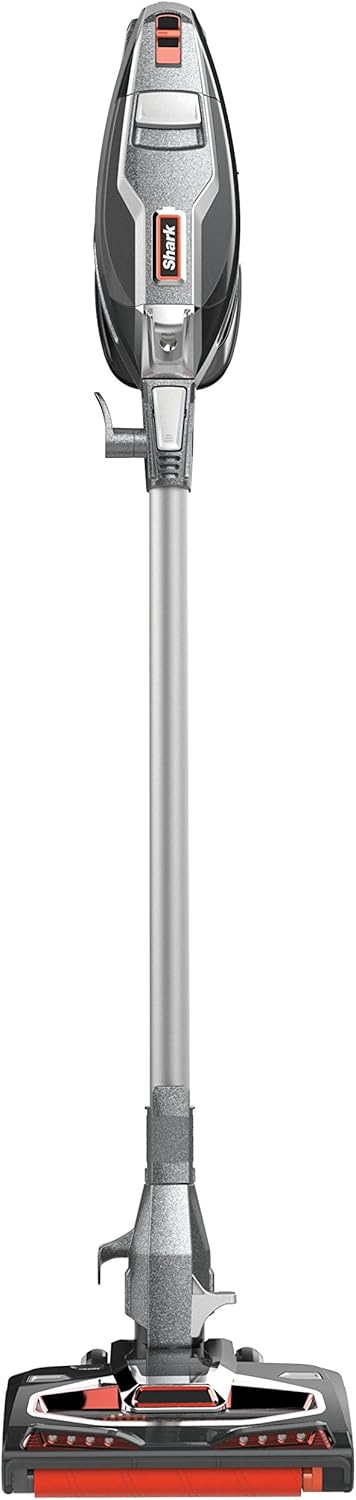
Image: The Shark HV382 Rocket DuoClean vacuum fully assembled, showing the handheld unit attached to the wand and motorized floor nozzle.
Operating Instructions
Power and Surface Settings
The Shark HV382 offers multiple power settings to optimize cleaning for different surfaces:
- Speed I (Bare Floors/Area Rugs): Use this setting for delicate bare floors and area rugs. The brushrolls spin at a slower speed to prevent damage while still providing effective cleaning.
- Speed II (Higher Pile Carpet): Select this setting for deeper cleaning on carpets, especially higher pile or plush carpets. The brushrolls engage at a faster speed to agitate and lift embedded dirt.

Image: A detailed view of the DuoClean floor nozzle, highlighting the soft brushroll (1) and bristle brush (2) components.
Handheld and Above-Floor Cleaning
The vacuum easily converts into a handheld unit for versatile cleaning:
- Detach Wand: For above-floor cleaning with the wand, detach the wand from the motorized floor nozzle using the foot pedal release. Attach desired accessories to the end of the wand.
- Detach Hand Vac: For compact handheld cleaning, detach only the handheld vacuum from the wand. Attach desired accessories directly to the handheld unit.

Image: The handheld vacuum unit of the Shark HV382, showing its compact design and dust cup.
LED Headlights
The motorized floor nozzle and handheld vacuum are equipped with LED lights. These lights illuminate hidden debris and dust, making it easier to spot and clean in dimly lit areas or under furniture.

Image: The front of the motorized floor nozzle with its LED lights turned on, highlighting debris on the floor.
Maintenance
Emptying the Dust Cup
Empty the dust cup regularly to maintain optimal suction performance. Press the dust cup release button to detach it from the handheld vacuum, then hold it over a trash receptacle and press the bottom release latch to empty. Close the bottom flap securely before reattaching.

Image: The handheld unit of the Shark HV382, illustrating the dust cup and its release mechanism.
Cleaning Brushrolls
The DuoClean brushrolls require periodic cleaning to remove tangled hair and debris. The brushroll garage provides easy access:
- Ensure the vacuum is unplugged.
- Open the brushroll garage by pressing the release buttons on the floor nozzle.
- Remove any tangled hair or debris from both the soft brushroll and the bristle brush. A hair removal tool may be included to assist with this.
- Reinstall the brushrolls and close the brushroll garage until it clicks.
Filter Maintenance
Regularly clean the foam filters to maintain suction and prevent motor strain. Refer to the full user manual for specific instructions on filter removal and cleaning frequency. Typically, filters should be rinsed with water and allowed to air dry completely before reinstallation.
Troubleshooting
If you encounter issues with your Shark HV382, refer to the following common solutions:
- No Power: Ensure the power cord is securely plugged into a working electrical outlet. Check the circuit breaker if necessary.
- Loss of Suction:
- Empty the dust cup if it is full.
- Clean or replace the foam filters.
- Check for blockages in the nozzle, wand, or hose.
- Ensure brushrolls are free of tangled hair and debris.
- Brushrolls Not Spinning:
- Ensure the vacuum is powered on and the correct surface setting (Speed I or II) is selected.
- Check for obstructions in the brushroll area.
- Verify the brushroll garage is properly closed.
- Vacuum is Top-Heavy / Does Not Stand Upright: This model is designed to be lightweight and versatile. It does not stand upright on its own. For storage, use the provided wall mount or detach the handheld unit and store it separately. When pausing during use, lean the vacuum against a stable surface or lay it flat.
- Cord Management: The vacuum has a long cord for extended reach. To prevent tangling, carefully unwind and rewind the cord rather than pulling it all off at once.
Specifications
| Brand | Shark |
| Model Name | Rocket DuoClean HV382 |
| Model Number | HV382 |
| Power Source | Corded Electric |
| Voltage | 120 Volts |
| Wattage | 600 watts |
| Amperage | 4.2 Amps |
| Capacity | 0.54 Quarts |
| Filter Type | Foam |
| Item Weight | 9.9 Pounds |
| Item Dimensions (L x W x H) | 10.2"L x 9.8"W x 46.4"H |
| Noise Level | 80 Decibels |
| Surface Recommendation | Carpet, Hard Floor |
| Form Factor | Handheld, Upright |
Warranty and Support
The Shark HV382 Rocket DuoClean vacuum comes with a SharkNinja five-year (5) limited warranty. For detailed warranty information, service, or support, please refer to the official SharkNinja website or contact their customer service. Keep your purchase receipt as proof of purchase for warranty claims.
For additional assistance, you may also refer to the official User Manual (PDF) or User Guide (PDF) available for download from the product's support page.

