
Altec Lansing MZX657
Altec Lansing True Wireless Earbuds
User Manual
Product Overview
The Altec Lansing True Wireless Bluetooth Earbuds offer a cable-free listening experience with rechargeable lithium-ion batteries integrated directly into the earbuds. Designed for comfort and discretion, these earbuds are also built to withstand the elements with an IPX7 waterproof rating, making them suitable for active use. Key features include a long battery life and Bluetooth-based GPS tracking for easy recovery of misplaced earbuds.
- Model: MZX657
- Battery Life: Up to 6 hours for earbuds, with an additional 3 hours from the charging case.
- Waterproof Rating: IPX7 (submersible up to 1 meter for 30 minutes).
- Compatibility: Works with Apple, Android, Blackberry devices, tablets, and laptops.
- GPS Tracking: Locate misplaced earbuds using the dedicated app.

What's in the Box
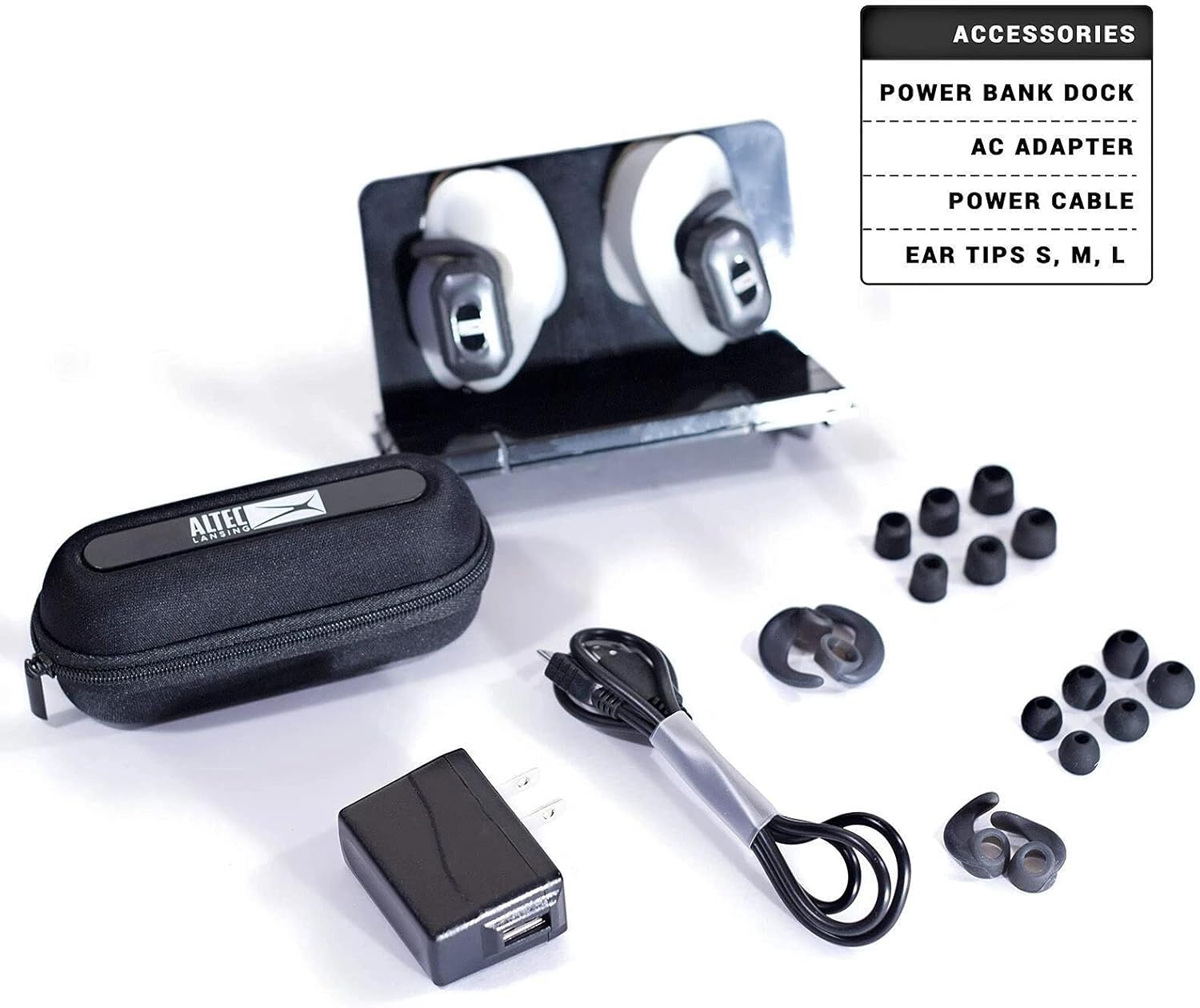
Upon unboxing your Altec Lansing True Wireless Earbuds, you should find the following components:
- Altec Lansing True Wireless Earbuds (Left and Right)
- Charging Case
- Power Bank Dock
- AC Adapter
- Power Cable
- Ear Tips (Sizes S, M, L)
Setup
Charging the Earbuds and Case
- Connect the provided power cable to the charging case and a suitable power source using the AC adapter.
- Ensure the earbuds are properly seated in their respective slots within the charging case.
- Allow the case and earbuds to charge fully before first use. A full charge provides up to 6 hours of listening time for the earbuds and an additional 3 hours from the charging case.
Bluetooth Pairing
- Ensure the earbuds are charged and removed from the charging case. They should automatically enter pairing mode.
- On your device (smartphone, tablet, laptop), navigate to the Bluetooth settings.
- Search for available devices and select "Altec Lansing MZX657" (or similar name) from the list.
- Once connected, a confirmation sound or indicator light will signify successful pairing.
Fitting the Earbuds
Select the ear tips that provide the most comfortable and secure fit. A proper seal is crucial for optimal sound quality and bass response. Experiment with the different sizes (S, M, L) included in the package.
Operating Instructions
Power On/Off
- The earbuds typically power on automatically when removed from the charging case.
- To power off, place the earbuds back into the charging case.
Audio Playback and Calls
Specific controls for playback (play/pause, skip track) and call management (answer/end call) are typically managed via the connected device or through the Altec Lansing app, as the earbuds are designed for app control.
Waterproof Functionality (IPX7)
The earbuds are IPX7 rated, meaning they are protected against immersion in water up to 1 meter for up to 30 minutes. This makes them suitable for workouts and use in light rain. Ensure the charging port is dry before charging.
GPS Tracking
To utilize the GPS tracking feature for locating misplaced earbuds, download the "Find My Earphone" app from your device's app store (Apple App Store or Google Play Store). Follow the in-app instructions to connect and track your earbuds.
Maintenance
Cleaning
- Regularly clean the ear tips with a soft, damp cloth.
- Gently wipe the earbuds and charging case with a dry, lint-free cloth to remove dust and debris.
- Avoid using harsh chemicals or abrasive materials.
Storage
When not in use, store the earbuds in their charging case to protect them from damage and to keep them charged. Store in a cool, dry place away from extreme temperatures.
Troubleshooting
| Problem | Possible Cause | Solution |
|---|---|---|
| Earbuds not powering on | Low battery; not properly seated in case. | Ensure earbuds are charged. Place them firmly in the charging case. |
| Cannot pair with device | Earbuds not in pairing mode; device Bluetooth off; interference. | Ensure earbuds are out of case and in pairing mode. Turn device Bluetooth off and on. Move closer to device. |
| No sound | Volume too low; not connected; incorrect audio output selected. | Increase volume on device. Re-pair earbuds. Check device audio settings. |
| Lost an earbud | Earbud misplaced. | Use the "Find My Earphone" app to track the last known location of the earbud. |
Specifications
| Feature | Detail |
|---|---|
| Model Number | MZX657 |
| Connectivity Technology | Wireless (Bluetooth) |
| Wireless Communication Technology | Bluetooth |
| Battery Life | 6 Hours (earbuds), 3 Hours (charging case additional) |
| Charging Time | 6 Hours (for full charge of case and earbuds) |
| Water Resistance Level | IPX7 Waterproof |
| Control Method | App |
| Material | Plastic, Silicone |
| Product Dimensions | 2.25 x 7.25 x 5.3 inches |
| Item Weight | 8 ounces |
| Manufacturer | Altec Lansing Technologies |
| UPC | 021331912282 |
Warranty and Support
For warranty information, technical support, or service inquiries, please refer to the official Altec Lansing website or contact their customer support directly. Keep your proof of purchase for warranty claims.
Official Altec Lansing Website: www.alteclansing.com
Related documentsMZX657


Ask a question about this manual
Ask about setup, troubleshooting, compatibility, parts, safety, or missing instructions. Manuals+ will review the question and use this page’s manual context to help answer it.